
Best Wireless Keyboard and Mouse with Type C Dongle (2026): 4 Picks Compared
 By Theo LangUpdated
You type at a desk with a USB-C port and want one receiver for keyboard and mouse, so the INFINMIND Wireless Keyboard and Mouse Combo fits: a full-size layout with a number pad, a shared nano receiver, an included USB-C adapter, and 4 DPI levels up to 3200. Its keyboard runs on 2 AAA batteries and its mouse on 1 AA battery, with up to 12 months of usage stated.
Your shortlist at a glance
PCKitHQ scores range from 9.2 to 9.8. See how we pick.
| Product and key specifications | Score and retailer |
|---|---|
01 Best Overall Wireless Keyboard and Mouse Combo | 9.8PCKitHQ scoreView on Amazon |
02 Second Pick Computer Wireless Keyboard and Mouse Combo | 9.6PCKitHQ scoreView on Amazon |
03 Also Consider 2.4G Wireless Keyboard and Mouse Combo | 9.4PCKitHQ scoreView on Amazon |
04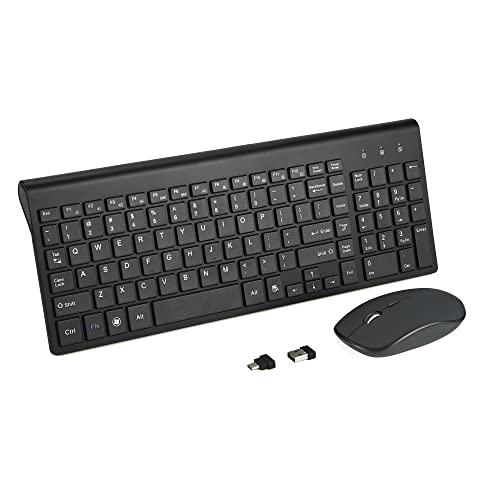 Also Consider Fonicer Wireless Keyboard and Mouse Combo | 9.2PCKitHQ scoreView on Amazon |
A closer look at each configuration
Wireless Keyboard and Mouse Combo
score
The full-size layout, shared nano receiver, included USB-C adapter, and up to 12 months of battery use define this combo.
- Wireless
- Yes
- Connection
- 2.4G wireless
- Weight
- 1.36 lb
- Warranty
- 1-Year Warranty
This INFINMIND combo connects over 2.4G wireless with one shared nano receiver for both keyboard and mouse, and the receiver stores in the back of the mouse. A USB-C adapter is included for USB-C devices, and the wireless range reaches up to 10 m. The full-size keyboard has a number pad, dedicated arrow keys, and 19 multimedia shortcuts, with 12 multimedia keys and 7 additional shortcuts. The mouse offers 4 DPI levels of 1000, 1600, 2400 and 3200. Noiseless click technology reduces noise by up to 90 percent. The keyboard uses 2 AAA batteries and the mouse uses 1 AA battery, both included, with up to 12 months of usage and an auto sleep function after 5 minutes of inactivity. The combo weighs 1.36 lb and carries a 1-Year Warranty.
Choose it if
- You type on a full-size keyboard with a number pad
- You connect through USB-C with the included adapter
Consider another if
- You need a mouse DPI above 3200
- You need a rechargeable keyboard instead of AAA batteries
Computer Wireless Keyboard and Mouse Combo
score
The rechargeable keyboard and mouse, Type-C adapter, and rainbow backlight make this combo a cord-free desk set.
- Wireless
- Yes
- Connection
- 2.4G wireless
- Warranty
- 1 Year
This MICROPACK combo connects over 2.4G wireless with a USB receiver and an included Type-C adapter, and it works with Windows and macOS devices that have Type-A or Type-C ports. The keyboard and mouse have built-in rechargeable batteries: the keyboard lasts up to 50 days and the mouse up to 10 days on a full charge. The mouse buttons are silent, with 4-level adjustable CPI of 1000, 2000, 3000 and 4000, and the membrane keyboard is made for low-noise typing. The combo works with Windows 11, 10, 8, 7, Vista and XP, Android, and Mac OS X 10.4 or above, and it carries a 1 Year warranty.
Choose it if
- You want a rechargeable keyboard and mouse with no replacement batteries
- You type quietly with a backlit rainbow keyboard
Consider another if
- You need a mouse that lasts up to 300 hours on a full charge
- You need a keyboard that lasts up to 12 months on one set of batteries
2.4G Wireless Keyboard and Mouse Combo
score
The USB-C rechargeable set pairs RGB lighting with a Type-C dongle for Windows, Android and macOS devices.
- Wireless
- Yes
- Connection
- 2.4G wireless
- Backlight
- Yes
- Weight
- 1.98 lb
This MICROPACK combo connects over 2.4G wireless with a USB dongle and a Type-C adapter, and it works with Windows, Android and macOS devices, including a Smart TV. The keyboard and mouse are USB-C rechargeable: the keyboard stays powered for up to 80 hours and the mouse for up to 300 hours on a full charge, and a quick charge takes 3 hours. The set has rainbow RGB lighting that you adjust with backlit keys. The auto sleep function turns the keyboard backlight off after 1 minute of sitting idle and the mouse backlight off after 5 minutes, with both going to sleep after 10 minutes. The combo weighs 1.98 lb.
Choose it if
- You want USB-C charging with up to 300 hours of mouse use
- You use Windows, Android or macOS with a Type-C dongle
Consider another if
- You need a keyboard that lasts up to 50 days on a full charge
- You need a mouse with 4000 CPI
Fonicer Wireless Keyboard and Mouse Combo
score
The full-size keyboard, USB-C and USB-A receivers, and whisper-quiet mouse suit a shared desk.
- Wireless
- Yes
- Connection
- 2.4G wireless
- Weight
- 1.37 lb
- Warranty
- 1 year manufacturer
This Fonicer combo is a full-size wireless keyboard and mouse set with a standard US QWERTY layout and a number pad. It connects over 2.4G wireless with USB-C and USB-A receivers, and the wireless range reaches up to 33 ft. The keyboard has 12 multimedia hotkeys combined with FN for music, movies, web browsing and email, and those hotkeys are not compatible with a Mac system. The mouse has whisper-quiet clicking and 3 levels of DPI at 800, 1200 and 1600. The keyboard runs on 2 AA batteries and the mouse on 1 AA battery, and batteries are not included. The mouse enters sleep mode after 10 minutes of disuse, and both keyboard and mouse have an on and off switch. The combo weighs 1.37 lb and carries a 1 year manufacturer warranty.
Choose it if
- You want a full-size keyboard with 12 multimedia hotkeys
- You connect with USB-C or USB-A receivers
Consider another if
- You need a mouse DPI above 1600
- You need a keyboard with batteries included in the box
Make the choice for your setup
Connect through USB-C
Every combo here reaches a USB-C port, but the route differs. The INFINMIND combo shares one nano receiver for keyboard and mouse and adds a USB-C adapter, so one receiver covers both devices. The MICROPACK combos each include a Type-C adapter with a USB receiver or dongle, and both work with Windows and macOS devices that have Type-A or Type-C ports. The Fonicer combo ships USB-C and USB-A receivers, so you plug in the receiver that matches the port in front of you. Check the port on the device you use most, then match it to the adapter or receiver in the box.
Battery power and charging
Power splits this guide into two camps: replaceable batteries and built-in rechargeable batteries. The INFINMIND keyboard takes 2 AAA batteries and its mouse takes 1 AA battery, both included, with up to 12 months of usage stated and auto sleep after 5 minutes of inactivity. The MICROPACK rechargeable combo gives up to 50 days for the keyboard and up to 10 days for the mouse on a full charge. The second MICROPACK set charges over USB-C, with up to 80 hours for the keyboard and up to 300 hours for the mouse, and a quick charge in 3 hours. The Fonicer keyboard takes 2 AA batteries and its mouse takes 1 AA battery, with batteries not included. For a closely related choice, read our guide to the Best Multi Device Wireless Keyboard and Mouse.
DPI, keys and quiet typing
Cursor sensitivity and key layout decide how the combo feels in daily use. The INFINMIND mouse offers 4 DPI levels of 1000, 1600, 2400 and 3200, while the first MICROPACK mouse offers 4 levels of CPI at 1000, 2000, 3000 and 4000, and the Fonicer mouse offers 3 levels at 800, 1200 and 1600. The INFINMIND keyboard has 19 multimedia shortcuts with a full number pad, and the Fonicer keyboard has 12 multimedia hotkeys with a number pad. Both MICROPACK keyboards carry rainbow backlighting, and the first MICROPACK set adds silent mouse buttons and membrane keys for low-noise typing, with a rainbow backlight in 3 modes and 3 levels of brightness.
Before you decide, also read Best Wireless Keyboard and Mouse USB C.
FAQ: Wireless Keyboard and Mouse with Type C Dongle
Which combos connect through a Type-C dongle?
All four combos reach a USB-C port. The INFINMIND and both MICROPACK combos include a USB-C adapter with a USB receiver or dongle, and the Fonicer combo includes USB-C and USB-A receivers for either port.
How long do the rechargeable combos last on a full charge?
The first MICROPACK combo gives up to 50 days for the keyboard and up to 10 days for the mouse on a full charge. The second MICROPACK set gives up to 80 hours for the keyboard and up to 300 hours for the mouse, with a quick charge in 3 hours.
Which keyboards in this guide have backlighting?
Both MICROPACK keyboards name backlighting. The first has a rainbow backlight with 3 modes in 3 levels of brightness, and the second has rainbow RGB lighting that you adjust with backlit keys for use in a dark room.


