Best Wi-Fi Card for Laptop ASUS (2026): 5 Picks Compared
 By Theo LangUpdated
Choose the ASUS AX1800 Dual Band WiFi 6 USB Adapter if you want WiFi 6 over a USB connection with WPA3 security and a 5GHz band up to 2.4Gbps. Its AX1800 speed class, 160MHz bandwidth, and 1024-QAM suit Windows 10 and Linux users who want a nano adapter. The other ASUS adapters here cover 802.11ac, WiFi 7, tri-band, and USB-C connections, so the choice turns on the standard, bands, and connector your laptop needs.
Your shortlist at a glance
PCKitHQ scores range from 9.2 to 9.8. See how we pick.
| Product and key specifications | Score and retailer |
|---|---|
01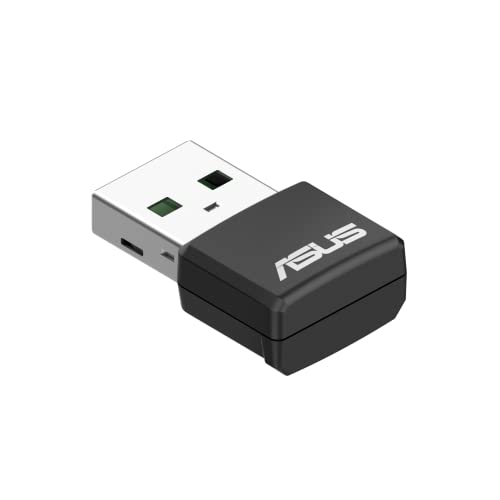 | 9.8PCKitHQ scoreView on Amazon |
02 | 9.7PCKitHQ scoreView on Amazon |
03 | 9.5PCKitHQ scoreView on Amazon |
04 Also Consider ASUS AX1800 Dual-Band AX1800Wi-Fi standard: WiFi 6, Speed class: AX1800, Interface: USB | 9.3PCKitHQ scoreView on Amazon |
05 | 9.2PCKitHQ scoreView on Amazon |
A closer look at each configuration
ASUS AX1800 Dual Band
score
The AX1800 speed class, WiFi 6 standard, and 5GHz band rated up to 2.4Gbps define this USB-AX55 Nano adapter.
- Wi-Fi standard
- WiFi 6
- Speed class
- AX1800
- Interface
- USB
- Weight
- 0.01 lb
- Warranty
- 3 years
This adapter brings WiFi 6 to a laptop through a USB connection, with an AX1800 speed class and a 5GHz band rated up to 2.4Gbps using 160MHz bandwidth and 1024-QAM. OFDMA and MU-MIMO support steadier transmission in dense wireless environments. WPA3 security covers authentication on supported networks. It works with Windows 10 and Linux. It weighs 0.01 pounds, and the whole device carries a 3-year warranty. The 5GHz speed is rated up to 2.7X faster.
Choose it if
- You want WiFi 6 over a USB connection
- You use Windows 10 or Linux on your laptop
Consider another if
- You need the 6GHz band of the USB-BE92 Nano
- You need a USB-C connector like the USB-BE93 Mini
ASUS USB-AC53 Nano USB
score
The AC1200 speed class and dual-band 2.4GHz and 5GHz connection suit older 802.11ac networks.
- Wi-Fi standard
- 802.11ac
- Speed class
- AC1200
- Interface
- USB
- Bands
- Dual-band
- Weight
- 0.1 lb
- Warranty
- 3 Years
This USB-AC53 Nano adapter adds dual-band 802.11ac Wi-Fi to desktops and laptops through a USB connection. Its AC1200 speed class covers 2.4GHz and 5GHz bands, with download speeds up to 867 Mbps. MU-MIMO support connects to MIMO-enabled routers and access points. It works with Windows XP, Vista, 7, 8, 8.1, and 10, and with Mac OS. The adapter weighs 0.1 pounds, and the whole device carries a 3-year warranty. Plug and play setup keeps installation simple.
Choose it if
- You connect to an 802.11ac network at home
- Your laptop runs Windows 10 or Mac OS
Consider another if
- You need the WiFi 6 standard of the USB-AX55 Nano
- You need the 6GHz band of the USB-BE92 Nano
ASUS Tri-Band
score
The WiFi 7 standard, tri-band connection, and 6GHz band define this USB-BE92 Nano adapter.
- Wi-Fi standard
- WiFi 7
- Interface
- USB
- Bands
- Tri-band
- Weight
- 0.01 lb
- Warranty
- 3 year
This USB-BE92 Nano adapter moves a laptop to WiFi 7 over a USB connection, using the 802.11be standard with tri-band support including the 6GHz band. The 6GHz band and 4096-QAM support streaming and gaming on supported networks, and the adapter selects the best band for the connection. WPA3 security covers authentication. Plug and play needs no extra drivers. It works with Windows 10 and 11, weighs 0.01 pounds, and the whole device carries a 3-year warranty.
Choose it if
- You want WiFi 7 with a 6GHz band
- You run Windows 10 or 11 on your laptop
Consider another if
- You need a USB-C connector like the USB-BE93 Mini
- You want the AX1800 speed class of the USB-AX55 Nano
ASUS AX1800 Dual-Band AX1800
score
The AX1800 speed class and WiFi 6 standard pair with dual-band 5GHz support in this USB-AX57 Nano.
- Wi-Fi standard
- WiFi 6
- Speed class
- AX1800
- Interface
- USB
- Bands
- Dual-band
- Weight
- 0.01 lb
- Warranty
- 3 years
This USB-AX57 Nano adapter upgrades a laptop to WiFi 6 through a USB connection, with an AX1800 speed class and dual-band support that includes the 5GHz band for 4K UHD streaming and low-latency gaming. OFDMA, MU-MIMO, and BSS Coloring support faster transmission in dense wireless environments. WPA3 security covers authentication. Plug and play needs no extra drivers. It works with Windows 10 and 11, measures 0.6 inches by 0.4 inches by 1.0 inches, weighs 0.01 pounds, and the whole device carries a 3-year warranty.
Choose it if
- You want WiFi 6 over a USB connection
- You run Windows 10 or 11 on your laptop
Consider another if
- You need the 6GHz band of the USB-BE92 Nano
- You need a USB-C connector like the USB-BE93 Mini
ASUS USB-BE93 Mini USB-C
score
The USB-C connector, WiFi 7 standard, and tri-band 2.4, 5, and 6GHz support define this USB-BE93 Mini.
- Wi-Fi standard
- WiFi 7
- Interface
- USB-C
- Bands
- Tri-band
- Weight
- 0.01 lb
- Warranty
- 3 years
This USB-BE93 Mini adapter adds WiFi 7 to a laptop through a compact Type-C mini adapter, with tri-band support across 2.4GHz, 5GHz, and 6GHz bands for stable connections and low-latency streaming. A built-in driver means plug and play with no complex setup. WPA3 encryption covers online connections. The mini design blends with laptops or desktops for use on the go, weighs 0.01 pounds, and the whole device carries a 3-year warranty.
Choose it if
- You want WiFi 7 through a USB-C port
- You want a built-in driver with plug and play
Consider another if
- You need the 2.4Gbps 5GHz rating of the USB-AX55 Nano
- You need the AC1200 class of the USB-AC53 Nano
Make the choice for your setup
Match the Wi-Fi standard to your network
The five adapters split across three standards. The USB-AX55 Nano and USB-AX57 Nano use WiFi 6 with the 802.11ax standard, while the USB-AC53 Nano uses 802.11ac. The USB-BE92 Nano and USB-BE93 Mini use WiFi 7 with the 802.11be standard. A WiFi 6 adapter suits a laptop that connects to a WiFi 6 network, and a WiFi 7 adapter suits a laptop that connects to a WiFi 7 network with 6GHz support. The USB-AC53 Nano suits a laptop on an 802.11ac network, where its AC1200 speed class and dual-band connection apply. Check the standard your router and laptop already use before choosing, since the adapter standard sets the connection the laptop can use.
Compare bands and speed classes
Band count and speed class separate these adapters. The USB-AX55 Nano and USB-AX57 Nano are dual-band with an AX1800 speed class, and the USB-AC53 Nano is dual-band with an AC1200 speed class. The USB-BE92 Nano and USB-BE93 Mini are tri-band across 2.4GHz, 5GHz, and 6GHz. The USB-AX55 Nano rates its 5GHz band up to 2.4Gbps with 160MHz bandwidth and 1024-QAM, while the USB-AC53 Nano rates download speeds up to 867 Mbps. Compare those rated figures against the bands your network uses, and keep rated figures separate from measured speed. The 6GHz band appears only on the two WiFi 7 adapters, so a laptop that needs 6GHz narrows the choice to those two. For a closely related choice, read our guide to the Best USB Wireless Network Card.
Check the connector and operating system
Four adapters use a USB connection, and the USB-BE93 Mini uses a USB-C connection through a compact Type-C mini adapter. The USB-AX55 Nano works with Windows 10 and Linux, the USB-AX57 Nano and USB-BE92 Nano work with Windows 10 and 11, the USB-BE93 Mini uses a built-in driver with plug and play, and the USB-AC53 Nano works with Windows XP, Vista, 7, 8, 8.1, and 10, and with Mac OS. Match the connector to the port your laptop has free, and match the operating system to the one your laptop runs. All five adapters carry a 3-year whole-device warranty, and each weighs 0.1 pounds or less, with the USB-AC53 Nano at 0.1 pounds and the others at 0.01 pounds.
Comparing more options? See Best Wi-Fi Card for PC Windows 10.
FAQ: Wi-Fi Card for Laptop ASUS
Which adapter should I choose for WiFi 6?
Choose the ASUS AX1800 Dual Band WiFi 6 USB Adapter for WiFi 6 over USB, with an AX1800 speed class, WPA3 security, and a 5GHz band rated up to 2.4Gbps. The USB-AX57 Nano is the other WiFi 6 adapter here, also with an AX1800 speed class and dual-band support.
What is the difference between the WiFi 7 adapters?
The USB-BE92 Nano connects over USB, while the USB-BE93 Mini connects over USB-C with a built-in driver. Both use WiFi 7 with tri-band support across 2.4GHz, 5GHz, and 6GHz bands, WPA3 security, and a 3-year warranty. The USB-BE92 Nano also supports 4096-QAM.
Does the USB-AC53 Nano work with older systems?
Yes. It works with Windows XP, Vista, 7, 8, 8.1, and 10, and with Mac OS. Its AC1200 speed class covers dual-band 2.4GHz and 5GHz connections, with download speeds up to 867 Mbps. It weighs 0.1 pounds and carries a 3-year warranty.