Best Wi-Fi Card with External Antenna (2026): 6 Picks Compared
 By Theo LangUpdated
The TP-Link USB WiFi Adapter for Desktop PC is the pick for a desktop that needs a stronger wireless connection, with AC1300 dual-band speeds up to 867 Mbps on 5 GHz and a 5 dBi adjustable antenna. Its USB 3.0 connection and support for Windows 11 through XP and macOS 10.9 through 10.15 cover many machines. The other adapters trade that broad support for newer WiFi 6, WiFi 6E, and WiFi 7 standards.
Your shortlist at a glance
PCKitHQ scores range from 9.2 to 9.8. See how we pick.
| Product and key specifications | Score and retailer |
|---|---|
01 | 9.8PCKitHQ scoreView on Amazon |
02 | 9.7PCKitHQ scoreView on Amazon |
03 | 9.6PCKitHQ scoreView on Amazon |
04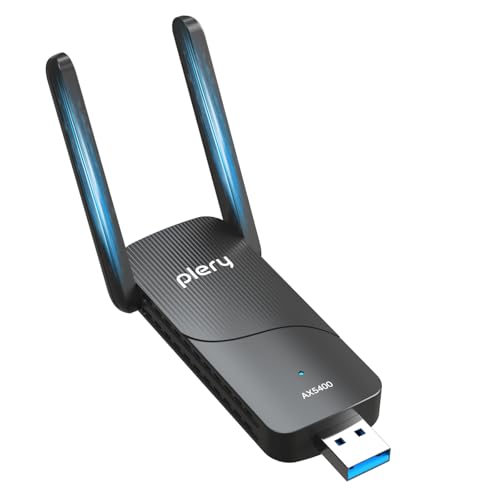 Also Consider WiFi 6E USB Adapter for Desktop PC - AX5400 Tri-Band (6GHz/5GHz/2.4GHz)Wi-Fi standard: WiFi 6E, Speed class: AX5400, Interface: USB 3.0 | 9.4PCKitHQ scoreView on Amazon |
05 Also Consider D-Link Wi-Fi 7 USB 3.0 AdapterWi-Fi standard: Wi-Fi 7, Speed class: BE6500, Interface: USB 3.0 | 9.3PCKitHQ scoreView on Amazon |
06 Also Consider PLERY BE6500 WiFi 7 USB AdapterWi-Fi standard: WiFi 7, Speed class: BE6500, Interface: USB 3.0 | 9.2PCKitHQ scoreView on Amazon |
A closer look at each configuration
TP-Link USB
score
The AC1300 dual-band adapter pairs 867 Mbps on 5 GHz with a 5 dBi adjustable external antenna and USB 3.0.
- Speed class
- AC1300
- Interface
- USB 3.0
- Weight
- 0.04 lb
- Warranty
- 2 year manufacturer
This TP-Link adapter, the Archer T3U Plus, connects through USB 3.0 and runs at AC1300 dual-band speeds, with up to 867 Mbps on the 5 GHz band and up to 400 Mbps on the 2.4 GHz band. Its 5 dBi high-gain antenna is adjustable and multi-directional, so you can rotate it toward the router. MU-MIMO technology supports the throughput and efficiency of the whole network. It works with Windows 11, 10, 8.1, 8, 7, and XP, and with macOS 10.9 through 10.15. The adapter weighs 0.04 lb and carries a 2 year manufacturer warranty. Setup uses a friendly user interface for smooth and simple installation.
Choose it if
- You want AC1300 dual-band WiFi on a desktop PC
- You run Windows 11 or macOS 10.9 through 10.15
Consider another if
- You need the BE5000 tri-band speeds of the NETGEAR
- You need the Bluetooth 5.4 of the UGREEN adapter
NETGEAR Nighthawk USB
score
The WiFi 7 adapter offers BE5000 tri-band speeds up to 5 Gbps with a flip-up high-gain antenna for Windows 11 PCs.
- Wi-Fi standard
- WiFi 7
- Speed class
- BE5000
- Interface
- USB 3.0
- Bands
- Tri Band
- Warranty
- 1 Year Limited
This NETGEAR Nighthawk adapter, the A8500, brings WiFi 7 to a Windows 11 computer through a USB 3.0 port, with BE5000 tri-band speeds up to 5 Gbps. It uses the 6 GHz band alongside 2.4 GHz and 5 GHz, and stays backward compatible with WiFi 6E, WiFi 6, and WiFi 5. Its flippable high-gain external antenna adjusts to find the best signal. It works with any WiFi router or mesh system, with WPA3 security on every connection. The adapter is built for Windows 11 only. It carries a 1 Year Limited warranty.
Choose it if
- You run Windows 11 and want WiFi 7
- You want the 6 GHz band for less crowded connections
Consider another if
- You need Windows 10 or macOS support like the TP-Link
- You need the Bluetooth 5.4 of the UGREEN adapter
UGREEN 2-in-1 USB Bluetooth
score
The UGREEN adapter combines WiFi 6 AX900 speeds with Bluetooth 5.4 and a 6dBi adjustable antenna for Windows 10 and 11.
- Wi-Fi standard
- WiFi 6
- Speed class
- AX900
- Interface
- USB
- Bands
- Dual Band
- Weight
- 0.2 lb
This UGREEN 2-in-1 adapter pairs WiFi 6 AX900 speeds with Bluetooth 5.4. It reaches up to 600 Mbps on the 5 GHz band and up to 287 Mbps on the 2.4 GHz band, and its Bluetooth 5.4 stays backward compatible with Bluetooth 5.3, 5.2, 5.0, and 4.0 devices. The external 6dBi high-gain antenna is adjustable and helps the signal pass through walls, with the adapter placed within 30 ft of the router. A built-in driver covers Windows 10 and 11 on X86 and X64 systems. One adapter can also transmit WiFi from a networked computer to share it with other devices. It weighs 0.2 lb.
Choose it if
- You want WiFi 6 and Bluetooth 5.4 in one adapter
- You run Windows 10 or 11 on a desktop or laptop
Consider another if
- You need the 6 GHz band of the NETGEAR adapter
- You need macOS support like the TP-Link adapter
WiFi 6E USB Adapter for Desktop PC - AX5400 Tri-Band (6GHz/5GHz/2.4GHz)
score
The PLERY adapter delivers AX5400 tri-band speeds up to 5400 Mbps with dual high-gain antennas and USB 3.0.
- Wi-Fi standard
- WiFi 6E
- Speed class
- AX5400
- Interface
- USB 3.0
- Weight
- 0.09 lb
- Warranty
- 1 year
This PLERY WiFi 6E adapter runs at AX5400 tri-band speeds up to 5400 Mbps, with up to 2402 Mbps on the 6 GHz band, up to 2402 Mbps on the 5 GHz band, and up to 574 Mbps on the 2.4 GHz band. Two adjustable external high-gain antennas support stronger signal strength across the home or office. The USB 3.0 interface delivers data transfer rates up to 5 Gbps, and OFDMA and MU-MIMO handle multiple data streams at once. It works with Windows 11 (64-bit) for the 6 GHz band, Windows 10 for 5 GHz and 2.4 GHz, and Linux (v3.13-6.14). WPA3 encryption protects the connection, and built-in pre-loaded drivers cover setup without a CD drive. It weighs 0.09 lb and carries a 1 year warranty.
Choose it if
- You want the 6 GHz band on Windows 11
- You run Windows 10, Windows 11, or Linux
Consider another if
- You need Bluetooth like the UGREEN adapter offers
- You need the BE6500 speeds of the D-Link adapter
D-Link Wi-Fi 7 USB 3.0 Adapter
score
The D-Link adapter pairs BE6500 tri-band WiFi 7 with two adjustable antennas and a detachable cradle for placement.
- Wi-Fi standard
- Wi-Fi 7
- Speed class
- BE6500
- Interface
- USB 3.0
- Bands
- Tri-Band
- Weight
- 0.05 lb
- Warranty
- 1 Year Manufacturer
This D-Link Wi-Fi 7 adapter, the AE65U, runs at BE6500 tri-band speeds up to 2882 Mbps on the 6 GHz band, up to 2882 Mbps on the 5 GHz band, and up to 688 Mbps on the 2.4 GHz band. Two adjustable high-gain antennas and an included USB cradle with an extension cable help with placement and reception, and beamforming helps direct signals toward the router. It supports Wi-Fi 7 features such as 4K-QAM and 160MHz channels, plus OFDMA, MU-MIMO, and Multi-RU. The 6 GHz band and full Wi-Fi 7 features require Windows 11 version 24H2 or later and a compatible 6 GHz network; on Windows 10 it operates on the 2.4 GHz and 5 GHz bands only. It weighs 0.05 lb and carries a 1 Year Manufacturer warranty. WPA3 is supported for the wireless connection.
Choose it if
- You want WiFi 7 on Windows 11 or Windows 10
- You want a cradle to place the adapter away from the PC
Consider another if
- You need Bluetooth like the UGREEN adapter offers
- You need the 2 year manufacturer warranty of the TP-Link
PLERY BE6500 WiFi 7 USB Adapter
score
The PLERY adapter offers BE6500 tri-band WiFi 7 speeds up to 6500 Mbps with dual 6dBi antennas and USB 3.0.
- Wi-Fi standard
- WiFi 7
- Speed class
- BE6500
- Interface
- USB 3.0
- Bands
- Tri-Band
- Weight
- 0.18 lb
- Warranty
- 1 year
This PLERY BE6500 WiFi 7 adapter delivers tri-band speeds up to 6500 Mbps, with up to 2882 Mbps on both the 5 GHz and 6 GHz bands and up to 688 Mbps on the 2.4 GHz band. Two 6dBi high-gain external antennas adjust through 180 degrees to support signal penetration and coverage. WiFi 7 features include MLO (Multi-Link Operation), 4K-QAM, 160MHz bandwidth, and Multi-RU, which support lower network latency. The USB 3.0 connection is plug-and-play, and WPA3 encryption is supported. Built-in drivers cover setup with no CD or extra downloads. It works with Windows 11 for the 6 GHz band and Windows 10 for the 2.4 GHz and 5 GHz bands. It weighs 0.18 lb and carries a 1 year warranty.
Choose it if
- You want WiFi 7 speeds up to 6500 Mbps
- You run Windows 11 or Windows 10 on a gaming PC
Consider another if
- You need Bluetooth like the UGREEN adapter offers
- You need the 2 year manufacturer warranty of the TP-Link
Make the choice for your setup
Match the adapter to your Windows version
Operating system support decides which adapters work on your machine. The TP-Link adapter works with Windows 11, 10, 8.1, 8, 7, and XP, plus macOS 10.9 through 10.15, so it covers older systems as well. The UGREEN adapter covers Windows 10 and 11 only. The NETGEAR adapter is built for Windows 11 only. The PLERY WiFi 6E adapter works with Windows 11 (64-bit) for the 6 GHz band, Windows 10 for 5 GHz and 2.4 GHz, and Linux (v3.13-6.14). The D-Link and PLERY WiFi 7 adapters work with Windows 11 and Windows 10, with the 6 GHz band limited to Windows 11. Check your installed Windows version before choosing, since the 6 GHz band is tied to Windows 11 on these adapters.
Compare speed classes and bands
The TP-Link adapter runs at AC1300 dual-band speeds, with up to 867 Mbps on 5 GHz and up to 400 Mbps on 2.4 GHz. The UGREEN adapter runs at AX900, with up to 600 Mbps on 5 GHz and up to 287 Mbps on 2.4 GHz. The PLERY WiFi 6E adapter runs at AX5400 tri-band, with up to 2402 Mbps on 6 GHz and 5 GHz and up to 574 Mbps on 2.4 GHz. The NETGEAR adapter runs at BE5000 tri-band with speeds up to 5 Gbps. The D-Link and PLERY WiFi 7 adapters run at BE6500 tri-band, with up to 2882 Mbps on 6 GHz and 5 GHz and up to 688 Mbps on 2.4 GHz. The 6 GHz band appears only on the tri-band adapters and needs a matching router and Windows 11. Shoppers with a related need can compare our guide to the Best USB Wireless Network Card.
Use the antenna and placement features
Every adapter in this guide has an external antenna, and the differences are in adjustment and placement. The TP-Link adapter has a 5 dBi high-gain antenna that is adjustable and multi-directional, so you can rotate it toward the router. The UGREEN adapter has a 6dBi adjustable high-gain antenna, with the adapter placed within 30 ft of the router. The NETGEAR adapter has a flippable high-gain external antenna that adjusts to find the best signal. The PLERY WiFi 6E adapter has two adjustable external high-gain antennas. The D-Link adapter has two adjustable high-gain antennas plus a USB cradle with an extension cable for placement. The PLERY WiFi 7 adapter has two 6dBi antennas with a 180-degree adjustable design. Point the antenna toward the router.
Before you decide, also read Best M.2 Wi-Fi Card.
FAQ: Wi-Fi Card with External Antenna
Which adapter works with the most Windows versions?
The TP-Link adapter works with Windows 11, 10, 8.1, 8, 7, and XP, plus macOS 10.9 through 10.15. The other adapters in this guide cover Windows 10 and 11, or Windows 11 only. The PLERY WiFi 6E adapter also works with Linux (v3.13-6.14).
Which adapters use the 6 GHz band?
The NETGEAR, PLERY WiFi 6E, D-Link, and PLERY WiFi 7 adapters use the 6 GHz band. The TP-Link and UGREEN adapters are dual-band, covering 2.4 GHz and 5 GHz only. On these adapters, the 6 GHz band needs a matching router and Windows 11.
Which adapter also connects Bluetooth devices?
The UGREEN adapter combines WiFi 6 AX900 with Bluetooth 5.4, which pairs with PCs, laptops, phones, headsets, speakers, keyboards, controllers, and printers. Its Bluetooth 5.4 stays backward compatible with Bluetooth 5.3, 5.2, 5.0, and 4.0 devices.