Best Trackball Roller Ball Mouse (2026): Top 4 by the Specs
 By Theo LangUpdated
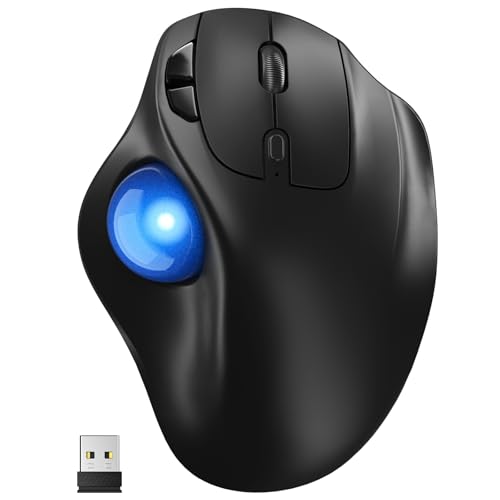
The Nulea M501 Wireless Trackball Mouse Ergonomic Thumb Control suits buyers who want thumb control without moving the mouse, with 4 DPI levels and pairing for up to 3 devices over Bluetooth or a USB dongle. Its rechargeable battery removes disposable batteries, and its 6 buttons include back and forward controls. The other picks cover a tilt stand, a wired connection and programmable buttons.
Your shortlist at a glance
PCKitHQ scores range from 9.2 to 9.8. See how we pick.
| Product and key specifications | Score and retailer |
|---|---|
01 | 9.8PCKitHQ scoreView on Amazon |
02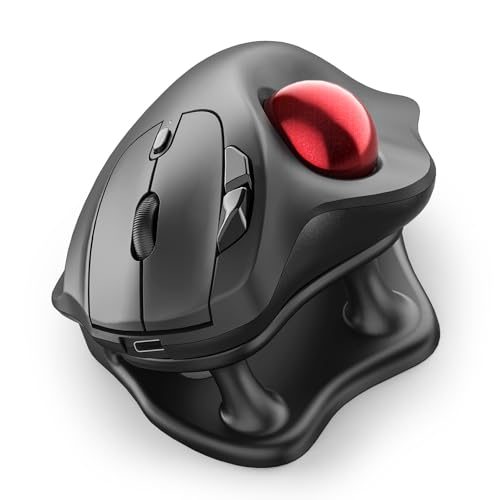 Second Pick Nulea Wireless Trackball Mouse Ergonomic 21.7 Tilt Stand Thumb ControlSensor resolution: 1600 DPI | 9.6PCKitHQ scoreView on Amazon |
03 Also Consider Kensington Orbit Trackball Mouse (K64327F) | 9.4PCKitHQ scoreView on Amazon |
04 Also Consider Perixx11568 Perimice-717 Wireless Trackball Mouse | 9.2PCKitHQ scoreView on Amazon |
A closer look at each configuration
Nulea M501 Wireless Trackball Mouse Ergonomic Thumb Control
score
The Nulea M501 pairs thumb control with 4 DPI levels, Bluetooth or USB dongle pairing for 3 devices, and a rechargeable battery.
- Wireless
- Yes
- Connection
- bluetooth or USB dongle
- Weight
- 0.28 lb
- Warranty
- 180 days
The Nulea M501 connects to up to 3 devices through Bluetooth or the included USB dongle, and the switch sits on the bottom of the mouse. The 2.4G USB receiver stores at the bottom when it is not in use. Its built-in rechargeable battery charges through the included cable. Use a computer USB port or a 5V charger to charge it, and do not use a fast charger. The mouse has 6 buttons, including back and forward controls, and all buttons are non-programmable. Thumb control moves the cursor while the mouse stays in place, which suits a narrow desk, a couch or a bed. It weighs 0.28 lb and carries a 180 days warranty. Its color is purple, and it works with PC, Mac and Windows.
Choose it if
- You want thumb control with 4 DPI levels
- You switch between 3 devices over Bluetooth or USB
Consider another if
- You need the 1600 DPI sensor resolution of the M511
- You need the 21.7° tilt stand of the M511
Nulea Wireless Trackball Mouse Ergonomic 21.7 Tilt Stand Thumb Control
score
The Nulea M511 pairs a 21.7° tilt stand and silent operation with thumb control, 1600 DPI and 3-device switching.
- Sensor resolution
- 1600 DPI
- Wireless
- Yes
- Connection
- Bluetooth or the included USB receiver
- Weight
- 0.28 lb
- Warranty
- 12 months
The Nulea M511 sits on a 21.7° tilt stand that holds the wrist in a more natural position, and its shape fits the palm for long hours at the desk. Its trackball, buttons and scroll wheel operate without noise, which suits shared spaces and late-night work. Four DPI levels run from 400 to 1600 DPI, with 1600 DPI as the sensor resolution, and the levels suit drawing, editing, multitasking and daily office work. It pairs with up to 3 devices through Bluetooth or the included USB receiver and switches at the tap of a button. It works with PC, Mac, laptops, tablets and phones. Its 6 buttons are non-programmable. It weighs 0.28 lb and carries a 12 months warranty.
Choose it if
- You want a 21.7° tilt stand with thumb control
- You want silent buttons, trackball and scroll wheel
Consider another if
- You need the 2 year warranty of the Kensington Orbit
- You need programmable buttons like the Perimice-717
Kensington Orbit Trackball Mouse (K64327F)
score
The Kensington Orbit uses a wired USB connection and a 40mm ball with red optics, plus a 2 year warranty.
- Connection
- wired USB connection
- Weight
- 0.59 lb
- Warranty
- 2 year warranty
The Kensington Orbit connects through a wired USB connection and needs no batteries, so setup is a fast installation through the USB port. Its medium 40mm ball uses internal red optics to track movement, and clicking and scrolling run through the wired USB connection. The ambidextrous design is compact and uses less desk space than a mouse, which leaves room to arrange the workstation. Kensington Konnect software assigns program functions to each of the 2 buttons and adjusts cursor speeds. It weighs 0.59 lb. The 2 year warranty applies only when bought through Kensington Authorized Resellers.
Choose it if
- You want a wired USB connection with no batteries
- You want an ambidextrous design with a 40mm ball
Consider another if
- You need a wireless connection for your desk
- You need a scroll ring on the mouse
Perixx11568 Perimice-717 Wireless Trackball Mouse
score
The Perimice-717 pairs a 1.34-inch trackball with 5 programmable buttons and a 2.4 GHz wireless connection.
- Wireless
- Yes
- Connection
- 2.4 GHz
- Weight
- 0.3 lb
- Warranty
- 1-year manufacturer warranty
The Perimice-717 uses a 2.4 GHz wireless connection with a 1.34-inch trackball and 5 programmable buttons, and DPI switch buttons change the cursor speed across its 2 DPI levels. Download the software from the Perixx website to set the programmable buttons. Its design is right-handed. It enters power-saving mode after 10 seconds in sleep mode and after 8 to 10 minutes in standby mode. It needs Windows 7, 8 or 10 and a USB port, with basic function on Linux, Android and iOS. It measures 5.12 x 4.21 x 1.77 inches, weighs 0.3 lb and carries a 1-year manufacturer warranty.
Choose it if
- You want 5 programmable buttons on a wireless mouse
- You want a 1.34-inch trackball with a right-handed design
Consider another if
- You need the 1600 DPI sensor resolution of the M511
- You need a left-handed design for your desk
Make the choice for your setup
Weigh wireless freedom against a wired link
The Nulea M501 and the Nulea M511 each pair with up to 3 devices through Bluetooth or a USB receiver, and each switches between devices with a button, which suits a desk shared by a PC and a Mac. The M511 also pairs with laptops, tablets and phones. The Perimice-717 uses a 2.4 GHz wireless connection with a 10m operating range, and it needs Windows 7, 8 or 10 and a USB port, with basic function on Linux, Android and iOS. The Kensington Orbit takes the other route: a wired USB connection with no batteries and a fast installation through the USB port. Match the connection to the machines on the desk before choosing between wireless switching and a wired link.
Compare DPI levels and button control
The Nulea M511 offers four DPI levels at 400, 800, 1200 and 1600 DPI, with 1600 DPI as the sensor resolution, while the Nulea M501 offers 4 DPI levels. The Perimice-717 has 2 DPI levels and DPI switch buttons that change the cursor speed. Button control splits the picks: the Perimice-717 has 5 programmable buttons set through software from the Perixx website, and the Kensington Orbit has 2 buttons whose functions Kensington Konnect software assigns while also adjusting cursor speeds. Both Nulea mice have 6 buttons, including back and forward controls, and all of those buttons are non-programmable. Choose the DPI range and the button setup that match the work on the desk. A related shortlist covers the Best Gaming Mouse for Mac.
Check size, weight and warranty terms
The two Nulea mice each weigh 0.28 lb, while the Perimice-717 weighs 0.3 lb and the Kensington Orbit weighs 0.59 lb. The Perimice-717 measures 5.12 x 4.21 x 1.77 inches, and the Kensington Orbit is compact with an ambidextrous design that uses less desk space than a mouse. Warranty terms differ across the picks: the Nulea M501 carries a 180 days warranty, the Nulea M511 carries a 12 months warranty, the Perimice-717 carries a 1-year manufacturer warranty, and the Kensington Orbit carries a 2 year warranty that applies only when bought through Kensington Authorized Resellers. The M511 adds a 21.7° tilt stand, the Perimice-717 has a right-handed design, and the Kensington Orbit uses a 40mm ball. Compare these figures against the desk space and the hand that will use the mouse.
For a wider shortlist, start with Best Mouse.
FAQ: Trackball Roller Ball Mouse
Which of these trackball mice connect wirelessly?
The Nulea M501 connects through Bluetooth or a USB dongle, the Nulea M511 connects through Bluetooth or the included USB receiver, and the Perimice-717 uses a 2.4 GHz wireless connection. The Kensington Orbit connects through a wired USB connection only and needs no batteries.
What DPI levels do the Nulea mice offer?
The Nulea M511 offers four DPI levels at 400, 800, 1200 and 1600 DPI, with 1600 DPI as the sensor resolution. The Nulea M501 offers 4 DPI levels. The Perimice-717 offers 2 DPI levels with DPI switch buttons, and the Kensington Orbit adjusts cursor speeds through Kensington Konnect software.
Which pick has programmable buttons?
The Perimice-717 has 5 programmable buttons set through software downloaded from the Perixx website. The Kensington Orbit assigns program functions to its 2 buttons through Kensington Konnect software. Both Nulea mice have 6 buttons, including back and forward controls, and all of those buttons are non-programmable.