
Best Trackball for Windows (2026): 6 Models Side by Side
 By Theo LangUpdated
The Kensington Orbit Wireless Trackball with Scroll Ring suits Windows users who want dual wireless connections and a scroll ring, with four DPI settings from 400 to 1,600 and a 40mm ball. It connects through 2.4 GHz or Bluetooth LE and weighs 0.35 lb. The remaining picks cover larger balls, thumb control, left-handed use, and multi-device switching, so the guide below matches each configuration to a specific Windows setup.
Your shortlist at a glance
PCKitHQ scores range from 9.2 to 9.8. See how we pick.
| Product and key specifications | Score and retailer |
|---|---|
01 Best Overall Kensington Orbit Wireless Trackball | 9.8PCKitHQ scoreView on Amazon |
02 | 9.7PCKitHQ scoreView on Amazon |
03 Also Consider Logitech Ergo M575 for Wireless Trackball Mouse | 9.6PCKitHQ scoreView on Amazon |
04 Also Consider ELECOM EX-G Left Handed Trackball Mouse | 9.4PCKitHQ scoreView on Amazon |
05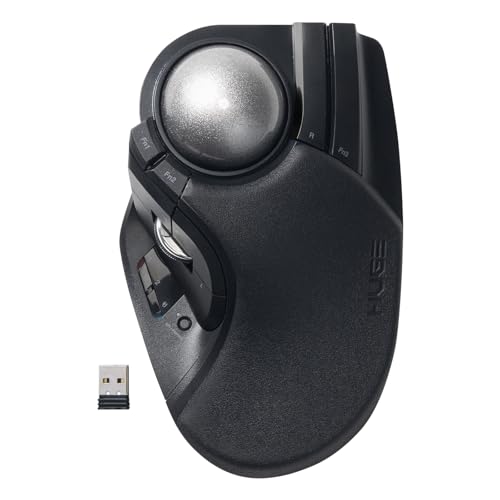 Also Consider ELECOM Huge Plus Wireless Trackball Mouse | 9.3PCKitHQ scoreView on Amazon |
06 | 9.2PCKitHQ scoreView on Amazon |
A closer look at each configuration
Kensington Orbit Wireless Trackball
score
The Orbit pairs dual wireless with a scroll ring, four DPI settings, and a 40mm ball at 0.35 lb.
- Wireless
- Yes
- Connection
- 2.4 GHz and Bluetooth LE
- Weight
- 0.35 lb
- Warranty
- 3 year
The Orbit connects through 2.4 GHz and Bluetooth LE, and KensingtonKonnect software assigns functions to the buttons and adjusts cursor and scrolling speed. The scroll ring moves up and down pages and documents, and the 40mm ball is designed as a sphere for precise tracking. Four DPI settings cover 400, 800, 1,200, and 1,600. The ambidextrous design works for right-handed and left-handed users. The 3 year warranty covers the device, and the 0.35 lb weight keeps the unit light on a desk.
Choose it if
- You want 2.4 GHz and Bluetooth LE in one trackball
- You want a scroll ring and four DPI settings
Consider another if
- You need a 55mm ball like the Expert
- You need a DPI setting above 1,600
Kensington Expert Wireless Trackball Mouse (K72359WW) Black
score
The Expert pairs a 55mm ball and Diamond Eye optical tracking with a detachable wrist rest and 2.4 GHz or Bluetooth LE.
- Wireless
- Yes
- Connection
- built-in Bluetooth LE or with the USB dongle using 2.4Ghz wireless
- Weight
- 1.35 lb
- Warranty
- 3 years parts & labor
The Expert uses a 55mm ball with Diamond Eye optical tracking and a patented scroll ring for scanning pages. Its detachable wrist rest supports the hand and wrist, and the ambidextrous design works for right-handed and left-handed users. It connects through built-in Bluetooth LE or a USB dongle using 2.4 GHz wireless, and KensingtonKonnect software customizes four buttons, scroll speed, and cursor speed. Two AA batteries power the unit, and the 3 year coverage includes parts and labor.
Choose it if
- You want a 55mm ball with Diamond Eye tracking
- You want a detachable wrist rest included
Consider another if
- You want the 0.35 lb weight of the Orbit
- You want a 40mm ball like the Orbit
Logitech Ergo M575 for Wireless Trackball Mouse
score
The M575 for Business pairs thumb control with Logi Bolt and Bluetooth, a sculpted shape, and Logi Options+ shortcuts.
- Wireless
- Yes
- Connection
- Logi Bolt, Bluetooth
- Weight
- 0.32 lb
- Warranty
- 2 Years Limited Hardware Warranty
The M575 for Business uses thumb control for precise tracking on any surface, with cursor speed adjusted through Logi Tune. Its sculpted shape suits tight workspaces because the trackball stays in place. Buttons take shortcuts through the Logi Options+ app, including Copilot in Windows. Logi Bolt and Bluetooth provide the wireless connections. Logitech rates battery life at up to 18 months from a single AA battery, and the 2 Years Limited Hardware Warranty covers the device.
Choose it if
- You want thumb control on a sculpted ergonomic shape
- You want Logi Bolt and Bluetooth connections
Consider another if
- You need battery life beyond 18 months
- You want the 0.3 lb weight of the M575S
ELECOM EX-G Left Handed Trackball Mouse
score
The EX-G serves left-handed users with thumb control, 6 programmable buttons, tilt scroll, and switchable 750 or 1500 DPI.
- Connection
- 2.4GHz wireless
- Warranty
- 1 year manufacturer
The EX-G is designed for a left-handed person, with thumb control and a 6-button layout that includes tilt scrolling for horizontal movement. The DPI button switches between 750 and 1500, and ELECOM Mouse Assistant software customizes button functions. The ball rolls on three 2.5 mm artificial ruby bearings and pops out through the bottom hole for cleaning. System requirements name Windows 8.1, Windows 10, and Windows 11, and the 1 year manufacturer warranty covers the device.
Choose it if
- You want a trackball shaped for the left hand
- You want 6 programmable buttons and tilt scroll
Consider another if
- You need Bluetooth like the Orbit
- You need a DPI setting above 1,500
ELECOM Huge Plus Wireless Trackball Mouse
score
The Huge Plus pairs a 52mm ball with Bluetooth, 2.4 GHz, and wired USB-C, plus 10 programmable buttons and silent clicks.
- Wireless
- Yes
- Connection
- Bluetooth, 2.4GHz wireless, or wired USB-C
- Weight
- 0.64 lb
- Warranty
- 2 Year
The Huge Plus uses a 52mm trackball with MinebeaMitsumi steel bearings that can be swapped or upgraded to ruby units. It connects through Bluetooth, 2.4 GHz wireless, or wired USB-C, switching between up to three devices. Ten programmable buttons take custom shortcuts, and silent clicks keep button operation quiet. ELECOM rates the built-in rechargeable lithium-ion battery at up to 5 months of use per charge, with charging through the included USB-C to USB-A cable.
Choose it if
- You want a 52mm ball with 10 programmable buttons
- You want Bluetooth, 2.4 GHz, and wired USB-C
Consider another if
- You need battery life beyond 5 months
- You need the 0.35 lb weight of the Orbit
Logitech Ergo M575S Wireless Bluetooth Trackball Mouse- Off-White Blue Ball
score
The M575S pairs thumb control with Bluetooth or Logi Bolt, quiet clicks, and 3 customizable buttons at 0.3 lb.
- Wireless
- Yes
- Connection
- Bluetooth or the included Logi Bolt USB receiver
- Weight
- 0.3 lb
- Warranty
- 1 Year limited Hardware Warranty
The M575S uses thumb control for smooth, precise tracking, with cursor speed adjusted through the Logi Options+ app. Three customizable buttons take shortcuts and Smart Actions, and quiet clicks keep operation quiet. It connects through Bluetooth or the included Logi Bolt USB receiver. Logitech rates battery life at up to 18 months from a single AA battery, and the 1 Year limited Hardware Warranty covers the device. The off-white body carries a blue ball.
Choose it if
- You want thumb control in a 0.3 lb trackball
- You want Bluetooth or the Logi Bolt receiver
Consider another if
- You need more than 3 customizable buttons
- You need 10 programmable buttons like the Huge Plus
Make the choice for your setup
Match the ball size and control style
The Orbit uses a 40mm ball with a scroll ring and four DPI settings from 400 to 1,600. The Expert uses a 55mm ball with Diamond Eye optical tracking and a patented scroll ring, plus a detachable wrist rest. The Huge Plus uses a 52mm ball with 10 programmable buttons. The M575 for Business and the M575S use thumb control with a sculpted shape, while the EX-G is shaped for the left hand with thumb control and tilt scroll. Compare ball diameter, scroll control, and button count across the six configurations before choosing, and keep each figure with the product that states it.
Compare the wireless connections
The Orbit connects through 2.4 GHz and Bluetooth LE. The Expert connects through built-in Bluetooth LE or a USB dongle using 2.4 GHz wireless. The M575 for Business connects through Logi Bolt and Bluetooth, and the M575S connects through Bluetooth or the included Logi Bolt USB receiver. The EX-G connects through 2.4 GHz wireless only. The Huge Plus connects through Bluetooth, 2.4 GHz wireless, or wired USB-C, switching between up to three devices. Bluetooth connectivity on the Expert works best for PC Windows 8.1 or later, and the USB dongle connection is recommended for Windows 7 or later. Match the connection list to the ports and wireless options on the Windows computer before choosing. For a closely related choice, read our guide to the Best Trackball Mouse with Scroll Wheel.
Check weight, battery, and warranty
The Orbit weighs 0.35 lb, the M575S weighs 0.3 lb, and the M575 for Business weighs 0.32 lb, while the Expert weighs 1.35 lb and the Huge Plus weighs 0.64 lb. The M575 for Business and the M575S each run up to 18 months from a single AA battery, per Logitech, and the Huge Plus runs up to 5 months per charge on its rechargeable battery, per ELECOM. The Orbit and the Expert each carry a 3 year warranty, the M575 for Business carries a 2 Years Limited Hardware Warranty, and the EX-G carries a 1 year manufacturer warranty. The M575S carries a 1 Year limited Hardware Warranty.
Before you decide, also read Best Wireless Mouse for Windows.
FAQ: Trackball for Windows
Which trackball here has a scroll ring?
The Orbit has a scroll ring that moves up and down pages and documents, with four DPI settings from 400 to 1,600. The Expert has a patented scroll ring for scanning pages. The other four configurations use thumb control, tilt scroll, or programmable buttons instead of a ring.
Which of these trackballs work with Bluetooth?
The Orbit, the Expert, the M575 for Business, the Huge Plus, and the M575S each list Bluetooth among their connections. The EX-G connects through 2.4 GHz wireless only. Check the connection list for each configuration against the Windows computer before choosing.
What warranty terms do these trackballs carry?
The Orbit carries a 3 year warranty, and the Expert carries 3 year coverage with parts and labor. The M575 for Business carries a 2 Years Limited Hardware Warranty, and the Huge Plus carries a 2 Year warranty. The EX-G carries a 1 year manufacturer warranty, and the M575S carries a 1 Year limited Hardware Warranty.


