Best SSD Enclosure with Cooling Fan (2026): 8 Picks Compared
 By Theo LangUpdated
Buy the Rosewill 40Gbps M.2 NVMe SSD Enclosure with Cooling Fan if you want an 8TB-capable enclosure with a built-in fan and 40Gbps speeds for Thunderbolt 4. It supports M.2 NVMe SSDs up to 8TB, while the UGREEN enclosure supports up to 4TB. The ACASIS 80Gbps and ANYOYO 80Gbps enclosures run at up to 80Gbps, and the two xiaobi enclosures run at 10Gbps over USB 3.2 Gen 2.
Your shortlist at a glance
PCKitHQ scores range from 9.2 to 9.8. See how we pick.
| Product and key specifications | Score and retailer |
|---|---|
01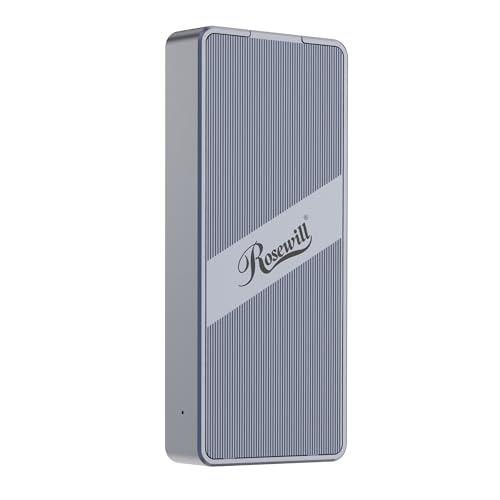 Best Overall Rosewill 40Gbps M.2 NVMe SSD Enclosure | 9.8PCKitHQ scoreView on Amazon |
02 Second Pick ACASIS 40Gbps M.2 NVMe SSD Enclosure | 9.7PCKitHQ scoreView on Amazon |
03 Also Consider ACASIS 80Gbps M.2 NVMe SSD Enclosure | 9.6PCKitHQ scoreView on Amazon |
04 Also Consider xiaobi NVMe Enclosure | 9.5PCKitHQ scoreView on Amazon |
05 Also Consider NVMe Enclosure | 9.5PCKitHQ scoreView on Amazon |
06 Also Consider UGREEN 40Gbps M.2 NVMe Enclosure | 9.4PCKitHQ scoreView on Amazon |
07 Also Consider Yottamaster M.2 NVMe SSD Enclosure 40Gbps | 9.3PCKitHQ scoreView on Amazon |
08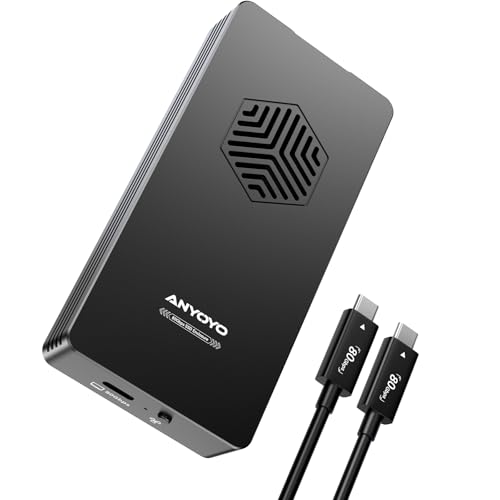 Also Consider ANYOYO 80Gbps M.2 NVMe SSD Enclosure | 9.2PCKitHQ scoreView on Amazon |
A closer look at each configuration
Rosewill 40Gbps M.2 NVMe SSD Enclosure
score
The Rosewill pairs 40Gbps Thunderbolt 4 speeds with a built-in fan and 8TB support.
- Interface
- Thunderbolt 4
- Form factor
- 2230-2280
- Weight
- 0.4 lb
- Warranty
- 1 Year Warranty
The Rosewill runs on the ASM2464PD controller with Thunderbolt 4, USB4 and M.2 NVMe SSDs in 2230-2280 sizes. Speeds reach up to 3187MB/s over the 40Gbps interface. A built-in fan and vent design support up to 4 hours of full-speed operation. The enclosure supports SSDs up to 8TB, works with macOS and Windows, and weighs 0.4 lb. A transparent back plate shows the internal components, and the warranty runs 1 year.
Choose it if
- You want 40Gbps speeds over Thunderbolt 4
- You want a fan-cooled enclosure for SSDs up to 8TB
Consider another if
- You need 80Gbps speeds like the ACASIS 80Gbps
- You need a 2-year warranty like the ACASIS
ACASIS 40Gbps M.2 NVMe SSD Enclosure
score
The FREEGENE ACASIS pairs 40Gbps speeds with a silent cooling fan and 8TB support.
- Interface
- USB4
- Form factor
- 2280/2260/2242/2230
- Weight
- 0.36 lb
- Warranty
- 2 YEAR
The FREEGENE ACASIS uses the Intel JHL7440 dual-chip design with Thunderbolt 5, 4 and 3 and USB4. Speeds reach up to 2805 and 2734 MB/s. A built-in silent cooling fan keeps the SSD cool, and a switch activates the fan. It supports 2280, 2260, 2242 and 2230 SSDs up to 8TB, works with Mac, Windows and Linux, and weighs 0.36 lb. The warranty runs 2 years.
Choose it if
- You want 40Gbps speeds for 4K video editing
- You want Thunderbolt 5, 4 and 3 support in one enclosure
Consider another if
- You need 80Gbps speeds like the ACASIS 80Gbps
- You need the lighter 0.24 lb Yottamaster
ACASIS 80Gbps M.2 NVMe SSD Enclosure
score
The ACASIS 80Gbps pairs an 80Gbps interface with a smart fan and 6000 MB/s speeds.
- Interface
- USB4 V2.0
- Form factor
- M.2
- Weight
- 0.67 lb
- Warranty
- 2 Year Warranty
The ACASIS 80Gbps runs on the JHL9480 chip with USB4 V2.0 and supports PCIe 5.0 SSDs. Speeds reach up to 6000 MB/s, and speeds over 3000 MB/s call for a PCIe 4.0 x4 NVMe 1.4 or higher SSD. The built-in fan auto-starts at 55°C and stops at 40°C, with manual mode on the switch. It stays backward compatible with 40Gbps and USB4 V1.0, weighs 0.67 lb, and the warranty runs 2 years.
Choose it if
- You want 80Gbps speeds over USB4 V2.0
- You want a fan that starts itself at 55°C
Consider another if
- You need Thunderbolt 3 support like the Rosewill
- You need a lighter enclosure like the 0.24 lb Yottamaster
xiaobi NVMe Enclosure
score
The xiaobi pairs a 10Gbps USB 3.2 Gen 2 interface with a silent fan and tool-free fitting.
- Interface
- USB 3.2 Gen 2
- Warranty
- 1 Year Manufacturer
The xiaobi runs on the RTL9210C chip with a USB 3.2 Gen 2 interface at up to 10Gbps. It fits M-Key or B+M Key NVMe SSDs and B+M Key SATA SSDs in 2230, 2242, 2260 and 2280 sizes. A built-in silent cooling fan, aluminum alloy shell and silicone thermal pad handle heat from the drive. The sandwich-style case fits without tools, for Windows, macOS and Linux. The warranty runs 1 year.
Choose it if
- You want a 10Gbps enclosure for NVMe and SATA SSDs
- You want tool-free fitting in a sandwich-style case
Consider another if
- You need 40Gbps speeds like the Rosewill
- You need Thunderbolt 4 support like the Rosewill
NVMe Enclosure
score
The black xiaobi pairs a 10Gbps USB 3.2 Gen 2 interface with a silent fan and tool-free fitting.
- Interface
- USB 3.2 Gen 2
- Warranty
- 12-Mouth
The black xiaobi runs on the RTL9210C chip with a USB 3.2 Gen 2 interface at up to 10Gbps. It fits M-Key or B+M Key NVMe SSDs and B+M Key SATA SSDs in 2230, 2242, 2260 and 2280 sizes. A built-in silent cooling fan, black aluminum alloy shell and silicone thermal pad handle heat. The sandwich-style case fits without tools, for Windows, macOS and Linux. It cannot support B-Key SATA or AHCI SSDs.
Choose it if
- You want a 10Gbps enclosure in black aluminum alloy
- You want tool-free fitting for 2230 to 2280 SSDs
Consider another if
- You need 40Gbps speeds like the Rosewill
- You need Thunderbolt 4 support like the Rosewill
UGREEN 40Gbps M.2 NVMe Enclosure
score
The UGREEN pairs 40Gbps speeds with a PWM turbo fan and 4TB support.
- Interface
- USB4
- Form factor
- 2230/2242/2260/2280
- Weight
- 0.44 lb
The UGREEN runs on the ASM2464PD chip with a USB4 Type-C interface at 40Gbps, compatible with USB4 and Thunderbolt 3 and 4. A PWM turbo fan adjusts speed on its own, with an aluminum alloy casing and a silicone thermal pad for heat. It supports M and B+M key NVMe drives in 2230, 2242, 2260 and 2280 sizes up to 4TB. S.M.A.R.T. monitoring and TRIM come with it, and a silicone case guards against drops. It weighs 0.44 lb.
Choose it if
- You want 40Gbps speeds with S.M.A.R.T. monitoring
- You want a silicone case for drop protection
Consider another if
- You need support for SSDs up to 8TB like the Rosewill
- You need Thunderbolt 5 support like the ANYOYO
Yottamaster M.2 NVMe SSD Enclosure 40Gbps
score
The Yottamaster pairs 40Gbps Thunderbolt 4 speeds with an active cooling fan at 0.24 lb.
- Interface
- Thunderbolt 4
- Form factor
- 2230/2242/2260/2280
- Weight
- 0.24 lb
- Warranty
- 1 Year
The Yottamaster runs on the ASM2464PD controller with Thunderbolt 4 and USB4 at 40Gbps. Sustained read and write speeds range from 2800 to 3200 MB/s. An active cooling fan sits behind a transparent cover that shows the power and activity LED and fan status. It supports 2230, 2242, 2260 and 2280 SSDs up to 8TB, installs in 3 steps without tools, and weighs 0.24 lb. The warranty runs 1 year.
Choose it if
- You want a 0.24 lb enclosure for 4K video editing
- You want a transparent cover to see the fan
Consider another if
- You need 80Gbps speeds like the ACASIS 80Gbps
- You need a 2-year warranty like the ACASIS
ANYOYO 80Gbps M.2 NVMe SSD Enclosure
score
The ANYOYO pairs an 80Gbps Thunderbolt 5 interface with a turbo fan and 6000 MB/s speeds.
- Interface
- Thunderbolt 5
- Form factor
- 2230/2242/2260/2280
- Weight
- 0.57 lb
- Warranty
- 2 Year Manufacturer
The ANYOYO runs on the JHL9480 chip with Thunderbolt 5 and USB4 at up to 80Gbps. Speeds reach up to 6000 MB/s, and speeds over 3000 MB/s call for a PCIe 4.0 x4 NVMe 1.4 or higher SSD. A silent turbo cooling fan starts on its own at 55°C and stops below 40°C. It fits 2230, 2242, 2260 and 2280 SSDs, installs without tools or drivers, and weighs 0.57 lb. The warranty runs 2 years.
Choose it if
- You want 80Gbps speeds over Thunderbolt 5
- You want tool-free fitting with no drivers
Consider another if
- You need the lighter 0.24 lb Yottamaster
- You need Thunderbolt 3 at full speed like the Rosewill
Make the choice for your setup
Interface speed and capacity
Speed runs at 10Gbps on the two xiaobi enclosures over USB 3.2 Gen 2, 40Gbps on the Rosewill, FREEGENE ACASIS, UGREEN and Yottamaster, and 80Gbps on the ACASIS 80Gbps and ANYOYO. The Rosewill reaches up to 3187MB/s, the FREEGENE ACASIS up to 2805 and 2734 MB/s, and the Yottamaster ranges from 2800 to 3200 MB/s. At the top end, the ACASIS 80Gbps and ANYOYO reach up to 6000 MB/s, and speeds over 3000 MB/s call for a PCIe 4.0 x4 NVMe 1.4 or higher SSD. Capacity runs to 8TB on the Rosewill, FREEGENE ACASIS and Yottamaster, and to 4TB on the UGREEN.
Cooling fans and heat design
Every pick has a cooling fan. The Rosewill pairs its built-in fan with a vent design that supports up to 4 hours of full-speed operation. The FREEGENE ACASIS pairs a silent cooling fan with aluminum heat dissipation, and a switch activates the fan. The ACASIS 80Gbps fan auto-starts at 55°C and stops at 40°C. ANYOYO matches that pattern: its fan also starts at 55°C and stops below 40°C, with a switch to force it on or off. The UGREEN PWM turbo fan adjusts speed on its own beside an aluminum alloy casing and a silicone thermal pad. The two xiaobi enclosures pair a silent fan with an aluminum alloy shell and a silicone thermal pad. If that fits your setup better, see our guide to the Best Type C SSD Enclosure.
Compatibility, size and weight
The Rosewill 40Gbps enclosure covers Thunderbolt 4 and 3 and USB4 on macOS and Windows. The FREEGENE 40Gbps enclosure covers Thunderbolt 5, 4 and 3 and USB4 on M1, M2 and M3 Macs, Windows and Linux. The ACASIS 80Gbps enclosure works with USB4 V2.0 at full speed and stays backward compatible with 40Gbps, but it is not compatible with Thunderbolt 3 devices. The ANYOYO enclosure covers Thunderbolt 3, 4 and 5 and USB4, but it is not compatible with mobile phones. Weight runs from 0.24 lb on the Yottamaster to 0.67 lb on the ACASIS 80Gbps enclosure, with the Rosewill at 0.4 lb and the FREEGENE 40Gbps enclosure at 0.36 lb.
Before you decide, also read Best SSD Enclosure.
FAQ: SSD Enclosure with Cooling Fan
Which enclosures run at 80Gbps?
The ACASIS 80Gbps and the ANYOYO run at up to 80Gbps, with speeds up to 6000 MB/s. The Rosewill, FREEGENE ACASIS, UGREEN and Yottamaster run at 40Gbps, and the two xiaobi enclosures run at 10Gbps over USB 3.2 Gen 2.
What SSD sizes do these enclosures fit?
The Rosewill fits 2230-2280 SSDs, and the FREEGENE ACASIS, UGREEN, Yottamaster and ANYOYO fit 2230, 2242, 2260 and 2280 SSDs. The two xiaobi enclosures fit the same four sizes for NVMe and B+M Key SATA SSDs.
How do the cooling fans work?
The Rosewill fan and vent design support up to 4 hours of full-speed operation. The ACASIS 80Gbps and ANYOYO fans start at 55°C and stop at 40°C. The FREEGENE ACASIS fan starts with a switch, and the UGREEN PWM turbo fan adjusts speed on its own.