Best PCIe Wi-Fi Card Wi-Fi 5 (2026): 5 Models Side by Side
 By Theo LangUpdated
Choose the TP-Link PCIe WiFi Card AC600 for Desktop PC-Dual Band Wireless (Archer T2E) for a Windows 10 or 11 desktop that needs dual-band Wi-Fi with a high-gain antenna, MU-MIMO and WPA3. Its AC600 speed class sits below the AC1200 class of the Archer T5E and the AC1300 class of the Cudy WE1300, so the choice turns on how much rated speed your desktop needs.
Your shortlist at a glance
PCKitHQ scores range from 9.2 to 9.8. See how we pick.
| Product and key specifications | Score and retailer |
|---|---|
01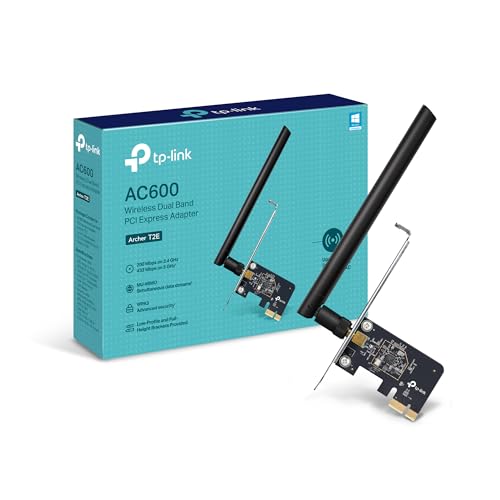 | 9.8PCKitHQ scoreView on Amazon |
02 | 9.7PCKitHQ scoreView on Amazon |
03 Also Consider Cudy Wi-Fi 5 AC1300 PCI Express EthernetWi-Fi standard: Wi-Fi 5, Speed class: AC1300, Interface: PCIe | 9.5PCKitHQ scoreView on Amazon |
04 Also Consider PCIE-AC7265 Wireless-AC 1200Mbps (2.4GHz 300Mbps and 5GHz 867Mbps) PCIEWi-Fi standard: 802.11ac, Interface: PCIe x1 | 9.3PCKitHQ scoreView on Amazon |
05 | 9.2PCKitHQ scoreView on Amazon |
A closer look at each configuration
TP-Link PCIe
score
The Archer T2E pairs dual-band AC600 Wi-Fi with a high-gain antenna, MU-MIMO, WPA3 and a low-profile bracket.
- Speed class
- AC600
- Interface
- PCIe
- Bands
- Dual-band
- Weight
- 0.11 lb
- Warranty
- 2 year
The Archer T2E is a PCIe card with an AC600 speed class and dual-band operation. Its external high-gain antenna strengthens reception and transmission for a desktop PC. MU-MIMO improves the throughput and efficiency of the wireless network, and WPA3 gives more secure and individualized protection while on the internet. The card plugs into an existing PCIe slot, and a low-profile bracket is provided in addition to the standard bracket for mini tower computer cases. It supports Windows 10 and Windows 11. Its weight is 0.11 lb, and the warranty is 2 year manufacturer coverage.
Choose it if
- You want dual-band Wi-Fi on a Windows 10 or 11 desktop
- You want a low-profile bracket for a mini tower case
Consider another if
- You need the AC1200 speed class of the Archer T5E
- You need two external antennas on the card
TP-Link AC1200 PCIe
score
The Archer T5E pairs up to 1200 Mbps dual-band Wi-Fi with Bluetooth 5.0, two external antennas and WPA3.
- Speed class
- AC1200
- Bands
- Dual-band
- Weight
- 0.2 lb
- Warranty
- 2 year
The Archer T5E is a PCIe card with an AC1200 speed class and dual-band Wi-Fi at up to 1200 Mbps, with 867 Mbps on the 5 GHz band and 300 Mbps on the 2.4 GHz band. Bluetooth 5.0 connects game controllers, headphones, keyboards and mice, and the Bluetooth USB cable must be connected to a F_USB connector to use it. Two external antennas support Wi-Fi coverage and stability, and beamforming strengthens Wi-Fi signals toward the client. 2x2 MIMO supports a high-speed wireless connection. It supports Windows 10 and Windows 11, and the warranty is 2 year manufacturer coverage.
Choose it if
- You want Bluetooth 5.0 for controllers, headphones and keyboards
- You want up to 1200 Mbps Wi-Fi on your desktop
Consider another if
- You need the AC1300 speed class of the Cudy WE1300
- You need support for Windows 7 or 8
Cudy Wi-Fi 5 AC1300 PCI Express Ethernet
score
The Cudy WE1300 pairs AC1300 dual-band Wi-Fi with 802.11ac, two detachable antennas and a PCIe interface.
- Wi-Fi standard
- Wi-Fi 5
- Speed class
- AC1300
- Interface
- PCIe
- Bands
- Dual-band
- Weight
- 0.19 lb
- Warranty
- 2-Year
The Cudy WE1300 is a PCIe card with an AC1300 speed class and Wi-Fi 5 dual-band operation, with 867 Mbps on the 5 GHz band and 400 Mbps on the 2.4 GHz band. Two external high-gain antennas improve wireless range and signal quality, and the antennas are detachable for flexible positioning. The PCIe interface gives a clean internal installation without occupying external USB ports. It is compatible with Windows 10 and Windows 11 64-bit systems. Its weight is 0.19 lb, and the warranty is a 2-Year Warranty.
Choose it if
- You want 400 Mbps on the 2.4 GHz band
- You want detachable antennas for flexible positioning
Consider another if
- You need the Bluetooth 5.0 of the Archer T5E
- You need the 2-Stream MU-MIMO of the LinksTek card
PCIE-AC7265 Wireless-AC 1200Mbps (2.4GHz 300Mbps and 5GHz 867Mbps) PCIE
score
The LinksTek PCIE-AC7265 pairs 1200 Mbps dual-band Wi-Fi with the Intel Wireless-AC 7265 chipset and 2-Stream MU-MIMO.
- Wi-Fi standard
- 802.11ac
- Interface
- PCIe x1
- Weight
- 0.18 lb
The LinksTek PCIE-AC7265 is a PCIe x1 card with 1200 Mbps dual-band Wi-Fi, with 300 Mbps on the 2.4 GHz band and 867 Mbps on the 5 GHz band. It uses the Intel Wireless-AC 7265 chipset with 2-Stream MU-MIMO technology, and two 3dBi external detachable antennas support reliable Wi-Fi reception. The PCIe x1 interface works in PCIe x1, x2, x4, x8 and x16 slots, and full height and low profile brackets are included. Its weight is 0.18 lb.
Choose it if
- You run Windows on your desktop and can install the drivers
- You want a PCIe x1 card for an x1 slot
Consider another if
- You need a Wi-Fi card for macOS
- You need 400 Mbps on the 2.4 GHz band
AC1200 PCIe
score
The DERAPID AC1200 pairs 867 Mbps on 5 GHz with Bluetooth 5.1 and two high-gain external antennas.
- Speed class
- AC1200
- Interface
- PCIe x1/x4/x8/x16
- Weight
- 0.2 lb
- Warranty
- 1 year
The DERAPID AC1200 is a PCIe card with an AC1200 speed class and dual-band Wi-Fi, with 867 Mbps on the 5 GHz band and 300 Mbps on the 2.4 GHz band. Its RTL8822CE chipset delivers the rated speeds, and built-in Bluetooth 5.1 pairs headsets, mice, keyboards and speakers. Bluetooth requires connecting the included internal USB cable to the motherboard. The card installs into any PCIe x1, x4, x8 or x16 slot, and two high-gain external antennas are adjustable and detachable for flexible positioning. It supports Windows 10 and 11 in 64-bit, and the warranty is 1 year.
Choose it if
- You want Bluetooth 5.1 for headsets, mice and keyboards
- You want a PCIe card that fits x1, x4, x8 or x16 slots
Consider another if
- You need the 2 year warranty of the TP-Link cards
- You need 400 Mbps on the 2.4 GHz band
Make the choice for your setup
Compare the rated speed classes
The Archer T2E is rated AC600, the Archer T5E and the DERAPID card are rated AC1200, and the Cudy WE1300 is rated AC1300. The LinksTek PCIE-AC7265 is rated at 1200 Mbps, with 300 Mbps on the 2.4 GHz band and 867 Mbps on the 5 GHz band. The Archer T5E gives the same per-band figures at up to 1200 Mbps, while the Cudy WE1300 gives 400 Mbps on the 2.4 GHz band with the same 867 Mbps on the 5 GHz band. These are rated figures from each card's own specifications. Match the rated speed class and the per-band figures to the Wi-Fi speeds your desktop needs, and keep the AC class separate from the per-band Mbps figures when you compare cards.
Check Bluetooth and the USB cable
The Archer T5E has Bluetooth 5.0, and the DERAPID card has Bluetooth 5.1. Each pairs headsets, mice, keyboards and other peripherals without a separate USB dongle. Each card also needs its Bluetooth USB cable connected inside the desktop: the Archer T5E cable goes to a F_USB connector, and the DERAPID cable goes to a USB 2.0 header on the motherboard. The Archer T5E connects game controllers, headphones, keyboards and mice, while the DERAPID card pairs headsets, mice, keyboards and speakers. Choose one of these two cards when the desktop needs Bluetooth for peripherals. Confirm that your motherboard has the matching connector before you choose a card with Bluetooth, since the cable connection is part of the installation. If that fits your setup better, see our guide to the Best USB Wireless Network Card.
Match the bracket and slot to your desktop
Every card here uses a PCIe interface, and the LinksTek PCIE-AC7265 and the DERAPID card name PCIe x1 slots, with the DERAPID card also naming x4, x8 and x16 slots. The Archer T2E, the Archer T5E, the Cudy WE1300 and the LinksTek PCIE-AC7265 include a low-profile bracket, and the Archer T2E bracket is provided for mini tower computer cases. The LinksTek card includes full height and low profile brackets for standard size PCs and slim PCs. The Cudy WE1300 gives a clean internal installation without occupying external USB ports, which keeps the desktop setup organized. Check that your desktop has an empty PCIe slot and the bracket your case needs before you buy.
For a wider shortlist, start with Best Low Profile PCIe Wi-Fi Card.
FAQ: PCIe Wi-Fi Card Wi-Fi 5
Which card suits a Windows 10 or 11 desktop?
The Archer T2E, the Archer T5E, the Cudy WE1300 and the DERAPID card each support Windows 10 and Windows 11. The LinksTek PCIE-AC7265 also supports Windows 11 and 10, plus Windows 8.1, 8 and 7 in 32 or 64 bit, and Linux Kernel 4.2 and above.
Which cards add Bluetooth to a desktop?
The Archer T5E adds Bluetooth 5.0, and the DERAPID card adds Bluetooth 5.1. Each card needs its Bluetooth USB cable connected inside the desktop, to a F_USB connector on the Archer T5E and to a USB 2.0 header on the DERAPID card. The cable connection is part of the installation for either card.
What speed classes do these cards carry?
The Archer T2E is rated AC600, the Archer T5E and the DERAPID card are rated AC1200, and the Cudy WE1300 is rated AC1300. The LinksTek PCIE-AC7265 is rated at 1200 Mbps, with 300 Mbps on the 2.4 GHz band and 867 Mbps on the 5 GHz band. These are rated figures, not measured speeds.