
Best Mouse for MacBook USB C (2026): Top 8 by the Specs
 By Theo LangUpdated
Choose the Apple Magic Mouse if you want a wireless mouse that pairs automatically with your Mac and charges through a woven USB-C cable. Its Multi-Touch surface handles swipes between web pages and scrolling through documents, and the rechargeable battery powers it for about a month or more between charges. The wired Macally mice connect through USB-C. RAPIQUE and cimetech use 2.4GHz wireless receivers, and VssoPlor uses USB-A and Type-C receivers.
Your shortlist at a glance
PCKitHQ scores range from 9.2 to 9.8. See how we pick.
| Product and key specifications | Score and retailer |
|---|---|
01 Best Overall Apple Magic Mouse | 9.8PCKitHQ scoreView on Amazon |
02 | 9.7PCKitHQ scoreView on Amazon |
03 | 9.6PCKitHQ scoreView on Amazon |
04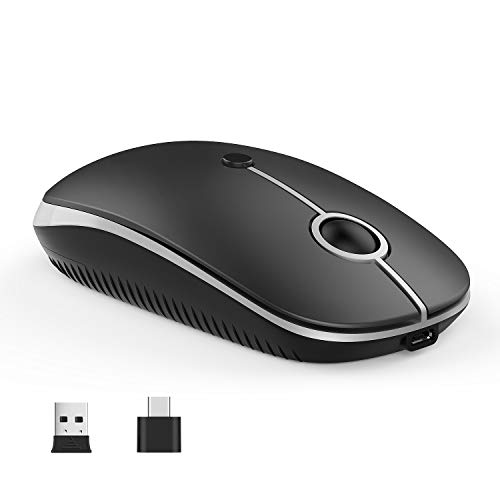 | 9.5PCKitHQ scoreView on Amazon |
05 | 9.5PCKitHQ scoreView on Amazon |
06 | 9.4PCKitHQ scoreView on Amazon |
07 Also Consider LOONASA USB-C Wired Mouse | 9.3PCKitHQ scoreView on Amazon |
08 Also Consider cimetech Type C Wireless Mouse | 9.2PCKitHQ scoreView on Amazon |
A closer look at each configuration
Apple Magic Mouse
score
The Apple Magic Mouse pairs automatically with a Mac, charges by USB-C, and swipes between web pages on a Multi-Touch surface.
- Wireless
- Yes
- Connection
- wireless
- Warranty
- Apple One (1) Year Limited Warranty
This Apple Magic Mouse is wireless and rechargeable, with a foot design that lets it glide smoothly across your desk. The Multi-Touch surface allows simple gestures such as swiping between web pages and scrolling through documents. The rechargeable battery will power the mouse for about a month or more between charges. It pairs automatically with your Mac, and it includes a woven USB-C Charge Cable that lets you pair and charge by connecting to a USB-C port on your Mac. The warranty is the Apple One (1) Year Limited Warranty.
Choose it if
- You want a wireless mouse that pairs automatically with your Mac
- You want Multi-Touch swipes between web pages and scrolling through documents
Consider another if
- You need a wired USB-C connection like the Macally mice
- You need a warranty term longer than 1 Year
Macally Wired USB C Mouse for Mac and PC
score
The Macally wired mouse connects through USB-C, offers 3 buttons and a scroll wheel, and switches between 800 and 2400 DPI.
- Sensor resolution
- 2400 DPI
- Buttons
- 3
- Connection
- USB-C
- Weight
- 0.16 lb
This Macally mouse is a wired USB-C mouse for Mac and PC, with a simple 3 button and scroll wheel layout and plug and play setup. It works with any device with a USB-C port, including MacBook Pro and MacBook Air, iMac and iPad. The quiet buttons reduce 90% of click noise, according to the maker, for a peaceful environment at home or at the office. DPI adjusts between 800, 1200, 1600 and 2400 by pressing the DPI button. It weighs 0.16 lb and comes in white.
Choose it if
- You want a wired USB-C mouse with 3 buttons and a scroll wheel
- You want quiet clicks at your desk at home or at the office
Consider another if
- You need a wireless mouse like the Apple Magic Mouse
- You need a mouse that weighs less than 0.16 lb
Macally Wired USB C Mouse for Mac and PC
score
This black Macally mouse matches the white model with a wired USB-C connection and 800 to 2400 DPI.
- Sensor resolution
- 2400 DPI
- Buttons
- 3
- Connection
- USB-C
- Weight
- 0.16 lb
This black Macally mouse is the same wired USB-C model as the white one, with a 3 button and scroll wheel layout and plug and play setup. It works with any device with a USB-C port, including MacBook Pro and MacBook Air and iMac. The quiet buttons reduce 90 percent of click noise, according to the maker, for a peaceful environment at home or at the office. DPI adjusts between 800, 1200, 1600 and 2400 by pressing the DPI button. It weighs 0.16 lb and comes in black.
Choose it if
- You want the same wired USB-C mouse in black
- You want quiet clicks at your desk at home or at the office
Consider another if
- You need a wireless connection like the VssoPlor mouse
- You need a rechargeable battery like the Apple Magic Mouse
VssoPlor Type C Wireless Mouse
score
The VssoPlor wireless mouse switches between devices with a single button and adjusts between 1000 and 2400 DPI.
- Sensor resolution
- 2400 DPI
- Weight
- 0.13 lb
- Warranty
- 1 year
This VssoPlor mouse is a dual mode wireless mouse with USB-A and Type-C receivers, compatible with MacBook, MacBook Pro, iMac, Chromebook and other Type-C devices. It recharges through a charging cable and has a built-in 300mAh lithium rechargeable battery. DPI adjusts across 3 levels at 1000, 1600 and 2400. It has a contoured shape and quiet clicks, and the nano Type-C and USB-A receiver stores in the battery compartment. It weighs 0.13 lb and carries a 1 year warranty.
Choose it if
- You want a wireless mouse with USB-A and Type-C receivers
- You want to switch between connected devices with a single button
Consider another if
- You need a wired USB-C connection like the Macally mice
- You need a mouse that weighs less than 0.13 lb
RAPIQUE USB C Wireless Mouse for MacBook
score
The RAPIQUE wireless mouse runs on one AA battery for up to 480 hours and switches between 800 and 1600 DPI.
- Sensor resolution
- 1600 DPI
- Wireless
- Yes
- Connection
- 2.4GHz wireless
- Weight
- 0.14 lb
- Warranty
- 1 year
This RAPIQUE mouse is a wireless mouse with a 2.4GHz USB-C receiver, silent clicks and an ambidextrous slim design. It switches between 800, 1200 and 1600 DPI with a press, and the scroll wheel moves up and down only. One AA battery, not included, powers it for up to 480 hours of use, with a smart sleep mode and an ON/OFF switch. The 2.4GHz connection works up to 10 meters. It weighs 0.14 lb, comes in white, and carries a 1 year warranty.
Choose it if
- You want a wireless mouse that runs on one AA battery
- You want silent clicks and a scroll wheel for quiet work
Consider another if
- You need DPI above 1600 like the 2400 DPI Macally mice
- You need a rechargeable battery like the Apple Magic Mouse
RAPIQUE USB C Wireless Mouse for MacBook
score
This pink RAPIQUE mouse matches the white model with a 2.4GHz USB-C receiver and 800 to 1600 DPI.
- Sensor resolution
- 1600 DPI
- Wireless
- Yes
- Connection
- 2.4GHz wireless
- Weight
- 0.14 lb
- Warranty
- 1 year
This pink RAPIQUE mouse is the same wireless model as the white one, with a 2.4GHz USB-C receiver, silent clicks and an ambidextrous slim design. It switches between 800, 1200 and 1600 DPI with a press, and the scroll wheel moves up and down only. One AA battery, not included, powers it for up to 480 hours of use, with a smart sleep mode and an ON/OFF switch. The 2.4GHz connection works up to 10 meters. It weighs 0.14 lb, comes in flesh pink, and carries a 1 year warranty.
Choose it if
- You want the same wireless mouse in pink
- You want ambidextrous design for either hand
Consider another if
- You need a wired USB-C connection like the Macally mice
- You need a mouse that weighs less than 0.14 lb
LOONASA USB-C Wired Mouse
score
The LOONASA wired mouse plugs into USB-C with no batteries, charging or Bluetooth pairing.
- Connection
- USB-C
- Weight
- 0.13 lb
This LOONASA mouse is a wired USB-C mouse with plug and play setup. The wired connection needs no batteries, charging or Bluetooth pairing. Low-noise clicks help reduce distractions during work and study in shared offices, libraries and home workspaces. The symmetrical, ambidextrous shape supports use with either hand, and optical tracking supports everyday cursor navigation. It weighs 0.13 lb, measures 4.29 x 2.4 inch, and works with compatible MacBook, Mac, laptop and PC models that support USB-C mice.
Choose it if
- You want a wired USB-C mouse with no charging to manage
- You want quiet clicks for shared offices and libraries
Consider another if
- You need a wireless mouse like the Apple Magic Mouse
- You need a mouse that weighs less than 0.13 lb
cimetech Type C Wireless Mouse
score
The cimetech wireless mouse uses a Type-C receiver, adjusts between 1000 and 1600 DPI, and weighs 0.11 lb.
- Connection
- 2.4GHz wireless
- Weight
- 0.11 lb
This cimetech mouse is a wireless mouse with a Type-C receiver and 2.4GHz wireless technology. The 3-level adjustable DPI switches between 1000, 1200 and 1600. A precision metal scroll wheel has more grooves per millimeter, and the mouse offers a 30° ergonomic grip angle with a contoured handle and premium matte finish. Wireless transmission reaches up to 33 feet. It weighs 0.11 lb and works with Windows, Linux and Mac OS.
Choose it if
- You want a wireless mouse that weighs 0.11 lb
- You want a metal scroll wheel and a 30° ergonomic grip angle
Consider another if
- You need a wired USB-C connection like the Macally mice
- You need DPI above 1600 like the 2400 DPI Macally mice
Make the choice for your setup
Wired USB-C or wireless receiver
The Macally mice and the LOONASA mouse connect through a wired USB-C plug. The LOONASA connection needs no batteries, charging or Bluetooth pairing. The Apple Magic Mouse is wireless and rechargeable, pairs automatically with a Mac, and charges through its woven USB-C cable. The RAPIQUE and cimetech mice use a 2.4GHz wireless receiver that plugs into a USB-C port, and the VssoPlor mouse uses USB-A and Type-C receivers. The RAPIQUE mice run on one AA battery, while the VssoPlor recharges through a cable and the Magic Mouse recharges through USB-C. The wired mice draw power through the cable, so there is no battery to charge before a trip.
Compare DPI and buttons
The Macally mice and the VssoPlor mouse reach 2400 DPI, with the Macally mice switching between 800, 1200, 1600 and 2400 and the VssoPlor switching between 1000, 1600 and 2400. The RAPIQUE mice and the cimetech mouse reach 1600 DPI, switching between 800, 1200 and 1600 for the RAPIQUE mice and 1000, 1200 and 1600 for the cimetech mouse. The Macally mice have 3 buttons and a scroll wheel, the RAPIQUE scroll wheel moves up and down only, and the cimetech mouse has a precision metal scroll wheel. The Apple Magic Mouse uses a Multi-Touch surface for swipes between web pages and scrolling through documents. Shoppers with a related need can compare our guide to the Best Wireless Mouse Without USB Receiver.
Match battery and weight to travel
The Apple Magic Mouse recharges through USB-C and powers the mouse for about a month or more between charges. The VssoPlor mouse recharges through a cable and has a built-in 300mAh lithium rechargeable battery. The RAPIQUE mice run on one AA battery, not included, for up to 480 hours of use, with a smart sleep mode and an ON/OFF switch. The Macally mice and the LOONASA mouse connect through a wired USB-C plug. Stated weights run from 0.11 lb for the cimetech mouse to 0.16 lb for the Macally mice, and the VssoPlor weighs 0.13 lb and the RAPIQUE mice weigh 0.14 lb.
Before you decide, also read Best Mouse.
FAQ: Mouse for MacBook USB C
Which mice here connect through USB-C?
The Macally mice and the LOONASA mouse connect through a wired USB-C plug. The Apple Magic Mouse charges and pairs through a woven USB-C cable. The RAPIQUE and cimetech mice use a 2.4GHz wireless receiver that plugs into a USB-C port, and the VssoPlor mouse uses USB-A and Type-C receivers.
Which mice here are wireless?
The Apple Magic Mouse is wireless and rechargeable. The VssoPlor mouse is a dual mode wireless mouse with USB-A and Type-C receivers. The RAPIQUE mice and the cimetech mouse use a 2.4GHz wireless receiver. The Macally mice and the LOONASA mouse are wired USB-C mice.
How long do the batteries in these mice last?
The Apple Magic Mouse battery powers it for about a month or more between charges. The RAPIQUE mice run on one AA battery for up to 480 hours of use. The VssoPlor mouse has a built-in 300mAh lithium rechargeable battery, and the Macally mice and the LOONASA mouse are wired.


