
Best Gaming Mouse USB C (2026): 7 Picks Compared
 By Theo LangUpdated
Choose the Logitech G Pro X Superlight 2 Lightspeed Wireless Gaming Mouse if you want a wireless mouse that charges over USB-C, tracks with the HERO 2 sensor at up to 32,000 DPI, and carries 5 programmable buttons at 60 g. The other mice below connect through USB-C for charging or as a wired connection.
Your shortlist at a glance
PCKitHQ scores range from 9.2 to 9.8. See how we pick.
| Product and key specifications | Score and retailer |
|---|---|
01 | 9.8PCKitHQ scoreView on Amazon |
02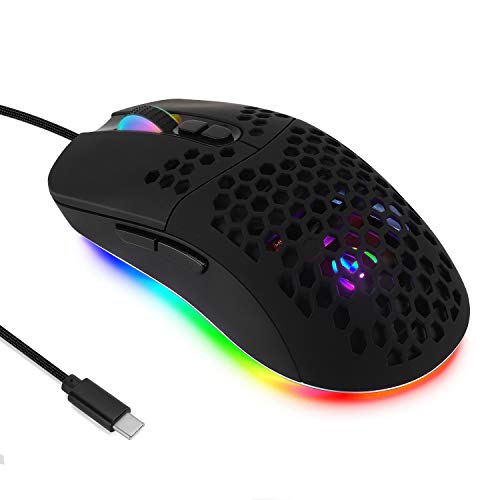 | 9.7PCKitHQ scoreView on Amazon |
03 Also Consider AULA SC580 Wireless Gaming Mouse | 9.6PCKitHQ scoreView on Amazon |
04 | 9.5PCKitHQ scoreView on Amazon |
05 Also Consider MELOGAGA Wireless Gaming Mouse | 9.4PCKitHQ scoreView on Amazon |
06 Also Consider IULONEE USB Type C Wired Mouse 2400 DPI Gaming Mice for Office Home PinkSensor resolution: 2400 DPI | 9.3PCKitHQ scoreView on Amazon |
07 Also Consider Typehaven G57 Wireless Gaming Mouse | 9.2PCKitHQ scoreView on Amazon |
A closer look at each configuration
Logitech G Pro X Superlight 2 Lightspeed Wireless Gaming Mouse
score
The HERO 2 sensor at up to 32,000 DPI and USB-C charging define this wireless mouse.
- Sensor
- HERO 2
- Wireless
- Yes
- Connection
- Lightspeed Wireless
- Weight
- 0.13 lb
- Warranty
- 1 Year Limited Hardware Warranty
The Logitech G Pro X Superlight 2 pairs the HERO 2 sensor with tracking over 500 IPS and up to 32,000 DPI,. It polls at 2K, charges over USB-C, and runs up to 95 hours on a charge with POWERPLAY compatibility. The mouse weighs 60 g and carries a 1 Year Limited Hardware Warranty. Its 5 programmable buttons suit players who want a light wireless mouse with USB-C charging.
Choose it if
- You play on Mac or PC and want USB-C charging
- You want up to 32,000 DPI from the HERO 2 sensor
Consider another if
- You need more than 5 programmable buttons
- You need a mouse that never needs charging
HXMJ Wired USB C Gaming Mice
score
A wired USB-C mouse with RGB backlight and up to 7,200 DPI for players who want a corded connection.
- Sensor resolution
- 7200 DPI
- Backlight
- Yes
- Weight
- 0.22 lb
The HXMJ mouse connects through a USB-C port and uses a high-performance optical sensor adjustable up to 7,200 DPI across four levels. Its honeycomb hollow shell keeps the mouse at 0.22 lb, and the RGB backlight offers 5 lighting effects from a lighting button. It works with Windows 7, 8 and 10, XP, Vista, Linux and Mac OS. Two left side buttons are not available in Mac OS.
Choose it if
- You want a wired USB-C connection for your Type-C device
- You want RGB backlight with 5 lighting effects
Consider another if
- You need wireless play away from your desk
- You need more than 7,200 DPI from your sensor
AULA SC580 Wireless Gaming Mouse
score
2.4G wireless and USB-C wired connections with 6 programmable buttons and up to 12,000 DPI.
- Wireless
- Yes
- Weight
- 0.18 lb
- Warranty
- 6 Months
The AULA SC580 connects through 2.4G wireless or a USB-C wired connection, and it can save up to 4 devices switched from a bottom button. Its sensor offers 6 DPI levels from 800 to 12,000 with a 1000Hz polling rate, and 6 programmable buttons support macro editing through the Windows driver. The maker rates the built-in 500mAh battery at 10 to 14 days with 5 hours of daily use.
Choose it if
- You switch between 2.4G wireless and USB-C wired modes
- You want 6 programmable buttons for macros
Consider another if
- You need more than 12,000 DPI from your sensor
- You need driver support outside Windows
Razer DeathAdder V3 HyperSpeed Ergonomic Wireless Gaming Mouse
score
The Focus X 26K sensor, 55 g frame and up to 100 hours of battery suit wireless play over USB-C.
- Sensor
- Focus X 26K
- Wireless
- Yes
- Connection
- HyperSpeed Wireless
- Weight
- 0.12 lb
- Warranty
- 2 Year Manufacturer
The Razer DeathAdder V3 HyperSpeed uses the Focus X 26K optical sensor with 99.6% resolution accuracy and 26K DPI, plus Optical Switches Gen-3 rated for a 90-million click lifecycle. HyperSpeed Wireless keeps the connection stable in busy wireless environments, and the USB Type C rechargeable design runs up to 100 hours. The mass-centralized shape weighs 55 g, and the mouse carries a 2 Year Manufacturer warranty.
Choose it if
- You want up to 100 hours of battery from USB-C charging
- You want the Focus X 26K sensor at 26K DPI
Consider another if
- You need more than 26K DPI from your sensor
- You want a mouse with no battery to charge
MELOGAGA Wireless Gaming Mouse
score
Triple 2.4GHz, Bluetooth 5.4 and USB-C modes with 8 DPI levels and up to 120 hours of use.
- Wireless
- Yes
- Warranty
- 1 Year
The MELOGAGA mouse switches between 2.4GHz wireless, Bluetooth 5.4 and USB-C wired modes, and it works with Windows, macOS, iPadOS and Android across PC, Mac, laptop, tablet and Android devices. Its 8 DPI levels run from 800 to 6,400, and the mouse is rated for 5 million clicks. The maker rates wireless use at up to 120 hours on a charge, and the USB-C cable lets you play while charging.
Choose it if
- You switch between PC, Mac, tablet and Android devices
- You want up to 120 hours of wireless use
Consider another if
- You need more than 6,400 DPI from your sensor
- You need a mouse that runs without a battery
IULONEE USB Type C Wired Mouse 2400 DPI Gaming Mice for Office Home Pink
score
A wired USB-C mouse with 7 LED backlight kinds, 6 buttons and 4 DPI levels up to 2,400 DPI.
- Sensor resolution
- 2400 DPI
- Weight
- 0.21 lb
- Warranty
- No warranty
The IULONEE mouse connects by a wired USB-C port with plug-and-play setup and no batteries, Bluetooth or added accessories. Its 4 DPI levels run 800, 1,200, 1,600 and 2,400, and the mouse has 6 buttons with forward and backward controls. The 7 kinds of LED lights switch from the DPI and forward/backward buttons, and the silent click keeps others nearby undisturbed. The mouse weighs 0.21 lb.
Choose it if
- You want a wired USB-C mouse for a Type-C port
- You want silent clicks and 7 LED backlight kinds
Consider another if
- You need wireless play away from your desk
- You need more than 2,400 DPI from your sensor
Typehaven G57 Wireless Gaming Mouse
score
Tri-mode 2.4G, Bluetooth and USB-C connections with 5 programmable buttons and up to 8,000 DPI.
- Wireless
- Yes
- Warranty
- 1 year warranty
The Typehaven G57 switches between 2.4G wireless, Bluetooth and wired connections, and Bluetooth mode pairs with a long press of the mode button across two Bluetooth channels. Its 6 DPI levels range from 800 to 8,000, each with a color indicator for quick switching, and the wired mode polls at 1000Hz. The mouse charges over USB-C with red-to-green indicators, weighs 80 g, and carries a 1 year warranty.
Choose it if
- You switch between 2.4G, Bluetooth and wired modes
- You want 5 programmable buttons on PC or Mac
Consider another if
- You need more than 8,000 DPI from your sensor
- You want a wired mouse with no charging
Make the choice for your setup
Match the USB-C connection to your setup
The Logitech G Pro X Superlight 2 and the Razer DeathAdder V3 HyperSpeed charge over USB-C while staying wireless, so the cable leaves the desk between charges. The AULA SC580, MELOGAGA and Typehaven G57 switch between wireless modes and a USB-C wired connection, so the same cable can carry the signal when the battery runs low. The HXMJ and IULONEE mice connect only through a wired USB-C port, so they need a free Type-C port and no charging. Check the port on your laptop or desktop before choosing a wired-only mouse, and keep a charger nearby if you choose a wireless model.
Compare DPI ceilings and sensor names
The Logitech G Pro X Superlight 2 reaches up to 32,000 DPI with the HERO 2 sensor, and the Razer DeathAdder V3 HyperSpeed reaches 26K DPI with the Focus X 26K sensor. The AULA SC580 tops out at 12,000 DPI, the Typehaven G57 at 8,000 DPI, the HXMJ at 7,200 DPI, the MELOGAGA at 6,400 DPI and the IULONEE at 2,400 DPI. The Logitech and Razer name their sensors, HERO 2 and Focus X 26K, while the other five mice state DPI levels without naming a sensor. Each mouse lists its own levels: the AULA has 6 levels, the Typehaven has 6, the MELOGAGA has 8, the HXMJ has 4 and the IULONEE has 4. For a closely related choice, read our guide to the Best Vertical Mouse in Nepal.
Weigh battery life against wired simplicity
The MELOGAGA is rated at up to 120 hours of wireless use, the Razer DeathAdder V3 HyperSpeed at up to 100 hours, and the Logitech G Pro X Superlight 2 at 95 hours. The AULA SC580 is rated at 10 to 14 days with 5 hours of daily use, and the Typehaven G57 charges over USB-C with red-to-green indicators. The HXMJ and IULONEE mice draw power through their wired USB-C connection, so they never need a charge and never run flat mid-game. A wireless mouse suits a desk where you want no cable at all, while a wired mouse suits a setup where the port sits close and the cable never snags.
Before you decide, also read Best Mouse.
FAQ: Gaming Mouse USB C
Which mice here charge over USB-C?
The Logitech G Pro X Superlight 2, Razer DeathAdder V3 HyperSpeed and Typehaven G57 charge over USB-C, and the AULA SC580 and MELOGAGA recharge through a USB-C cable. The HXMJ and IULONEE mice use a wired USB-C connection instead of charging.
Do any of these mice work with Mac computers?
The Logitech G Pro X Superlight 2 lists Mac and PC gaming, and the AULA SC580, HXMJ and IULONEE mice list Mac OS support. The MELOGAGA works with macOS, and the Typehaven G57 works with macOS 10.5 and later.
What DPI ceilings do these gaming mice reach?
The Logitech reaches up to 32,000 DPI, the Razer reaches 26K DPI, the AULA reaches 12,000 DPI and the Typehaven reaches 8,000 DPI. The HXMJ reaches 7,200 DPI, the MELOGAGA reaches 6,400 DPI and the IULONEE reaches 2,400 DPI.


