
Best Monitor Type (2026): Top 4 by the Specs
 By Theo LangUpdated
Choose the Dell 27 Plus QHD USB-C Monitor if you want a 27-inch QHD screen at 144Hz with USB-C, HDMI, and DisplayPort 1.4 in one setup. Its 2560x1440 resolution, 1ms Moving Picture Response Time, and dual 3W speakers cover work, video, and play on a single display. The other three monitors trade refresh rate, size, or touch for a different desk. The Samsung offers a 32-inch screen at 75Hz and a 3 year warranty.
Your shortlist at a glance
PCKitHQ scores range from 9.2 to 9.8. See how we pick.
| Product and key specifications | Score and retailer |
|---|---|
01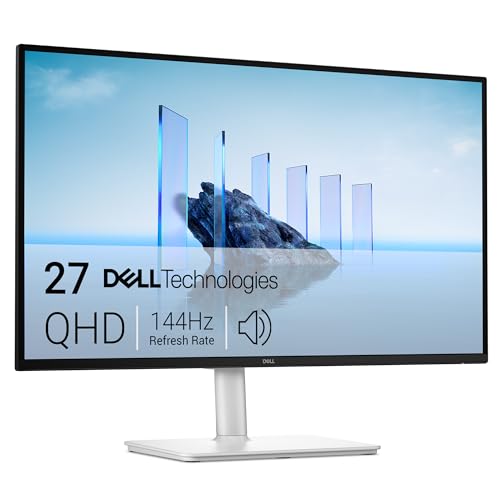 | 9.8PCKitHQ scoreView on Amazon |
02 | 9.6PCKitHQ scoreView on Amazon |
03 | 9.4PCKitHQ scoreView on Amazon |
04 | 9.2PCKitHQ scoreView on Amazon |
A closer look at each configuration
Dell 27 Plus USB-C Monitor S2725DC
score
The 27-inch QHD screen at 144Hz with USB-C, HDMI, and DisplayPort 1.4 defines this Dell configuration.
- Resolution
- 2560x1440
- Native refresh rate
- 144 Hz
- Screen size
- 27 in
- USB-C
- Yes
- HDMI
- Yes
- DisplayPort
- Yes
- Weight
- 14.29 lb
- Warranty
- 1-year Advanced Exchange Service and Premium Panel Exchange
This Dell monitor has a 27-inch screen with 2560x1440 resolution, a 144Hz refresh rate, and a 1ms Moving Picture Response Time. Its 1500:1 contrast ratio and AMD FreeSync support smooth viewing. A single USB-C connection carries up to 65W power delivery, and a pop-out port adds USB-C up to 15W and a USB Type-A connection. HDMI and DisplayPort 1.4 are also present. Dual 3W speakers provide audio without separate speakers. The stand adjusts height, tilt, pivot, and swivel. The warranty is 1-year Advanced Exchange Service and Premium Panel Exchange. The monitor weighs 14.29 lb. The 1500:1 contrast ratio adds depth to video and still images on the 27-inch screen. A single USB-C connection cuts cable clutter on your desk.
Choose it if
- You want a 27-inch QHD screen at 144Hz
- You want USB-C, HDMI, and DisplayPort 1.4 on one monitor
Consider another if
- You need the 32-inch screen of the Samsung
- You need the 3-year warranty of the Samsung
Samsung 32-inch Flat Computer Monitor LS32B304NWNXGO
score
The 32-inch borderless screen with a 75Hz refresh rate and AMD FreeSync defines this Samsung configuration.
- Native refresh rate
- 75 Hz
- Screen size
- 32 in
- HDMI
- Yes
- DisplayPort
- Yes
- Weight
- 11.02 lb
- Warranty
- 3 year manufacturer, ship-in service
This Samsung monitor has a 32-inch screen with a three-sided borderless display that lines up in a multi-monitor setup. Its 75Hz refresh rate and AMD FreeSync keep the monitor and graphics card refresh rate in sync to reduce image tearing. Game Mode adjusts settings for games, and the display supports HDMI and DisplayPort. Advanced eye comfort technology includes Flicker Free technology and Eye Saver Mode. The monitor weighs 11.02 lb. The warranty is 3 year manufacturer, ship-in service. Game Mode adjusts any game to fill your screen with every detail in view. The 75Hz refresh rate pairs with AMD FreeSync, which keeps the monitor and graphics card refresh rate in sync. Advanced eye comfort technology reduces eye strain for extended computing.
Choose it if
- You want a 32-inch screen for your desk
- You want a three-sided borderless display for your desk
Consider another if
- You need the 144Hz refresh rate of the Dell
- You need the USB-C connection of the Dell
YOTETION 19-inch Small Thin Monitor for laptops
score
The 19-inch screen at 1440 x 900 with HDMI and VGA defines this YOTETION configuration.
- Resolution
- 1440 x 900
- Native refresh rate
- 75 Hz
- Screen size
- 19 in
- HDMI
- Yes
- Warranty
- 1years
This YOTETION monitor has a 19-inch screen with 1440 x 900 resolution and a 75Hz refresh rate. Its 6 millisecond response time keeps activities on the LED screen moving without delay. HDMI and VGA ports connect modern and classic devices, and the anti-glare LED display suits home and office use. The warranty is 1years, with free replacement of goods within one year of quality problems. The 1440 x 900 resolution suits home and office use for a desktop or laptop. The 19-inch screen and 1440 x 900 resolution fit a desktop or laptop in home and office use. A 6 millisecond response time moves activities on the LED screen almost instantly.
Choose it if
- You want a compact 19-inch screen for a small desk
- You want HDMI and VGA connections for older devices
Consider another if
- You need the 1920x1080 resolution of the Dragolftie
- You need the 144Hz refresh rate of the Dell
24-inch Touchscreen Monitor VA 3000
score
The 24-inch touchscreen with 1920x1080 resolution and a VA panel defines this Dragolftie configuration.
- Resolution
- 1920x1080
- Native refresh rate
- 75 Hz
- Screen size
- 24 in
- Panel
- VA
- HDMI
- Yes
- Warranty
- 1
This Dragolftie monitor has a 24-inch touchscreen with 1920x1080 resolution, a 75Hz refresh rate, and a VA panel with a 3000:1 contrast ratio and 99% sRGB color coverage. Its 10-point multi-touch control supports tapping, swiping, zooming, scrolling, and multi-finger operation. Connect through HDMI, VGA, or Type-B, noting that touch needs a Type-A to Type-B cable and does not work on Apple devices, gaming devices, Linux systems, or XP systems. The stand adjusts height, pivot, swivel, and tilt, and rotates from -90° to +90°. Dual 5W speakers provide audio. The warranty is 1. The screen supports -90° to +90° vertical rotation, and you set the display to portrait mode in the display settings first. The VA panel delivers a 178° wide view angle with clear details and vivid color. The low-blue light and flicker-free technology protects eyes from visual fatigue.
Choose it if
- You want 10-point touch control on a 24-inch screen
- You want a height, pivot, swivel, and tilt stand
Consider another if
- You need the 144Hz refresh rate of the Dell
- You need the 32-inch screen of the Samsung
Make the choice for your setup
Compare screen size and resolution
The Dell has a 27-inch screen at 2560x1440. The Samsung has a 32-inch screen. The YOTETION has a 19-inch screen at 1440 x 900. The Dragolftie has a 24-inch screen at 1920x1080. Match the screen size to the space on your desk and the resolution to the words and video you watch each day. A 32-inch screen gives more room for side-by-side windows. A 19-inch screen fits a small desk. The Dell pairs its 27-inch screen with a 144Hz refresh rate, while the other three monitors run at 75Hz. Keep screen size and resolution separate from refresh rate when you compare them. The Samsung screen measures 32 inches, and the YOTETION screen measures 19 inches. The Dragolftie pairs its 24-inch screen with 10-point touch control for tapping, swiping, zooming, and scrolling.
Check connections and speakers
The Dell connects through USB-C, HDMI, and DisplayPort 1.4, with a single USB-C connection carrying up to 65W power delivery and a pop-out port adding USB-C up to 15W and a USB Type-A connection. The Samsung connects through HDMI and DisplayPort. The YOTETION connects through HDMI and VGA. The Dragolftie connects through HDMI, VGA, and Type-B, with touch needing a Type-A to Type-B cable. The Dell has dual 3W speakers and the Dragolftie has dual 5W speakers, so both provide audio without separate speakers. Check each connection against the ports on your own computer before you choose. The Dell pop-out port also carries a USB Type-A connection for quick access. The Samsung Game Mode adjusts settings for games with vivid color and greater image contrast. The YOTETION VGA port connects classic devices alongside HDMI. A related shortlist covers the Best 27 Inch Monitor for Eyes.
Weigh warranty and adjustability
The Samsung warranty is 3 year manufacturer, ship-in service. The Dell warranty is 1-year Advanced Exchange Service and Premium Panel Exchange. The YOTETION warranty is 1years with free replacement of goods within one year of quality problems. The Dragolftie warranty is 1. The Dell stand adjusts height, tilt, pivot, and swivel. The Dragolftie stand adjusts height, pivot, swivel, and tilt, and rotates from -90° to +90° for portrait use after you change the display setting. Set the Dell and Dragolftie stands to the height, tilt, pivot, and swivel that fit your desk, and check the portrait rotation steps for the Dragolftie before you switch orientation. The Dell warranty pairs Advanced Exchange Service with Premium Panel Exchange. The Samsung 3 year manufacturer warranty covers ship-in service. The Dragolftie low-blue light and flicker-free technology protects eyes from visual fatigue.
For a wider shortlist, start with 24 vs 27 Inch Monitor.
FAQ: Monitor Type
Which monitor here has a 144Hz refresh rate?
The Dell 27 Plus QHD USB-C Monitor has a 144Hz refresh rate with a 1ms Moving Picture Response Time. The Samsung, the YOTETION, and the Dragolftie each have a 75Hz refresh rate. The Dell is the only monitor in this guide with a 144Hz refresh rate. The Dell 144Hz refresh rate pairs with a 1ms Moving Picture Response Time for smooth viewing.
Which monitors have built-in speakers?
The Dell has dual 3W speakers and the Dragolftie has dual 5W speakers. The Dell speakers deliver a wider range of frequencies. Both provide audio without separate speakers. Compare the speaker wattage against the audio you need at your desk. The Dell speakers deliver a wider range of frequencies for sound at your desk.
Which monitor has a touchscreen?
The Dragolftie 24 Inch Touchscreen Monitor has 10-point multi-touch control on a 24-inch screen. Connect the Type-B port with a Type-A to Type-B cable to use touch. Touch does not work on Apple devices, gaming devices, Linux systems, or XP systems. The screen supports tapping, swiping, zooming, scrolling, and multi-finger operation. The Dragolftie screen supports -90° to +90° vertical rotation for portrait use.


