
Best Monitor for Split Screen Business Use (2026): 5 Picks Compared
 By Theo LangUpdated
InnoView Portable Dual Monitor 15.6" 1920x1080 Dual Stacked Foldable Monitor gives business users two 15.6-inch IPS panels at 1080P in one foldable unit, with split-screen mode for side-by-side documents. Its 0-315° rotation and 180° adjustable stands suit remote workers who move between desks. The INNOCN 49-inch ultrawide and the Samsung 34-inch ultrawide cover fixed desks, while the ViewSonic and Okaysonic dual packs cover two-screen setups.
Your shortlist at a glance
PCKitHQ scores range from 9.2 to 9.8. See how we pick.
| Product and key specifications | Score and retailer |
|---|---|
01 | 9.8PCKitHQ scoreView on Amazon |
02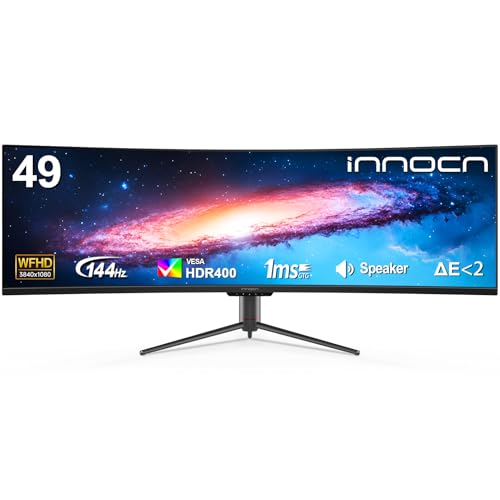 | 9.7PCKitHQ scoreView on Amazon |
03 | 9.5PCKitHQ scoreView on Amazon |
04 | 9.3PCKitHQ scoreView on Amazon |
05 | 9.2PCKitHQ scoreView on Amazon |
A closer look at each configuration
InnoView Portable Dual Monitor 15.6-inch Dual Stacked Foldable Monitor
score
Two 15.6-inch IPS panels at 1080P fold into one portable unit with split-screen mode for side-by-side business documents.
- Native refresh rate
- 60 Hz
- Screen size
- 15.6 in
- Panel
- IPS
- HDMI
- Yes
- Weight
- 3.5 lb
- Warranty
- 18-month
This InnoView unit pairs two 15.6-inch IPS panels, each at 1080P, in a foldable design that rotates 0-315° with 180° adjustable stands and gravity sensors. Split-screen mode places two documents side by side on one screen, while extended mode works over a full-featured Type-C cable on Windows without a driver. Mac users need a driver for extended mode, and HDMI connections support duplicate and split-screen modes only. One Type-C cable carries the signal and another supplies power, with a 30W or higher power source recommended. The unit weighs 3.5 lb and carries an 18-month warranty with a 30-day return policy.
Choose it if
- You work across two documents at once
- You carry your second screen between desks
Consider another if
- You need extended mode over HDMI on any system
- You need a single large screen instead of two panels
INNOCN 49-inch Curved Ultrawide 3840 x Monitor R1800
score
A 49-inch curved ultrawide at 3840 x 1080 and 144Hz works as a dual-screen setup with USB-C, DisplayPort and HDMI.
- Resolution
- 3840 x 1080
- Native refresh rate
- 144 Hz
- Screen size
- 49 in
- Curved screen
- Yes
- Ultrawide screen
- Yes
- USB-C
- Yes
- HDMI
- Yes
- DisplayPort
- Yes
- Warranty
- 12 months
This INNOCN monitor has a 49-inch curved ultrawide panel with a 32:9 aspect ratio, 1800R curvature and 3840 x 1080 resolution at 144Hz. DisplayPort and HDMI inputs join the USB-C port, and built-in speakers are included. The panel carries VESA DisplayHDR 400 certification with 99% sRGB color gamut coverage. The fully adjustable stand changes height and tilt, and the monitor carries a 12-month warranty.
Choose it if
- You want one wide screen instead of two monitors
- You connect a laptop over a single USB-C cable
Consider another if
- You need more vertical pixels than 1080
- You need a screen smaller than 49 inches
ViewSonic VA2456A-MHD_H2 24-inch Monitor
score
Two 24-inch 1080p IPS displays at 120Hz with frameless bezels form a side-by-side pair for documents and spreadsheets.
- Resolution
- 1080p
- Native refresh rate
- 120 Hz
- Screen size
- 24 in
- Panel
- IPS
- HDMI
- Yes
- DisplayPort
- Yes
- Weight
- 11.9 lb
- Warranty
- 3-year
This ViewSonic dual pack includes two 24-inch 1080p IPS head-only displays with 120Hz refresh rates and frameless bezels. The pair suits spreadsheets, documents, communication and research across a two-screen workstation. Each display provides HDMI, DisplayPort and VGA inputs for compatible PC and Mac systems. The head-only design ships without stands and supports compatible VESA mounting, so monitor arms or other mounting solutions hold the pair. Eye Care features and thin bezels support longer work sessions. The package carries a 3-year limited warranty on parts, labor and backlight, and the listed weight is 11.9 lb.
Choose it if
- You want two matching 24-inch screens for spreadsheets
- You mount your monitors on VESA arms
Consider another if
- You need monitors that arrive with stands included
- You need a single ultrawide screen instead of two
Okaysonic 2 Pack 24-inch Home Office Computer Monitor
score
Two identical 24-inch Full HD monitors at 120Hz with FreeSync give a consistent dual-screen setup with tilt, pivot, height and swivel.
- Screen size
- 24 in
- Panel
- VA
- HDMI
- Yes
- Weight
- 7.72 lb
This Okaysonic two-pack pairs two identical 24-inch Full HD monitors at 120Hz with FreeSync, so windows, cursors and video content move between screens without a refresh-rate mismatch. The dual 1920 x 1080 setup places documents on one screen and reference material, email or chat tools on the other. One display can turn vertical for coding, reading or document review, while the other stays in landscape. Each monitor supports tilt, pivot, height and swivel adjustments, and VESA mounting compatibility adds arm options. The VA panel carries 100% sRGB coverage with HDR support, and built-in dual speakers are included. The pack carries a one-year warranty.
Choose it if
- You want two matching screens with the same refresh rate
- You use one screen upright for coding or reading
Consider another if
- You need a single ultrawide panel instead of two
- You need a screen larger than 24 inches
SAMSUNG 34-inch SJ55W Ultrawide Gaming Monitor (LS34J550WQNXZA)
score
A 34-inch ultrawide at 3440 x 1440 and 75Hz splits its screen with PBP and PIP for side-by-side business multitasking.
- Resolution
- 3440 x 1440
- Native refresh rate
- 75 Hz
- Screen size
- 34 in
- Panel
- VA
- Ultrawide screen
- Yes
- HDMI
- Yes
- Weight
- 15.21 lb
- Warranty
- 1 year
This Samsung monitor has a 34-inch ultrawide VA panel with WQHD resolution of 3440 x 1440 and a 75Hz refresh rate. Its split-screen features use PBP and PIP with embedded split-screen software, so two input sources can share the display for multitasking. The 21:9 aspect ratio and 178-degree viewing angles suit side-by-side documents and video meetings. AMD FreeSync synchronizes the refresh rate with the graphics card to reduce image tear and stutter. The tilt range runs from minus 1.5 degrees to 15 degrees, and the monitor carries a one-year warranty.
Choose it if
- You want one wide screen with built-in split-screen software
- You connect several sources through the HDMI ports
Consider another if
- You need a refresh rate above 75Hz
- You need a screen smaller than 34 inches
Make the choice for your setup
Match the screen layout to your work
Split-screen business use starts with how the screens divide. The InnoView gives two separate 15.6-inch IPS panels at 1080P that fold and rotate 0-315 degrees, so documents sit side by side on distinct panels. The INNOCN 49-inch ultrawide at 3840 x 1080 and the Samsung 34-inch ultrawide at 3440 x 1440 divide one wide panel instead, with the Samsung adding PBP and PIP split-screen software. The ViewSonic and Okaysonic packs each give two 24-inch 1080p screens, so each document gets a full display. Choose separate panels when each task deserves its own screen, and choose one ultrawide when a single continuous surface suits the desk.
Check the connections before you buy
Every pick in this guide connects over HDMI, so confirm the ports on the computer first. The InnoView connects over USB-C or HDMI, with extended mode over a full-featured Type-C cable on Windows and split-screen and duplicate modes over HDMI. The INNOCN adds DisplayPort beside USB-C and HDMI. The Samsung connects through HDMI ports. The ViewSonic pair adds VGA beside HDMI and DisplayPort, while the Okaysonic pair connects over HDMI with VGA and audio output. Count the outputs on the laptop or desktop, then match them against the monitor inputs, and choose the monitor whose inputs fit the computer. The InnoView also needs a 30W or higher power source for its dual panels. Shoppers with a related need can compare our guide to the Best Monitor for Xbox Series S.
Weigh size, weight and warranty
Screen size and weight decide where each pick fits. The InnoView weighs 3.5 lb and folds, so it travels between desks and offices. The INNOCN spans 49 inches, the Samsung 34 inches, and the ViewSonic and Okaysonic pairs each use two 24-inch screens, so measure the desk before choosing a fixed setup. The ViewSonic pair ships head-only without stands and needs compatible VESA mounting, while the Okaysonic pair adjusts through tilt, pivot, height and swivel. Warranty terms differ too: the InnoView carries 18 months, the INNOCN 12 months, the ViewSonic 3 years, and the Okaysonic and Samsung one year each. Match the warranty length to how long the monitors should serve the desk.
Before you decide, also read 24 vs 27 Inch Monitor.
FAQ: Monitor for Split Screen Business Use
Which pick suits a portable split-screen setup?
The InnoView Portable Dual Monitor suits portable use: two 15.6-inch IPS panels at 1080P fold into one unit that weighs 3.5 lb, with split-screen mode for side-by-side documents, and it rotates 0-315 degrees with 180-degree adjustable stands.
Which monitors work as one wide screen?
The INNOCN 49-inch ultrawide at 3840 x 1080 and the Samsung 34-inch ultrawide at 3440 x 1440 each divide a single wide panel for multitasking. The Samsung adds PBP and PIP split-screen software, while the INNOCN functions as a dual-screen setup.
Do any picks come as a two-monitor pack?
Yes. The ViewSonic pack includes two 24-inch 1080p IPS displays at 120Hz. The Okaysonic pack includes two identical 24-inch Full HD monitors at 120Hz with FreeSync. The ViewSonic pair ships head-only without stands and needs VESA mounting.


