
Best Mechanical Keyboard with Number Pad (2026): 4 Picks Compared
 By Theo LangUpdated
Choose the YUNZII B98 PRO 96% Wireless Mechanical Keyboard (Matcha Green, Candy Switch) if you want a 100-key layout with a numeric pad, tri-mode connection across up to 5 devices and an 8000mAh battery. Its QMK/VIA customization, gasket mount and hot-swappable pre-lubed switches suit number entry and long typing sessions on one keyboard. The RK R98 Pro has 98 keys, the AULA F99 Pro has 99 keys, and the Logitech MX Mechanical is full-size.
Your shortlist at a glance
PCKitHQ scores range from 9.2 to 9.8. See how we pick.
| Product and key specifications | Score and retailer |
|---|---|
01 Best Overall YUNZII B98 PRO 96% Wireless Mechanical Keyboard(Matcha GreenSwitch type: Candy Switch, Layout: 96%, Wireless: Yes | 9.8PCKitHQ scoreView on Amazon |
02 Second Pick RK ROYAL KLUDGE R98 Pro Creamy Mechanical KeyboardSwitch type: Beige Switch, Layout: 96%, Backlight: Yes | 9.6PCKitHQ scoreView on Amazon |
03 Also Consider AULA F99 Pro Wireless Mechanical KeyboardSwitch type: linear switches, Layout: 96%, Wireless: Yes | 9.4PCKitHQ scoreView on Amazon |
04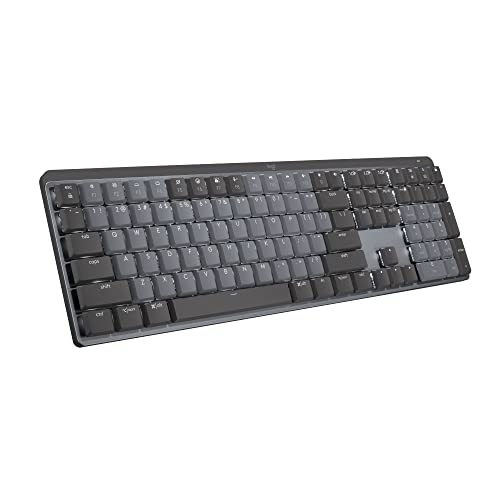 Also Consider Logitech MX Mechanical Wireless Illuminated Keyboard TactileSwitch type: Tactile Quiet, Layout: full-size, Wireless: Yes | 9.2PCKitHQ scoreView on Amazon |
A closer look at each configuration
YUNZII B98 PRO 96% Wireless Mechanical Keyboard(Matcha Green
score
A 100-key 96% layout with a numeric pad, tri-mode connection, QMK/VIA and an 8000mAh battery.
- Switch type
- Candy Switch
- Layout
- 96%
- Wireless
- Yes
- Backlight
- Yes
- Connection
- Bluetooth 5.0, 2.4GHz, USB-C
- Weight
- 2.43 lb
- Warranty
- 1 Year
This YUNZII keyboard uses a 96% layout with 100 keys plus a dedicated numeric pad, and Candy Switches that are pre-lubed. QMK/VIA firmware supports remapping, macros and RGB lighting with 16.8 million colors from south-facing LEDs. Tri-mode connection covers Bluetooth 5.0, 2.4GHz and USB-C across up to 5 devices, with Windows, Mac and Android support. The built-in 8000mAh battery powers the wireless modes, and a 2.4G receiver stores under the stand. A gasket mount with five layers of filling, tuned stabilizers and double-shot PBT keycaps shape the typing feel. Two knobs are included: a 3D cat knob and a round metal knob. It weighs 2.43 lb and carries a 1 Year warranty.
Choose it if
- You want a 100-key layout with a numeric pad
- You want tri-mode connection for up to 5 devices
Consider another if
- You need a keyboard under 2.43 lb in weight
- You need fewer than 100 keys on the desk
RK ROYAL KLUDGE R98 Pro Creamy Mechanical Keyboard
score
A 98-key 96% wired keyboard with a numeric pad, hot-swappable tactile switches and a detachable volume knob.
- Switch type
- Beige Switch
- Layout
- 96%
- Backlight
- Yes
- Hot-swappable
- Yes
- Connection
- Wired
- Weight
- 1.96 lb
- Warranty
- 1 Year
This RK keyboard uses a 96% layout with 98 keys, keeping the numeric pad, arrow keys and most functions. Pre-lubed Beige tactile switches are hot-swappable for 3-pin and 5-pin switches, and a gasket mount with five layers of sound-absorbing foam sits under the keys. MDA profile double-shot PBT keycaps have a matte surface. A detachable aluminum CNC volume knob adjusts volume, and four indicator lights show Num Lock, Caps Lock, Win Lock and Mac Mode. The RK online driver handles key remapping, macros and custom RGB on Windows and Mac, with more than 20 RGB modes. It weighs 1.96 lb and carries a 1 Year warranty.
Choose it if
- You want a 98-key layout with a numeric pad
- You want a wired keyboard for Windows and Mac
Consider another if
- You need a wireless connection for your desk
- You need more than 98 keys on the keyboard
AULA F99 Pro Wireless Mechanical Keyboard
score
A 99-key 96% wireless keyboard with a numeric pad, tri-mode connection and an 8000mAh battery.
- Switch type
- linear switches
- Layout
- 96%
- Wireless
- Yes
- Backlight
- Yes
- Hot-swappable
- Yes
- Connection
- BT5.0, 2.4GHz wireless mode, and USB wired mode
- Warranty
- 6 Months
This AULA keyboard uses a 96% layout with 99 keys, keeping the arrow keys and number area. Tri-mode connection covers BT5.0, 2.4GHz wireless and USB wired modes across up to 5 devices, switched with FN and key combinations and a side button. Pre-lubed linear switches are hot-swappable for 3-pin and 5-pin switches, with a keycap and switch puller in the package. A gasket structure with five layers of filling silencer and a silicone pad shapes the feel. The control knob adjusts backlight brightness or volume, switches lighting effects or plays and pauses, and a long press of about 5 seconds switches modes. Macro customization and 16.8 million light colors are supported, with N-key rollover. The built-in 8000mAh battery powers the wireless modes, and double-shot PBT keycaps are fitted. It carries a 6 Months warranty.
Choose it if
- You want a 99-key layout with a numeric pad
- You want a control knob for volume and lighting
Consider another if
- You need a warranty longer than 6 Months
- You need fewer than 99 keys on the desk
Logitech MX Mechanical Wireless Illuminated Keyboard Tactile
score
A full-size low-profile keyboard with Tactile Quiet switches, smart backlighting and pairing for up to 3 devices.
- Switch type
- Tactile Quiet
- Layout
- full-size
- Wireless
- Yes
- Backlight
- Yes
- Connection
- Bluetooth Low Energy
- Weight
- 2.55 lb
- Warranty
- 1 Year
This Logitech keyboard uses a full-size layout with low-profile Tactile Quiet switches that give a tactile bump with less noise. Smart illumination lights the keys when hands approach and adjusts to changing lighting conditions. Fn keys can be customized and Flow cross-computer control enabled in Logi Options+. It pairs with up to 3 devices through Bluetooth Low Energy or the included Logi Bolt receiver. USB-C quick charging gives up to 15 days on a full charge, or up to 10 months with the backlighting turned off. Plastic parts include 45% certified post-consumer recycled plastic in Graphite. It weighs 2.55 lb and carries a 1 Year warranty.
Choose it if
- You want a full-size low-profile keyboard
- You want pairing for up to 3 devices
Consider another if
- You need a keyboard under 2.55 lb in weight
- You need pairing for more than 3 devices
Make the choice for your setup
Compare key counts and layouts
Key count sets how much desk space each keyboard needs and how much number entry it holds. The YUNZII has 100 keys with a dedicated numeric pad, the AULA has 99 keys with a number area, and the RK has 98 keys with the numeric pad and arrow keys kept. The Logitech MX Mechanical is full-size with low-profile keys. Match the key count to the number entry you do each day, and keep the layout with the arrow keys and numeric pad you use, since a smaller count saves desk space only when you give up keys you do not press.
Match connection to your devices
Connection decides how many devices one keyboard serves. The YUNZII connects through Bluetooth 5.0, 2.4GHz and USB-C, and pairs with up to 5 devices. The AULA connects through BT5.0, 2.4GHz wireless mode and USB wired mode, and pairs with up to 5 devices. The Logitech pairs with up to 3 devices through Bluetooth Low Energy or the Logi Bolt receiver. The RK is wired only, and works with Windows and Mac. The YUNZII stores a 2.4G receiver under its stand, and the AULA switches devices with FN and key combinations and a side button. A wired-only board suits a single fixed setup, while a tri-mode board suits switching between several systems. Count the devices you switch between, and check the connection each keyboard lists against the ports and systems you already use. For a closely related choice, read our guide to the Best Gaming Keyboard for Mac.
Weigh switches, battery and warranty
Switches, battery and warranty differ across these four keyboards. The YUNZII and the AULA each carry an 8000mAh battery, while the Logitech is rated at up to 15 days on a full charge and up to 10 months with the backlighting turned off. The YUNZII uses Candy Switches, the RK uses pre-lubed Beige tactile switches, the AULA uses pre-lubed linear switches and the Logitech uses Tactile Quiet switches. The YUNZII, the RK and the Logitech each carry a 1 Year warranty, while the AULA carries a 6 Months warranty. The RK is wired, so battery figures do not apply to that keyboard. Compare the switch type, the stated battery figure where one is given, and the warranty term for the keyboard you pick before you choose.
Before you decide, also read Mechanical vs Membrane Keyboard.
FAQ: Mechanical Keyboard with Number Pad
How many keys does each keyboard have?
The YUNZII has 100 keys, the AULA has 99 keys and the RK has 98 keys, each with a numeric pad in a 96% layout. The Logitech MX Mechanical is full-size with low-profile keys and Tactile Quiet switches.
Which keyboards connect to more than one device?
The YUNZII pairs with up to 5 devices through Bluetooth 5.0, 2.4GHz and USB-C. The AULA pairs with up to 5 devices through BT5.0, 2.4GHz wireless mode and USB wired mode. The Logitech pairs with up to 3 devices through Bluetooth Low Energy or the Logi Bolt receiver. The RK is wired only.
What warranty does each keyboard carry?
The YUNZII carries a 1 Year warranty, the RK carries a 1 Year warranty and the Logitech carries a 1 Year warranty. The AULA carries a 6 Months warranty, the shortest term here. Check the warranty term for the keyboard you pick before you order, since the terms differ across the four keyboards.


