
Best Gaming Keyboard for Mac (2026): 4 Picks Compared
 By Theo LangUpdated
The AULA 99 Key Keyboard is the pick for Mac gaming, with tri-mode Bluetooth 5.0, 2.4GHz wireless, and USB-C for up to five devices. Its 96% layout keeps a numeric keypad, and RGB backlighting with adjustable brightness and speed adds atmosphere to games. Macro customization records complex actions into a single key, and the dual-mode rotary knob adjusts volume, audio, and lighting effects. A 2000mAh rechargeable battery powers the wireless modes.
Your shortlist at a glance
PCKitHQ scores range from 9.2 to 9.8. See how we pick.
| Product and key specifications | Score and retailer |
|---|---|
01 | 9.8PCKitHQ scoreView on Amazon |
02 | 9.6PCKitHQ scoreView on Amazon |
03 Also Consider SOLAKAKA A99 Pro Wireless Mechanical KeyboardSwitch type: LEOBOG star vector switches, Layout: 96%, Wireless: Yes | 9.4PCKitHQ scoreView on Amazon |
04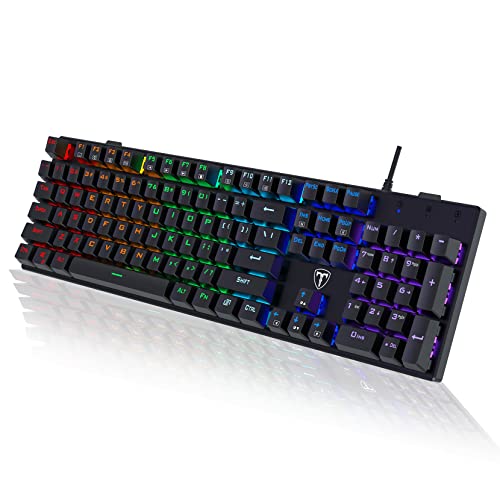 Also Consider RisoPhy Mechanical Gaming KeyboardSwitch type: Blue Switch, Layout: Full-size, Connection: USB Wired | 9.2PCKitHQ scoreView on Amazon |
A closer look at each configuration
AULA 99 Key Keyboard
score
Tri-mode connection for up to five devices and a 96% layout with a numpad make this AULA the Mac gaming pick.
- Switch type
- membrane
- Layout
- 96%
- Wireless
- Yes
- Backlight
- Yes
- Weight
- 2.34 lb
- Warranty
- 1 Year Manufacturer
The AULA 99 Key Keyboard offers three connection modes: Bluetooth 5.0, 2.4GHz wireless, and USB-C wired mode, switching between up to five devices with FN key combinations. Its 96% layout keeps a separate numeric keypad area, and three-color keycaps dress the desk. RGB lighting adds atmosphere to games, with brightness and speed adjustable by the knob or FN key combinations, and Macro software creates custom lighting setups after switching to the corresponding Mac system. All keys support macro customization for recording complex actions into a single key. The foldable two-stage kickstand sets the tilt angle, and three M1/M2/M3 buttons remap key functions. A 2000mAh rechargeable battery powers the board, which weighs 2.34 lb and carries a 1 Year Manufacturer warranty.
Choose it if
- You want tri-mode connection across Bluetooth, 2.4GHz, and USB-C
- You want a 96% layout with a numeric keypad
Consider another if
- You need a mechanical switch board like the SOLAKAKA A99 Pro
- You need the 8000mAh battery of the SOLAKAKA A99 Pro
AULA S99 Gaming Keyboard
score
Tri-mode connection, full-key macro programming, and Mac compatibility make this green AULA S99 a flexible Mac board.
- Switch type
- membrane
- Layout
- 96%
- Wireless
- Yes
- Backlight
- Yes
- Warranty
- 1 Year Manufacturer
The AULA S99 Gaming Keyboard supports Bluetooth 5.0, 2.4GHz wireless, and USB-C wired connectivity, switching flexibly between scenes for office, gaming, or mobile use. All keys support macro customization for recording complex actions into a single key, and full-key macro programming creates exclusive shortcut operations. The dual-mode rotary knob adjusts volume, audio, and lighting effects, and the dual-mode knob design switches between gaming and office modes. Three programmable shortcut keys, M1/M2/M3, set up personalized functions. The 96% layout keeps an integrated numeric keypad, and the foldable two-stage stand adjusts the typing angle. The board is compatible with Windows, Mac, Android, and iOS, and carries a 1 Year Manufacturer warranty. It is a membrane keyboard and does not support hot-swapping.
Choose it if
- You want tri-mode connection for office, gaming, or mobile use
- You want full-key macro programming for complex commands
Consider another if
- You need a mechanical switch board like the SOLAKAKA A99 Pro
- You need the hot-swappable switches of the SOLAKAKA A99 Pro
SOLAKAKA A99 Pro Wireless Mechanical Keyboard
score
An LCD screen, hot-swappable switches, and an 8000mAh battery set this SOLAKAKA apart for Mac play.
- Switch type
- LEOBOG star vector switches
- Layout
- 96%
- Wireless
- Yes
- Backlight
- Yes
- Hot-swappable
- Yes
- Warranty
- 1
The SOLAKAKA A99 Pro carries an LCD screen that shows date, time, battery level, connected system, connection mode, and GIF images, with a multi-functional knob for time, systems, lighting modes, colors, brightness, and volume. Tri-mode connectivity covers BT5.0, 2.4GHz wireless, and USB-C wired connections for up to five devices, and the board works with Windows, Mac, iOS, and Android. Full hot-swappable technology supports 3/5-pin switches without soldering, and pre-lubricated LEOBOG star vector switches give smooth, stable typing. A five-layer gasket structure with noise-dampening cotton pads gives a creamy sound and soft hand feel. RGB lighting offers 16 modes plus 5 side-backlight modes, and the 8000mAh battery gives about 61 hours in backlit mode and about 170 hours without backlight.
Choose it if
- You want an LCD screen showing date, time, and battery level
- You want hot-swappable switches you can change without soldering
Consider another if
- You need a full-size 104-key layout like the RisoPhy
- You need a wired-only board like the RisoPhy
RisoPhy Mechanical Gaming Keyboard
score
Blue switches, a full-size 104-key layout, and a wired USB connection make this RisoPhy a direct Mac gaming board.
- Switch type
- Blue Switch
- Layout
- Full-size
- Connection
- USB Wired
- Warranty
- 1
This RisoPhy keyboard uses Blue switches with a clicky feel, deeper key travel, and wider key spacing. Its full-size 104-key layout includes a Win lock function and 12 multimedia shortcuts for calculator, media, volume, and email. Nine backlight options with five levels of light speed and brightness sit under double-injection ABS keycaps for clear, uniform backlight. Four hydrophobic holes let water flow away quickly, and two foldable rear kickstands slope the board for comfort. It offers 100% anti-ghosting, so all keys work at once, with a keystroke life of up to 50 million. It works with Windows and Mac OS.
Choose it if
- You want a full-size 104-key board with a number pad
- You want Blue switches with a clicky, tactile feel
Consider another if
- You need wireless connection like the AULA 99 Key Keyboard
- You need the 8000mAh battery of the SOLAKAKA A99 Pro
Make the choice for your setup
Match Mac compatibility first
Mac support differs across these four boards. The SOLAKAKA A99 Pro works with Windows, Mac, iOS, and Android, and switches smoothly between operating systems. The AULA S99 is compatible with Windows, Mac, Android, and iOS. The AULA 99 Key Keyboard creates lighting setups with Macro software after switching to the corresponding Mac system. The RisoPhy works with Windows and Mac OS. Check the connection your Mac offers before choosing. The two AULA boards connect by Bluetooth 5.0, 2.4GHz wireless, or USB-C. The SOLAKAKA connects by BT5.0, 2.4GHz wireless, or USB-C. The RisoPhy connects only by wired USB. A wireless board needs charging, so weigh the 2000mAh battery of the AULA 99 Key Keyboard against the 8000mAh battery of the SOLAKAKA A99 Pro.
Compare layout and key counts
Three of the four boards use a 96% layout: the AULA 99 Key Keyboard, the AULA S99, and the SOLAKAKA A99 Pro. The AULA boards keep a numeric keypad in that compact footprint, and the SOLAKAKA has 97 keys with a numeric keypad, arrow keys, and essential function keys. The RisoPhy uses a full-size 104-key layout with a number pad. Layout decides desk space and reach: a 96% board saves room while keeping the keys used most, while a full-size board keeps every key at full spacing. Measure the space beside your mouse, and check whether a number pad matters for your daily work and games. A related shortlist covers the Best Led Keyboard.
Weigh switches, screens, and extras
Switch type shapes the typing feel. The SOLAKAKA A99 Pro uses pre-lubricated LEOBOG star vector switches, and the RisoPhy uses Blue switches with a clicky feel. The two AULA boards use membrane keys. The SOLAKAKA is the only board here with an LCD screen, showing date, time, battery level, connected system, connection mode, and GIF images, and it takes 3/5-pin switches without soldering. The AULA S99 is a membrane keyboard and does not support hot-swapping. Knobs appear on the AULA 99 Key Keyboard, the AULA S99, and the SOLAKAKA for volume, audio, and lighting control. The RisoPhy adds a Win lock function and 12 multimedia shortcuts.
For a wider shortlist, start with Mechanical vs Membrane Keyboard.
FAQ: Gaming Keyboard for Mac
Which keyboard should I buy for Mac gaming?
Start with the AULA 99 Key Keyboard. Its tri-mode connection across Bluetooth 5.0, 2.4GHz wireless, and USB-C switches between up to five devices, its 96% layout keeps a numeric keypad, and Macro software creates lighting setups after switching to the corresponding Mac system.
Which boards are hot-swappable?
The SOLAKAKA A99 Pro is hot-swappable. It takes 3/5-pin switches without soldering, and its pre-lubricated LEOBOG star vector switches give smooth, stable typing. The AULA S99 is a membrane keyboard and does not support hot-swapping. The AULA boards use membrane keys, and the RisoPhy uses Blue switches.
Which batteries do these keyboards carry?
The SOLAKAKA A99 Pro carries an 8000mAh battery, giving about 61 hours of use in backlit mode and about 170 hours in non-backlit mode. The AULA 99 Key Keyboard carries a 2000mAh rechargeable battery for its Bluetooth and 2.4GHz wireless modes.


