
Best Keyboard for Data Entry (2026): 5 Picks Compared
 By Theo LangUpdated
TECKNET Wired Keyboard is the recommendation for data entry, with low-profile membrane keys and a standard 104-key layout with a 3-zone design. Its USB-A plug-and-play connection needs no drivers or batteries, and its adjustable tilt feet and anti-slip pads support long working sessions. The quiet keystrokes suit shared offices, libraries, and late-night work where typing noise matters.
Your shortlist at a glance
PCKitHQ scores range from 9.2 to 9.8. See how we pick.
| Product and key specifications | Score and retailer |
|---|---|
01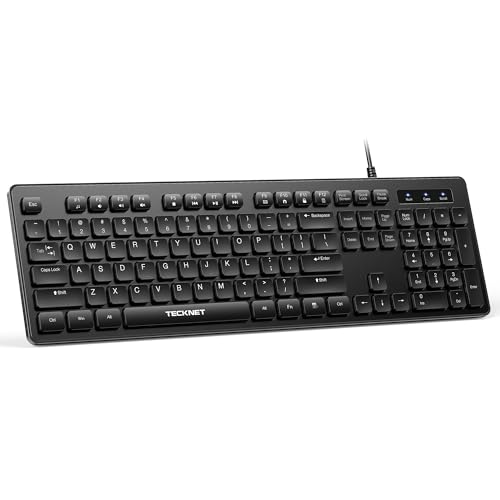 | 9.8PCKitHQ scoreView on Amazon |
02 | 9.7PCKitHQ scoreView on Amazon |
03 | 9.5PCKitHQ scoreView on Amazon |
04 Also Consider MIKUSO French AZERTY Keyboard Wired USB for Computer Laptop PCLayout: 105-key AZERTY, Connection: USB-A | 9.3PCKitHQ scoreView on Amazon |
05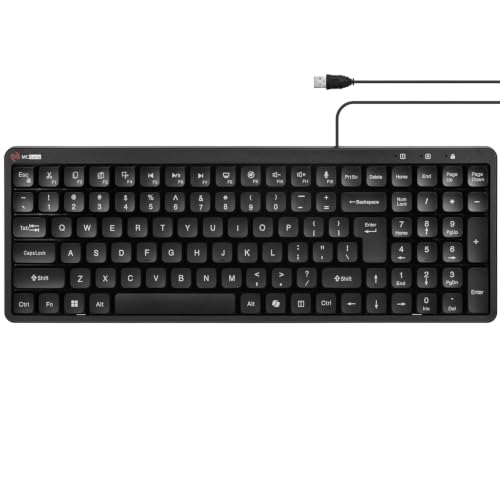 | 9.2PCKitHQ scoreView on Amazon |
A closer look at each configuration
TECKNET Wired Keyboard
score
The 104-key layout, quiet low-profile membrane keys, and USB-A plug-and-play connection suit steady data entry work.
- Switch type
- low-profile membrane
- Connection
- USB-A
This TECKNET keyboard has a standard 104-key layout with a 3-zone design, including a numeric keypad for data entry and multitasking. Its low-profile membrane keys give soft keystrokes, and its adjustable tilt feet and anti-slip pads let you set the typing angle. The 12 FN+F key combinations cover volume control, mute, media playback, email, homepage, and calculator. A spill-resistant conductive film protects against water splashes, and each key is rated for up to 80 million keystrokes. It connects by USB-A with no drivers required and works with Windows 2000/XP/Vista/7/8/10/11, Raspberry Pi 3/4, and Mac OS, although multimedia keys may have limited functionality on Mac OS.
Choose it if
- You enter figures through a dedicated numeric keypad daily
- You want quiet low-profile membrane keys in a shared office
Consider another if
- You need a 105-key layout for French AZERTY typing
- You need keys rated for more than 80 million keystrokes
SABLUTE Wired Large Print Backlit Computer Keyboard
score
The 3X larger print keys and 7-color LED backlight make keys easy to identify in bright and low-light rooms.
- Connection
- USB
- Weight
- 1.32 lb
This SABLUTE keyboard uses 3X larger print keys on a 104-key US layout with an independent numeric keypad for rapid data processing. A foldable tilt stand gives two angles, and the 5.2ft USB cable draws a stable 5V current for continuous use. Status indicators for Num, Caps, and Scroll Lock glow yellow when activated. The 12 FN+F1 to FN+F12 multimedia combination keys cover Windows desktop navigation and volume, while standard typing is supported on macOS and Chrome. It weighs 1.32 lb.
Choose it if
- You want 3X larger print keys for clear key identification
- You want a 7-color backlight with 8 brightness levels
Consider another if
- You need a 105-key AZERTY layout for French typing
- You need the 4X larger print keys of the EDJO keyboard
EDJO Large Print Backlit Wired Keyboard
score
The 4X larger print keys and 7-color backlight support clear key identification during long data entry sessions.
- Backlight
- Yes
- Connection
- USB
- Weight
- 1.33 lb
This EDJO keyboard has print 4X larger than standard keyboard fonts on a full-size QWERTY English (US) layout with a numeric keypad. Its backlit keys offer 7 colors, 4 brightness levels, and 2 backlight modes, and the backlight can be turned on or off for low-light typing. The 5.25ft USB cable connects to Windows, PCs, laptops, Mac OS, and Chrome with plug-and-play setup and no charging or battery replacement. It provides 12 multimedia keys and 10 hotkeys for email, calculator, and other applications. Feet at the back unfold to reduce hand fatigue, the design is spill-resistant, and it carries a free one-year replacement warranty. It weighs 1.33 lb.
Choose it if
- You want 4X larger print keys for clear key identification
- You want a 7-color backlight with 4 brightness levels
Consider another if
- You need the 8 brightness levels of the SABLUTE keyboard
- You need the 105-key AZERTY layout for French typing
MIKUSO French AZERTY Keyboard Wired USB for Computer Laptop PC
score
The 105-key AZERTY layout and laser-etched keycaps suit French typing and spreadsheet work with a numeric keypad.
- Layout
- 105-key AZERTY
- Connection
- USB-A
- Warranty
- 2
This MIKUSO keyboard has the standard 105-key AZERTY layout used by French speakers, with a dedicated numeric keypad for spreadsheet work in accounting, data entry, and billing, plus a complete F-key row and a standard arrow cluster. Its keycaps use laser etching, so the crisp white characters are burned into the keycap surface rather than printed on top. The 1.6m USB-A cable gives a wired connection with no pairing or charging, and the keyboard is intended for Windows PC users. Its plug-and-play setup needs no drivers, and it carries a 2-year manufacturer warranty.
Choose it if
- You type in French and want the 105-key AZERTY layout
- You want a dedicated number pad for spreadsheet work
Consider another if
- You need a QWERTY layout for English data entry work
- You need a USB cable longer than 1.6m
MC-519 Full Size Wired Keyboard USB Plug-and-Play
score
The 104-key layout with a dedicated number pad gives a straightforward wired keyboard for Windows data entry.
- Connection
- USB
This M MC Saite MC-519 keyboard has a complete 104-key layout including a dedicated number pad, function keys, and arrow keys for data entry and everyday work. Its wired USB connection is plug-and-play, with no batteries required, and it is compatible with Windows and other major operating systems for desktop and laptop computers. The keycaps are well spaced in a standard key layout, and the keyboard includes media hotkeys and foldable stands. Its sturdy materials are designed to withstand daily heavy use, so the keyboard is built for regular work at a desk.
Choose it if
- You want a 104-key layout with a dedicated number pad
- You want a plug-and-play USB keyboard with no batteries
Consider another if
- You need a 105-key AZERTY layout for French typing
- You need a keyboard with more than 104 keys
Make the choice for your setup
Match the layout to the work
Start with the layout you will type on every day. The TECKNET, SABLUTE, EDJO, and M MC Saite keyboards use full-size layouts with a dedicated numeric keypad, which suits entering figures, accounting, and spreadsheet work. The MIKUSO keyboard is different: it uses a 105-key AZERTY layout, so it suits French typing and French language work, while the other four use QWERTY layouts for English data entry. Check the key count, the numeric keypad, the F-key row, and the arrow cluster against the work you do, and choose the layout that matches the language and the figures you enter. The SABLUTE and EDJO keyboards also add large print keys, which help when you need to identify keys quickly during long entry sessions.
Choose print size and backlight
Large print and backlighting help when you need to find keys quickly or type in low light. The SABLUTE keyboard has 3X larger print keys with a 7-color LED backlight, 4 backlight modes, 8 brightness levels, and 6 speed controls. The EDJO keyboard has 4X larger print keys with 7 colors, 4 brightness levels, and 2 backlight modes. Compare those print sizes and brightness controls directly, and decide how much adjustment you want. The TECKNET keyboard instead focuses on quiet low-profile membrane keys for shared offices and libraries. Use the brightness levels and modes to set the light for the room you work in, and switch the backlight off when you do not need it. A related shortlist covers the Best Keyboard for Fat Fingers.
Check connection and compatibility
All five keyboards connect by USB with plug-and-play setup and no batteries, but cable length and system support differ. The TECKNET and MIKUSO keyboards use USB-A, with the MIKUSO cable measuring 1.6m. The SABLUTE keyboard has a 5.2ft USB cable, and the EDJO keyboard has a 5.25ft USB cable. The TECKNET keyboard works with Windows 2000/XP/Vista/7/8/10/11, Raspberry Pi 3/4, and Mac OS, although its multimedia keys may have limited functionality on Mac OS. The EDJO keyboard also notes that multimedia keys may not be fully compatible with Mac OS systems. Measure the distance from your computer to your desk position before choosing, so the cable you pick reaches without pulling.
Comparing more options? See Mechanical vs Membrane Keyboard.
FAQ: Keyboard for Data Entry
Which keyboard suits quiet data entry in a shared office?
The TECKNET Wired Keyboard suits that work. Its low-profile membrane keys give soft keystrokes and reduce typing noise, and its 104-key layout includes a numeric keypad. Adjustable tilt feet and anti-slip pads support long working sessions.
Which keyboards have large print keys and backlighting?
The SABLUTE keyboard has 3X larger print keys and a 7-color LED backlight with 8 brightness levels. The EDJO keyboard has 4X larger print keys and a 7-color backlight with 4 brightness levels and 2 modes.
Which keyboard suits French data entry work?
The MIKUSO keyboard suits French data entry. It has the standard 105-key AZERTY layout, a dedicated numeric keypad, a complete F-key row, and a 1.6m USB-A cable for Windows PC users. Its laser-etched keycaps keep the white characters visible, and its numeric keypad supports accounting, data entry, and billing work.


