Best Gaming Mouse Usbc (2026): 6 Models Side by Side
 By Theo LangUpdated
If your laptop or tablet has only a USB-C port, choose the HXMJ Wired USB C Gaming Mouse: it connects by USB-C and pairs a 7200 DPI sensor with a 0.22 lb honeycomb shell. Its DPI levels run 1200, 2400, 4800 and 7200, and its RGB backlight offers five lighting effects. The other mice here use USB-C too.
Your shortlist at a glance
PCKitHQ scores range from 9.2 to 9.8. See how we pick.
| Product and key specifications | Score and retailer |
|---|---|
01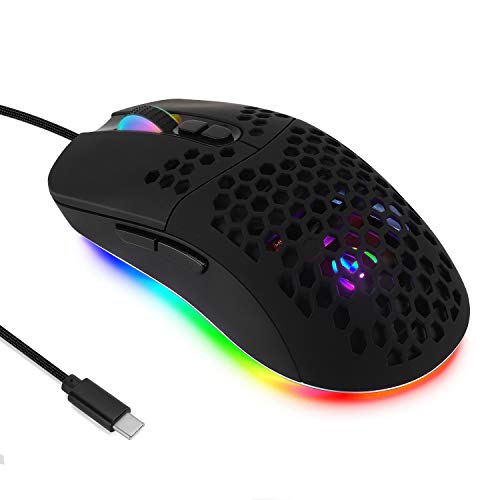 | 9.8PCKitHQ scoreView on Amazon |
02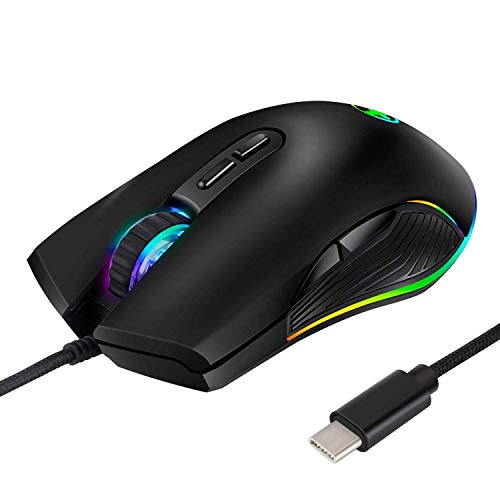 Second Pick HXMJ RGB LED Gaming Mice | 9.7PCKitHQ scoreView on Amazon |
03 Also Consider IULONEE Wired Type C Mouse Gaming Mice 3200 DPI for USB Type C Device BlackSensor resolution: 3200 DPI | 9.6PCKitHQ scoreView on Amazon |
04 Also Consider Huifen USB-C Wired Gaming Mouse 7-Color RGB 2400 DPI for Type-C DevicesSensor resolution: 2400 DPI | 9.4PCKitHQ scoreView on Amazon |
05 Also Consider CBUS Wired USB C Mouse | 9.3PCKitHQ scoreView on Amazon |
06 Also Consider Wired Gaming Mouse USB C | 9.2PCKitHQ scoreView on Amazon |
A closer look at each configuration
HXMJ Wired USB C Gaming Mice
score
The HXMJ M02 pairs a 7200 DPI sensor with a 0.22 lb honeycomb shell and a USB-C connection.
- Sensor resolution
- 7200 DPI
- Backlight
- Yes
- Connection
- USB C
- Weight
- 0.22 lb
The HXMJ M02 connects through USB-C and works with MacBook 12-inch, MacBook Pro 2016 and 2017, and Chromebook. Its optical sensor adjusts across 1200, 2400, 4800 and 7200 DPI. The honeycomb shell keeps the weight at 0.22 lb, and the RGB backlight switches among five lighting effects or turns off with the lighting switch button. It is plug and play with no added software, and it supports Windows 7, 8 and 10, XP, Vista, Linux and Mac OS. The two left side buttons do not work in Mac OS.
Choose it if
- You want a wired USB-C mouse for a MacBook or Chromebook
- You want four DPI levels up to 7200
Consider another if
- You need the two left side buttons to work in Mac OS
- You want a wireless connection instead of a wired one
HXMJ RGB LED Gaming Mice
score
The HXMJ M01 offers four DPI levels up to 3200, four RGB lighting modes and a 0.33 lb body.
- Backlight
- Yes
- Connection
- USB C
- Weight
- 0.33 lb
The HXMJ M01 connects by USB-C and works with MacBook 12-inch, MacBook Pro 2016 and 2017, Chromebook, and Type-C smartphones and tablets. Its resolution adjusts across 800, 1600, 2400 and 3200 DPI. The mouse has four RGB lighting modes with side flow lighting, changed with the lighting switch button. Its ergonomic design and skin-friendly surface suit long sessions. It weighs 0.33 lb and is plug and play with no added software, supporting Windows, Linux and Mac OS.
Choose it if
- You want a USB-C mouse with RGB lighting for gaming and office use
- You want four DPI levels from 800 to 3200
Consider another if
- You need DPI settings above 3200
- You want a mouse lighter than 0.33 lb
IULONEE Wired Type C Mouse Gaming Mice 3200 DPI for USB Type C Device Black
score
The IULONEE E33 gives four DPI levels up to 3200, four RGB lights and a 0.26 lb body.
- Sensor resolution
- 3200 DPI
- Backlight
- Yes
- Connection
- USB C
- Weight
- 0.26 lb
- Warranty
- No warranty
The IULONEE E33 connects by USB-C and works with MacBook 12-inch, MacBook Pro 2016, 2017 and 2018, Chromebook, Samsung S8 and S8+, Matebook X and HP OMEN. Its DPI adjusts across 800, 1600, 2400 and 3200. Four RGB lights with side flow lighting change with the lighting switch button. The frosted surface coating uses a skin-like material that is sweatproof and anti-slip. It weighs 0.26 lb, needs no batteries or Bluetooth, and runs on Windows, Linux and Mac OS.
Choose it if
- You want a USB-C mouse with 3200 DPI for a Chromebook or Matebook
- You want a frosted sweatproof surface that resists slipping
Consider another if
- You need DPI settings above 3200
- You need the forward and backward buttons to work in Mac OS
Huifen USB-C Wired Gaming Mouse 7-Color RGB 2400 DPI for Type-C Devices
score
The Huifen mouse pairs 2400 DPI with seven-color RGB lighting, silent clicks and a USB-C connection.
- Sensor resolution
- 2400 DPI
- Connection
- USB C
The Huifen USB-C mouse connects to any device with a USB-C port. Its DPI adjusts across 800, 1200, 1600 and 2400. Seven kinds of LED light give the mouse a rainbow RGB effect. The left and right buttons click silently, and the ergonomic shape has textured rubber side grips for thumb support. Its compact size keeps control steady on the move, and the wired connection gives stable signals without interruption. It is plug and play with no added setup.
Choose it if
- You want silent left and right buttons for the office or library
- You want a compact USB-C mouse with textured rubber side grips
Consider another if
- You need DPI settings above 2400
- You want more than four DPI levels to switch between
CBUS Wired USB C Mouse
score
The CBUS mouse combines four DPI speeds up to 2400, six buttons and quiet clicks in a 0.17 lb body.
- Connection
- USB-C
- Weight
- 0.17 lb
The CBUS mouse plugs into a USB-C port and works with MacBook and MacBook Pro, iPad and iPad Pro, HP, DELL XPS 13, 14, 15 and 16, Microsoft Surface, Samsung Galaxy Book, Chromebook and Galaxy Tab. Its red optical sensor switches across 800, 1200, 1600 and 2400 DPI. The six-button design adds a scroll wheel, a DPI switch and forward and backward keys to the left and right buttons. It weighs 0.17 lb and needs no dongles or batteries, running on Mac OS, iOS, Windows 10 and 11, and Chrome OS.
Choose it if
- You want a 0.17 lb USB-C mouse for a MacBook, Surface or Chromebook
- You want six buttons with forward and backward keys for browsing
Consider another if
- You need DPI settings above 2400
- You want RGB lighting with more than a blue LED glow
Wired Gaming Mouse USB C
score
The SVJEFY mouse offers four DPI speeds up to 3200, seven buttons and four-color RGB lighting over USB-C.
- Backlight
- Yes
- Connection
- USB-C
The SVJEFY mouse connects by USB-C and works with iPhone 17, 16, 15 and 14, MacBook, iPad, HP, DELL XPS, Microsoft Surface, Samsung Galaxy Book, Chromebook and Galaxy Tab. Its optical sensor switches across 800, 1600, 2400 and 3200 DPI. The seven-button design adds a scroll wheel, a DPI switch and forward and backward keys to the left and right buttons. Four-color LED RGB backlighting lights the mouse, and the quiet-click buttons keep clicks low. The 5.9ft cable gives room to move across Mac OS, iOS, Windows 10 and 11, and Chrome OS.
Choose it if
- You want seven buttons with forward and backward keys
- You want a 5.9ft cable and quiet clicks for work and games
Consider another if
- You need DPI settings above 3200
- You want a wireless connection instead of a wired one
Make the choice for your setup
Match DPI levels to your games
The HXMJ M02 adjusts across 1200, 2400, 4800 and 7200 DPI. The HXMJ M01, the IULONEE E33 and the SVJEFY mouse top out at 3200 DPI, with levels at 800, 1600, 2400 and 3200. The Huifen and CBUS mice top out at 2400 DPI, with the Huifen at 800, 1200, 1600 and 2400 and the CBUS at 800, 1200, 1600 and 2400. The CBUS and SVJEFY mice have a DPI switch in their button layouts. The HXMJ, IULONEE and Huifen mice offer adjustable DPI levels, so check the levels for the mouse you pick against the sensitivity you play at. Only the HXMJ M02 reaches past 3200 DPI, so players who play at high sensitivity have a single option in this guide.
Weigh the mouse and the cable
The CBUS mouse weighs 0.17 lb, the HXMJ M02 weighs 0.22 lb, the IULONEE E33 weighs 0.26 lb and the HXMJ M01 weighs 0.33 lb. The SVJEFY mouse has a 5.9ft cable, the only cable length stated in this guide. The HXMJ M02 honeycomb shell is built to move quickly and freely during games. The four weights above are the only weights stated in this guide, and the SVJEFY cable is the only cable length stated. Use those figures when you choose between a lighter mouse and a longer cable. Weigh each mouse against the one you use now before you decide. A related shortlist covers the Best Computer Mouse with Cord.
Check buttons and Mac OS limits
The CBUS mouse has six buttons and the SVJEFY mouse has seven, each with a scroll wheel, a DPI switch and forward and backward keys. The HXMJ M02 has two left side buttons that do not work in Mac OS, and the IULONEE forward and backward buttons do not work in Mac OS either. The Huifen, CBUS and SVJEFY mice have silent or quiet clicks. Match the button count and the Mac OS notes to the system you use every day. Count the buttons on the mouse you pick: six on the CBUS, seven on the SVJEFY, and two side buttons on the HXMJ M02.
Before you decide, also read Best Mouse.
FAQ: Gaming Mouse Usbc
Which mouse here has the highest DPI rating?
The HXMJ M02 reaches 7200 DPI, with levels at 1200, 2400, 4800 and 7200. The HXMJ M01, the IULONEE E33 and the SVJEFY mouse reach 3200 DPI, while the Huifen and CBUS mice reach 2400 DPI.
Do these mice work with a MacBook?
Five of the six support MacBook or Mac OS, and all six connect by USB-C. The Huifen mouse suits all devices with a USB-C port, such as PC and notebook. The HXMJ M02 side buttons and the IULONEE forward and backward buttons do not work in Mac OS, so check those limits before you buy.
Which mice have silent or quiet clicks?
The Huifen mouse has silent left and right buttons, the CBUS mouse has a quiet click, and the SVJEFY mouse has quiet clicking. Each of the three describes quiet clicks in its own description, so check the mouse you pick for the wording.