Best Bluetooth Gaming Mouse (2026): Top 7 by the Specs
 By Theo LangUpdated
You want one mouse for Bluetooth work and 2.4G gaming, and the Redragon Wireless Gaming Mouse gives you both, with tri-mode 2.4G, Bluetooth and USB-C plus 8000 DPI. The Naga V2 adds 19 buttons with a 30K sensor, the Orochi V2 adds up to 950 hours on Bluetooth, and the G309 adds a HERO 25K sensor. Compare DPI, buttons and battery life before you choose.
Your shortlist at a glance
PCKitHQ scores range from 9.2 to 9.8. See how we pick.
| Product and key specifications | Score and retailer |
|---|---|
01 | 9.8PCKitHQ scoreView on Amazon |
02 | 9.7PCKitHQ scoreView on Amazon |
03 Also Consider Razer Orochi V2 Wireless Gaming Mouse | 9.6PCKitHQ scoreView on Amazon |
04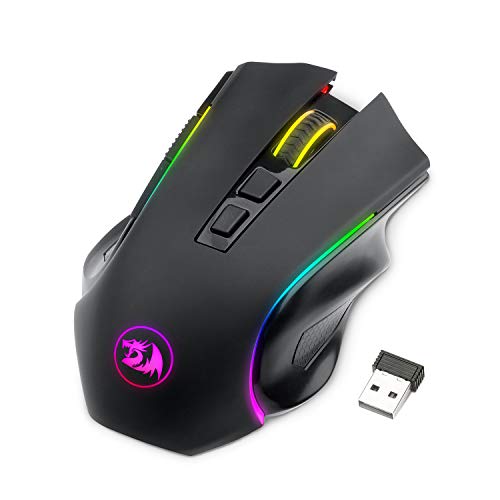 Also Consider Redragon M602 Griffin RGB Gaming Mouse | 9.5PCKitHQ scoreView on Amazon |
05 Also Consider Logitech G309 Lightspeed Wireless Gaming Mouse | 9.4PCKitHQ scoreView on Amazon |
06 Also Consider MELOGAGA Wireless Bluetooth Gaming Mouse | 9.3PCKitHQ scoreView on Amazon |
07 | 9.2PCKitHQ scoreView on Amazon |
A closer look at each configuration
Redragon Wireless Gaming Mouse
score
The tri-mode connection, the 8000 DPI sensor and the Rapid Fire key define this Redragon M814.
- Sensor resolution
- 8000 DPI
- Wireless
- Yes
- Backlight
- Yes
- Warranty
- 2 year
This Redragon M814 switches between 2.4G, Bluetooth and wired USB-C. Seven primary buttons remap through software, and the Rapid Fire key turns one click into three clicks. Sensitivity adjusts from 800 to 8000 DPI on the fly, with a 1000Hz polling rate. Redragon states up to 250 hours of battery life in 2.4G mode with RGB off. RGB lighting and button remapping need the downloadable software for Windows PCs. It carries a 2 year warranty.
Choose it if
- You switch between 2.4G gaming and Bluetooth
- You want a Rapid Fire key for gaming
Consider another if
- You need the 30K sensor of the Naga V2
- You need up to 950 hours like the Orochi V2
Razer Naga V2 HyperSpeed Wireless MMO Gaming Mouse
score
The 19 programmable buttons, the Focus Pro 30K sensor and HyperSpeed wireless define this Naga V2.
- Sensor
- Focus Pro 30K Optical Sensor
- Wireless
- Yes
- Warranty
- 2 year manufacturer
This Razer Naga V2 HyperSpeed carries 19 programmable buttons, with HyperScroll for repeated commands. It connects through Razer HyperSpeed Wireless at 2.4 GHz or Bluetooth. Razer states up to 400 hours on Bluetooth and 250 hours on HyperSpeed. The Focus Pro 30K optical sensor tracks on glass and other surfaces. Mechanical Mouse Switches Gen-2 use gold-plated contact points and are rated for up to 60 million clicks. It carries a 2 year manufacturer warranty.
Choose it if
- You map many commands across 19 buttons
- You want a 30K optical sensor
Consider another if
- You need up to 950 hours like the Orochi V2
- You want an under-60g mouse like the Orochi V2
Razer Orochi V2 Wireless Gaming Mouse
score
The 18K DPI sensor, the under-60g frame and the AA or AAA battery define this Orochi V2.
- Sensor
- Razer 5G Advanced 18K DPI Optical Sensor
- Wireless
- Yes
- Warranty
- 2 year manufacturer
This Razer Orochi V2 connects through HyperSpeed Wireless or Bluetooth. Razer states up to 950 hours on Bluetooth and up to 425 hours on HyperSpeed. The Razer 5G Advanced 18K DPI optical sensor tracks for precise aiming. The mouse weighs under 60g without the battery, and a single AA or AAA battery fits the hybrid slot. Second Gen switches use gold-plated contact points rated for up to 60 million clicks. It carries a 2 year manufacturer warranty.
Choose it if
- You travel with a compact mouse under 60g
- You want up to 950 hours on Bluetooth
Consider another if
- You need 19 buttons like the Naga V2
- You want a rechargeable battery like the M814
Redragon M602 Griffin RGB Gaming Mouse
score
The tri-mode connection, the 250 to 8000 DPI range and the RGB effects define this M602 Griffin.
- Wireless
- Yes
- Backlight
- Yes
- Connection
- Type-C Wired, Bluetooth and 2.4GHz
This Redragon M602 Griffin connects through Type-C wired, Bluetooth and 2.4GHz modes. DPI adjusts from 250 to 8000, with four polling rates from 125Hz to 1000Hz. Nine RGB light effects and 16.8 million color combinations change through the driver. The battery runs between 35 hours with RGB on and 70 hours with RGB off. All buttons program through the driver for macros and remapping. The ergonomic design and skin-friendly material give a comfortable grip.
Choose it if
- You want tri-mode 2.4G, Bluetooth and USB-C
- You want up to 8000 DPI for gaming
Consider another if
- You need a 30K sensor like the Naga V2
- You need up to 950 hours like the Orochi V2
Logitech G309 Lightspeed Wireless Gaming Mouse
score
The HERO 25K sensor, the 86g frame and LIGHTSPEED wireless define this Logitech G309.
- Sensor
- HERO 25K
- Wireless
- Yes
- Warranty
- 1 Year Limited Hardware Warranty
This Logitech G309 switches between LIGHTSPEED wireless and Bluetooth. It weighs 86g with the included AA battery or 68g with POWERPLAY wireless charging. The HERO 25K sensor tracks for precise wireless gaming, and LIGHTFORCE optical-mechanical switches give optical speed with a mechanical feel. Logitech states 300+ hours with the AA battery, and unlimited battery life with POWERPLAY. Up to 6 buttons cover gameplay and shortcuts. It carries a 1 Year Limited Hardware Warranty.
Choose it if
- You want a lightweight mouse at 86g with AA
- You want 300+ hours on one AA battery
Consider another if
- You need 19 buttons like the Naga V2
- You need a 30K sensor like the Naga V2
MELOGAGA Wireless Bluetooth Gaming Mouse
score
The dual-mode connection, the silent buttons and the RGB lighting define this MELOGAGA mouse.
- Wireless
- Yes
- Backlight
- Yes
- Warranty
- 1 YEAR
This MELOGAGA mouse connects through Bluetooth or 2.4G wireless with a USB receiver. DPI adjusts across 1600, 1200 and 800, with 6 buttons for work and gaming. RGB 7-color lights add a visual effect at night. The lights turn off in sleep mode to save power. The built-in rechargeable battery charges through a Type-C port. The ergonomic design supports extended sessions. It carries a 1 YEAR warranty.
Choose it if
- You want silent buttons for work and gaming
- You want RGB lighting with a rechargeable battery
Consider another if
- You need an 8000 DPI sensor like the M814
- You need 19 buttons like the Naga V2
Guiheng Dual Mode Bluetooth Wireless Crack Gaming Mouse
score
The dual-mode connection, the 7-color LED crackle design and the silent buttons define this Guiheng mouse.
- Wireless
- Yes
This Guiheng mouse connects through Bluetooth or 2.4G wireless with a USB receiver. DPI adjusts across 1600, 1200 and 800, with 6 buttons for work and gaming. The crackle design pairs with 7-color LED light that changes automatically. The built-in rechargeable battery charges through the included cable, and smart power-saving sleep mode starts after 8 minutes without use. The ergonomic shape and skin-friendly materials give long-term comfort.
Choose it if
- You want a crackle LED design for gaming nights
- You want dual-mode Bluetooth and 2.4G wireless
Consider another if
- You need an 8000 DPI sensor like the M814
- You need 19 buttons like the Naga V2
Make the choice for your setup
Compare connection modes
Every mouse here connects through Bluetooth, and six of the seven also use 2.4G wireless. The Redragon M814 and the Redragon M602 add a wired USB-C mode for continuous use. The Razer Naga V2 and the Orochi V2 pair Bluetooth with HyperSpeed Wireless at 2.4 GHz. The Logitech G309 pairs Bluetooth with LIGHTSPEED wireless. The MELOGAGA and Guiheng mice pair Bluetooth with 2.4G wireless through a USB receiver. Bluetooth suits office work and travel, while 2.4G suits gaming sessions where the cable stays off the desk. The M814 software for Windows PCs handles RGB lighting and button remapping. The M602 driver handles macros, remapping and DPI changes.
DPI, buttons and polling
The Redragon M814 and the M602 reach 8000 DPI, with the M814 adjusting from 800 to 8000 and the M602 from 250 to 8000. The Razer Naga V2 carries a Focus Pro 30K sensor, the Orochi V2 carries an 18K DPI sensor, and the Logitech G309 carries a HERO 25K sensor. The MELOGAGA and Guiheng mice adjust across 1600, 1200 and 800 DPI. The Naga V2 carries 19 programmable buttons, the M814 carries 7, and the G309 carries up to 6. The M814 polls at 1000Hz, and the M602 offers 125Hz, 250Hz, 500Hz and 1000Hz polling rates. The M814 Rapid Fire key turns one click into three clicks. For a closely related choice, read our guide to the Best Lightweight Wireless Gaming Mouse.
Battery life and weight
Razer states up to 950 hours on Bluetooth for the Orochi V2 and up to 400 hours on Bluetooth for the Naga V2. Redragon states up to 250 hours in 2.4G mode with RGB off for the M814. Logitech states 300+ hours with the AA battery for the G309, with unlimited battery life on POWERPLAY. The M602 battery runs between 35 hours with RGB on and 70 hours with RGB off. The Orochi V2 weighs under 60g without the battery, and the G309 weighs 86g with the AA battery or 68g with POWERPLAY. The MELOGAGA and Guiheng mice use built-in rechargeable batteries.
For a wider shortlist, start with Best Mouse.
FAQ: Bluetooth Gaming Mouse
Which mice here use Bluetooth?
All seven mice connect through Bluetooth. The M814, M602, Naga V2, Orochi V2, G309, MELOGAGA and Guiheng mice all connect through Bluetooth alongside their other connection modes. The M814 and M602 add wired USB-C, and the Razer mice add HyperSpeed Wireless.
Which mouse here lasts longest on Bluetooth?
The Razer Orochi V2 states up to 950 hours on Bluetooth, the longest figure here. The Naga V2 states up to 400 hours on Bluetooth. The G309 states 300+ hours with the AA battery, and the M814 states up to 250 hours in 2.4G mode.
Which mice here are rechargeable?
The M814, M602, MELOGAGA and Guiheng mice use rechargeable batteries. The Orochi V2 takes a single AA or AAA battery, and the G309 takes an AA battery. The Naga V2 runs on a replaceable battery too.