Best Docking Station with Vga Port (2026): 6 Picks Compared
 By Theo LangUpdated
Choose the MOKiN USB C Docking Station Dual DisplayPort for a desk with two DisplayPort monitors at 4K@60Hz, an HDMI monitor at 4K@60Hz and a VGA monitor at 1080P@60Hz. The Selore dock splits its two HDMI outputs between 4K@60Hz and 4K@30Hz, while the MOKiN dock keeps both DisplayPort outputs at 4K@60Hz. All six docks carry a VGA port, so the choice turns on display mix.
Your shortlist at a glance
PCKitHQ scores range from 9.2 to 9.8. See how we pick.
| Product and key specifications | Score and retailer |
|---|---|
01 | 9.8PCKitHQ scoreView on Amazon |
02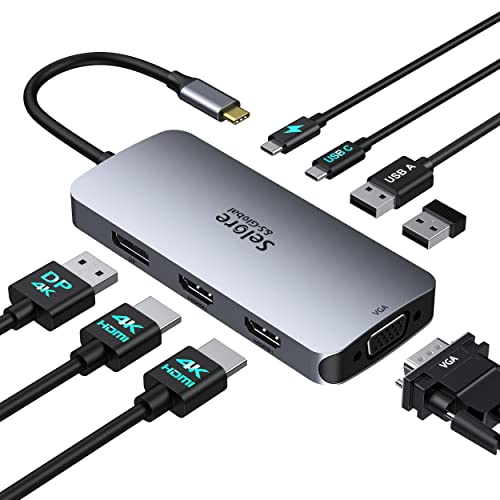 | 9.7PCKitHQ scoreView on Amazon |
03 | 9.6PCKitHQ scoreView on Amazon |
04 | 9.4PCKitHQ scoreView on Amazon |
05 | 9.3PCKitHQ scoreView on Amazon |
06 | 9.2PCKitHQ scoreView on Amazon |
A closer look at each configuration
USB C Docking Station Dual
score
Two DisplayPort outputs at 4K@60Hz, an HDMI output at 4K@60Hz and a VGA output at 1080P@60Hz cover a four-monitor desk from one USB-C port.
- Power delivery
- 100 W
- Interface
- USB C
- HDMI
- Yes
- DisplayPort
- Yes
- USB-C
- Yes
- Weight
- 0.22 lb
The MOKiN dock connects two DisplayPort monitors at 4K@60Hz, one HDMI monitor at 4K@60Hz and one VGA monitor at 1080P@60Hz through a single USB-C connection. Its PD charging port supplies a maximum of 100W, and its USB-C 2.0 port and two USB-A 2.0 ports transfer data at up to 480Mbps. The dock weighs 0.22 lb and works with full-featured USB Type-C ports on Dell, HP and Lenovo laptops. On a MacBook it supports mirror mode only.
Choose it if
- You run two DisplayPort monitors at 4K@60Hz
- You charge a laptop through a 100W PD port
Consider another if
- You need extended mode on a MacBook
- You need data transfer above 480Mbps
Selore USB C Docking Station Dual
score
Dual HDMI at 4K, one DisplayPort at 4K@60Hz and one VGA at 1080P support four monitors, with 100W PD charging.
- Power delivery
- 100 W
- Interface
- USB C
- HDMI
- Yes
- USB-C
- Yes
- Weight
- 0.2 lb
- Warranty
- 18-month
The Selore dock drives four monitors: two HDMI outputs at 4K, with one at 60Hz and one at 30Hz, one DisplayPort at 4K@60Hz and one VGA output at 1080P. Its PD port charges a laptop at up to 100W, and its USB-C 2.0 port and two USB 2.0 ports move data at up to 480Mbps. The dock weighs 0.2 lb and needs a full-featured USB-C port, a Thunderbolt 3 or 4 port, or a USB4 port. On a MacBook it works in mirroring mode.
Choose it if
- You drive four monitors from one USB-C port
- You want dual HDMI outputs at 4K resolution
Consider another if
- You need both HDMI outputs at 4K@60Hz
- You need extended mode on a MacBook
Anker Laptop Docking Station 3 Monitors
score
Fourteen connections include two 4K HDMI ports, a 1080p VGA port, a 1 Gbps Ethernet port and an SD and microSD slot.
- Power delivery
- 80 W
- Interface
- USB-C
- HDMI
- Yes
- Ethernet
- Yes
- USB-C
- Yes
- Weight
- 0.3 lb
- Warranty
- 18-month
The Anker dock offers 14 connections: two 4K HDMI ports, a 1080p VGA port, a 5 Gbps USB-C port, five USB-A ports, a 1 Gbps Ethernet port, an SD and microSD slot and an AUX port. It streams across three monitors, with 4K through the two HDMI ports and 1080p through the VGA port. Its USB-C PD-IN port accepts 100W, and the hub passes 80W through to the laptop, with the wall charger not included.
Choose it if
- You run three monitors at once from one dock
- You need a 1 Gbps Ethernet port
Consider another if
- You need more than 80W pass-through charging
- You need Linux support for this dock
Hortore Docking Station USB C Hub Multiport Adapter Triple Display
score
A DisplayLink DL-3900 chip drives three monitors, with one HDMI output at 4K 60Hz and 92W charging to the laptop.
- Power delivery
- 92 W
- Interface
- USB C
- HDMI
- Yes
The Hortore dock uses a DisplayLink DL-3900 chip to run three external monitors, with dual HDMI and a VGA port and one HDMI output at 4K 60Hz. Its 100W PD input port supplies up to 92W charging to the laptop while the dock runs, and its Ethernet port offers a 1000Mbps wired connection. A USB 3.0 port reaches 5Gbps, three USB 2.0 ports run at 480Mbps, and the SD and TF card reader supports up to 104MB/s.
Choose it if
- You connect three external monitors at once
- You want 3-year replacement coverage on the dock
Consider another if
- You need more than 92W charging to the laptop
- You need a 10 Gbps USB-C port
Acer USB C Hub
score
A 9-in-1 hub pairs a 4K@30Hz HDMI output with a 1080P VGA output and a 90W maximum charging output.
- Power delivery
- 90 W
- Interface
- USB C
- HDMI
- Yes
- Ethernet
- Yes
- USB-C
- Yes
- Weight
- 0.18 lb
- Warranty
- 1 year
The Acer hub expands one USB-C port into nine ports: one HDMI at 4K@30Hz, one VGA at 1080P, one RJ45 Ethernet port at 1000Mbps, three USB-A 3.0 ports at 5Gbps, a 100W PD charging port and microSD and SD slots. It runs HDMI and VGA dual display at up to 1080P@60Hz, with mirror and extend modes. The hub accepts up to 100W input and provides a 90W maximum output to the laptop.
Choose it if
- You use HDMI and VGA displays together
- You need a 1 Gbps Ethernet connection
Consider another if
- You need HDMI output above 4K@30Hz
- You need more than 90W charging output
ORICO 20-in-1 Laptop Docking Station
score
Twenty connections include two DisplayPort outputs, one HDMI output and one VGA output for up to four monitors.
- Power delivery
- 60 W
- Interface
- USB C
- HDMI
- Yes
- DisplayPort
- Yes
- Ethernet
- Yes
- USB-C
- Yes
- Weight
- 1.1 lb
The ORICO dock packs 20 connections: one HDMI, two DisplayPorts, one VGA, two USB-C 3.2 Gen 2 ports, three USB-A 3.0 ports, three USB-A 2.0 ports, three audio jacks, SD and TF slots and Gigabit Ethernet. It supports up to four monitors at once, with 4K resolution through HDMI and the DisplayPorts. Its USB-C ports transfer at 10Gbps, and its 90W DC input port feeds a 60W USB-C PD output port for the laptop.
Choose it if
- You connect up to four monitors at once
- You need three audio jacks with volume control
Consider another if
- You need more than 60W pass-through charging
- You need multi-screen display on macOS
Make the choice for your setup
Match the display mix to your monitors
Start with the monitors. The MOKiN dock runs two DisplayPort monitors at 4K@60Hz, one HDMI monitor at 4K@60Hz and one VGA monitor at 1080P@60Hz. The Selore dock runs two HDMI monitors at 4K, one at 60Hz and one at 30Hz, plus a DisplayPort monitor at 4K@60Hz and a VGA monitor at 1080P. The Anker dock runs three monitors in 4K and 1080p. The Hortore dock runs three monitors with one HDMI output at 4K 60Hz. The ORICO dock runs up to four monitors with 4K through HDMI and its DisplayPorts. On a MacBook the MOKiN and Selore docks mirror only, the Anker dock shows identical displays on macOS, and the ORICO dock extends only one external monitor.
Compare charging power and data speed
Charging power differs even where the input figure matches. The MOKiN and Selore docks both charge at up to 100W. The Anker dock accepts 100W at its PD-IN port and passes 80W through to the laptop. The Hortore dock takes 100W in and supplies up to 92W. The Acer hub accepts up to 100W input and provides a 90W maximum output. The ORICO dock takes 90W in and passes 60W through its USB-C PD output. The MOKiN and Selore docks move data at up to 480Mbps. The Anker dock moves files at 5 Gbps. The Hortore USB 3.0 port reaches 5Gbps. The Acer hub's three USB-A 3.0 ports run at 5Gbps, while only the ORICO dock's two USB-C 3.2 Gen 2 ports run at 10Gbps; its USB-A 3.0 ports run at 5Gbps and its USB-A 2.0 ports at 480Mbps. For a closely related choice, read our guide to the Best Docking Station for Dell Laptop.
Count the ports you will use daily
Count every port against the devices on the desk. The MOKiN dock is 8-in-1 with two DisplayPorts, one HDMI, one VGA, one USB-C 2.0 port, two USB-A 2.0 ports and a PD charging port. The Anker dock is 14-in-1 with five USB-A ports, a 1 Gbps Ethernet port, an SD and microSD slot and an AUX port. The Hortore dock is 12-in-1 with an RJ45 port, USB-A and USB-C 3.0 ports and an SD and TF card reader. The Acer hub is 9-in-1 with three USB-A 3.0 ports, an RJ45 Ethernet port and microSD and SD slots. The ORICO dock is 20-in-1 with three audio jacks and volume control, SD and TF slots and Gigabit Ethernet.
For a wider shortlist, start with Best Docking Station.
FAQ: Docking Station with Vga Port
Which dock charges a laptop at 100W?
The MOKiN and Selore docks charge at up to 100W through their PD ports. The Hortore dock supplies up to 92W, the Acer hub provides a 90W maximum output, the Anker dock passes 80W through, and the ORICO dock passes 60W through its USB-C PD output. Check the input figure against the output figure before choosing.
Which docks run four monitors at once?
The MOKiN dock runs two DisplayPort monitors at 4K@60Hz, one HDMI monitor at 4K@60Hz and one VGA monitor at 1080P@60Hz. The Selore dock runs two HDMI monitors at 4K, one DisplayPort monitor at 4K@60Hz and one VGA monitor at 1080P. The ORICO dock runs up to four monitors with 4K through HDMI and its DisplayPorts.
Do these docks work with a MacBook?
The MOKiN dock supports mirror mode only on a MacBook, and the Selore dock works in mirroring mode on a MacBook. The Anker dock shows identical displays on external monitors under macOS. The ORICO dock extends only one external monitor on macOS. The Hortore dock works with Windows and macOS with mirror, extend and MST display modes.