Best Docking Station RGB (2026): 5 Picks Compared
 By Theo LangUpdated
The SUITOK Dual Bay SATA Hard Drive Cloner Dock USB C suits buyers who want two drive bays holding 40TB in total, at 20TB per bay, plus one-key offline cloning and RGB lighting. The FARBOKO dock matches that 40TB total. The Inateck dock holds two drives with offline cloning and RGB lighting. The JoyReken hub takes a different direction with 4K HDMI output at 30Hz and 85W pass-through charging instead of drive bays.
Your shortlist at a glance
PCKitHQ scores range from 9.2 to 9.8. See how we pick.
| Product and key specifications | Score and retailer |
|---|---|
01 | 9.8PCKitHQ scoreView on Amazon |
02 Second Pick Dual-Bay RGB Hard Drive Docking Station | 9.7PCKitHQ scoreView on Amazon |
03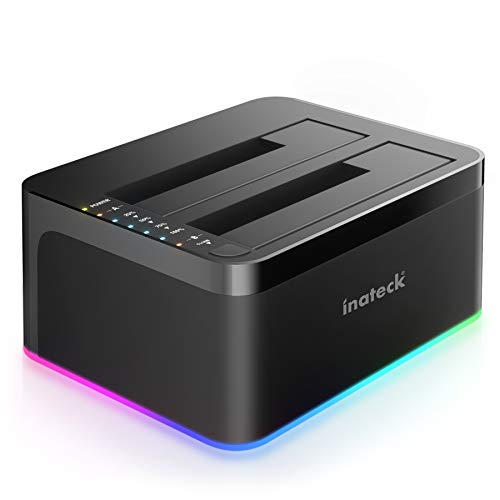 | 9.5PCKitHQ scoreView on Amazon |
04 | 9.3PCKitHQ scoreView on Amazon |
05 | 9.2PCKitHQ scoreView on Amazon |
A closer look at each configuration
SUITOK Dual Bay SATA Hard Drive Cloner Dock USB C 5Gbps
score
The SUITOK dock pairs two SATA bays holding 40TB in total with one-key offline cloning, a 5Gbps USB-C connection, and RGB lighting.
- Interface
- USB 3.2 Gen1
- USB-C
- Yes
- Weight
- 0.59 lb
- Warranty
- 18 months by SUITOK
This dock holds two 2.5-inch or 3.5-inch SATA drives, with 20TB in each bay for 40TB in total. Its USB 3.2 Gen1 connection runs at 5Gbps through the RTL9201DP bridge chip, and it supports UASP, TRIM, and S.M.A.R.T. monitoring. Offline cloning runs with one key press and no computer connected, while the LED progress bar shows 25%, 50%, 75%, and 100% as the copy advances. The vertical open-air design uses tool-free insertion, cooling vents, and anti-slip silicone pads. The fabric top panel carries customizable RGB lighting. It works with Windows, macOS, Linux, Chrome OS, and Android through OTG. SUITOK covers it for 18 months, and it weighs 0.59 lb.
Choose it if
- You want two bays holding 20TB drives each
- You want offline cloning without a computer connected
Consider another if
- You need 4K HDMI output for an external display
- You need 85W pass-through charging for a laptop
Dual-Bay RGB Hard Drive Docking Station
score
The FARBOKO dock holds two 20TB drives, clones offline when the copy button is held for about five seconds, and adds flowing RGB lighting.
- Interface
- USB 3.0
- Weight
- 1.2 lb
This dock holds two 2.5-inch or 3.5-inch SATA drives at 20TB each. Its USB 3.0 interface supports UASP and TRIM. Offline cloning starts by holding the copy button for about five seconds, and all indicators light up when the copy completes; the target drive must hold more capacity than the source drive. Flowing RGB lights run while a hard drive is connected, and the LEDs switch to a blinking mode when no cloning is in progress. The 2-in-1 USB A and USB-C cable supports plug-and-play use with hot-swap, so drives can connect or disconnect without shutting the device down. A 12V 2A power adapter is included. It works with Windows, Mac OS, and Linux, and it weighs 1.2 lb.
Choose it if
- You want offline cloning started by holding the copy button for about five seconds
- You want two bays holding 20TB drives each
Consider another if
- You need the 5Gbps USB 3.2 Gen1 connection of the SUITOK
- You need 4K HDMI output for an external display
Inateck RGB SATA to USB 3.0 Hard Drive Docking Station
score
The Inateck dock combines offline cloning, UASP support, and RGB lighting that changes with drive activity.
- Interface
- USB 3.0
- Weight
- 0.57 lb
- Warranty
- 1 year
This Inateck dock accepts 2.5-inch and 3.5-inch HDDs and SSDs, with room for up to two hard drives. Its USB 3.0 connection supports UASP for data transfer. Offline cloning runs independent from a computer. The RGB LED flashes quickly while a hard drive is working in the dock, and it switches to a different light pattern when the hard drive is under sleep status or gets removed. A 12V/3A power adapter and a USB 3.0 data cable come in the package. The dock weighs 0.57 lb, and Inateck covers it with a 1-year warranty.
Choose it if
- You want RGB lighting that signals drive activity
- You want offline cloning independent from a computer
Consider another if
- You need 40TB total capacity across two bays
- You need a 5Gbps USB-C connection like the SUITOK
USB C Hub
score
The JoyReken hub adds 4K HDMI output, 85W pass-through charging, and three USB-A ports to a USB-C laptop.
- Power delivery
- 85 W
- Interface
- USB-C 3.0
- HDMI
- Yes
- USB-C
- Yes
- Weight
- 0.42 lb
- Warranty
- 12 months
This 8-in-1 hub connects through USB-C and adds a 4K HDMI port at 30Hz, a USB-C 3.0 port, three USB-A 3.0 ports, and microSD and SD card slots. Its USB-C PD input accepts 100W and delivers up to 85W of pass-through charging to a laptop, reserving 15W for the hub itself; the wall charger and cable are not included. Data transfer runs at up to 5Gbps across the USB-C and USB-A ports, and SD and microSD cards read at up to 104 Mbps. The upright design uses an adhesive strip on the bottom and a 1.6ft cable. Mac OS supports mirror mode only. The hub weighs 0.42 lb and carries a 12-month warranty.
Choose it if
- You want 4K HDMI output at 30Hz for a monitor
- You want 85W pass-through charging for a laptop
Consider another if
- You need two drive bays holding 20TB drives each
- You need offline cloning without a computer connected
Computer Docking Station RGB Multi-Task Overload Protection Electronics
score
The Generic dock centers on 13 USB ports with 7-color gradient lighting and overload protection.
- Interface
- USB
This dock provides 13 USB ports for centralized management of drives and input peripherals, with simultaneous connectivity that reduces cable swapping. Its 7-color gradient illumination runs in dynamic lighting modes. The dock supplies stable high-current output for continuous working and uses auto energy detection with smart current allocation to protect connected electronics from overloads and surges. Optimized port placement and cable-friendly features support a laptop setup in a home, school, library, dorm, or apartment workspace. The dock is white.
Choose it if
- You want 13 USB ports managed from one dock
- You want 7-color gradient lighting on your desk
Consider another if
- You need 4K HDMI output for an external display
- You need two drive bays holding 20TB drives each
Make the choice for your setup
Match the dock to your drives
The three drive docks in this guide hold SATA hard drives, while the other two picks serve different needs. The SUITOK dock holds two 2.5-inch or 3.5-inch SATA drives at 20TB each, for 40TB in total. The FARBOKO dock also holds two drives at 20TB each. The Inateck dock holds up to two hard drives, with 2.5-inch and 3.5-inch HDDs and SSDs supported. The JoyReken hub takes a different direction: it adds ports, video output, and charging to a USB-C laptop. The Generic dock centers on 13 USB ports for drives and peripherals. Start with the number of drives you need to connect, then check the capacity each bay supports.
Weigh cloning against ports and video
Offline cloning separates the three drive docks from the other picks. The SUITOK dock clones with one key press and shows progress on an LED bar at 25%, 50%, 75%, and 100%. The FARBOKO dock starts cloning when the copy button is held for about five seconds, and all indicators light up when the copy completes. The Inateck dock also clones offline, independent from a computer. The JoyReken hub takes a different path with 4K HDMI output at 30Hz, 85W pass-through charging, and three USB-A ports. The Generic dock takes another path with 13 USB ports and overload protection. Decide whether a copy without a computer matters more than video output or extra ports. If that fits your setup better, see our guide to the Best Docking Station for Surface Pro 11.
Check the connection and power details
Each pick connects differently, so match the interface to your computer. The SUITOK dock uses USB 3.2 Gen1 at 5Gbps with a USB-C connection and the RTL9201DP bridge chip. The FARBOKO and Inateck docks use USB 3.0, and both support UASP. The JoyReken hub uses USB-C 3.0 at 5Gbps, offers a 4K@30Hz HDMI output for mirror or extend use on a TV, monitor, or projector, and takes 100W in to deliver 85W of pass-through charging. The FARBOKO dock ships with a 12V 2A power adapter, and the Inateck dock ships with a 12V/3A power adapter. Check the cable and adapter in the package before you buy.
For a wider shortlist, start with Best Docking Station.
FAQ: Docking Station RGB
Which docks in this guide hold two hard drives?
The SUITOK dock holds two drives at 20TB each, for 40TB in total. The FARBOKO dock also holds two drives at 20TB each. The Inateck dock holds up to two hard drives. Check the capacity each bay supports before choosing.
Which docks clone a drive without a computer?
The SUITOK dock clones with one key press, the FARBOKO dock clones when its copy button is held for about five seconds, and the Inateck dock clones offline independent from a computer. For the FARBOKO dock, the target drive must hold more capacity than the source drive.
Which pick adds video output and laptop charging?
The JoyReken hub adds 4K HDMI output at 30Hz and 85W pass-through charging through USB-C, with a 100W PD input. Your computer's USB-C port must support DisplayPort Alt Mode, and Mac OS supports mirror mode only.