
Best Delta E Monitor (2026): Top 4 by the Specs
 By Theo LangUpdated
Choose the ASUS ProArt PA278QGV 27 Inch 1440p QHD Professional Monitor for color work that needs Calman Verified Delta E < 2 accuracy. Its 27-inch QHD IPS panel covers 95% DCI-P3 and 100% sRGB, with a 120Hz variable refresh rate and an ergonomic stand. The other monitors here trade resolution, refresh rate, panel type and Delta E figures against that baseline.
Your shortlist at a glance
PCKitHQ scores range from 9.2 to 9.8. See how we pick.
| Product and key specifications | Score and retailer |
|---|---|
01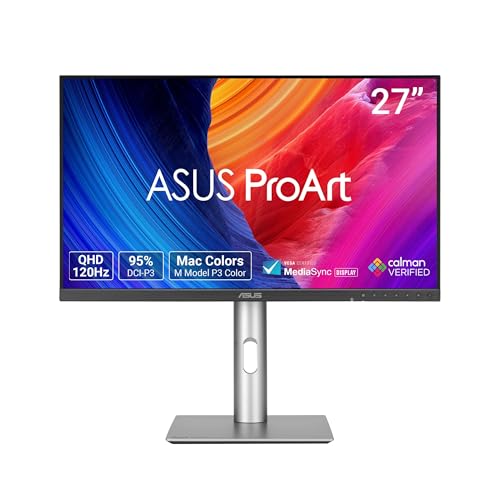 | 9.8PCKitHQ scoreView on Amazon |
02 Highest Native Refresh ASUS ProArt PA32UCDM 32-inch 4K Professional Monitor for Mac3840 x 2160, 240 Hz | 9.6PCKitHQ scoreView on Amazon |
03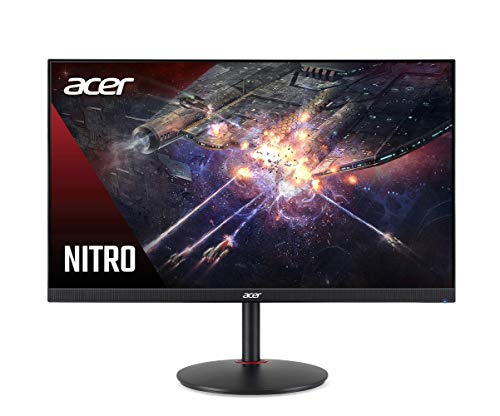 | 9.4PCKitHQ scoreView on Amazon |
04 | 9.2PCKitHQ scoreView on Amazon |
A closer look at each configuration
ASUS ProArt PA278QGV 27-inch Professional Monitor
score
The 27-inch QHD IPS panel pairs Calman Verified Delta E < 2 accuracy with 95% DCI-P3, 100% sRGB and a 120Hz variable refresh rate.
- Resolution
- 2560 x 1440
- Native refresh rate
- 120 Hz
- Screen size
- 27 in
- Panel
- IPS
- HDMI
- Yes
- DisplayPort
- Yes
- Weight
- 14.1 lb
- Warranty
- 3 years
This ASUS ProArt PA278QGV has a 27-inch QHD IPS panel at 2560 x 1440 with a 120Hz variable refresh rate. Its color coverage is 95% DCI-P3 and 100% sRGB, and its factory calibration is Calman Verified at Delta E < 2. The ASUS Light Sync solution uses an ambient light sensor to adjust the color gamut based on ambient lighting. Connections include DisplayPort, HDMI and a USB hub. HDR-10 compatibility is included. The ergonomic stand adjusts tilt, swivel, pivot and height, and the monitor is VESA wall-mountable. The warranty is 3 years, and a 5-year warranty covers 3 years plus 2 years extension with online registration. The package includes a USB Type-B to A cable, a DisplayPort cable and an HDMI cable.
Choose it if
- You want a 27-inch QHD IPS panel with Calman Verified Delta E < 2 accuracy
- You want 95% DCI-P3 and 100% sRGB coverage for color-critical work
Consider another if
- You need a 4K resolution panel
- You need a 240Hz native refresh rate
ASUS ProArt PA32UCDM 32-inch 4K Professional Monitor for Mac
score
The 32-inch 4K QD-OLED panel pairs Delta E < 1 color accuracy with a 240Hz refresh rate, 99% DCI-P3 and Thunderbolt 4.
- Resolution
- 3840 x 2160
- Native refresh rate
- 240 Hz
- Panel
- QD-OLED
- Weight
- 19.8 lb
- Warranty
- 3 years
This ASUS ProArt PA32UCDM has a 32-inch 4K QD-OLED panel at 3840 x 2160 with a 240Hz refresh rate and a 0.1 ms (GTG) response time. Its color coverage is 100% sRGB, 99% DCI-P3 and BT. 2020, with true 10-bit color depth and Delta E < 1 color performance. Peak brightness is 1000 nits with VESA DisplayHDR True Black 400. Connectivity includes Thunderbolt 4 with 96W power delivery, and the monitor supports Dolby Vision, HLG and HDR10. An ergonomic stand is included. The warranty is 3 years, and a 5-year warranty covers 3 years plus 2 years extension with online registration.
Choose it if
- You want a 32-inch 4K QD-OLED panel at a 240Hz refresh rate
- You want Delta E < 1 color accuracy with 99% DCI-P3 coverage
Consider another if
- You need an IPS panel rather than QD-OLED
- You need a 27-inch screen size
acer Nitro XV272U Pbmiiprzx 27-inch WQHD Compatible Monitor
score
The 27-inch WQHD IPS panel pairs Delta E < 2 color accuracy with a 144Hz refresh rate and VESA Certified DisplayHDR400.
- Resolution
- 2560 x 1440
- Native refresh rate
- 144 Hz
- Panel
- IPS
- HDMI
- Yes
- Weight
- 10.82 lb
- Warranty
- 3 year parts and labor
This acer Nitro XV272U Pbmiiprzx has a 27-inch WQHD IPS panel at 2560 x 1440 with a 144Hz refresh rate and a 1ms VRB response time. Its color support is 1.07 billion colors with DCI-P3 coverage and Delta E < 2 accuracy. Brightness is 400 cd per square meter with VESA Certified DisplayHDR400. The aspect ratio is 16:9 with a 178-degree viewing angle horizontally and vertically. The warranty is 3 year parts and labor.
Choose it if
- You want a 27-inch WQHD IPS panel at a 144Hz refresh rate
- You want Delta E < 2 accuracy with DCI-P3 and DisplayHDR400
Consider another if
- You need a 4K resolution panel
- You need a 240Hz native refresh rate
Acer ProDesigner PE270K L1smiqpruzx 27-inch 4K UHD Monitor
score
The 27-inch 4K UHD IPS panel pairs factory-calibrated Delta E < 1 accuracy with 99% Adobe RGB, 96% DCI-P3 and USB-C 90W charging.
- Resolution
- 3,840×2,160
- Native refresh rate
- 72 Hz
- Panel
- IPS
- USB-C
- Yes
- HDMI
- Yes
- DisplayPort
- Yes
- Weight
- 24.65 lb
- Warranty
- 3 year parts and labor
This Acer ProDesigner PE270K L1smiqpruzx has a 27-inch 4K UHD IPS panel at 3,840 x 2,160 with a 72Hz native refresh rate and 163 pixels per inch. Its color coverage is 99% Adobe RGB and 96% DCI-P3, and its factory calibration is Calman Verified at Delta E < 1 under Adobe RGB mode. The DFR technology toggles between 4K at 72Hz and 1080p at 144Hz. Connections include USB-C with 90W charging, DisplayPort 1.4, HDMI 2.1 and DisplayPort daisy-chain support. A built-in KVM switch controls two PCs, and a Smart Dial adjusts brightness, color space and volume. The warranty is 3 year parts and labor.
Choose it if
- You want a 27-inch 4K UHD IPS panel at 163 pixels per inch
- You want Delta E < 1 accuracy with 99% Adobe RGB coverage
Consider another if
- You need a 240Hz native refresh rate
- You need a QD-OLED panel rather than IPS
Make the choice for your setup
Compare Delta E figures across these monitors
The ASUS ProArt PA278QGV is Calman Verified at Delta E < 2 with 95% DCI-P3 and 100% sRGB. The ASUS ProArt PA32UCDM reaches Delta E < 1 with 99% DCI-P3, 100% sRGB and BT. 2020. The acer Nitro XV272U Pbmiiprzx is rated at Delta E < 2 with DCI-P3 coverage and DisplayHDR400. The Acer ProDesigner PE270K L1smiqpruzx is factory calibrated at Delta E < 1 under Adobe RGB mode with 99% Adobe RGB and 96% DCI-P3. A smaller Delta E figure means the displayed color sits closer to the target color. Compare the figure with the color spaces each monitor covers, since Delta E < 1 measured under Adobe RGB mode does not describe other color spaces.
Match resolution and refresh rate to the work
The ASUS ProArt PA278QGV has a 27-inch QHD panel at 2560 x 1440 with a 120Hz variable refresh rate. The ASUS ProArt PA32UCDM has a 32-inch 4K panel at 3840 x 2160 with a 240Hz refresh rate. The acer Nitro XV272U Pbmiiprzx has a 27-inch WQHD panel at 2560 x 1440 with a 144Hz refresh rate. The Acer ProDesigner PE270K L1smiqpruzx has a 27-inch 4K panel at 3,840 x 2,160 with a 72Hz native refresh rate, and its DFR technology toggles between 4K at 72Hz and 1080p at 144Hz. A 4K panel holds 3840 x 2160 pixels, while a QHD panel holds 2560 x 1440 pixels. Match the resolution to the detail the work needs and the refresh rate to the motion the work shows. Shoppers with a related need can compare our guide to the Best 1440p Monitor with HDMI 2.1.
Check ports, stands and warranty terms
The ASUS ProArt PA278QGV connects through DisplayPort, HDMI and a USB hub, and its ergonomic stand adjusts tilt, swivel, pivot and height. The ASUS ProArt PA32UCDM connects through Thunderbolt 4 with 96W power delivery. The acer Nitro XV272U Pbmiiprzx connects through 2 HDMI 2.0 ports and 4 USB 3.0 ports. The Acer ProDesigner PE270K L1smiqpruzx connects through USB-C with 90W charging, DisplayPort 1.4, HDMI 2.1 and DisplayPort daisy-chain support, with a built-in KVM switch for two PCs. The ASUS monitors carry a 3-year warranty with a 5-year term as 3 years plus 2 years extension with online registration. The acer and Acer monitors carry a 3 year parts and labor warranty.
Before you decide, also read 24 vs 27 Inch Monitor.
FAQ: Delta E Monitor
Which monitor here has the lowest Delta E figure?
The ASUS ProArt PA32UCDM and the Acer ProDesigner PE270K L1smiqpruzx are both rated at Delta E < 1. The ASUS ProArt PA32UCDM is a 32-inch 4K QD-OLED panel at 240Hz. The Acer ProDesigner PE270K L1smiqpruzx is a 27-inch 4K IPS panel at 72Hz native refresh with Delta E < 1 measured under Adobe RGB mode.
What refresh rates do these monitors offer?
The ASUS ProArt PA278QGV has a 120Hz variable refresh rate. The ASUS ProArt PA32UCDM has a 240Hz refresh rate. The acer Nitro XV272U Pbmiiprzx has a 144Hz refresh rate. The Acer ProDesigner PE270K L1smiqpruzx has a 72Hz native refresh rate, and its DFR technology toggles between 4K at 72Hz and 1080p at 144Hz.
What connections do these monitors offer?
The Acer ProDesigner PE270K L1smiqpruzx connects through USB-C with 90W charging, DisplayPort 1.4, HDMI 2.1 and DisplayPort daisy-chain support. The ASUS ProArt PA32UCDM connects through Thunderbolt 4 with 96W power delivery. The ASUS ProArt PA278QGV connects through DisplayPort, HDMI and a USB hub.


