
Best Computer Mouse Usbc Wireless (2026): 5 Picks Compared
 By Theo LangUpdated
Buy the Logitech MX Anywhere 3S Compact Wireless Mouse Fast Scrolling if you work across Windows, macOS, Chrome OS and Linux and want an 8K DPI sensor that tracks on any surface, even glass. It connects to up to 3 devices over Bluetooth, scrolls at 1000 lines per second with the MagSpeed wheel, and charges over USB-C. The other four mice cover tri-mode wireless, Type-C receivers, six-button layouts and rechargeable Bluetooth in different combinations.
Your shortlist at a glance
PCKitHQ scores range from 9.2 to 9.8. See how we pick.
| Product and key specifications | Score and retailer |
|---|---|
01 | 9.8PCKitHQ scoreView on Amazon |
02 Second Pick Uciefy Bluetooth Wireless Mouse | 9.7PCKitHQ scoreView on Amazon |
03 Also Consider cimetech Type C Wireless Mouse | 9.5PCKitHQ scoreView on Amazon |
04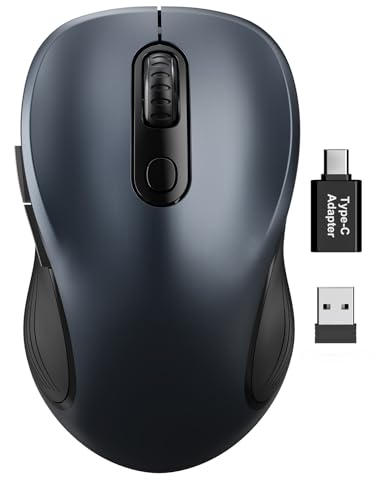 Also Consider Trueque Wireless Mouse for Laptop | 9.3PCKitHQ scoreView on Amazon |
05 | 9.2PCKitHQ scoreView on Amazon |
A closer look at each configuration
Logitech MX Anywhere 3S Compact Wireless Mouse Fast Scrolling
score
The 8K DPI sensor, MagSpeed scroll wheel and Bluetooth connection to 3 devices define this compact Logitech mouse.
- Wireless
- Yes
- Connection
- Bluetooth
- Weight
- 0.44 lb
- Warranty
- 1 Year Limited Hardware Warranty
The MX Anywhere 3S tracks on any surface, even glass, with its 8K DPI sensor. Its MagSpeed scroll wheel is rated at 1000 lines per second, and Quiet Clicks reduce click noise compared with the MX Anywhere 3. It connects to up to 3 devices over Bluetooth and works with Windows, macOS, Chrome OS and Linux. Logitech states up to 70 days on a full charge, with up to 3 hours of use from a 1-minute charge over the included USB-C cable. The mouse weighs 0.44 lb and carries a 1 Year Limited Hardware Warranty. It is compatible with a Logi Bolt USB receiver, but the receiver is not included.
Choose it if
- You switch between 3 devices on Windows, macOS, Chrome OS or Linux
- You want quiet clicks and an 8K DPI sensor for glass surfaces
Consider another if
- You need a USB receiver included in the box
- You need to connect more than 3 devices at once
Uciefy Bluetooth Wireless Mouse
score
Tri-mode Bluetooth 5.0/5.1 and 2.4GHz wireless, a visible battery level and seven-color LED lights define this Uciefy mouse.
- Wireless
- Yes
- Connection
- bluetooth 5.0/5.1 dual modes and 2.4GHz
- Weight
- 0.17 lb
The Uciefy mouse connects over Bluetooth 5.0/5.1 in dual modes and 2.4GHz, with a USB receiver and a Type-C adapter included, and switches between three devices. Its built-in rechargeable battery charges over USB-C, with a charging indicator in front of the wheel and a battery level visible behind the mouse. It works with Windows, macOS, iPadOS, ChromeOS and Linux, and weighs 0.17 lb. Bluetooth is incompatible with the Apple M4 chip.
Choose it if
- You switch between 3 devices with Bluetooth and 2.4GHz
- You want a visible battery level and a rechargeable USB-C mouse
Consider another if
- You need Bluetooth on an Apple M4 chip device
- You need a mouse without LED lighting
cimetech Type C Wireless Mouse
score
A Type-C receiver, 2.4GHz wireless and three DPI levels up to 1600 define this slim ambidextrous cimetech mouse.
- Connection
- 2.4GHz wireless technology
- Weight
- 0.11 lb
The cimetech mouse uses 2.4GHz wireless technology with a Type-C receiver that stores in the battery compartment, and its wireless transmission distance reaches up to 33 feet. Three DPI levels (1000/1200/1600) adjust precision for different screen sizes, and the silent click design with a mute button reduces noise. A precision metal scroll wheel and a 30-degree ergonomic grip angle with a contoured handle shape the slim ambidextrous body. It works with Windows, Linux and Mac OS, and weighs 0.11 lb.
Choose it if
- You want a Type-C receiver for a MacBook or laptop
- You want a slim mouse with a 30-degree ergonomic grip angle
Consider another if
- You need Bluetooth instead of a 2.4GHz receiver
- You need DPI above 1600 for your screen size
Trueque Wireless Mouse for Laptop
score
Six responsive buttons, three DPI levels up to 1600 and a 24-month warranty define this ergonomic Trueque mouse.
- Connection
- 2.4GHz USB receiver
- Warranty
- 24-month warranty
The Trueque mouse has 6 responsive buttons, including dedicated forward and back shortcuts, and 3 adjustable DPI levels (800/1200/1600). Its contoured shape fits the natural curve of the hand, and silent clicks reduce noise in shared workspaces, libraries and meetings. It includes a standard USB receiver and a USB-C adapter, and works with Windows, Mac, Linux and Chrome OS. The mouse enters auto-sleep mode after 15 minutes of inactivity, and Trueque states up to 12 months of use on 1 AA battery, which is not included. It carries a 24-month warranty.
Choose it if
- You want forward and back buttons for web browsing
- You want silent clicks for shared workspaces and libraries
Consider another if
- You need a rechargeable battery instead of a AA battery
- You need DPI above 1600 for your work
Quntee Wireless Bluetooth Mouse USBC for MacBook Air Laptop
score
Bluetooth 5.2, a 2.4G receiver, a Type-C adapter and three DPI levels up to 1600 define this rechargeable Quntee mouse.
- Wireless
- Yes
- Connection
- Bluetooth(BT5.2/3.0) 2.4G USB A receiver and Type-C adapter
- Weight
- 0.2 lb
- Warranty
- 18 Months
The Quntee mouse connects over Bluetooth 5.2/3.0, a 2.4G USB A receiver and a Type-C adapter, with three connection modes for MacBook, laptop and other devices. Three DPI levels (800/1200/1600) adjust precision, and the 2.4G connection stays stable up to 33 feet. Its built-in battery charges in 2.5 hours, and Quntee states it lasts up to 2-3 weeks, with auto-sleep after 1 or 10 minutes of inactivity. The streamlined arc design and frosted finish suit small to medium-sized hands, and silent clicks fit quiet rooms. It weighs 0.2 lb and carries an 18 Months warranty.
Choose it if
- You switch between Bluetooth and 2.4G across several devices
- You have small to medium-sized hands and want a silent mouse
Consider another if
- Your hands are larger than medium size
- You need DPI above 1600 for detailed design work
Make the choice for your setup
Match the connection to your ports
The five mice connect in different ways, so match the connection to the ports on your computer. The Logitech MX Anywhere 3S connects over Bluetooth to up to 3 devices and charges over USB-C, while a Logi Bolt USB receiver works with it but is not included. The Uciefy and Quntee mice add 2.4GHz alongside Bluetooth, with a USB receiver and a Type-C adapter in the box. The cimetech mouse uses a Type-C receiver, and the Trueque mouse includes a standard USB receiver and a USB-C adapter. Check which ports your laptop has before choosing, since a mouse that needs a receiver occupies a port.
Compare DPI levels and button counts
DPI sets how far the pointer moves for a small hand movement. The Logitech MX Anywhere 3S has an 8K DPI sensor, while the cimetech, Trueque and Quntee mice offer three adjustable levels up to 1600 DPI: 1000/1200/1600 for cimetech and 800/1200/1600 for Trueque and Quntee. Button counts differ too: the Trueque mouse has 6 responsive buttons with forward and back shortcuts, and the Logitech mouse has programmable buttons. The Quntee mouse pairs its three DPI levels with a stable 2.4G connection up to 33 feet. The cimetech mouse ties its three DPI levels to the precision different screen sizes call for. If that fits your setup better, see our guide to the Best Computer Mouse in Shape of A Car.
Weigh battery life, weight and warranty
Battery life, weight and warranty separate these mice once the connection and DPI fit. Logitech states up to 70 days on a full charge for the MX Anywhere 3S, with up to 3 hours from a 1-minute charge, and the mouse weighs 0.44 lb with a 1 Year Limited Hardware Warranty. The Uciefy and Quntee mice recharge over USB-C, and Quntee states its battery lasts up to 2-3 weeks after a 2.5-hour charge. The Trueque mouse runs on 1 AA battery, with Trueque stating up to 12 months of use, and carries a 24-month warranty. The cimetech mouse weighs 0.11 lb, the Uciefy mouse weighs 0.17 lb, and the Quntee mouse weighs 0.2 lb and carries an 18 Months warranty.
Comparing more options? See Best Mouse.
FAQ: Computer Mouse Usbc Wireless
Which mouse connects to the most devices at once?
The Logitech MX Anywhere 3S connects with up to 3 devices via Bluetooth. The Uciefy mouse also switches between three devices over Bluetooth 5.0/5.1 and 2.4GHz. The Quntee mouse has three connection modes: Bluetooth, a 2.4G USB A receiver and a Type-C adapter.
Which mice recharge over USB-C?
The Logitech MX Anywhere 3S charges with the included USB-C cable. The Uciefy mouse has a built-in rechargeable battery with a USB-C connection, and the Quntee mouse is a USB-C rechargeable mouse with a built-in battery. The cimetech mouse connects through a Type-C receiver, and the Trueque mouse runs on 1 AA battery.
What warranty terms do these mice carry?
The Logitech MX Anywhere 3S carries a 1 Year Limited Hardware Warranty, the Trueque mouse includes a 24-month warranty, and the Quntee mouse carries an 18 Months warranty. Those three terms cover the whole device as stated. Compare them against how long you expect to keep the mouse.


