
Wired vs Wireless Mouse (2026): Key Differences Compared
 By Theo LangUpdated
A wired mouse connects by cable, and a wireless mouse connects without one. Look at the wired examples for a cable connection with 17 or 16 programmable buttons and a braided cable. Look at the wireless examples for battery-powered use with a nano receiver or dual wireless modes.
Wired or Wireless at a glance
Each side is shown through example configurations from our buying guides. These are examples, not a ranking.
The example configurations
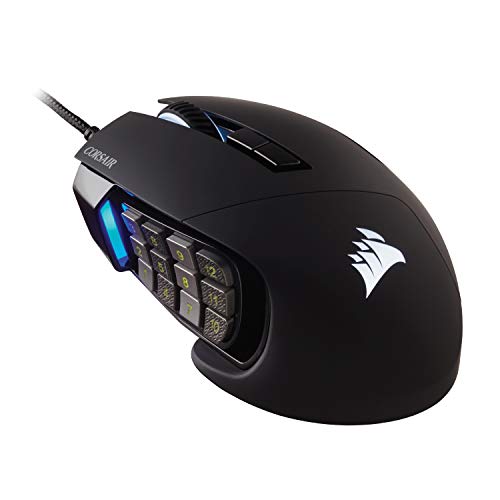
Corsair Scimitar RGB Elite Wired MMO MOBA PC Gaming Mouse
The 18,000 DPI sensor with 17 programmable buttons and a key slider suits MMO and MOBA play with a cable connection.
- Sensor
- PixArt PMW3391
- Backlight
- Yes
- Weight
- 0.27 lb
- Warranty
- 2 Year Manufacturer
The Corsair Scimitar RGB Elite pairs a custom PixArt PMW3391 sensor at 18,000 DPI, adjustable in 1 DPI steps, with 17 programmable buttons for frequent actions and complex macros in MMOs and MOBAs. A patented key slider repositions the 12 side buttons to fit your grip, and Omron switches rated for 50 million clicks sit under a contoured shape with a right-side finger rest. A sturdy scroll wheel and a braided cable connect the mouse, and the shape fits the contours of the palm regardless of hand size or grip style. The mouse weighs 0.27 lb and works with PC, Mac, PS5, PS4, and Xbox through iCUE, with a 2 Year Manufacturer warranty.
Choose it if
- You want 17 programmable buttons for MMOs
- You want a 0.27 lb mouse with a braided cable
Consider the other side if
- You want a wireless connection for your mouse
- You want up to 250 hours of battery use
UtechSmart Venus Pro Wired MMO Gaming Mouse
The 16,400 DPI Avago sensor with 16 programmable buttons and adjustable weights suits MMO play with a cable connection.

- Sensor resolution
- 16400 DPI
- Sensor
- Avago
- Backlight
- Yes
- Connection
- Wired
- Weight
- 0.49 lb
The UtechSmart Venus Pro pairs a high-precision Avago sensor at up to 16,400 DPI with 16 programmable buttons, including 12 side buttons, and five custom profiles with five LED RGB colors each. Eight 2.4g weights adjust the balance, and TEFLON feet pads sit under an ergonomic right-handed shape with a frosted surface. The 12 side buttons angle for fast positioning by touch, and great micro switches give crisp, firm clicks. A 6ft braided-fiber cable with a gold-plated USB connector connects the mouse, and an 18 months manufacturer's warranty backs it.
Choose it if
- You want 16 programmable buttons for MMOs
- You want a 6ft braided-fiber cable on your mouse
Consider the other side if
- You want Bluetooth or HyperSpeed wireless modes
- You want up to 950 hours of battery use
Logitech G305 LIGHTSPEED Wireless Gaming Mouse
The HERO sensor at 12,000 DPI with 6 programmable buttons and LIGHTSPEED wireless suits travel play with one AA battery.

- Sensor
- HERO
- Wireless
- Yes
- Connection
- LIGHTSPEED wireless
The Logitech G305 pairs a next-generation HERO sensor at up to 12,000 DPI with 400 IPS precision and 6 programmable buttons, with up to 10x the power efficiency of previous generations. LIGHTSPEED wireless connects with a 1 ms report rate, and the nano receiver stores inside the mouse for travel. The mouse runs up to 250 hours of continuous gameplay on one AA battery, and Endurance mode through Logitech G HUB software extends battery use up to 9 months. The durable, compact design makes the mouse a laptop travel companion for play anywhere, at only 3.4 oz. On-board memory keeps your settings, and a 1 Year Limited Hardware Warranty backs it.
Choose it if
- You want a 3.4 oz mouse for travel
- You want up to 250 hours of battery use
Consider the other side if
- You want a wired connection for your mouse
- You want 17 programmable buttons for MMOs
Razer Orochi V2 Wireless Gaming Mouse
The 18K DPI sensor with HyperSpeed and Bluetooth and up to 950 hours of battery suits travel play with two wireless modes.

- Sensor
- Razer 5G Advanced 18K DPI Optical Sensor
- Wireless
- Yes
- Connection
- HyperSpeed & Bluetooth
- Warranty
- 2 year manufacturer
The Razer Orochi V2 pairs a Razer 5G Advanced 18K DPI Optical Sensor with two wireless modes: HyperSpeed and Bluetooth. The sensor gives responsive tracking with zero spinouts for precise aiming and fast reactions. The battery runs up to 950 hours on Bluetooth and up to 425 hours on HyperSpeed Wireless, and the mouse takes a single AA or AAA battery in a hybrid battery slot. The design weighs under 60g excluding battery weight, and 2nd Gen Razer Mechanical Mouse Switches with gold-plated contact points are rated for up to 60 million clicks. A 2 year manufacturer warranty backs it.
Choose it if
- You want two wireless modes on one mouse
- You want up to 950 hours of battery use
Consider the other side if
- You want 17 programmable buttons for MMOs
- You want a mouse with a braided cable
How to choose between them
Buttons and sensors
The wired examples carry 17 programmable buttons on the Corsair and 16 on the UtechSmart, with 18,000 DPI on the Corsair and 16,400 DPI on the UtechSmart. The wireless examples carry 6 programmable buttons on the Logitech with a HERO sensor at 12,000 DPI, and the Razer carries an 18K DPI sensor with HyperSpeed and Bluetooth. The Corsair also carries 50 million click-rated Omron switches, and the Razer carries 60 million click-rated switches. The wired examples fit MMO play with many buttons, while the wireless examples fit travel play with a battery and a receiver or dual modes. Match the button count and sensor to the games you play.
Weight and size
The wired examples weigh 0.27 lb for the Corsair and 0.49 lb for the UtechSmart. The wireless examples weigh 3.4 oz for the Logitech and under 60g excluding battery weight for the Razer. The Corsair shape is contoured with a right-side finger rest, and the UtechSmart is an ergonomic right-handed shape with TEFLON feet pads and a frosted surface. The UtechSmart also carries eight 2.4g weights for balance and a 6ft braided-fiber cable with a gold-plated USB connector. The Logitech is a compact design with built-in nano receiver storage, and the Razer is a compact portable design. The wired examples fit a desk setup with a cable, while the wireless examples fit travel with a light carry weight. Match the weight to the hand and the bag you carry.
Cables, batteries, and connections
The wired examples connect by cable: the Corsair carries a braided cable, and the UtechSmart carries a 6ft braided-fiber cable with a gold-plated USB connector. The wireless examples run on a battery: the Logitech runs up to 250 hours of continuous gameplay on one AA battery, and the Razer runs up to 950 hours on Bluetooth and up to 425 hours on HyperSpeed Wireless. The Logitech connects over LIGHTSPEED wireless with a nano receiver, and the Razer connects over HyperSpeed and Bluetooth. The Logitech also carries on-board memory, and the Razer takes a single AA or AAA battery. The wired examples fit a desk with a cable always attached, while the wireless examples fit travel with no cable to pack. Match the connection to the desk and the travel you do.
Compare the full buying guides

FAQ: Wired vs Wireless Mouse
What is the difference between wired and wireless mice here?
The wired examples connect by cable with 17 or 16 programmable buttons, while the wireless examples run on a battery with 6 programmable buttons on the Logitech. The Corsair weighs 0.27 lb, and the Logitech weighs 3.4 oz. The Razer runs up to 950 hours on Bluetooth and up to 425 hours on HyperSpeed Wireless.
Which mouse should I choose for MMO games?
The Corsair carries 17 programmable buttons and 18,000 DPI, and the UtechSmart carries 16 programmable buttons and 16,400 DPI. Both connect by cable, and the Corsair adds a key slider for its 12 side buttons. The UtechSmart adds 12 side buttons, five custom profiles, and eight 2.4g weights for balance.
Which mouse should I choose for travel?
The Logitech weighs 3.4 oz with a nano receiver that stores inside, and the Razer weighs under 60g excluding battery weight. The Logitech runs up to 250 hours on one AA battery, and the Razer runs up to 950 hours on Bluetooth. The Razer also takes a single AA or AAA battery, and the Logitech keeps your settings in on-board memory.

