
Best Computer Mouse Trackball Wireless (2026): 4 Picks Compared
 By Theo LangUpdated
The Nulea M501 Wireless Trackball Mouse Ergonomic Thumb Control is the pick for anyone who wants adjustable cursor speed, with 4 DPI levels, Bluetooth or USB dongle connections to 3 devices, and a rechargeable battery. The SABLUTE answers with 5 DPI settings and a 2-year warranty, while the Perixx offers a 1.34 inch trackball with 5 programmable buttons, and the Logitech Ergo M575S adds 3 customizable buttons with a Logi Bolt receiver.
Your shortlist at a glance
PCKitHQ scores range from 9.2 to 9.8. See how we pick.
| Product and key specifications | Score and retailer |
|---|---|
01 | 9.8PCKitHQ scoreView on Amazon |
02 | 9.6PCKitHQ scoreView on Amazon |
03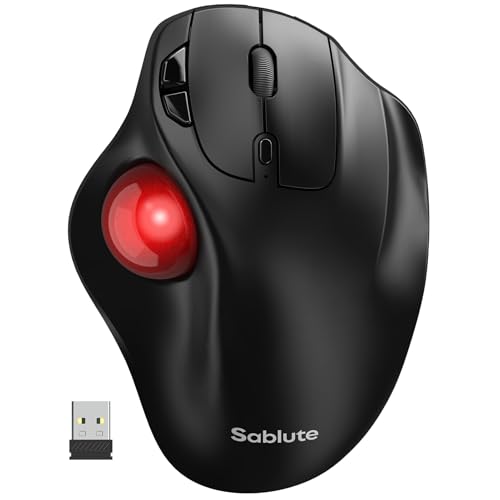 Also Consider Wireless Trackball Mouse | 9.4PCKitHQ scoreView on Amazon |
04 Also Consider Perixx11568 Perimice-717 Wireless Trackball Mouse | 9.2PCKitHQ scoreView on Amazon |
A closer look at each configuration
Nulea M501 Wireless Trackball Mouse Ergonomic Thumb Control
score
The Nulea M501 pairs 4 DPI levels with Bluetooth or USB dongle connections to 3 devices and a rechargeable battery.
- Wireless
- Yes
- Connection
- bluetooth or USB dongle
- Weight
- 0.28 lb
- Warranty
- 1 year
The Nulea M501 connects to 3 devices by Bluetooth or USB dongle, with a button on the bottom to switch between them, and the 2.4G USB receiver stores at the bottom of the mouse. It has 4 DPI levels, a rechargeable battery charged by the included cable through a computer USB port or a 5V charger, and 6 buttons including back and forward, all non-programmable. It weighs 0.28 lb and carries a 1 year warranty. The trackball sits at an angle that keeps the palm in a natural position, and the thumb control moves the cursor without moving the wrist and arm. It works on almost any surface, including a narrow space such as a messy desktop, couch or bed.
Choose it if
- You want a thumb trackball with 4 DPI levels
- You switch between 3 devices with Bluetooth or a USB dongle
Consider another if
- You need 5 DPI settings for finer cursor steps
- You need programmable buttons for custom shortcuts
Logitech Ergo M575S Wireless Ergonomic Trackball Mouse
score
The Logitech Ergo M575S pairs 3 customizable buttons with Bluetooth or Logi Bolt receiver connections and an included AA battery.
- Wireless
- Yes
- Connection
- Bluetooth or the included Logi Bolt USB receiver
The Logitech Ergo M575S connects by Bluetooth or the included Logi Bolt USB receiver and runs on an included AA battery. It has 3 customizable buttons with time-saving shortcuts and Smart Actions, and the thumb control moves the cursor without moving the hand, which suits small or space-saving setups and use on any surface. The plastic parts use certified post-consumer recycled plastic, and the ergonomic shape supports the hand. The warranty is listed as Contact Manufacturer. The ergonomic shape supports the hand throughout the day.
Choose it if
- You want 3 customizable buttons with Smart Actions shortcuts
- You want a thumb trackball for a small desk setup
Consider another if
- You want a built-in rechargeable battery instead of an AA battery
- You need 5 programmable buttons like the Perixx
Wireless Trackball Mouse
score
The SABLUTE pairs 5 DPI settings with 2.4GHz wireless or Bluetooth connections to 3 devices and a 2-year warranty.
- Wireless
- Yes
- Connection
- 2.4GHz wireless or Bluetooth
- Warranty
- 2 Year Manufacturer
The SABLUTE connects by 2.4GHz wireless or Bluetooth to 3 devices, with one button to switch between laptops, desktops or tablets. It has 5 DPI settings, a built-in rechargeable battery with a USB charging port, and durable micro-switch buttons with dedicated forward and back navigation. The thumb-controlled trackball works on small desks and limited spaces without moving the arm. The warranty is 2 Year Manufacturer. New users may require 1 to 2 weeks to adjust to trackball operation. The ergonomic design supports office professionals, programmers and designers during extended periods at a desk.
Choose it if
- You want 5 DPI settings across 3 devices
- You want a rechargeable mouse with a 2-year warranty
Consider another if
- You want to skip the 1 to 2 week adjustment period for trackball use
- You need the 2 DPI levels of the Perixx
Perixx11568 Perimice-717 Wireless Trackball Mouse
score
The Perixx Perimice-717 pairs a 1.34 inch trackball with 5 programmable buttons and a 2.4 GHz wireless connection.
- Wireless
- Yes
- Connection
- 2.4 GHz
- Weight
- 0.3 lb
- Warranty
- 1-year manufacturer warranty
The Perixx Perimice-717 connects by 2.4 GHz with a USB receiver and has a 1.34 inch trackball, 5 programmable buttons and 2 DPI levels switched by DPI switch buttons. The right-handed design measures 5.12 x 4.21 x 1.77 inches and weighs 0.3 lb, with an operating range of 10m with a steady signal. It enters power-saving mode after 10 seconds asleep and 8-10 minutes on standby. It works with Windows 7, 8 and 10, with basic function on Linux, Android and iOS, and carries a 1-year manufacturer warranty. The package includes a 12-month limited warranty.
Choose it if
- You want 5 programmable buttons and a 1.34 inch trackball
- You want a 2.4 GHz wireless mouse for Windows 7, 8 or 10
Consider another if
- You need Bluetooth for a connection without a USB receiver
- You need to switch between 3 devices
Make the choice for your setup
Match DPI levels to cursor work
The Nulea M501 has 4 DPI levels, the SABLUTE has 5 DPI settings, and the Perixx Perimice-717 has 2 DPI levels switched by DPI switch buttons. More levels give finer steps between slow, precise moves and fast sweeps across the screen. The SABLUTE pairs its 5 settings with spreadsheets, presentations, browsing and detail work, while the Perixx switches cursor speed with dedicated DPI switch buttons. Choose the level count that matches the cursor speeds the work needs during the day, and keep the count separate from the connection type. A higher count suits work that jumps between fine detail and broad moves, while a lower count suits steady, repeated cursor work.
Compare wireless connections and device switching
The Nulea M501 connects to 3 devices by Bluetooth or USB dongle, with a button on the bottom to switch between them. The SABLUTE connects to 3 devices by 2.4GHz wireless or Bluetooth, with one button for switching between laptops, desktops or tablets. The Logitech Ergo M575S connects by Bluetooth or the included Logi Bolt USB receiver. The Perixx Perimice-717 connects by 2.4 GHz with a USB receiver provided inside or along with the mouse. Count the devices the work spans before choosing between a one-device link and a 3-device switcher. The Nulea stores its 2.4G USB receiver at the bottom of the mouse, keeping the dongle with the mouse when it moves. Shoppers with a related need can compare our guide to the Best USB Trackball.
Weigh buttons, battery and warranty
The Nulea M501 has 6 buttons including back and forward, all non-programmable, with a rechargeable battery and a 1 year warranty. The Logitech Ergo M575S has 3 customizable buttons with Smart Actions and runs on an included AA battery, with the warranty listed as Contact Manufacturer. The SABLUTE has durable micro-switch buttons with forward and back navigation, a built-in rechargeable battery and a 2 Year Manufacturer warranty. The Perixx Perimice-717 has 5 programmable buttons, an auto power-saving feature and a 1-year manufacturer warranty. The Perixx also enters power-saving mode after 10 seconds asleep and 8-10 minutes on standby, and its operating range reaches 10m with a steady signal.
For a wider shortlist, start with Best Trackball Mouse Wireless Bluetooth.
FAQ: Computer Mouse Trackball Wireless
Which trackball mice connect to 3 devices?
The Nulea M501 and the SABLUTE each connect to 3 devices. The Nulea uses Bluetooth or a USB dongle with a switch button on the bottom, and the SABLUTE uses 2.4GHz wireless or Bluetooth with one button for switching. The Logitech Ergo M575S connects through its Logi Bolt USB receiver, and the Perixx Perimice-717 connects through its USB receiver.
How many DPI levels do these trackball mice have?
The Nulea M501 has 4 DPI levels, the SABLUTE has 5 DPI settings, and the Perixx Perimice-717 has 2 DPI levels switched by DPI switch buttons. Compare those counts against the cursor speeds the work needs.
Which of these trackball mice are rechargeable?
The Nulea M501 and the SABLUTE have built-in rechargeable batteries. The Nulea charges with its included cable through a computer USB port or a 5V charger, and the SABLUTE charges through a USB charging port. The Logitech Ergo M575S runs on an included AA battery.


