Best Computer Monitor for Video and Photo Editing (2026): 5 Picks Compared
 By Theo LangUpdated
You edit photos and video, so choose the ZZA 27 Inch 4K UHD Monitor first. Its 27-inch IPS panel runs at 3840x2160 with 120% sRGB and HDR10 support, with HDMI 2.0 and DisplayPort 1.2 ports. The CUNPU 27-inch adds 100% DCI-P3 with ΔE<2 calibration at 70Hz. The ViewSonic VP2768A brings 2560 x 1440 resolution with a 90W USB-C hub. The CUNPU 24-inch packs 4K into a screen, and the Kuycon P27G runs 3840x2160.
Your shortlist at a glance
PCKitHQ scores range from 9.2 to 9.8. See how we pick.
| Product and key specifications | Score and retailer |
|---|---|
01 | 9.8PCKitHQ scoreView on Amazon |
02 | 9.7PCKitHQ scoreView on Amazon |
03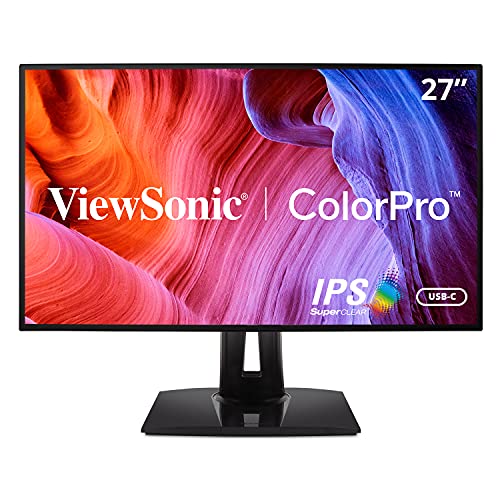 | 9.5PCKitHQ scoreView on Amazon |
04 | 9.3PCKitHQ scoreView on Amazon |
05 | 9.2PCKitHQ scoreView on Amazon |
A closer look at each configuration
ZZA 27-inch 4K UHD Monitor
score
The 27-inch 4K IPS panel at 3840x2160 with 120% sRGB and HDR10 defines this monitor for editing work.
- Resolution
- 3840x2160
- Native refresh rate
- 60 Hz
- Panel
- IPS
- HDMI
- Yes
- DisplayPort
- Yes
- Warranty
- 1 Year
This ZZA 27 Inch 4K UHD Monitor has a 27-inch IPS panel at 3840x2160 with approximately 163 PPI pixel density and a 60Hz refresh rate. It covers 120% sRGB with HDR10 support and uses AMD FreeSync with Adaptive Sync for 60fps video. HDMI 2.0 and DisplayPort 1.2 provide 4K at 60Hz, and the package includes a DP cable and an HDMI cable. Low Blue Light and Flicker-Free backlight technology are built in, and the tilt-adjustable stand supports a 100x100mm VESA mount. The warranty is 1 Year.
Choose it if
- You want a 27-inch 4K display at 3840x2160
- You want HDMI 2.0 and DisplayPort 1.2 connections
Consider another if
- You need the 70Hz refresh rate of the CUNPU 27-inch
- You need the 90W USB-C charging of the ViewSonic VP2768A
CUNPU 27-inch 4K Ultra-Slim Bezel Black Photo Video Editing Monitor
score
The 27-inch 4K IPS panel with 100% DCI-P3, ΔE<2 calibration, and a 70Hz refresh rate defines this monitor.
- Resolution
- 3840×2160
- Native refresh rate
- 70 Hz
- Panel
- IPS
- HDMI
- Yes
- DisplayPort
- Yes
- Warranty
- 1 Year
This CUNPU 27-inch monitor has a 27-inch UHD IPS panel at 3840x2160 with ΔE<2 factory calibration, 100% DCI-P3 coverage, 1.07 billion colors, and 163 PPI pixel density. Its 70Hz refresh rate uses Adaptive Sync, and the 178-degree viewing angles sit behind a matte anti-glare screen with a 3-sided ultra-slim bezel. PIP and PBP run two sources side by side through 2x DisplayPort 1.4, 1x HDMI 2.0, and a headphone jack. The warranty is 1 Year.
Choose it if
- You want 100% DCI-P3 coverage with ΔE<2 calibration
- You want a 70Hz refresh rate on a 4K panel
Consider another if
- You need the 90W USB-C charging of the ViewSonic VP2768A
- You need the 185 PPI density of the CUNPU 24-inch
ViewSonic VP2768A 27-inch ColorPro Monitor 90W USB-C
score
The 27-inch 2560 x 1440 IPS panel with 100% sRGB, Pantone Validation, and a 90W USB-C hub defines this monitor.
- Resolution
- 2560 x 1440
- Native refresh rate
- 60 Hz
- Screen size
- 27 in
- Panel
- IPS
- USB-C
- Yes
- Weight
- 15.17 lb
- Warranty
- 3-Year limited warranty on parts, labor and backlight
This ViewSonic VP2768A has a 27-inch 2K IPS panel at 2560 x 1440 with a 60Hz refresh rate, factory calibrated to 100% sRGB and Rec.709 with Delta E<2 accuracy and Pantone Validation. Its integrated USB-C hub provides 90W passthrough power and RJ45 Ethernet, and it supports daisy chaining. The fully adjustable stand offers tilt, swivel, rotate, and height adjustment. Flicker-Free technology and a Blue Light Filter are built in. The monitor weighs 15.17 lb, and the warranty is a 3-Year limited warranty on parts, labor and backlight.
Choose it if
- You want a 90W USB-C hub with RJ45 Ethernet
- You want Pantone Validated color on a 27-inch screen
Consider another if
- You need the 3840x2160 resolution of the ZZA monitor
- You need the 100% DCI-P3 coverage of the CUNPU 27-inch
CUNPU 24-inch 4K UHD USB-C Monitor for Photo Editing Office Home
score
The 24-inch 4K IPS panel with 185 PPI, 100% DCI-P3, and a USB-C connection defines this compact monitor.
- Resolution
- 4K
- Screen size
- 24 in
- Panel
- IPS
- USB-C
- Yes
- HDMI
- Yes
- DisplayPort
- Yes
This CUNPU 24-inch monitor has a 24-inch 4K IPS panel with 185 PPI pixel density, 100% coverage of sRGB, Adobe RGB, and DCI-P3, ΔE<2, and 1.07B+ colors. A single USB-C cable carries video, data transfer, and 15W power delivery, and the monitor also has HDMI and DisplayPort. PIP and PBP show two computers side by side. The fully adjustable stand offers height, pivot, tilt, and swivel, and dual speakers are built in. The monitor is VESA mountable.
Choose it if
- You want a 24-inch 4K screen with 185 PPI density
- You want USB-C video with 15W power delivery
Consider another if
- You need the 27-inch screen of the ZZA monitor
- You need the 90W USB-C charging of the ViewSonic VP2768A
Kuycon P27G 27’’ UHD 4K Glossy Monitor (Honeycomb
score
The 27-inch glossy 4K IPS panel at 3840x2160 with 99% sRGB and 96% DCI-P3 defines this monitor.
- Resolution
- 3840x2160
- Native refresh rate
- 60 Hz
- Screen size
- 27 in
- Panel
- IPS
- Warranty
- 1 Year Manufacturer Warranty
This Kuycon P27G has a 27-inch glossy 4K IPS panel at 3840x2160 with 163 PPI, 178-degree viewing angles, 99% sRGB, 96% DCI-P3, 10-bit color, and HDR. A single-cable universal port provides 100W power while streaming 4K video, alongside high-speed video interfaces and multi-purpose ports. The ergonomic stand adjusts in height, swivel, tilt, and pivot, and the monitor supports a 100x100mm mount. Low blue light and flicker-free technology are built in, with an 8ms response time and adaptive refresh technology. The warranty is a 1 Year Manufacturer Warranty.
Choose it if
- You want a 27-inch glossy 4K screen at 3840x2160
- You want 100W charging through a single-cable universal port
Consider another if
- You need the 70Hz refresh rate of the CUNPU 27-inch
- You need the 185 PPI density of the CUNPU 24-inch
Make the choice for your setup
Resolution and pixel density
The ZZA 27 Inch 4K UHD Monitor, the CUNPU 27-inch monitor, and the Kuycon P27G each run at 3840x2160 on a 27-inch IPS panel, with approximately 163 PPI pixel density on the ZZA and Kuycon panels. The CUNPU 24-inch monitor is a 4K IPS panel at 185 PPI, so its pixels sit closer together on a smaller screen. The ViewSonic VP2768A runs at 2560 x 1440 on a 27-inch IPS panel. A higher pixel count shows more detail in photos and video timelines, while the 2560 x 1440 panel shows fewer pixels across the same 27-inch width. Compare the resolution against the detail your editing work needs and the size you want on your desk.
Color coverage and calibration
The ZZA 27 Inch 4K UHD Monitor covers 120% sRGB with HDR10 support. The CUNPU 27-inch monitor covers 100% DCI-P3 with ΔE<2 factory calibration and 1.07 billion colors. The CUNPU 24-inch monitor covers 100% sRGB, Adobe RGB, and DCI-P3 with ΔE<2 and 1.07B+ colors. The Kuycon P27G covers 99% sRGB and 96% DCI-P3 with 10-bit color and HDR. The ViewSonic VP2768A is factory calibrated to 100% sRGB and Rec.709 with Delta E<2 accuracy and Pantone Validation. For professional color-critical work, manual calibration is recommended on the ZZA monitor, while the CUNPU 27-inch monitor needs no separate calibration session out of the box. Compare the stated coverage against the color spaces your photo and video work uses. For a closely related choice, read our guide to the Best 27 Inch Monitor for Laptop.
Connections and desk setup
The ZZA 27 Inch 4K UHD Monitor connects over HDMI 2.0 and DisplayPort 1.2, and the package includes a DP cable and an HDMI cable. The CUNPU 27-inch monitor has 2x DisplayPort 1.4, 1x HDMI 2.0, and a headphone jack, with PIP and PBP for two sources side by side. The ViewSonic VP2768A connects over USB-C with 90W passthrough power and RJ45 Ethernet, and supports daisy chaining. The CUNPU 24-inch monitor connects over USB-C with 15W power delivery, HDMI, and DisplayPort. The Kuycon P27G charges through a single-cable universal port at 100W while streaming 4K video. Compare the ports against the computers and sources you connect.
For a wider shortlist, start with 24 vs 27 Inch Monitor.
FAQ: Computer Monitor for Video and Photo Editing
Which monitors in this guide have a 3840x2160 resolution?
The ZZA 27 Inch 4K UHD Monitor, the CUNPU 27-inch monitor, and the Kuycon P27G each run at 3840x2160. The CUNPU 24-inch monitor is a 4K panel. The ViewSonic VP2768A runs at 2560 x 1440.
Which monitors in this guide cover 100% DCI-P3?
The CUNPU 27-inch monitor and the CUNPU 24-inch monitor in this guide each cover 100% DCI-P3. The Kuycon P27G covers 96% DCI-P3 and 99% sRGB. The ZZA monitor covers 120% sRGB, and the ViewSonic covers 100% sRGB.
Which monitors in this guide connect over USB-C?
The ViewSonic VP2768A connects over USB-C with 90W passthrough power and RJ45 Ethernet, and it supports daisy chaining. The CUNPU 24-inch monitor connects over USB-C with 15W power delivery, and a single USB-C cable carries video, data transfer, and power. The ZZA monitor and the CUNPU 27-inch monitor connect over HDMI and DisplayPort instead.