
Best Chromebook with Touchscreen and Backlit Keyboard (2026): 7 Picks Compared
 By Theo LangUpdated
HP Chromebook 14-inch HD Touchscreen Laptop pairs a 14-inch HD touchscreen with an Intel Celeron N4000 processor, 4 GB of memory, and 32 GB of eMMC storage, and it suits buyers who want a backlit keyboard and touch input for everyday Chrome use. The seven Chromebooks below pair a touchscreen with a backlit keyboard.
Your shortlist at a glance
PCKitHQ scores range from 9.2 to 9.8. See how we pick.
| Product and key specifications | Score and retailer |
|---|---|
01 | 9.8PCKitHQ scoreView on Amazon |
02 | 9.7PCKitHQ scoreView on Amazon |
03 | 9.6PCKitHQ scoreView on Amazon |
| 04 | 9.5PCKitHQ scoreView on Amazon |
05 | 9.4PCKitHQ scoreView on Amazon |
06 | 9.3PCKitHQ scoreView on Amazon |
07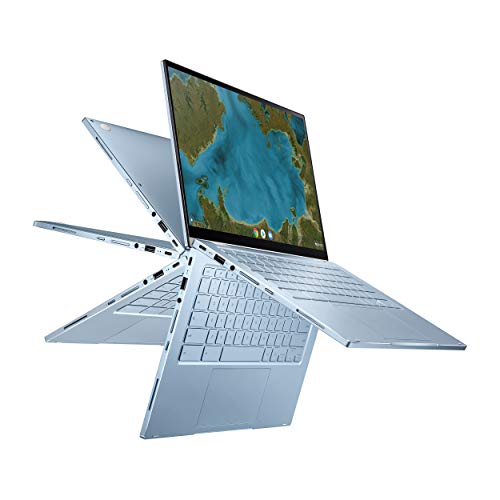 | 9.2PCKitHQ scoreView on Amazon |
A closer look at each configuration
HP Chromebook 14-inch HD Touchscreen Laptop
score
The HP Chromebook 14-inch HD Touchscreen Laptop combines a 14-inch HD touchscreen, a backlit keyboard, and a 3.24 lb body.
- Installed memory
- 4 GB
- Installed storage
- 32GB
- Processor
- Intel Celeron N4000
- Operating system
- Chrome
- Screen size
- 14 in
- Resolution
- HD
- Touchscreen
- Yes
- Weight
- 3.24 lb
- Warranty
- One year limited warranty
This HP Chromebook 14-inch HD Touchscreen Laptop has an Intel Celeron N4000 processor, 4 GB of memory, and 32 GB of eMMC storage, and it runs Chrome. The 14-inch HD touchscreen supports touch input, and the backlit keyboard sits beside a multi-touch touchpad that supports four finger gestures. The device weighs 3.24 lb and carries a one year limited warranty. Android apps from the Google Play Store run on this Chrome device.
Choose it if
- You want a 14-inch HD touchscreen for Chrome use
- Your files fit within 32 GB of eMMC storage
Consider another if
- You need more than 32 GB of installed storage
- You need more than 4 GB of installed memory
acer Chromebook Plus Spin 714 Laptop 512GB
score
The acer Chromebook Plus Spin 714 pairs a 14-inch WUXGA touchscreen with 8GB of memory and a 512GB SSD.
- Installed memory
- 8 GB
- Installed storage
- 512GB
- Processor
- Intel Core Ultra 5 115U
- Operating system
- Chrome OS
- Resolution
- 1920 x 1200
- Wi-Fi
- Yes
- Touchscreen
- Yes
- Weight
- 3.21 lb
This acer Chromebook Plus Spin 714 has an Intel Core Ultra 5 115U processor, 8GB of LPDDR5 memory, and a 512GB PCIe Gen 4 SSD, and it runs Chrome OS. The 14-inch WUXGA touchscreen shows 1920 x 1200 through Antimicrobial Gorilla Glass, and the display runs at 120Hz. The backlit keyboard sits with Thunderbolt 4 and Wi-Fi 6E. Gemini converts handwriting into editable text, and the device weighs 3.21 lb.
Choose it if
- You want a 1920 x 1200 touchscreen display
- Your files call for a 512GB SSD
Consider another if
- You need more than 512GB of installed storage
- You want a lighter device than 3.21 lb
Google Pixelbook Go
score
Google Pixelbook Go pairs 16 GB of memory with a 2.33 lb body, and Google states up to 12 hours of battery life.
- Installed memory
- 16 GB
- Operating system
- Chrome OS
- Touchscreen
- Yes
- Weight
- 2.33 lb
- Warranty
- 1 year
The Google Pixelbook Go has 16 GB of installed memory and an 8th Gen Intel Core processor, and it runs Chrome OS. Its capacitive touchscreen shows up to 8.3 million pixels, and the backlit keyboard uses Hush Keys beside a spacious touchpad. Google states up to 12 hours of battery life. The device weighs 2.33 lb, and the Titan C security chip sits with built-in anti-virus software.
Choose it if
- You want 16 GB of installed memory
- You want a 2.33 lb device to carry
Consider another if
- You need more than 16 GB of installed memory
- You want whole-device coverage longer than 1 year
acer Chromebook Plus Spin 714 Laptop 256GB
score
The acer Chromebook Plus Spin 714 pairs a 14-inch WUXGA touchscreen with 8GB of memory and a 256GB SSD.
- Installed memory
- 8 GB
- Installed storage
- 256GB
- Processor
- Intel Core Ultra 5 115U
- Operating system
- Chrome OS
- Resolution
- 1920 x 1200
- Wi-Fi
- Yes
- Touchscreen
- Yes
This acer Chromebook Plus Spin 714 has an Intel Core Ultra 5 115U processor, 8GB of LPDDR5 memory, and a 256GB PCIe Gen 4 SSD, and it runs Chrome OS. The 14-inch WUXGA touchscreen shows 1920 x 1200 through Antimicrobial Gorilla Glass, and the display runs at 120Hz. The backlit keyboard sits with Thunderbolt 4 and Wi-Fi 6E. Gemini converts handwriting into editable text and removes photo distractions.
Choose it if
- You want a 1920 x 1200 touchscreen display
- Your files fit within a 256GB SSD
Consider another if
- You need more than 256GB of installed storage
- You need more than 8GB of installed memory
Lenovo Chromebook 14-inch Touchscreen Laptop
score
The Lenovo Chromebook 14-inch WUXGA Touchscreen Laptop pairs a 1920 x 1200 IPS touchscreen with a backlit keyboard.
- Installed memory
- 4 GB
- Installed storage
- 128GB
- Processor
- MediaTek Kompanio 540
- Operating system
- ChromeOS
- Resolution
- 1920 x 1200
- Wi-Fi
- Yes
- Touchscreen
- Yes
- Weight
- 3.31 lb
- Warranty
- 1 Year Seller
This Lenovo Chromebook 14-inch WUXGA Touchscreen Laptop has a MediaTek Kompanio 540 processor with 8 cores and speeds up to 2.6GHz, 4GB of LPDDR5X memory, and 128GB of SSD storage, and it runs ChromeOS. The 14-inch WUXGA IPS touchscreen shows 1920 x 1200 at 400 nits. The backlit keyboard supports typing in low-light environments, and Wi-Fi 6E sits beside stereo speakers enhanced by Waves MaxxAudio. The device weighs 3.31 lb.
Choose it if
- You want a 1920 x 1200 IPS touchscreen
- Your files fit within 128GB of SSD storage
Consider another if
- You need more than 128GB of installed storage
- You need more than 4GB of installed memory
HP Chromebook Plus x360 Laptop 14-inch 2-inch 1 Touchscreen Laptop for Student
score
The HP Chromebook Plus x360 pairs a 14-inch FHD touchscreen with a 360-degree hinge and a backlit keyboard.
- Installed memory
- 8 GB
- Processor
- Intel Core i3 N305
- Operating system
- Chrome OS
- Resolution
- 1920 x 1080
- USB-C
- Yes
- Wi-Fi
- Yes
- Touchscreen
- Yes
- 2-in-1 design
- Yes
- Weight
- 5 lb
- Warranty
- 1 Year
This HP Chromebook Plus x360 has an Intel Core i3 N305 processor with 8-core power up to 3.8GHz, 8GB of memory, and 256GB of UFS storage, and it runs Chrome OS. The 14-inch FHD IPS touchscreen shows 1920 x 1080 at 250 nits, and the 360-degree hinge moves through laptop, yoga, flip, and tablet modes. The backlit keyboard sits with Wi-Fi 6 and Bluetooth 5.3. The device weighs 5 lb.
Choose it if
- You want a 2-in-1 design with four modes
- You want a 1920 x 1080 touchscreen display
Consider another if
- You need a device lighter than 5 lb
- You need more than 8GB of installed memory
ASUS Chromebook Flip C433 2-inch 1 Laptop
score
The ASUS Chromebook Flip C433 pairs a 14-inch FHD touchscreen with a 360-degree hinge and 8GB of memory.
- Installed memory
- 8 GB
- Installed storage
- 64GB
- Processor
- Intel Core m3-8100Y
- Operating system
- Chrome OS
- Screen size
- 14 in
- Resolution
- 1920x1080
- USB-C
- Yes
- Touchscreen
- Yes
- 2-in-1 design
- Yes
- Weight
- 3.31 lb
This ASUS Chromebook Flip C433 has an Intel Core m3-8100Y processor up to 3.4 GHz, 8GB of LPDDR3 memory, and 64GB of eMMC storage, and it runs Chrome OS. The 14-inch FHD touchscreen shows 1920 x 1080 through a 4-way NanoEdge display, and the 360-degree hinge moves through tent, stand, and tablet modes. The backlit chiclet keyboard sits with two USB Type-C ports and one USB Type-A port. The device weighs 3.31 lb.
Choose it if
- You want a 14-inch FHD touchscreen display
- Your files fit within 64GB of eMMC storage
Consider another if
- You need more than 64GB of installed storage
- You need a device lighter than 3.31 lb
Make the choice for your setup
Match memory and storage to files
Installed memory runs from 4 GB in the HP Chromebook 14-inch HD Touchscreen Laptop and the Lenovo Chromebook 14-inch WUXGA Touchscreen Laptop to 16 GB in the Google Pixelbook Go, with 8 GB in the two acer Chromebook Plus Spin 714 configurations, the HP Chromebook Plus x360, and the ASUS Chromebook Flip C433. Installed storage runs from 32 GB of eMMC storage in the HP Chromebook 14-inch HD Touchscreen Laptop. The acer Chromebook Plus Spin 714 configuration with the larger drive holds a 512GB SSD. Check the installed figures against the files you plan to keep on the device, since the installed capacity is what counts.
Compare the touchscreen resolutions
The two acer Chromebook Plus Spin 714 configurations and the Lenovo Chromebook 14-inch WUXGA Touchscreen Laptop show 1920 x 1200 on 14-inch touchscreens, while the HP Chromebook Plus x360 and the ASUS Chromebook Flip C433 show 1920 x 1080. The HP Chromebook 14-inch HD Touchscreen Laptop has a 14-inch HD touchscreen, and the Google Pixelbook Go shows up to 8.3 million pixels on its capacitive touchscreen. Resolution belongs to the screen itself, so compare the stated figures for each configuration before choosing. The HP Chromebook Plus x360 screen is an FHD IPS panel at 250 nits. The ASUS screen uses a 4-way NanoEdge design. A related shortlist covers the Best Chromebook for Business.
Check weight and the 2-in-1 hinge
The Google Pixelbook Go weighs 2.33 lb, the HP Chromebook 14-inch HD Touchscreen Laptop weighs 3.24 lb, and the Lenovo Chromebook 14-inch WUXGA Touchscreen Laptop and the ASUS Chromebook Flip C433 each weigh 3.31 lb. The acer Chromebook Plus Spin 714 with the 512GB SSD weighs 3.21 lb. The HP Chromebook Plus x360 weighs 5 lb. The HP Chromebook Plus x360 and the ASUS Chromebook Flip C433 have 360-degree hinges, so each folds through tablet mode. Compare the weight of each configuration against how you plan to carry it. The Pixelbook Go is 13 mm thin with a grippable design, and the Lenovo Chromebook has a slim 14-inch design for carrying between classrooms, libraries, and home.
Before you decide, also read Best Chromebook.
FAQ: Chromebook with Touchscreen and Backlit Keyboard
Which Chromebook here has the most installed memory?
The Google Pixelbook Go has 16 GB of installed memory. The two acer Chromebook Plus Spin 714 configurations, the HP Chromebook Plus x360, and the ASUS Chromebook Flip C433 each have 8 GB. The HP Chromebook 14-inch HD Touchscreen Laptop and the Lenovo Chromebook each have 4 GB.
Which picks have a 1920 x 1200 touchscreen?
The two acer Chromebook Plus Spin 714 configurations and the Lenovo Chromebook 14-inch WUXGA Touchscreen Laptop have 1920 x 1200 touchscreens. The HP Chromebook Plus x360 and the ASUS Chromebook Flip C433 have 1920 x 1080 touchscreens.
Which Chromebooks here fold into tablet mode?
The HP Chromebook Plus x360 has a 360-degree hinge with laptop, yoga, flip, and tablet modes. The ASUS Chromebook Flip C433 has a 360-degree hinge for tent, stand, and tablet modes. Both hinges let the touchscreen fold back so the device works in tablet mode.


