
Best Chromebook Lenovo (2026): Top 5 by the Specs
 By Theo LangUpdated
Choose the Lenovo Chromebook m 14" for study and everyday work: its 8GB of RAM, MediaTek Kompanio 540 processor, and 14-inch WUXGA display cover study and work, with USB-C and HDMI ports for a second screen. The IdeaPad Slim 3 Chromebook weighs 2.86 lb, and Lenovo lists up to 13.5 hours of battery life for it. The touchscreen models and the 15.6-inch model suit buyers who want touch input or a bigger screen.
Your shortlist at a glance
PCKitHQ scores range from 9.2 to 9.8. See how we pick.
| Product and key specifications | Score and retailer |
|---|---|
01 | 9.8PCKitHQ scoreView on Amazon |
02 | 9.7PCKitHQ scoreView on Amazon |
03 | 9.5PCKitHQ scoreView on Amazon |
04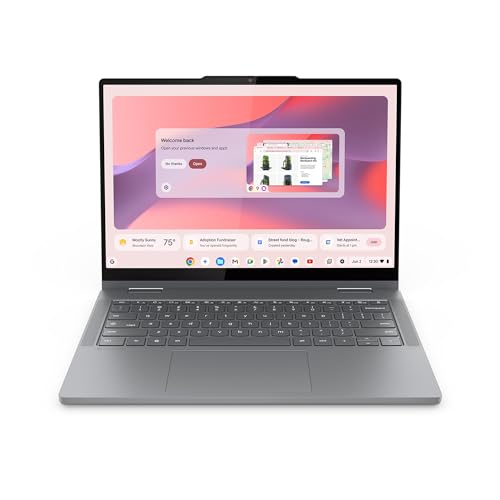 | 9.3PCKitHQ scoreView on Amazon |
05 | 9.2PCKitHQ scoreView on Amazon |
A closer look at each configuration
Lenovo Chromebook m 14-inch
score
The 8GB of RAM, MediaTek Kompanio 540 processor, and 1920x1200 WUXGA display suit study and everyday work.
- Installed memory
- 8 GB
- Installed storage
- 64GB
- Processor
- MediaTek Kompanio 540
- Graphics
- Integrated Arm Mali-G57 MC2 GPU
- Resolution
- 1920x1200
- USB-C
- Yes
- HDMI
- Yes
- Warranty
- 1 Year Limited Parts and Labor
This Lenovo Chromebook m 14" pairs a MediaTek Kompanio 540 processor with 8GB of RAM and 64GB of UFS storage. Its 14-inch WUXGA IPS display shows 1920x1200, and the integrated Arm Mali-G57 MC2 GPU drives the screen. The port set includes USB-C, USB-A, and HDMI, and the webcam carries a physical privacy shutter. Google Gemini sits on the home screen for planning, writing, and learning. The chassis uses a military-grade build and weighs just under 3 lb. MaxxAudio tuning shapes the sound from the speakers. The warranty covers 1 Year Limited Parts and Labor.
Choose it if
- You need 8GB of RAM for study and work
- You want a 14-inch WUXGA display at 1920x1200
Consider another if
- You need 16GB of RAM installed
- You need more than 64GB of installed storage
Lenovo IdeaPad Slim 3 Chromebook Laptop
score
The 14-inch HD display, MediaTek Kompanio 520 processor, and 2.86 lb weight suit light daily use.
- Installed memory
- 4 GB
- Installed storage
- 64GB
- Processor
- MediaTek Kompanio 520
- Resolution
- HD
- USB-C
- Yes
- Wi-Fi
- Yes
- Weight
- 2.86 lb
- Warranty
- 1 Year Limited Parts and Labor
This IdeaPad Slim 3 Chromebook pairs a MediaTek Kompanio 520 processor with 4GB of memory and 64GB of eMMC storage. Its 14-inch HD display pairs with Waves MaxxAudio-tuned stereo speakers, and the 720p camera carries a privacy shutter with a mute key. The USB-C port charges the laptop, transfers files, and syncs to a monitor. Wi-Fi 6 connects the laptop wirelessly. The chassis weighs 2.86 lb, and Lenovo lists up to 13.5 hours of battery life for this model. The warranty covers 1 Year Limited Parts and Labor.
Choose it if
- You need a 14-inch HD display for daily use
- You want a 2.86 lb laptop for travel
Consider another if
- You need 8GB of RAM installed
- You need a 1920x1200 display resolution
Lenovo Chromebook 14 Laptop 14-inch Touchscreen
score
The 14-inch FHD touchscreen, Kompanio 520 processor, and 64GB eMMC storage suit study on the go.
- Installed memory
- 4 GB
- Processor
- MediaTek Kompanio 520
- Graphics
- Arm Mali-G52 GPU
- Operating system
- Chrome OS
- Resolution
- 1920 x 1080
- USB-C
- Yes
- Wi-Fi
- Yes
- Touchscreen
- Yes
- Weight
- 2.87 lb
- Warranty
- 1-year warranty
This Lenovo Chromebook 14 pairs a MediaTek Kompanio 520 processor with 4GB of RAM and 64GB of eMMC storage, plus a 128GB SD card. Its 14-inch FHD IPS touchscreen shows 1920x1080 with anti-glare coating, and the integrated Arm Mali-G52 GPU drives the display. The HD webcam carries a privacy shutter. USB-C, USB-A, a microSD card reader, and an audio combo jack cover connections, with Wi-Fi 6 and Bluetooth 5.3. Chrome OS runs here, with an Auto Update Expiration date of June 2032. The chassis weighs 2.87 lb, and the warranty covers one year.
Choose it if
- You need a touchscreen for study and browsing
- You want a 1920x1080 IPS display
Consider another if
- You need 8GB of RAM installed
- You need 128GB of installed eMMC storage
Lenovo Chromebook 2-in-1
score
The 2-in-1 design, 14-inch WUXGA touchscreen, and 128GB UFS storage suit flexible daily use.
- Installed memory
- 4 GB
- Installed storage
- 128GB
- Graphics
- Integrated Intel® Graphics
- Resolution
- WUXGA
- USB-C
- Yes
- HDMI
- Yes
- Touchscreen
- Yes
- 2-in-1 design
- Yes
- Warranty
- 1 Year Limited Parts and Labor
This Lenovo Chromebook 2-in-1 pairs an Intel N150 processor with 4GB of RAM and 128GB of UFS storage. Its 14-inch WUXGA IPS touchscreen flips between laptop, tent, and tablet modes, and integrated Intel Graphics drive the display. Two USB-C ports, two USB-A ports, and an HDMI port cover connections. The FHD webcam carries a physical privacy shutter, and Google Gemini sits on the home screen. The chassis is 0.69 inches thick, weighs 3.3 lb, and uses a military-grade build. The warranty covers 1 Year Limited Parts and Labor.
Choose it if
- You need a 2-in-1 design for laptop and tablet modes
- You want a 14-inch WUXGA touchscreen display
Consider another if
- You need 8GB of RAM installed
- You need a 15.6-inch display for this laptop
Lenovo Chromebook 15 Laptop
score
The 15.6-inch FHD display, Celeron N4500 processor, and 64GB eMMC storage suit home and school use.
- Installed memory
- 4 GB
- Processor
- Intel Celeron N4500
- Graphics
- Integrated Intel UHD Graphics
- Operating system
- Chrome OS
- Resolution
- 1920x1080
- USB-C
- Yes
- HDMI
- Yes
- Wi-Fi
- Yes
- Weight
- 3.48 lb
- Warranty
- 1-yr
This Lenovo Chromebook 15 pairs an Intel Celeron N4500 processor with 4GB of LPDDR4x RAM and 64GB of eMMC storage, plus a 64GB SD card. Its 15.6-inch FHD display shows 1920x1080 with an anti-glare coating, and integrated Intel UHD Graphics drive the screen. The HD 720p webcam carries a privacy shutter. USB-C, two USB 3.2 ports, HDMI, and a microSD card reader cover connections, with Wi-Fi 6 and Bluetooth 5.2. Chrome OS runs here, with an Auto Update Expiration date of June 2030. The chassis weighs 3.48 lb, and the warranty covers one year.
Choose it if
- You need a 15.6-inch FHD display for schoolwork
- You want USB-C and HDMI ports for monitors
Consider another if
- You need 8GB of RAM installed
- You need a touchscreen display for this laptop
Make the choice for your setup
Compare memory and installed storage
The Lenovo Chromebook m 14" has 8GB of RAM and 64GB of UFS storage, while the other four Chromebooks in this guide each have 4GB of RAM. The IdeaPad Slim 3 Chromebook has 64GB of eMMC storage. The Lenovo Chromebook 14 has 64GB of eMMC storage plus a 128GB SD card. The Lenovo Chromebook 2-in-1 has 128GB of UFS storage. The Lenovo Chromebook 15 has 64GB of eMMC storage plus a 64GB SD card. Compare the installed eMMC or UFS storage with the local files you keep on the machine, and treat each SD card as added storage rather than installed storage.
Choose the screen and input style
The Lenovo Chromebook m 14" has a 14-inch WUXGA IPS display at 1920x1200. The Lenovo Chromebook 2-in-1 has a 14-inch WUXGA IPS touchscreen. The IdeaPad Slim 3 Chromebook has a 14-inch HD display. The Lenovo Chromebook 14 has a 14-inch FHD IPS touchscreen at 1920x1080 with an anti-glare coating. The Lenovo Chromebook 15 has a 15.6-inch FHD display at 1920x1080 with an anti-glare coating, without touch input. The 2-in-1 flips between laptop, tent, and tablet modes. The Lenovo Chromebook 14 and the Lenovo Chromebook 2-in-1 both carry a touchscreen for direct input on the display. Match the screen size, sharpness, and touch input to the work you do each day. Shoppers with a related need can compare our guide to the Best Chromebook Model.
Check ports, weight, and warranty
The Lenovo Chromebook m 14" has USB-C, USB-A, and HDMI ports. The IdeaPad Slim 3 Chromebook has a USB-C port and Wi-Fi 6. The Lenovo Chromebook 14 has USB-C, USB-A, a microSD card reader, and an audio combo jack, with Wi-Fi 6 and Bluetooth 5.3. The Lenovo Chromebook 2-in-1 has two USB-C ports, two USB-A ports, and an HDMI port. The Lenovo Chromebook 15 has USB-C, two USB 3.2 ports, HDMI, and a microSD card reader, with Wi-Fi 6 and Bluetooth 5.2. The IdeaPad Slim 3 Chromebook weighs 2.86 lb, the Lenovo Chromebook 14 weighs 2.87 lb, the 2-in-1 weighs 3.3 lb, and the Lenovo Chromebook 15 weighs 3.48 lb. Each warranty covers one year.
For a wider shortlist, start with Best Chromebook.
FAQ: Chromebook Lenovo
Which Lenovo Chromebook here has 8GB of RAM?
The Lenovo Chromebook m 14" has 8GB of RAM with a MediaTek Kompanio 540 processor and 64GB of UFS storage. The other four Chromebooks in this guide each have 4GB of RAM. Check the installed memory against the tabs and apps you keep open.
Which of these Chromebooks have a touchscreen?
The Lenovo Chromebook 14 has a 14-inch FHD IPS touchscreen at 1920x1080, and the Lenovo Chromebook 2-in-1 has a 14-inch WUXGA IPS touchscreen. The 2-in-1 flips between laptop, tent, and tablet modes. The Lenovo Chromebook 15 has a 15.6-inch FHD display with a non-touch panel.
How much installed storage do these Chromebooks have?
The Lenovo Chromebook m 14" has 64GB of UFS storage, and the Lenovo Chromebook 2-in-1 has 128GB of UFS storage. The IdeaPad Slim 3 Chromebook has 64GB of eMMC storage. The Lenovo Chromebook 14 adds a 128GB SD card to 64GB of eMMC storage, and the Lenovo Chromebook 15 adds a 64GB SD card to 64GB of eMMC storage.


