
Best 1440p VA Monitor (2026): 8 Picks Compared
 By Theo LangUpdated
The 180Hz refresh rate with a 1500R curve decides this search, and the KOORUI 27 Inch Curved Gaming Monitor QHD 180Hz delivers it for gamers who want speed and color. Its 2560x1440 VA panel runs at 180Hz.
Your shortlist at a glance
PCKitHQ scores range from 9.2 to 9.8. See how we pick.
| Product and key specifications | Score and retailer |
|---|---|
01 | 9.8PCKitHQ scoreView on Amazon |
02 | 9.7PCKitHQ scoreView on Amazon |
03 | 9.6PCKitHQ scoreView on Amazon |
04 | 9.5PCKitHQ scoreView on Amazon |
05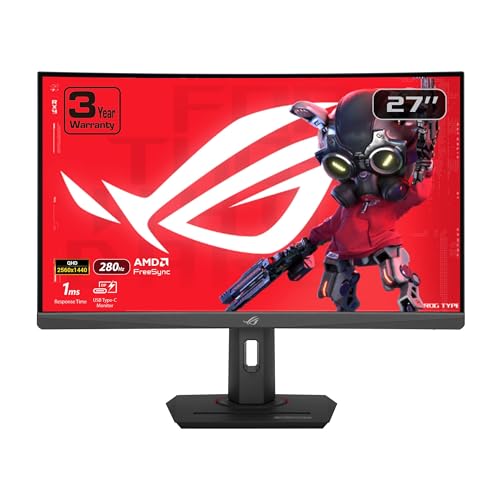 | 9.5PCKitHQ scoreView on Amazon |
06 | 9.4PCKitHQ scoreView on Amazon |
07 | 9.3PCKitHQ scoreView on Amazon |
08 | 9.2PCKitHQ scoreView on Amazon |
A closer look at each configuration
KOORUI 27-inch Curved Gaming Monitor
score
The 27-inch 2560x1440 VA panel at 180 Hz suits gaming and creative work.
- Resolution
- QHD 1440P
- Native refresh rate
- 180 Hz
- Screen size
- 27 in
- Panel
- VA
- Curved screen
- Yes
- HDMI
- Yes
- DisplayPort
- Yes
This KOORUI monitor has a 27-inch QHD 1440P VA panel at 180Hz with a 1ms response time and a 1500R curve. HDR10 with a 90% DCI-P3 gamut and 10.7 billion colors keeps scenes rich, and the 4000:1 contrast ratio adds depth. Adaptive Sync reduces tearing and stuttering. DisplayPort 1.4 and dual HDMI 2.0 ports connect PCs and laptops, and the stand tilts from -5 degrees to 15 degrees.
Choose it if
- You want a 27-inch 2560x1440 curved panel
- You want a 180 Hz refresh rate
Consider another if
- You need a 32-inch screen like the ZZA
- You need a 240 Hz refresh rate
ZZA 32-inch Curved Gaming Monitor
score
The 32-inch 2560x1440 VA panel at 165 Hz suits console and PC gaming.
- Resolution
- 2560x1440
- Native refresh rate
- 165 Hz
- Screen size
- 32 in
- Panel
- VA
- Curved screen
- Yes
- HDMI
- Yes
- DisplayPort
- Yes
- Warranty
- 1 Year
This ZZA monitor has a 32-inch QHD VA panel at 2560x1440 with a 165Hz refresh rate, a 1ms MPRT response time, and a 1500R curve. The 120% sRGB color gamut keeps colors vibrant, and HDR10 with Adaptive Sync keeps scenes detailed and tear-free. Two HDMI 2.0 ports and one DisplayPort 1.4 port connect your devices, and the monitor supports 1440P at 120Hz. VESA 100x100 mounting fits wall or arm installation.
Choose it if
- You want a 32-inch 2560x1440 curved panel
- You want a 165 Hz refresh rate
Consider another if
- You need a 27-inch screen like the KOORUI
- You need a 240 Hz refresh rate
Z-Edge 27-inch Curved Gaming Monitor UG27PX
score
The 27-inch 2560x1440 VA panel at 240 Hz suits fast competitive gaming.
- Resolution
- 2560×1440
- Native refresh rate
- 240 Hz
- Screen size
- 27 in
- Panel
- VA
- Curved screen
- Yes
- HDMI
- Yes
- DisplayPort
- Yes
- Weight
- 8.6 lb
- Warranty
- 18 months
This Z-Edge monitor has a 27-inch curved VA panel at 2560x1440 with a 240Hz refresh rate over DisplayPort and a 1ms response time. The 5000:1 contrast ratio with 1.07 billion colors keeps scenes vivid. QHD shows 1.7 times the detail of Full HD. Adaptive-Sync removes tearing and stuttering. Dual HDMI and dual DisplayPort inputs connect PCs and consoles, and PIP and PBP modes show two systems on one screen.
Choose it if
- You want a 27-inch 2560x1440 curved panel
- You want a 240 Hz refresh rate
Consider another if
- You need a 32-inch screen like the ZZA
- You need USB-C like the ASUS XG32WCS
ASUS ROG XG32WCS 32-inch Curved Gaming Monitor
score
The 32-inch 2560 x 1440 VA panel at 180 Hz with USB-C suits immersive gaming.
- Resolution
- 2560 x 1440
- Native refresh rate
- 180 Hz
- Screen size
- 32 in
- Panel
- VA
- Curved screen
- Yes
- USB-C
- Yes
- Weight
- 20.7 lb
- Warranty
- 3 Year
This ASUS monitor has a 32-inch curved 2560 x 1440 HDR gaming panel at 180Hz with a 1ms response time. Fast VA technology with ELMB Sync removes ghosting and tearing. The 90% DCI-P3 color gamut with gray-scale tracking keeps color gradation smooth. FreeSync synchronizes the refresh rate with your graphics card, and a USB Type-C port connects laptops with power delivery and data transfer. The monitor weighs 20.7 lb.
Choose it if
- You want a 32-inch 2560x1440 curved panel
- You want USB-C with power delivery
Consider another if
- You need a 27-inch screen like the KOORUI
- You need a 240 Hz refresh rate
ASUS ROG XG27WCMS 27-inch Curved USB-C Gaming Monitor
score
The 27-inch 2560 x 1440 VA panel with 95% DCI-P3 suits competitive gaming.
- Resolution
- 2560 x 1440
- Screen size
- 27 in
- Panel
- VA
- Curved screen
- Yes
- USB-C
- Yes
- Weight
- 15.9 lb
- Warranty
- 3 Year
This ASUS monitor has a 27-inch curved 2560 x 1440 HDR gaming panel with an overclock to 280Hz and a 1ms response time. Fast VA technology with ELMB Sync removes ghosting and tearing. The 95% DCI-P3 color gamut with gray-scale tracking keeps color gradation smooth. FreeSync Premium synchronizes the refresh rate with your graphics card, and a USB-C connection adds power delivery. The monitor weighs 15.9 lb.
Choose it if
- You want a 27-inch 2560x1440 curved panel
- You want USB-C with power delivery
Consider another if
- You need a 32-inch screen like the ZZA
- You need a 180 Hz native refresh rate
AOC 27-inch Gaming Monitor 2K VA 1ms HDR Q27G4XN
score
The 27-inch 2560x1440 VA panel at 180 Hz suits sharp, fast gaming.
- Resolution
- 2560x1440
- Native refresh rate
- 180 Hz
- Screen size
- 27 in
- Panel
- VA
- HDMI
- Yes
- Weight
- 18 lb
- Warranty
- 3 year
This AOC monitor has a 27-inch QHD VA panel at 2560x1440 with a 180Hz refresh rate and a 1ms GtG response time. Adaptive-Sync keeps team fights tear-free, and the 127.8% sRGB color gamut brings rich detail to every scene. The 3-sided frameless design suits multi-monitor setups. HDMI 2.0 connects your devices, and the height-adjustable stand fits your desk. The monitor weighs 18 lb and carries a 3-year warranty.
Choose it if
- You want a 27-inch 2560x1440 panel
- You want a 180 Hz refresh rate
Consider another if
- You need a curved screen like the KOORUI
- You need a 240 Hz refresh rate
AOC 27-inch Curved Gaming Monitor 2K VA CQ27G4H
score
The 27-inch 2560x1440 curved VA panel at 180 Hz suits immersive gaming.
- Resolution
- 2560×1440
- Native refresh rate
- 180 Hz
- Panel
- VA
- Curved screen
- Yes
- HDMI
- Yes
- DisplayPort
- Yes
- Warranty
- 3 year
This AOC monitor has a 27-inch curved QHD VA panel at 2560x1440 with a 180Hz refresh rate over DisplayPort and a 0.5ms response time. The 1500R curvature gives a wide, immersive visual field. HDR readiness keeps visuals vibrant, and Flicker-Free with low blue light technology helps minimize eye strain. DisplayPort 1.4, dual HDMI 2.0, and an earphone out connect your devices. The monitor carries a 3-year warranty.
Choose it if
- You want a 27-inch 2560x1440 curved panel
- You want a 180 Hz refresh rate
Consider another if
- You need a 32-inch screen like the ZZA
- You need a 240 Hz refresh rate
MSI MAG 275CQDF X24 27-inch Gaming Monitor
score
The 27-inch 2560 x 1440 VA panel at 240 Hz suits fast gaming and dark scenes.
- Native refresh rate
- 240 Hz
- Screen size
- 27 in
- Panel
- VA
- HDMI
- Yes
- Warranty
- 3 Years
This msi monitor has a 27-inch VA panel at 2560 x 1440 with a 240Hz native refresh rate and a 0.5ms response time. Dual Mode runs WQHD at 240Hz and HD at 400Hz. AI Vision reveals details in dark areas and enhances brightness and color saturation. FreeSync Premium keeps frames smooth, and Less Blue Light reduces light emission in the blue-violet region. HDMI connects your devices, and VESA mounting with a tilt stand fits your desk.
Choose it if
- You want a 27-inch 2560x1440 panel
- You want a 240 Hz refresh rate
Consider another if
- You need a curved screen like the KOORUI
- You need USB-C like the ASUS XG32WCS
Make the choice for your setup
Compare refresh rate and curve
Refresh rate differs across the guide: the Z-Edge and the msi run at 240Hz, the KOORUI, the ASUS XG32WCS, and both AOC monitors run at 180Hz, and the ZZA runs at 165Hz. The ASUS XG27WCMS overclocks to 280Hz, so compare it on its 95% DCI-P3 color gamut and USB-C instead of a native rate. The KOORUI, the ZZA, the Z-Edge, the ASUS monitors, and the AOC CQ27G4H are curved. The 1500R curve on the KOORUI, the ZZA, the Z-Edge, and the AOC CQ27G4H wraps around your field of view. Match the refresh rate and the curve to the games you play.
Compare color gamut and contrast
Color gamut differs across the guide: the AOC Q27G4XN covers 127.8% sRGB, the ZZA covers 120% sRGB, and the KOORUI covers 90% DCI-P3 with HDR10. The ASUS XG27WCMS covers 95% DCI-P3, the ASUS XG32WCS covers 90% DCI-P3, and the Z-Edge shows 1.07 billion colors with a 5000:1 contrast ratio. The KOORUI shows a 4000:1 contrast ratio with 10.7 billion colors. The ZZA pairs HDR10 with Adaptive Sync for detailed dark and bright scenes, and the AOC CQ27G4H pairs HDR readiness with a high dynamic contrast ratio. Weigh the gamut, the color count, and the contrast against the games and movies you watch. If that fits your setup better, see our guide to the Best 32 Inch VA Monitor.
Check ports, stands, and extras
Ports differ across the guide: the KOORUI has DisplayPort 1.4 and dual HDMI 2.0 ports, the ZZA has two HDMI 2.0 ports and one DisplayPort 1.4 port, and the Z-Edge has dual HDMI and dual DisplayPort inputs. The ASUS monitors add USB-C with power delivery, and the AOC monitors have DisplayPort 1.4 and HDMI 2.0 with an earphone out. The msi connects through HDMI. Stands differ too: the KOORUI tilts from -5 degrees to 15 degrees, the AOC Q27G4XN adjusts in height, and the msi tilts. The ASUS monitors add a tripod socket, and the Z-Edge adds PIP and PBP modes. Match the ports and stand to your desk setup.
For a wider shortlist, start with 24 vs 27 Inch Monitor.
FAQ: 1440p VA Monitor
Which monitors run at 240Hz in this guide?
The Z-Edge and the msi run at 240Hz. The KOORUI, the ASUS XG32WCS, and both AOC monitors run at 180Hz, and the ZZA runs at 165Hz. The ASUS XG27WCMS overclocks to 280Hz with a 1ms response time.
Which monitors here are curved?
The KOORUI, the ZZA, the Z-Edge, both ASUS monitors, and the AOC CQ27G4H are curved. The KOORUI, the ZZA, the Z-Edge, and the AOC CQ27G4H use a 1500R curve. The ASUS monitors pair their curves with USB-C and FreeSync.
Which monitor here has a USB-C port?
The ASUS XG32WCS and the ASUS XG27WCMS have a USB-C port. The XG32WCS pairs USB-C with power delivery and data transfer. The KOORUI, the ZZA, the Z-Edge, and both AOC monitors connect through HDMI and DisplayPort, while the msi connects through HDMI.


