How Big Is a 34 Inch Monitor?
 By Theo LangUpdated
A 34 inch monitor measures 34 inches across the screen from one corner to the opposite corner. The monitors here include ultrawide screens, such as the Samsung and Gawfolk models with a 21:9 aspect ratio, so they are much wider than a standard screen of the same diagonal size. That width fits two windows side by side, with room left for a third panel.
What 34 inches measures
The 34 inch figure is the diagonal of the screen itself, measured from one corner to the opposite corner. It does not measure the width of the monitor, the height, or the size of the stand and bezel. Two monitors with the same diagonal can look different on a desk when one is ultrawide and the other is not, so check the aspect ratio next.
What 21:9 ultrawide means
A 21:9 screen is wider in proportion to its height than a standard screen, so it holds more side by side. That shape suits a wide spreadsheet, a timeline, and two documents open at once, with each window still wide enough to read. The Samsung monitor here has a 21:9 aspect ratio, and the Alienware and Gawfolk monitors are ultrawide screens too.
Curved and flat 34 inch screens
Some 34 inch monitors curve around the viewer, and some stay flat. The Alienware monitor has a 1500R curve, and the Gawfolk monitor has a 1500R curve too, while the Samsung monitor is flat. A curve pulls the far edges of a wide screen closer to the viewer, and a flat screen keeps straight lines straight across the whole width. Choose the shape that suits the work on the desk.
Resolution and refresh rate
The 34 inch monitors here carry a WQHD or Ultra-WQHD resolution, which gives more pixels across the width than a smaller screen. The Dell monitor has a WQHD VA panel, the Samsung monitor has an Ultra-WQHD resolution, and the Gawfolk monitor has a 3440x1440 resolution. For motion, the Dell monitor runs at 120Hz, the Samsung monitor runs at 100Hz, and the Alienware monitor runs at 180Hz, so check the refresh rate that suits the work and games on the desk.
What you need

Dell 34 Monitor S3425DW
A 34 inch WQHD VA monitor at 120Hz with a USB-C cable that carries up to 65W power delivery.
View on Amazon
Alienware 34 Curved Gaming Monitor AW3425DWM
A 34 inch WQHD ultrawide monitor with a 1500R curve, a 180Hz refresh rate and a 3 year warranty.
View on Amazon
SAMSUNG 34-inch ViewFinity S50GC Ultra-WQHD Monitor
A 34 inch Ultra-WQHD monitor with a 21:9 aspect ratio, a 100Hz refresh rate, HDMI and DisplayPort inputs.
View on Amazon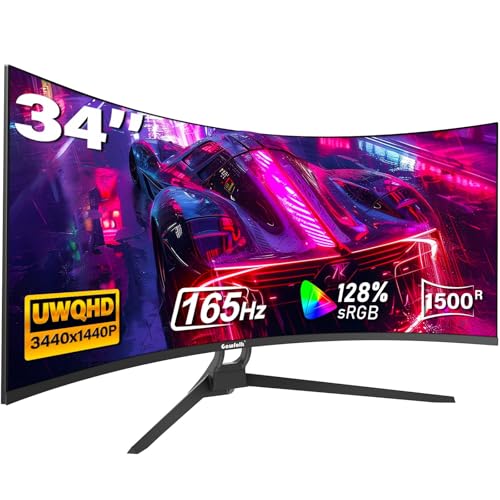
Gawfolk 34-inch Ultrawide Curved Gaming Monitor
A 34 inch UWQHD monitor at 3440x1440 with a 1500R curve, a 165Hz refresh rate, HDMI and DisplayPort ports.
View on AmazonThese come from our ranked list Best 34 Inch Monitor, which compares them spec by spec.
FAQ
Is a 34 inch monitor too big for a desk?
It depends on the desk and the viewing distance. A 34 inch ultrawide screen is wide, so measure the desk width and leave room for the stand and for a keyboard in front of it. If the desk is narrow, a smaller screen size fits better.
What resolution is a 34 inch monitor?
The monitors here use WQHD or Ultra-WQHD resolution. The Dell and Alienware monitors have WQHD resolution, the Samsung monitor has Ultra-WQHD resolution, and the Gawfolk monitor has a 3440x1440 resolution.
Are 34 inch monitors curved?
Some are and some are not. The Alienware and Gawfolk monitors here have a 1500R curve, while the Samsung monitor is flat, so check the curve in the monitor's own description before buying.