
1080p vs 1440p (2026): Key Differences Compared
 By Theo LangUpdated
1080p is the Full HD resolution tier. 1440p is the QHD resolution tier. Look at the 1080p examples for a 27-inch screen at 120Hz or 240Hz, and look at the 1440p examples for a 32-inch screen at 180Hz or a 27-inch IPS screen at 180Hz.
1080p or 1440p at a glance
Each side is shown through example configurations from our buying guides. These are examples, not a ranking.
1080p

The example configurations
SANSUI 27-inch Monitor
Suits you if you want a 27-inch Full HD screen at 120Hz with an HDMI input for work.
- Resolution
- 1920 x 1080
- Native refresh rate
- 120 Hz
- Screen size
- 27 in
The SANSUI ES-27F2 pairs a 27-inch screen with a 1920x1080 Full HD resolution and a 120Hz native refresh rate, with FreeSync for home and office use, and the monitor suits work, business and gaming. Its 4000:1 contrast ratio pairs with 110% sRGB and 300 nits of brightness, and the OD response time is 5ms. An HDMI port connects your devices, with a 100x100mm VESA mount for arms and brackets, and the tilt range runs from minus 5 degrees to 22 degrees. The 178-degree viewing angle covers the screen from the side, with Low Blue, Anti-Glare and Anti-Flicker technology built in. It ships without speakers or an earphone jack, and carries a 1 Year Manufacturer warranty.
Choose it if
- You want a 27-inch screen at 120Hz
- You need an HDMI port for your devices
Consider the other side if
- You need a 2560x1440 resolution panel
- You need a 180Hz refresh rate
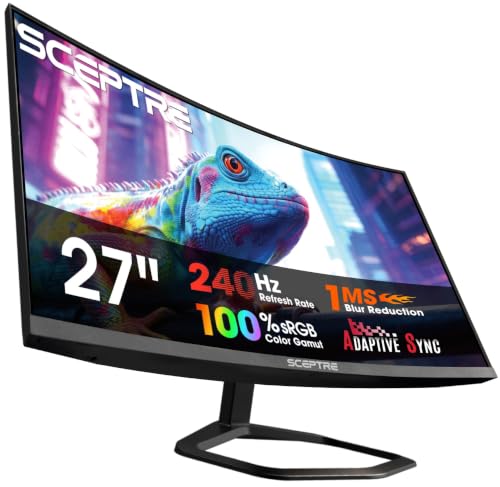
Sceptre 27-inch Curved Gaming Monitor C275B-FWT240
Suits you if you want a curved 27-inch VA screen at 240Hz with two HDMI and two DisplayPort inputs.
- Resolution
- FHD 1080p
- Native refresh rate
- 240 Hz
- Screen size
- 27 in
- Panel
- VA
- Curved screen
- Yes
- HDMI
- Yes
- DisplayPort
- Yes
- Weight
- 14.6 lb
- Warranty
- limited 1 year
The Sceptre C275B-FWT240 pairs a 27-inch curved VA panel with a 1500R curve, a 1080p resolution and a 240Hz native refresh rate, with a 1ms BR response time. Its VA panel is rated at 99% sRGB, and Blue-Light Shift technology is built in. Two HDMI ports and two DisplayPort inputs connect your devices at up to 240Hz, and built-in speakers keep audio on the desk without extra hardware. The 99% sRGB figure covers creative and multimedia work with accurate and stunning visuals. The monitor is part of the C275B-FWT240 series from 2026. The monitor weighs 14.6 lb and carries a limited 1 year warranty.
Choose it if
- You want a 240Hz refresh rate for gaming
- You need two HDMI and two DisplayPort inputs
Consider the other side if
- You need a 2560x1440 resolution panel
- You need a 32-inch screen size
Samsung 32-inch Odyssey G5 (G51F) Gaming Monitor
Suits you if you want a 32-inch QHD screen at 180Hz with a 1ms response time and AMD FreeSync.

- Native refresh rate
- 180 Hz
- Warranty
- 1 Year Manufacturer
The Samsung LS32FG510ENXZA pairs a 32-inch QHD screen with a 2560x1440 resolution and a 180Hz refresh rate, with a 1ms response time in MPRT. AMD FreeSync syncs the graphics card and the panel, and HDR10 is built in. Black Equalizer lifts visibility in dark scenes, making it easier to view fine details, and Virtual Aim Point provides increased accuracy in any game. Auto Source Switch+ moves to a new source signal when another device connects, and the ergonomic stand tilts and adjusts in height. The 180Hz rate and the 1ms response time pair for fast-paced action. It carries a 1 Year Manufacturer warranty.
Choose it if
- You want a 32-inch QHD screen at 180Hz
- You need AMD FreeSync for your games
Consider the other side if
- You need a 240Hz refresh rate
- You need a 27-inch screen size
Acer Nitro 27-inch Gaming Monitor KG271U N3bmiipx
Suits you if you want a 27-inch IPS screen at 2560x1440 and 180Hz with two HDMI inputs and DisplayPort.

- Resolution
- 2560 x 1440
- Panel
- IPS
- HDMI
- Yes
- DisplayPort
- Yes
- Weight
- 12.13 lb
- Warranty
- 3 year parts and labor
The Acer Nitro KG271U pairs a 27-inch IPS screen with a 2560x1440 QHD resolution in a 16:9 aspect ratio and a refresh rate of up to 180Hz, with up to 0.5ms GTG response time. AMD FreeSync syncs the monitor with the graphics card, and DCI-P3 95% coverage suits color-critical projects. DCI-P3 95% coverage fits graphic design, photography and film editing, with accurate colors for color-critical projects. Two HDMI inputs and a DisplayPort input connect your devices, with a speaker and a VESA mount built in. Bluelight Filter and Flickerless technology are built in, and the zero-frame design frees screen space. It weighs 12.13 lb and carries a 3 year parts and labor warranty.
Choose it if
- You want a 27-inch IPS screen at 180Hz
- You need DCI-P3 95% color coverage
Consider the other side if
- You need a 240Hz refresh rate
- You need a 32-inch screen size
How to choose between them
Resolution and screen size
The 1080p examples have 1920x1080 on the SANSUI at 27 inches and FHD 1080p on the Sceptre at 27 inches. The 1440p examples have 2560x1440 on the Samsung at 32 inches and on the Acer at 27 inches. Both 1440p examples share the 2560x1440 figure, while the 1080p examples share 1920x1080 in two forms. The Samsung is the only 32-inch example here, while the other three examples measure 27 inches. The Acer pairs 2560x1440 with a 27-inch IPS panel, while the Samsung pairs it with a 32-inch screen. If you want a 32-inch screen, the Samsung is the example with it. If you want a 27-inch screen, the SANSUI, the Sceptre and the Acer all have that size, with the Acer pairing it with 2560x1440 and the SANSUI and the Sceptre pairing it with 1920x1080.
Refresh rate and response time
The SANSUI has a 120Hz native refresh rate and the Sceptre has a 240Hz native refresh rate on the 1080p side. The Samsung has a 180Hz refresh rate and the Acer runs at up to 180Hz on the 1440p side. Response times differ in metric: the SANSUI has OD 5ms, the Sceptre has 1ms BR, the Samsung has 1ms MPRT, and the Acer has up to 0.5ms GTG. The SANSUI, the Samsung and the Acer all have FreeSync. If you want the highest refresh rate here, the Sceptre runs at 240Hz. The Sceptre is the only example here above 180Hz. If you want 180Hz on either side of the resolution split, the Samsung and the Acer both have it.
Weight, ports and warranty
The Sceptre weighs 14.6 lb and the Acer weighs 12.13 lb. Only the Sceptre and the Acer give a weight here. The SANSUI has an HDMI port with a 100x100mm VESA mount. The Sceptre has two HDMI ports and two DisplayPort inputs with built-in speakers. The Acer has two HDMI inputs, a DisplayPort input, a speaker and a VESA mount. Warranty terms run 1 Year Manufacturer on the SANSUI and the Samsung, limited 1 year on the Sceptre, and 3 year parts and labor on the Acer. If you want the lighter weight, the Acer weighs 12.13 lb. If you want the longest warranty term, the Acer has 3 year parts and labor.
Compare the full buying guides
 8 picks
Best Computer Monitors (2026): Our 8 Picks Ranked
Top pick: Dell 24 Monitor SE2426H. 1920x1080, 144 Hz.
 8 picks
Best Gaming Monitor (2026): Top 8 by the Specs
Top pick: Dell 27 Gaming Monitor SE2726HG. 1920x1080, 240 Hz.
 8 picks
Best Portable Monitor (2026): 8 Models Side by Side
Top pick: ARZOPA 16.1'' Portable Gaming Monitor 106% sRGB Z1FC. 1080P FHD, 144 Hz.
FAQ: 1080p vs 1440p
What resolutions do the examples have on each side?
The 1080p examples have 1920x1080 on the SANSUI at 27 inches and FHD 1080p on the Sceptre at 27 inches. The 1440p examples have 2560x1440 on the Samsung at 32 inches and on the Acer at 27 inches. Both 1440p examples share the 2560x1440 figure.
Which example has the highest refresh rate?
The Sceptre has a 240Hz native refresh rate with a 1ms BR response time. The Samsung has a 180Hz refresh rate with a 1ms MPRT response time, and the Acer runs at up to 180Hz with up to 0.5ms GTG. The SANSUI has a 120Hz native refresh rate with an OD response time of 5ms.
Which examples list built-in speakers?
The Sceptre has built-in speakers with two HDMI ports and two DisplayPort inputs, and the Acer has a speaker with two HDMI inputs and a DisplayPort input. The Acer also has a VESA mount. The SANSUI has an HDMI port, with no speakers and no earphone jack.

