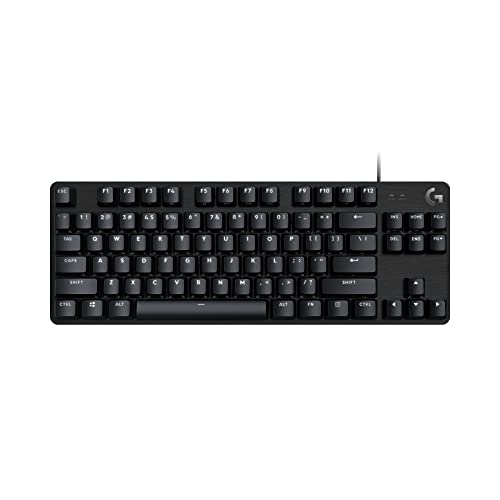
Why Do Gaming Keyboards Have Raised Keys?
 By Theo LangUpdated
Gaming keyboards have raised keys because a mechanical switch holds each keycap above the keyboard plate. The height gives each key room to travel down when you press it, and the gaps between keys let you feel each key on its own. Raised keys also leave room for backlight to show between the keys.
Raised keys come from mechanical switches
A mechanical keyboard puts a switch under each key, and the switch sits on a plate inside the case. The keycap mounts on top of the switch stem, so it stands above the plate instead of lying flat on the case. When you press a key, the stem moves down inside the switch and springs back when you let go. That travel is what makes the key feel tall.
Tall keys help fingers find each key
Raised keycaps leave a gap around every key, so your fingers can feel the edge of one key before they reach the next. That spacing helps you land on the right key without looking down at the board. On a flat keyboard the keys sit close together, so it is harder to tell them apart by touch alone. The gaps also keep a pressed key from brushing the keys beside it.
Raised keys make cleaning and light easier
The gaps between raised keys give dust and crumbs a place to fall instead of packing under the keys, and you can wipe or brush between the keys to clear them out. The same gaps let backlight shine out from under each keycap, so the light reaches your eyes and the letters on the keys stay visible in a dark room. A flat board hides the light behind the keycaps.
Raised keys are a trade, not a rule
Not every gaming keyboard has tall keys. Some use low-profile switches that sit closer to the case, and those boards are thinner and lighter to carry. A raised board takes up more room in a bag and sits higher on the desk. Read the switch type and the layout in the spec sheet, and pick the height that fits your desk and your bag.
What you need

AULA F75 Pro Wireless Mechanical Keyboard
A 75% wireless mechanical keyboard with hot-swappable LEOBOG reaper switches, RGB backlight, side-printed PBT keycaps and a control knob.
View on Amazon
AULA F75 Pro Wireless Mechanical Keyboard
A 75% wireless mechanical keyboard with hot-swappable LEOBOG star vector switches, RGB backlight, side-printed PBT keycaps and a control knob.
View on Amazon
Redragon K521 Upgrade Rainbow LED Gaming Keyboard
A wired 104-key keyboard with rainbow LED backlight, mechanical-feeling keys, 19-key anti-ghosting and 12 multimedia keys.
View on Amazon
Redragon Mechanical Gaming Keyboard Wired
A wired mechanical keyboard with a hot-swappable red switch, 11 backlit modes, full-key anti-ghosting and double-shot PBT keycaps.
View on AmazonThese come from our ranked list Best Gaming Keyboard, which compares them spec by spec.
FAQ
Do raised keys make you type faster?
No. Raised keys change how the board feels, not how fast you type. Your speed comes from practice, so pick the board that feels right and learn its layout.
Are raised keys the same as mechanical switches?
Raised keys and mechanical switches often go together, but they are not the same thing. The switch is the part under the key, while the raised look comes from how high the keycap sits above the plate.
Can you swap keycaps on a raised keyboard?
Some keyboards let you pull the keycaps off and fit new ones, and hot-swappable boards also let you change the switches. Check the spec sheet for hot-swappable switches and the keycap type before you buy new caps.