
What to Look for in a Streaming Webcam
 By Theo LangUpdated
A streaming webcam needs sharp resolution, a frame rate that matches your stream, autofocus that holds while you move, and a microphone that picks up your voice. Look for 4K or 1080p resolution, autofocus, a field of view that fits your desk, and a USB connection that fits your computer.
Resolution and frame rate
Resolution sets how sharp your picture looks, and frame rate sets how smooth motion looks. A 4K webcam records more detail than a 1080p one. Check what your streaming software and your computer can take, since higher resolution and frame rate need more bandwidth and processing. A 1080p camera suits a simple talking-head stream, while 4K suits a stream where you move, show products or switch between wide and close views.
Autofocus and field of view
Autofocus keeps you sharp as you lean in, gesture or step back, while a fixed-focus camera blurs when you move from the spot you set. Fast autofocus suits a stream where you move, show products or switch between views. Field of view sets how much of the room the camera shows: a wide angle fits a desk scene with props or a second person, while a narrower angle keeps the frame on you alone. Check the field of view the maker states and match it to your desk.
Microphones and privacy
Built-in microphones pick up your voice without a separate mic, and dual microphones capture sound from a wider area than one mic. Check how far the maker says the mics reach and whether they reduce background noise. A physical privacy cover covers the lens when the camera is not in use, so look for one if the camera sits on your desk all day. The EMEET C60E single-camera model has a flip privacy cover and two microphones that pick up voice within 8 ft.
Connection and mounting
A webcam that plugs in by USB works with most computers and streaming software, so check that the connector matches an open port on your computer and that the cable is long enough for your desk. The EMEET C60E single-camera model connects by USB 2.0 Type-A with a fixed 1.5 m cable. A tripod mount lets you put the camera on a tripod for a higher angle, and a clip mount holds it on top of a monitor. Check that your streaming software shows the camera as a video source before you buy.
Zoom and framing controls
Zoom lets you switch between a wide shot of your desk and a close view of a product without moving the camera. The EMEET C60E dual-camera model offers hybrid zoom from 1X to 11X with wide-angle and telephoto cameras, plus a remote control for zoom and color. If you show products on stream, look for zoom and a way to adjust it without touching the camera. If you only sit and talk, zoom matters less than autofocus and light handling.
What you need
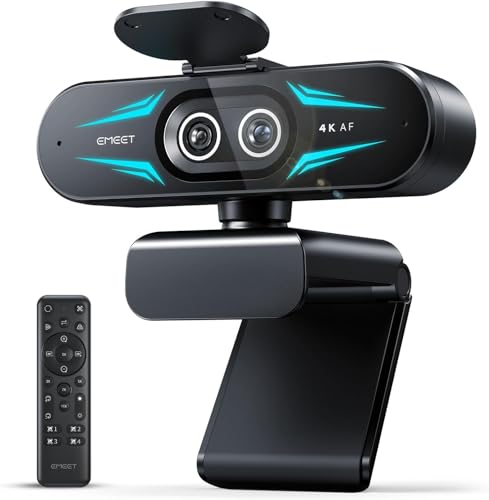
EMEET C60E Dual-Camera 4K Webcam for Streaming
A dual-camera 4K webcam with wide-angle and telephoto views, hybrid zoom from 1X to 11X, PDAF autofocus, a remote control and two microphones.
View on Amazon
Logitech C920x HD Pro PC Webcam
A 1080p webcam with autofocus, HD light correction, stereo audio from dual mics and a 3-month XSplit VCam license.
View on Amazon
Logitech MX Brio Ultra HD 4K Webcam for Streaming and Collaboration
A 4K webcam with autofocus, dual beamforming microphones, Show Mode for sharing desk work and a 1 year limited hardware warranty.
View on Amazon
EMEET C60E 4K Webcam for Streaming & Gaming,PDAF Autofocus
A 4K webcam with PDAF autofocus, a 73 degree field of view, two microphones, a flip privacy cover and a USB 2.0 Type-A connection.
View on AmazonThese come from our ranked list Best Webcam for Streaming, which compares them spec by spec.
FAQ
Do I need a 4K webcam for streaming?
Not always. A 1080p camera suits a simple talking-head stream, while 4K suits streams where you move or show detail. Check what your streaming software and computer can take before you pay for more resolution than you use.
Is a built-in microphone enough for streaming?
It can be. Dual microphones pick up clear voice within a few feet of the camera, which suits a desk stream. If you move around the room or stream in a noisy space, a separate microphone placed close to you gives more control.
What is the difference between the two EMEET C60E models?
The dual-camera model has wide-angle and telephoto cameras with hybrid zoom from 1X to 11X and a remote control. The single-camera model has one 4K camera with PDAF autofocus, a 73 degree field of view and a flip privacy cover. Both list 4K resolution and a 2 year warranty.


