
What Is a Good Monitor Response Time for Gaming?
 By Theo LangUpdated
For gaming, look for a stated response time of 1ms GtG or lower on a Fast IPS panel, paired with a high refresh rate. Response time is how fast a pixel changes from one shade to another, and a lower figure means less ghosting and trailing behind moving objects on screen.
What response time measures
Response time is the time a pixel needs to change from one shade to another, stated in milliseconds. When pixels change slowly, fast movement leaves a faint trail behind it, often called ghosting or trailing. The Pixio PX248 Wave has a 1ms response time and describes the result as no ghosting or trailing in fast gameplay. A lower stated figure means the panel changes shade sooner after each new frame arrives.
GtG and MPRT are different figures
Makers state response time in more than one way, so compare like with like. The Samsung 27 inch Odyssey G5 has 1ms response time (GtG), while the Samsung 32 inch Odyssey G5 has 1ms response time (MPRT). The ASUS TUF VG279QM5A has 0.3ms (min) response time. Because GtG and MPRT measure different things, a 1ms GtG figure and a 1ms MPRT figure do not describe the same measurement. Check which measurement each monitor uses before you compare two monitors.
Match response time to refresh rate
Refresh rate is how many times per second the screen redraws, stated in Hz. A higher refresh rate gives pixels less time to finish changing before the next frame, so high-refresh gaming monitors pair the two figures. The monitors here have 180Hz, 200Hz and 240Hz refresh rates with response times of 1ms or 0.3ms (min). Check both figures together, and check the requirements published for your game and graphics card before you choose.
Check sync and overdrive settings
Adaptive sync matches the monitor refresh rate to the frame rate from the graphics card, which reduces tearing and stuttering. The Samsung 27 inch Odyssey G5 has G-Sync compatibility and AMD FreeSync, the Samsung 32 inch Odyssey G5 has AMD FreeSync, the Pixio has Adaptive Sync, and the ASUS has FreeSync and G-Sync compatibility with Variable Overdrive and ELMB Sync. Overdrive settings change how fast pixels are driven, so read the monitor manual for the setting the maker recommends at your refresh rate.
What you need

Samsung 27-inch Odyssey G5 (G50F) Gaming Monitor
A 27 inch QHD Fast IPS monitor with 180Hz refresh rate, 1ms response time (GtG), HDR10 and G-Sync compatibility.
View on Amazon
Samsung 32-inch Odyssey G5 (G51F) Gaming Monitor
A 32 inch QHD monitor with 180Hz refresh rate, 1ms response time (MPRT), HDR10 and AMD FreeSync.
View on Amazon
Pixio PX248 Wave Pink 24-inch Refresh Rate Resolution Fast Panel 1ms GTG Response Time Built-in Speakers Gaming Monitor
A 24 inch FHD Fast IPS monitor with 200Hz refresh rate, 1ms GTG response time and Adaptive Sync.
View on Amazon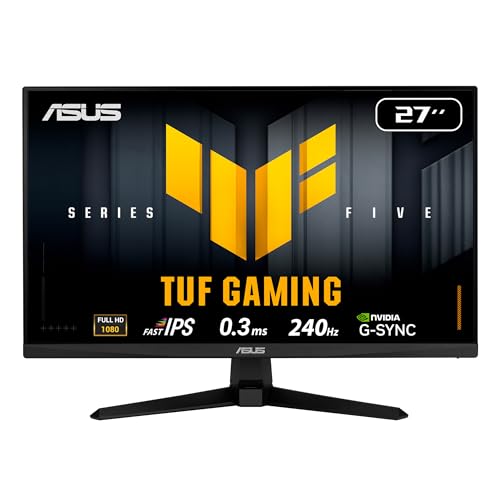
ASUS TUF VG279QM5A 27-inch Fast Gaming Monitor
A 27 inch Full HD Fast IPS monitor with 240Hz refresh rate, 0.3ms (min) response time and ELMB Sync.
View on AmazonThese come from our ranked list Best Gaming Monitor Response Time, which compares them spec by spec.
FAQ
Is 1ms response time good for gaming?
Yes. The Samsung 27 inch Odyssey G5 has 1ms (GtG), the Pixio has 1ms (GTG), and the ASUS has 0.3ms (min), while the Samsung 32 inch Odyssey G5 has 1ms (MPRT), so the same number can mean a different measurement.
What is the difference between GtG and MPRT?
They are different ways of stating response time. The Samsung 27 inch Odyssey G5 has 1ms (GtG) and the Samsung 32 inch Odyssey G5 has 1ms (MPRT), so the same number is not the same measurement for each monitor.
Does response time matter more than refresh rate?
Check both together. Refresh rate sets how often the screen redraws, and response time sets how fast pixels change shade between frames. The monitors here pair 180Hz to 240Hz refresh rates with 1ms or 0.3ms (min) response times.


