
What Is a Linear Mechanical Keyboard?
 By Theo LangUpdated
A linear mechanical keyboard uses switches that travel straight down with smooth, even resistance and no bump or click on the way down. The key actuates partway through the press, so the switch gives no physical signal when it registers. That smooth travel is the whole idea: a clean motion from top to bottom, with nothing to push past.
How a linear switch moves
Under each keycap sits a switch with a stem, a spring and metal contacts. Pressing the key pushes the stem straight down, the spring compresses, and the contacts meet to register the press. Nothing inside the switch adds a bump or a click, so resistance stays even from the top of the press to the bottom. Let go and the spring pushes the stem back up, ready for the next press.
Linear compared with tactile and clicky
A tactile switch adds a small bump partway down, so your finger feels the moment the key registers. A clicky switch adds the same bump plus a sharp click sound. A linear switch has neither, so each press feels the same all the way down and sounds quieter than a clicky switch. The trade is feel: with no bump, nothing tells your finger the key has registered except the key reaching the bottom.
Who chooses linear switches
People who press the same key many times in a row pick linear switches for the smooth travel, which lets the key reset and press again without pushing past a bump. That is why linear switches show up on gaming keyboards, where fast repeated presses matter. Typists who like a quiet board also pick them, since there is no click mechanism to make noise. If you want a clear signal under your finger for each press, a tactile switch fits that habit better.
What to check before you buy
Check the switch type in the product name or spec sheet: it should say linear. If the board is hot-swappable, you can change switches later without soldering, so a wrong first pick is easy to fix. The Logitech G316 X 98 uses USB-C wired only, while the Redragon K771 and K761 PRO add 2.4GHz wireless and Bluetooth. Match the layout to your desk, since full-size boards take more room than compact ones.
What you need

Redragon K771 Wireless Mechanical Keyboard
A full-size 108-key board with pre-lubed linear switches, hot-swap sockets, 5-layer dampening and tri-mode connection.
View on Amazon
Redragon K761 PRO Wireless 104-Key Gasket Gaming Keyboard
A 104-key gasket board with thick-lubed custom linear switches, 5-layer dampening, a display and a knob.
View on Amazon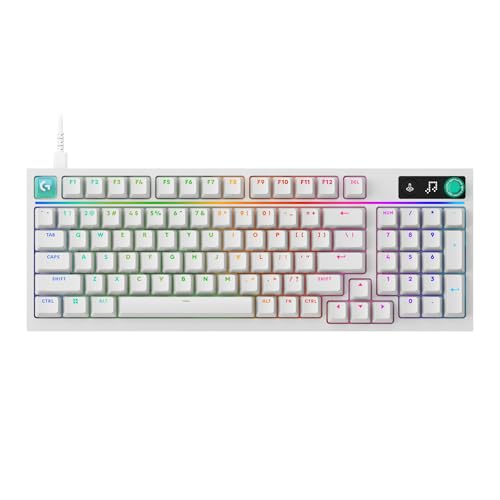
Logitech G316 X 98 Mechanical Gaming Keyboard (Linear)
A 98% layout board with hot-swappable linear switches, a gasket design, PBT keycaps and USB-C.
View on Amazon
Razer BlackWidow V4 X Mechanical Gaming Keyboard
A board with yellow linear switches, 6 macro keys, Chroma RGB, doubleshot ABS keycaps and media controls.
View on AmazonThese come from our ranked list Best Linear Keyboard, which compares them spec by spec.
FAQ
Is a linear switch quieter than a clicky switch?
Yes. A linear switch travels on a smooth stem and spring with even resistance, so it makes less noise than a clicky switch. Dampening layers and lubrication also cut noise, so check what the board lists for sound.
Can I change the switches on a linear keyboard?
Only if the board is hot-swappable. The Redragon K771 and the Logitech G316 X 98 list hot-swappable sockets, so their switches pull out without soldering. Check the board you buy for the same feature before ordering switches.
Do linear switches feel the same as membrane keys?
No. A membrane key presses a rubber dome, while a linear mechanical switch moves a stem against a spring. The mechanical switch gives a smoother, more even press and resets on its own when you let go.


