
OLED vs IPS (2026): Key Differences Compared
 By Theo LangUpdated
Look at the OLED examples here if you want a 34-inch ultrawide: the ASUS runs at 175Hz and the Alienware at 280Hz, both at 0.03ms. Look at the IPS examples here if you want a 27-inch screen: the LG runs at 3840x2160 and the Acer at 2560x1440 at up to 180Hz. The ASUS OLED weighs 18.3 lb, while both IPS examples weigh 12.13 lb each.
OLED or IPS at a glance
Each side is shown through example configurations from our buying guides. These are examples, not a ranking.
OLED


The example configurations
ASUS ROG XG34WCDG 34-inch Ultrawide Gaming Monitor
You want a 34-inch 3440x1440 QD-OLED ultrawide at 175Hz with G-SYNC and a 3-year warranty that covers burn-in.
- Resolution
- 3440 x 1440
- Native refresh rate
- 175 Hz
- Panel
- QD-OLED
- Ultrawide screen
- Yes
- Weight
- 18.3 lb
- Warranty
- 3 years warranty with ARR and burn-in coverage
The ASUS ROG XG34WCDG pairs a 34-inch 3440x1440 QD-OLED panel with a 175Hz native refresh rate and a 0.03ms response time. It has G-SYNC compatibility, ELMB, ELMB Sync, true 10-bit color, 99.3% DCI-P3, Delta E under 2, and DisplayHDR 400 True Black. OLED Care Pro works with a Neo Proximity Sensor that switches the screen to black when you step away, the DisplayWidget Center app adjusts monitor settings with a mouse, and ROG Gaming AI applies intelligent optimization and performance adjustments.
Choose it if
- You want a 34-inch ultrawide at 3440x1440
- You want 175Hz with a 0.03ms response time
Consider the other side if
- You want a 3840x2160 resolution like the LG
- You want a 12.13 lb monitor like the Acer
Alienware 34 Gaming Monitor AW3426DW
You want a 34-inch UWQHD QD-OLED ultrawide at 280Hz with a 1800R curve and USB-C.
- Resolution
- UWQHD
- Native refresh rate
- 280 Hz
- Panel
- QD-OLED
- Curved screen
- Yes
- Ultrawide screen
- Yes
- USB-C
- Yes
- HDMI
- Yes
- Warranty
- 3-Year
The Alienware AW3426DW pairs a 34-inch UWQHD QD-OLED panel with a 280Hz native refresh rate and a 0.03ms response time. Its 21:9 ultrawide screen carries a 1800R curve and 1300 nits peak brightness, with Dolby Vision, DisplayHDR True Black 500, 1,500,000:1 contrast, 99% DCI-P3, and an RGB stripe subpixel layout for text clarity. It has G-SYNC compatibility, AMD FreeSync Premium Pro, and VESA AdaptiveSync, plus USB-C at 15W, 2 HDMI 2.1 ports, 1 DP 1.4 port, VESA 100x100 mounting, AlienFX lighting, and 360-degree ventilation. An anti-burn-in AI algorithm and a graphite sheet protect the screen, backed by a 3-year warranty.
Choose it if
- You want a 280Hz refresh rate at UWQHD
- You want 2 HDMI 2.1 ports and 1 DP 1.4
Consider the other side if
- You want a 3840x2160 resolution like the LG
- You want a 27-inch screen like the Acer
Acer Nitro 27-inch Gaming Monitor KG271U N3bmiipx
You want a 27-inch 2560x1440 IPS screen at up to 180Hz with FreeSync and a speaker.

- Resolution
- 2560 x 1440
- Panel
- IPS
- HDMI
- Yes
- DisplayPort
- Yes
- Weight
- 12.13 lb
- Warranty
- 3 year parts and labor
The Acer Nitro KG271U pairs a 27-inch 2560x1440 IPS panel in a 16:9 aspect ratio with a refresh rate of up to 180Hz and a response time of up to 0.5ms GTG. It has AMD FreeSync, DCI-P3 95%, 2 HDMI ports, a DisplayPort, a speaker, and VESA mounting, with a zero-frame design. AMD FreeSync syncs the monitor frames with the graphics card frames to remove tearing, and the monitor suits graphic designers, photographers, and film editors working on color-critical projects. It also has a Bluelight Filter and Flickerless Technology, weighs 12.13 lb, and carries a 3-year parts and labor warranty.
Choose it if
- You want a 27-inch IPS screen at 2560x1440
- You want DCI-P3 95% color support
Consider the other side if
- You want a 280Hz refresh rate like the Alienware
- You want a 34-inch ultrawide like the ASUS
LG 27US500-W Ultrafine Monitor 27-inch 4K UHD HDR10 Borderless Design Reader Mode Flicker Safe Switch App
You want a 27-inch 3840x2160 IPS screen with HDR10 and a 1000:1 contrast ratio.
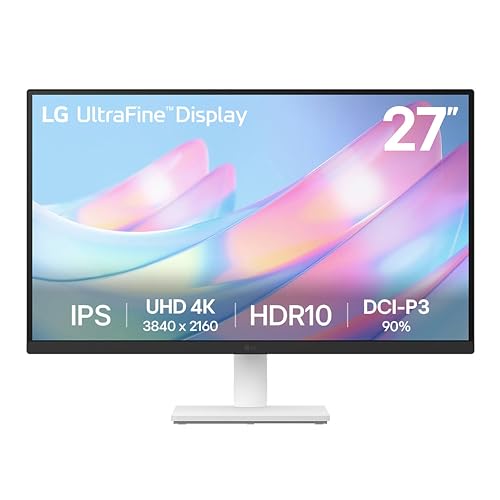
- Resolution
- 3840x2160
- Screen size
- 27 in
- Panel
- IPS
- HDMI
- Yes
- DisplayPort
- Yes
- Weight
- 12.13 lb
- Warranty
- 1 Year Parts and Labor
The LG 27US500-W pairs a 27-inch 3840x2160 IPS panel with HDR10 and a 1000:1 contrast ratio. It has up to 90% DCI-P3 color gamut expression, HDMI and DisplayPort connections, Onscreen Control for splitting the display, an ergonomic stand that adjusts the tilt, and wide viewing angles for highly detailed digital imagery. The borderless design trims the frame around the white 27-inch screen. It weighs 12.13 lb and carries a 1-year parts and labor warranty.
Choose it if
- You want a 3840x2160 resolution on 27 inches
- You want HDR10 with up to 90% DCI-P3
Consider the other side if
- You want a 34-inch ultrawide like the ASUS
- You want a 3-year warranty like the Alienware
How to choose between them
Compare screen, resolution, and response
On the OLED side, the ASUS has a 34-inch 3440x1440 ultrawide, and the Alienware has a 34-inch UWQHD ultrawide with a 21:9 aspect ratio and a 1800R curve. On the IPS side, the Acer has a 27-inch 2560x1440 screen in a 16:9 aspect ratio, and the LG has a 27-inch 3840x2160 screen. The ASUS and the Alienware list a 0.03ms response time, while the Acer has up to 0.5ms GTG. The LG has a 1000:1 contrast ratio. The OLED examples give you a wider ultrawide view across 34 inches, while the IPS examples give you a 27-inch screen, with the LG at the higher 3840x2160 resolution. Pick the 34-inch ultrawide if you want the wider screen, and pick the 27-inch IPS if you want the smaller screen with the LG resolution.
Compare color gamut figures
On the OLED side, the ASUS has 99.3% DCI-P3 with true 10-bit color and Delta E under 2, and the Alienware has 99% DCI-P3 with Dolby Vision and DisplayHDR True Black 500. On the IPS side, the Acer has DCI-P3 95%, and the LG has up to 90% DCI-P3 with HDR10. The OLED examples list 99.3% and 99% DCI-P3, while the IPS examples list 95% and up to 90% DCI-P3. The Acer supports DCI-P3 95% for color-critical projects, and the LG expresses up to 90% DCI-P3 for HDR10 content. Pick the OLED examples if you want the 99.3% or 99% DCI-P3 figures, and pick the IPS examples if you want the 95% or up to 90% DCI-P3 figures on a 27-inch screen.
Compare warranty terms
On the OLED side, the ASUS carries a 3-year warranty with Advance Replacement and burn-in coverage, and the Alienware carries a 3-year warranty with Advanced Exchange Service and Premium Panel Exchange, including coverage for OLED burn-in. On the IPS side, the Acer carries a 3-year parts and labor warranty, and the LG carries a 1-year parts and labor warranty. Three of the four examples carry a 3-year warranty, while the LG carries a 1-year warranty. Pick the ASUS or the Alienware if you want burn-in coverage in the warranty, and pick the Acer if you want a 3-year parts and labor warranty on a 27-inch IPS screen. Pick the LG if you accept a 1-year parts and labor warranty on a 27-inch 4K screen.
Compare the full buying guides
 8 picks
Best Computer Monitors (2026): Our 8 Picks Ranked
Top pick: Dell 24 Monitor SE2426H. 1920x1080, 144 Hz.
 8 picks
Best Gaming Monitor (2026): Top 8 by the Specs
Top pick: Dell 27 Gaming Monitor SE2726HG. 1920x1080, 240 Hz.
 8 picks
Best Portable Monitor (2026): 8 Models Side by Side
Top pick: ARZOPA 16.1'' Portable Gaming Monitor 106% sRGB Z1FC. 1080P FHD, 144 Hz.
FAQ: OLED vs IPS
Which monitors here have a 34-inch ultrawide screen?
The ASUS has a 34-inch 3440x1440 QD-OLED ultrawide at 175Hz, and the Alienware has a 34-inch UWQHD QD-OLED ultrawide at 280Hz with a 1800R curve. The Acer and the LG list 27-inch screens instead, at 2560x1440 and 3840x2160. The ASUS weighs 18.3 lb, while the Acer and the LG weigh 12.13 lb each. Both OLED examples list G-SYNC compatibility.
Which monitors list a 0.03ms response time?
The ASUS and the Alienware have a 0.03ms response time. The ASUS runs at 175Hz and the Alienware at 280Hz. The Acer has a response time of up to 0.5ms GTG at up to 180Hz. The LG runs at 3840x2160 with HDR10 and up to 90% DCI-P3. The Alienware also reaches 1300 nits peak brightness.
Which monitors have burn-in coverage in the warranty?
The ASUS carries a 3-year warranty with Advance Replacement and burn-in coverage. The Alienware carries a 3-year warranty with Advanced Exchange Service and Premium Panel Exchange, including coverage for OLED burn-in. The Acer carries a 3-year parts and labor warranty, and the LG carries a 1-year parts and labor warranty. The ASUS warranty also includes Advance Replacement.

