
Full-Size Mechanical Keyboards with Volume Knobs
 By Theo LangUpdated
A full-size mechanical keyboard with a volume knob gives you the number pad, arrow keys and function row, plus a dial that turns volume up and down without opening on-screen controls. Some knobs also adjust backlight brightness or switch media tracks, depending on how the maker set them up. Check what the knob controls before you buy, since the dial does not do the same job on each board.
What full size means
A full-size board keeps the number pad on the right, the arrow keys below the main keys and a full function row across the top. That layout suits work that uses numbers, shortcuts and media keys, and it keeps the keys spaced as they are on a desktop board. Measure the desk space first, since a full-size board takes more room than a smaller board and leaves less space for a mouse on a narrow desk.
What the volume knob does
Turn the knob to raise or lower volume while you type, and press it if the maker set it up as a mute or play and pause control. Some knobs also change backlight brightness or move between tracks, so read the listing to see which actions the knob covers. If you want volume control without reaching for the mouse, a knob that handles volume and mute covers the main actions.
Check the connection and layout
Decide how the board connects to your computer, such as a wired cable or a wireless link, and check that the connection works with your system. Look at the key layout too, including the number pad, the arrow keys and the position of the knob, since a knob on the right or above the keys changes how you reach it. Confirm the board fits your desk and that the cable or wireless link reaches your computer.
Check switches and keycaps
Switches set how a key feels and sounds when you press it, and keycaps set how the top of each key feels under your fingers. Look for hot-swappable sockets if you want to change switches later without soldering, and check the keycap material for wear over time. Try the feel in person when you can, since switch and keycap choice is a matter of taste and comfort.
What you need

Redragon K762 PRO Wireless 104-Key Gasket Gaming Keyboard
A full-size 104-key board with a knob for backlight brightness and media playback, a display for battery and connection mode, and USB-C, Bluetooth and 2.4GHz wireless connections.
View on Amazon
Keychron K10 HE Full-Size Hall Effect Keyboard Wireless
A full-size board with Hall Effect magnetic switches, hot-swappable sockets, dedicated media keys, and Bluetooth, 2.4GHz wireless and USB-C connections.
View on Amazon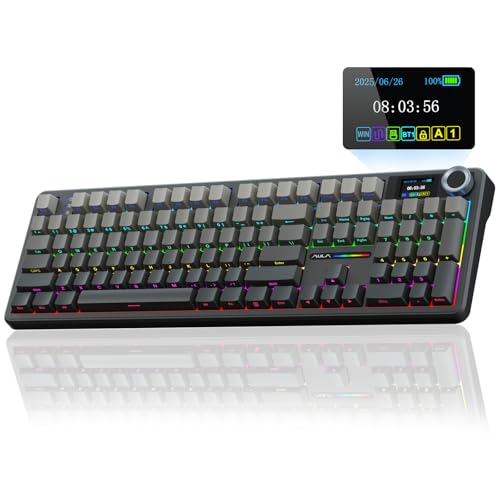
AULA F108 PRO
A full-size board with a multi-function knob for volume, a display screen, pre-lubed switches, hot-swappable sockets, and BT5.0, 2.4GHz wireless and USB-C connections.
View on Amazon
Redragon K668 108-Key Hot-Swap Wired RGB Gaming Keyboard
A wired full-size 108-key board with dedicated hotkeys for mute, calculator, screen lock and desktop, Red linear switches and hot-swappable sockets.
View on AmazonThese come from our ranked list Best Full Size Mechanical Keyboard, which compares them spec by spec.
FAQ
Does the knob control only volume?
No. The knob controls volume on boards set up that way, and it can also handle mute, media playback or backlight brightness when the maker set it up for those actions. Read the listing for the board you are looking at to see which actions its knob covers.
Do I need a full-size board for the number pad?
Yes, if you want a number pad built into the board. A full-size layout keeps the number pad, arrow keys and function row in place. If you rarely type numbers, a smaller board gives you more desk space and still covers the main keys.
Can I change the switches on these boards?
It depends on the board. Some boards have hot-swappable sockets that let you pull switches out and fit others without soldering. Check the listing for the board you are looking at, since a board without those sockets needs soldering to change switches.


