
Full-Size Mechanical Keyboard Kits Explained
 By Theo LangUpdated
A full-size mechanical keyboard keeps a separate number pad, arrow keys and a function row, so every key has its own place. A kit or swap-ready board also lets you change switches and keycaps to suit your typing. Check the layout, socket type and connection modes before you buy.
What full size means
Full size means the board keeps the full set of keys found on a desktop keyboard, including a separate number pad on the right. Arrow keys and a function row sit in their own areas instead of sharing keys with other functions. That layout takes more desk space, so measure your desk and compare it with the size listed for the board you want.
What swap-ready means
On a hot-swappable board, each switch sits in a socket and pulls out by hand or with a puller. You press a new switch into the same socket, with no soldering. Check which switch pins the socket accepts before you order switches, and check whether a switch and keycap puller comes in the box or needs to be bought apart from the board.
Check the connection modes
Boards connect by cable, by Bluetooth, or by a wireless receiver, and some boards offer more than one mode. Check which modes the board you want includes and which ports your computer has. If you plan to move between a desktop, a laptop and a tablet, look for a board that can pair with more than one device and switch between them from the keyboard.
Pick switches and keycaps
Switch type changes how a key feels and sounds when you press it, so read the switch description for the board you want. Keycap material and profile change the feel of the top of each key as well. Because swap-ready boards let you change both parts later, you can start with the switches and keycaps in the box and replace them when your preference changes.
Set it up and adjust
Plug in the cable or pair the board, then check that every key registers in a text editor. Many boards use software to change lighting, remap keys and record macros. Follow the manual for your board when you install that software, and check which system the software needs, since some tools only run in wired mode or on one system.
What you need

Redragon K762 PRO Wireless 104-Key Gasket Gaming Keyboard
A full-size 104-key wireless board with custom linear switches, a TFT info display and knob, tri-mode USB-C, Bluetooth and 2.4GHz connection, and round PBT keycaps.
View on Amazon
Keychron K10 HE Full-Size Hall Effect Keyboard Wireless
A full-size Hall Effect board with hot-swappable magnetic switches, adjustable actuation, Bluetooth, 2.4 GHz and USB-C modes, double-shot PBT keycaps and wood sidings.
View on Amazon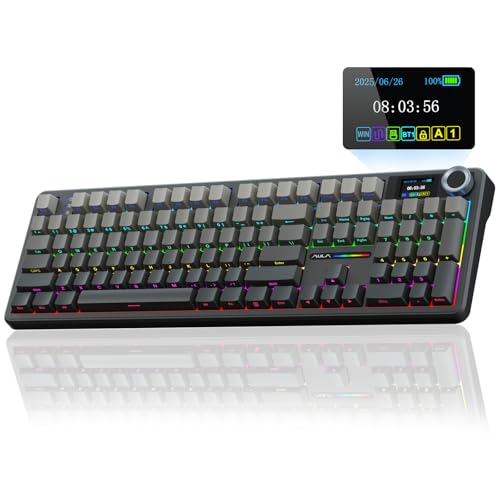
AULA F108 PRO
A full-size wireless board with pre-lubed switches, a TFT display and knob, hot-swappable 3-pin or 5-pin sockets, side printed PBT keycaps and an 8000mAh battery.
View on Amazon
Redragon K668 108-Key Hot-Swap Wired RGB Gaming Keyboard
A wired full-size 108-key board with Red linear switches, sockets for 3-pin or 5-pin switches, extra hotkeys for mute and calculator, and RGB lighting.
View on AmazonThese come from our ranked list Best Full Size Mechanical Keyboard, which compares them spec by spec.
FAQ
Do I need to solder switches on a hot-swappable board?
No. On a hot-swappable board the switches pull out of their sockets and new switches press in by hand. Check which switch pins the socket accepts before you buy replacement switches.
Will a full-size keyboard fit a small desk?
Measure the space where the keyboard will sit and compare it with the dimensions listed for the board. A full-size board needs room for its number pad, so leave space for your mouse beside it.
Can I use one keyboard with a computer and a tablet?
A board with Bluetooth can pair with a tablet, and a board with more than one connection mode can switch between devices. Check the connection modes listed for the board and the ports on each device.


