
Full-Size Hot-Swap Mechanical Keyboards
 By Theo LangUpdated
A full-size hot-swap mechanical keyboard has a number pad and lets you pull switches out of their sockets and press new ones in, with no soldering. The sockets hold the switches in place, so you can change the feel of a key without changing the whole board. Check that the socket fits the pins on the switches you want to use.
What hot-swap means
A hot-swap keyboard has sockets that hold each switch, instead of switches soldered to the board. You pull a switch out with a switch puller and press a new switch into the same socket. The board stays in place while you change one key or the whole set. Check the socket pin layout for your model before you buy switches, since a switch with the wrong pin layout will not fit.
What full-size gives you
A full-size keyboard has a number pad, a function row and arrow keys, along with the main letter keys. That layout suits work that uses numbers and shortcuts, and it keeps the keys you use often within reach. It takes more desk space than a smaller layout, so measure the space on your desk before you choose it.
Choose the switch type
Switches change how a key feels and sounds when you press it. Linear switches move straight down, while magnetic switches detect a press with a sensor instead of physical contact. Pre-lubed switches come with lubricant already applied. Read the switch description for the model you are choosing, and pick the switch type that matches how you type.
Check the connection modes
A keyboard can connect by a wired USB-C cable, by Bluetooth, or by a 2.4GHz wireless link, and some models offer more than one of those modes. A wired connection runs through a cable, while a wireless connection needs a charged battery or a receiver. Check the connection modes named for the model you are choosing, and check that your computer has the port or the receiver the keyboard needs.
Look at keycaps and backlight
Keycaps and backlight vary from model to model. PBT keycaps resist shine and keep their texture with use, and a backlight can light the keys in the dark. Some models add a display screen and a knob for volume, backlight and connection settings. Check the keycap material, the backlight and any screen or knob in the model details before you choose.
What you need

Redragon K762 PRO Wireless 104-Key Gasket Gaming Keyboard
A full-size 104-key keyboard with custom linear switches, tri-mode USB-C, Bluetooth and 2.4GHz connections, a TFT display and a knob.
View on Amazon
Keychron K10 HE Full-Size Hall Effect Keyboard Wireless
A full-size wireless keyboard with hot-swappable Hall Effect magnetic switches, adjustable actuation, PBT keycaps and an aluminum and wood frame.
View on Amazon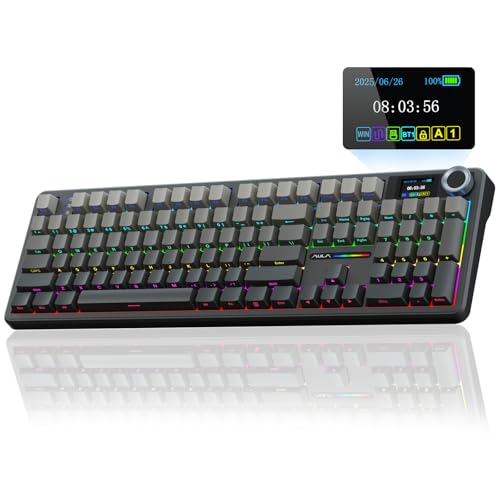
AULA F108 PRO
A full-size wireless keyboard with pre-lubed switches, a TFT display and knob, an 8000mAh battery and hot-swappable 3-pin or 5-pin sockets.
View on Amazon
Redragon K668 108-Key Hot-Swap Wired RGB Gaming Keyboard
A full-size 108-key wired keyboard with Red linear switches, hot-swap sockets, RGB backlight and 4 extra hotkeys.
View on AmazonThese come from our ranked list Best Full Size Mechanical Keyboard, which compares them spec by spec.
FAQ
Do I need to solder switches on a hot-swap keyboard?
No. The sockets let you pull a switch out and press a new one in without soldering. Use a switch puller so you do not bend the pins.
Will any switch fit a hot-swap keyboard?
No. Check the socket pin layout for your model against the pins on the switch. A switch with the wrong pin layout will not fit the socket.
What is a full-size keyboard?
A full-size keyboard has a number pad, a function row and arrow keys, along with the main letter keys. It is the widest common layout.


