
How to Build a Full-Size Mechanical Keyboard
 By Theo LangUpdated
Building a full-size mechanical keyboard means starting with a full-size board or kit, choosing switches and keycaps, fitting them into the board, and connecting it to your computer. Hot-swappable boards let you press switches straight into their sockets with no soldering, and full-size layouts keep the number pad, function row and arrow keys. The sections below walk through the choices in order.
Pick a full-size layout
A full-size layout keeps the number pad, the function row and the arrow keys, so it suits desks with room for a wide board. The Redragon K762 PRO is listed as a 104-key board, while the Redragon K668 is listed at 108 keys with 4 extra hotkeys for mute, calculator, screen lock and desktop. Count the keys you use in daily work before choosing, and measure the desk space the board needs.
Choose the switch type
Switches decide how a keypress feels and sounds. The Redragon boards here use linear switches, which travel straight down with no bump, while the Keychron K10 HE uses Hall Effect magnetic switches that detect keypresses with magnetic sensors and let you adjust actuation from 0.2mm to 3.8mm. The AULA F108 PRO uses pre-lubed switches, which arrive lubricated for a smoother press. Pick the switch description that matches how you type, and check the board's notes for which switch pins its sockets accept.
Decide wired or wireless
Wired boards connect through USB-C and need no charging, while wireless boards connect through Bluetooth or 2.4GHz wireless and need a charged battery. The Redragon K762 PRO and the Keychron K10 HE list tri-mode connection across USB-C, Bluetooth and 2.4GHz wireless. The AULA F108 PRO lists tri-mode connection across BT5.0, 2.4GHz wireless and USB-C wired, and it lists an 8000mAh battery. The Redragon K668 connects through a wired connection only. Choose the connection that fits where the board sits and how you charge it.
Fit the switches and keycaps
Hot-swappable boards let you press switches into their sockets with no soldering, and a switch puller helps remove them. Line up the switch pins with the socket, press straight down until the switch sits flat, and repeat across the board. Then press the keycaps onto the switch stems, starting with the space bar and the larger keys so the stabilizers sit right. The AULA F108 PRO includes a keycap and switch puller in the box.
Connect the board and set it up
Plug the board in through USB-C, or pair it over Bluetooth or 2.4GHz wireless using the switch or key combination in the board's manual. The Redragon K762 PRO and the AULA F108 PRO have a TFT display and a knob for backlight brightness, media playback and connection modes, and the Keychron K10 HE works with the Keychron Launcher web configurator for macros and actuation points. Install the board's software only from the maker's own download page, then set the lighting and keys the way you want them.
What you need

Redragon K762 PRO Wireless 104-Key Gasket Gaming Keyboard
A 104-key gasket board with custom linear switches, tri-mode USB-C, Bluetooth and 2.4GHz wireless, a TFT display and knob, and 5-layer noise dampening.
View on Amazon
Keychron K10 HE Full-Size Hall Effect Keyboard Wireless
A full-size wireless board with Hall Effect magnetic switches, adjustable actuation from 0.2mm to 3.8mm, hot-swappable sockets, and PBT keycaps in a wood frame.
View on Amazon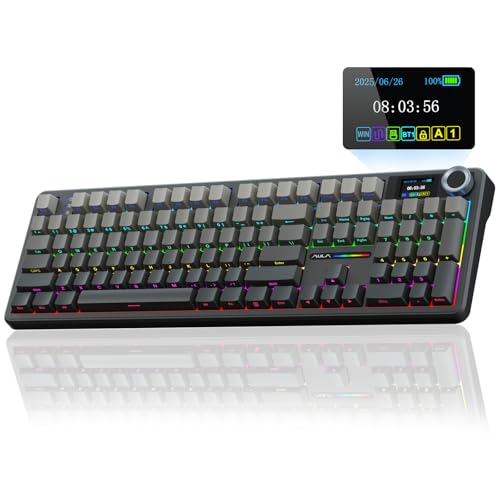
AULA F108 PRO
A full-size board with pre-lubed switches, a TFT display and knob, tri-mode connection, an 8000mAh battery, and hot-swappable sockets for 3-pin or 5-pin switches.
View on Amazon
Redragon K668 108-Key Hot-Swap Wired RGB Gaming Keyboard
A wired 108-key board with Red linear switches, 4 extra hotkeys, hot-swappable sockets, RGB with 19 preset modes, and two sets of keycaps.
View on AmazonThese come from our ranked list Best Full Size Mechanical Keyboard, which compares them spec by spec.
FAQ
Do you need to solder the switches?
No. The boards here have hot-swappable sockets, so switches press in and pull out with no soldering. A switch puller helps remove them without bending the pins.
What is the difference between 104-key and 108-key boards?
A 108-key board adds keys beyond the standard 104-key layout. The Redragon K668 is listed at 108 keys with 4 extra hotkeys for mute, calculator, screen lock and desktop, while the Redragon K762 PRO is listed as a 104-key board.
Can a wireless keyboard work for gaming?
It can, when the connection suits the game. The Redragon K762 PRO, the Keychron K10 HE and the AULA F108 PRO list 2.4GHz wireless and USB-C wired modes, and a wired connection removes wireless delay from the setup entirely. Check the board's notes for its connection modes before choosing.


