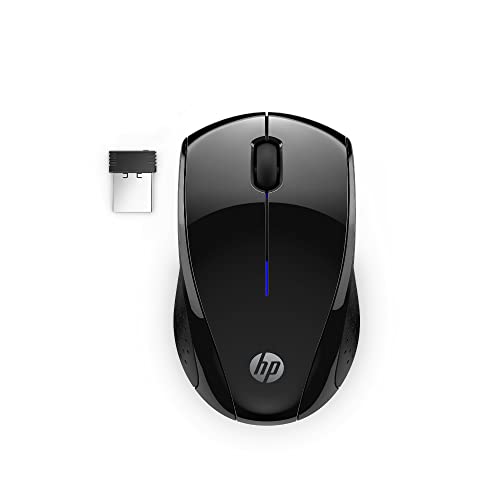
Best Wireless Mouse for Photo Editing (2026): 5 Picks Compared
 By Theo LangUpdated
The wegear Bluetooth Mouse Silent Wireless Mice suits photo editing, with 6 buttons and DPI settings of 800, 1200, and 1600 for precise cursor control. Bluetooth 5.0 pairs it with Windows and macOS machines, and silent clicks keep shared rooms quiet. The TECKNET adds a side scroll wheel for horizontal work across PS design canvases at up to 4800 DPI, while the YUNZII C1 adds a 4800 DPI top setting with tri-mode connections.
Your shortlist at a glance
PCKitHQ scores range from 9.2 to 9.8. See how we pick.
| Product and key specifications | Score and retailer |
|---|---|
01 | 9.8PCKitHQ scoreView on Amazon |
02 | 9.7PCKitHQ scoreView on Amazon |
03 | 9.5PCKitHQ scoreView on Amazon |
04 Also Consider TECKNET Wireless Mouse | 9.3PCKitHQ scoreView on Amazon |
05 Also Consider Ergonomic Wireless Trackball Mouse | 9.2PCKitHQ scoreView on Amazon |
A closer look at each configuration
wegear Bluetooth Mouse Silent Wireless Mice
score
The 6 buttons, 800 to 1600 DPI settings, and Bluetooth 5.0 define this silent wireless mouse.
- Sensor resolution
- 1600 DPI
- Buttons
- 6
- Wireless
- Yes
- Connection
- Bluetooth 5.0
- Warranty
- 1 Year
This wegear mouse pairs by Bluetooth 5.0 with Microsoft Swift Pair, and it works with Windows, macOS, Chrome OS, and Android. Six buttons include forward and backward controls for switching between pages, though the forward and backward buttons are not recognized on Mac. Three DPI levels run at 800, 1200, and 1600 for precise cursor control, and the left, right, and scroll wheel buttons click silently. A sculpted grip fits the hand for extended use, and the mouse runs up to 24 months on a single AA battery, which is not included. The left and right buttons are rated for up to 3 million clicks. The warranty runs 1 year.
Choose it if
- You want 6 buttons with forward and backward controls
- You want DPI settings of 800, 1200, and 1600
Consider another if
- You need DPI above 1600 for finer cursor control
- You need a rechargeable battery with USB-C charging
hunart H6 49g Wireless Mouse
score
The 49g frame, Bluetooth and 2.4GHz dual modes, and 1600 DPI top setting define this light mouse.
- Sensor resolution
- 1600 DPI
- Wireless
- Yes
- Connection
- Bluetooth and 2.4GHz
- Warranty
- 1 year
This hunart H6 mouse weighs 49g and connects by Bluetooth or 2.4GHz for flexible pairing with laptops and desktops. A built-in 500mAh battery charges by USB-C, so there is no battery to replace. Three DPI settings run at 800, 1200, and 1600 for more precise cursor control, and silent click buttons reduce noise in shared spaces. A right-hand ergonomic shape gives a natural grip, and the mouse fits small to medium hands rather than large hands. It works with Windows, macOS, ChromeOS, and Linux. The warranty runs 1 year.
Choose it if
- You want a 49g mouse that is easy to move
- You want Bluetooth and 2.4GHz connections in one mouse
Consider another if
- You need 6 buttons with forward and backward controls
- You need a mouse that suits large hands
YUNZll C1 Cute Silicone Tri-mode Wireless Mouse (Pink)
score
The tri-mode connections, 6 DPI levels up to 4800, and 500mAh battery define this silicone mouse.
- Wireless
- Yes
- Connection
- Bluetooth, 2.4GHz wireless, and USB-C wired
- Weight
- 0.37 lb
- Warranty
- 1 Year
This YUNZII C1 mouse switches between Bluetooth, 2.4GHz wireless, and USB-C wired connections, and it works with Windows, macOS, Android, and iPad OS. Six DPI levels run at 800, 1200, 1600, 2400, 3200, and 4800, with editing photos among the uses for that precision. The Windows software and web-based configurator for Mac and Windows set button assignments, DPI stages, and macros, with a USB connection for setup. A 500mAh battery gives up to 90 days from a charge, with over 120 hours of continuous use. The silicone body measures 98 by 62.5 by 40mm and weighs 0.37 lb. The warranty runs 1 year.
Choose it if
- You want 6 DPI levels up to 4800 for photo editing
- You want Bluetooth, 2.4GHz, and USB-C wired connections
Consider another if
- You need a full-size mouse rather than a compact one
- You need a side scroll wheel for horizontal scrolling
TECKNET Wireless Mouse
score
The side scroll wheel, 6 DPI levels up to 4800, and 90-day charge define this ergonomic mouse.
- Wireless
- Yes
- Connection
- BT 5.3/5.0 & 2.4G & Wired
- Weight
- 0.38 lb
- Warranty
- 36 Months Warranty
This TECKNET mouse connects by Bluetooth 5.3 or 5.0, 2.4GHz, or wired mode, with one-click switching between paired devices. A side scroll wheel moves horizontally across PS design canvases, spreadsheets, and web pages, though it is not supported on macOS. Six DPI levels run at 800, 1200, 1600, 2400, 3200, and 4800, with an LED flash for the active setting. The metal scroll wheel moves through long documents with a flick, and silent clicks suit shared rooms. A built-in rechargeable battery lasts up to 90 days on a charge. The mouse weighs 0.38 lb, and the warranty runs 36 months with registration.
Choose it if
- You want a side scroll wheel for PS design canvases
- You want 6 DPI levels up to 4800 for detailed work
Consider another if
- You need the side scroll wheel to work on macOS
- You need a mouse lighter than 0.38 lb
Ergonomic Wireless Trackball Mouse
score
The thumb trackball, 0 or 18 degree tilt, and 5 DPI levels up to 4800 define this trackball mouse.
- Wireless
- Yes
- Connection
- Bluetooth and 2.4GHz
- Weight
- 0.79 lb
- Warranty
- 2 Year warranty
This SABLUTE trackball mouse moves the cursor with a thumb-operated ball, so the arm stays still in tight workspaces. The tilt adjusts to 0 or 18 degrees for a natural hand position. It connects up to three devices by Bluetooth and 2.4GHz, with one-button switching between a PC, laptop, or tablet. Five DPI levels run from 800 to 4800, and quiet-touch buttons suit shared rooms. A built-in rechargeable battery charges by USB-C, and a soft ambient backlight turns on or off as needed. The mouse weighs 0.79 lb, and the warranty runs 2 years.
Choose it if
- You want precise cursor control without moving your arm
- You want to switch between three devices with one button
Consider another if
- You need a standard mouse shape rather than a trackball
- You need driver customization that works on Mac OS
Make the choice for your setup
DPI levels and precise control
DPI levels decide how fine the cursor moves. The wegear and hunart H6 run at 800, 1200, and 1600 DPI, and the YUNZII C1 and TECKNET run at 800, 1200, 1600, 2400, 3200, and 4800 DPI. The SABLUTE runs five DPI levels from 800 to 4800. The YUNZII C1 states editing photos among the uses for its 6 DPI levels, and the TECKNET states precise control for detailed work at its 6 DPI levels. The SABLUTE thumb trackball gives precise cursor control without moving your arm. The wegear and hunart H6 top out at 1600 DPI, and the YUNZII C1, TECKNET, and SABLUTE top out at 4800 DPI.
Connections and device switching
Connections decide which machines the mouse joins. The wegear pairs by Bluetooth 5.0, the hunart H6 connects by Bluetooth or 2.4GHz, and the SABLUTE connects up to three devices by Bluetooth and 2.4GHz. The YUNZII C1 switches between Bluetooth, 2.4GHz wireless, and USB-C wired. The TECKNET connects by Bluetooth 5.3 or 5.0, 2.4GHz, or wired mode. The TECKNET switches between paired devices with one click, and the SABLUTE switches between three devices with one button. The hunart H6 works with Windows, macOS, ChromeOS, and Linux. The wegear works with Windows, macOS, Chrome OS, and Android. The YUNZII C1 works with Windows, macOS, Android, and iPad OS. For a closely related choice, read our guide to the Best Wireless Mouse for Office.
Scrolling, weight, and batteries
Scrolling and weight change how the mouse feels in long edits. The TECKNET side scroll wheel moves horizontally across PS design canvases, and its metal scroll wheel moves through long documents. The wegear scroll wheel button clicks silently, and the SABLUTE thumb trackball moves the cursor without moving the arm. The hunart H6 weighs 49g, the YUNZII C1 weighs 0.37 lb, the TECKNET weighs 0.38 lb, and the SABLUTE weighs 0.79 lb. The wegear runs up to 24 months on a single AA battery, the YUNZII C1 gives up to 90 days from a charge, and the TECKNET lasts up to 90 days on a charge.
Before you decide, also read Best Mouse.
FAQ: Wireless Mouse for Photo Editing
Which mice have the highest DPI here?
The YUNZII C1 and TECKNET reach 4800 DPI, and the SABLUTE reaches 4800 DPI across five levels. The wegear and hunart H6 top out at 1600 DPI. Compare the top DPI figure against the precision your edits need.
Which mice connect by Bluetooth and 2.4GHz?
The hunart H6, YUNZII C1, TECKNET, and SABLUTE connect by Bluetooth and 2.4GHz. The wegear pairs by Bluetooth 5.0 with Microsoft Swift Pair. The YUNZII C1 also connects by USB-C wired. The TECKNET also connects in wired mode.
How long do the rechargeable mice run?
The YUNZII C1 gives up to 90 days from a charge, with over 120 hours of continuous use, and the TECKNET lasts up to 90 days on a charge. The wegear runs up to 24 months on a single AA battery, which is not included.