
Best Wireless Mouse for Editing (2026): 6 Picks Compared
 By Theo LangUpdated
Buy the Anker 2.4G Wireless Ergonomic Mouse if you edit with a vertical right-hand grip: it gives 5 buttons and 800/1200/1600 DPI over 2.4 GHz USB. The Logitech Lift adds 4 of 6 buttons customizable and a SmartWheel, and the Logitech M510 adds tilt-to-scroll with zoom for photos. The XBG B15Pro reaches 2400 DPI, the Lekvey gives 1600 DPI with a rechargeable battery, and the Uineer reaches 3200 DPI with a side scroll wheel.
Your shortlist at a glance
PCKitHQ scores range from 9.2 to 9.8. See how we pick.
| Product and key specifications | Score and retailer |
|---|---|
01 | 9.8PCKitHQ scoreView on Amazon |
02 | 9.7PCKitHQ scoreView on Amazon |
03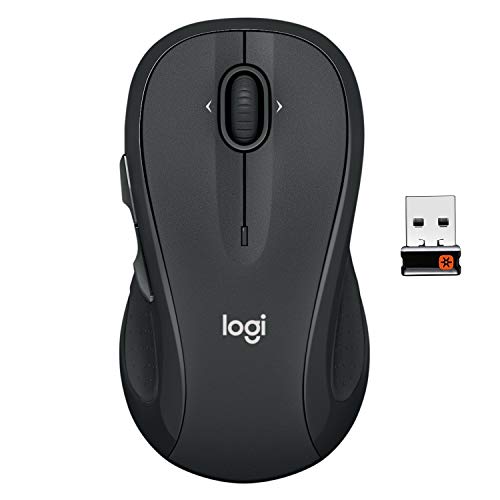 | 9.6PCKitHQ scoreView on Amazon |
04 Also Consider XBG B15Pro Tri-Mode Wireless Bluetooth Mouse | 9.4PCKitHQ scoreView on Amazon |
05 Also Consider Lekvey Ergonomic Mouse | 9.3PCKitHQ scoreView on Amazon |
06 Also Consider Uineer Ergonomic Wireless Vertical Mouse | 9.2PCKitHQ scoreView on Amazon |
A closer look at each configuration
Anker 2.4G Wireless Ergonomic Mouse
score
A vertical right-hand mouse with 5 buttons and 800/1200/1600 DPI, built for long editing sessions on a laptop or desktop.
- Sensor resolution
- 1600 DPI
- Buttons
- 5
- Wireless
- Yes
- Connection
- 2.4 GHz wireless via a USB receiver
- Warranty
- 18-month
This Anker mouse is a right-hand vertical mouse with 5 buttons and 800/1200/1600 DPI, connecting by 2.4 GHz wireless through a USB receiver. It does not use Bluetooth. Next and previous buttons sit on the side for webpage browsing. A power-saving mode starts after 8 minutes of inactivity. The mouse measures 120 by 62.8 by 74.8 mm and weighs 3.4 oz. The box holds the mouse, the receiver and a manual, with 2 AAA batteries not included. An 18-month warranty covers the mouse.
Choose it if
- You want a vertical right-hand mouse with 800/1200/1600 DPI
- You want 5 buttons with next and previous controls
Consider another if
- You need Bluetooth instead of a USB receiver
- You need more than 1600 DPI
Logitech Lift Vertical Ergonomic Wireless Mouse
score
A vertical mouse with 6 buttons, 4 customizable, a SmartWheel and quiet clicks for focused editing work.
- Buttons
- 6
- Wireless
- Yes
- Connection
- Bluetooth Low Energy or Logi Bolt USB
- Weight
- 0.28 lb
- Warranty
- 1 year
This Logitech Lift is a vertical mouse for small to medium right hands, with 6 buttons, 4 of them customizable, a SmartWheel and quiet clicks. It connects by Bluetooth Low Energy or the included Logi Bolt USB-A receiver, and works with Windows, macOS, iPadOS, Chrome OS and Linux. The vertical shape sits at 57 degrees with a textured grip and thumb rest. The mouse weighs 0.28 lb. The maker states up to two years of battery life. A 1-year warranty covers the mouse.
Choose it if
- You want 4 of 6 buttons customizable for editing shortcuts
- You want Bluetooth or Logi Bolt USB on Windows and Mac
Consider another if
- You need a fit for large hands
- You need more than 6 buttons
Logitech M510 Full Size Ambidextrous 2.4 GHz Wireless Mouse
score
A full-size mouse with tilt-to-scroll, side-to-side scrolling and zoom for moving through photos and spreadsheets.
- Wireless
- Yes
- Connection
- 2.4 GHz USB-A Nano Receiver
- Weight
- 0.28 lb
- Warranty
- 1 Year
This Logitech M510 is a full-size mouse with a contoured shape, soft rubber grips, gently curved sides and a broad palm area. It connects by 2.4 GHz wireless through a tiny USB-A Nano Receiver that stays in the laptop. Back and Forward buttons can be programmed to switch applications or go full screen, and side-to-side scrolling plus zoom moves through photos and spreadsheets. The maker states up to two years of battery life. The mouse weighs 0.28 lb, and a 1-year limited hardware warranty covers it.
Choose it if
- You want side-to-side scrolling and zoom for photos
- You want programmable Back and Forward buttons
Consider another if
- You want a rechargeable battery instead of replaceable cells
- You want a vertical mouse shape
XBG B15Pro Tri-Mode Wireless Bluetooth Mouse
score
A tri-mode mouse with a 2400 DPI maximum and an LED display showing battery, DPI and connection mode.
- Wireless
- Yes
- Connection
- Bluetooth 5.0/4.0 or 2.4GHz wireless
- Weight
- 0.17 lb
- Warranty
- 1 year
This XBG B15Pro is a tri-mode mouse that connects by Bluetooth 5.0 or 4.0 or 2.4GHz wireless, switching between devices in 0.8s. Its LED screen shows battery percentage, DPI level and connection mode, with DPI levels of 800, 1000, 1200, 1600 and 2400. A built-in 500mAh battery charges by Type-C, and the mouse enters sleep mode after 5 minutes of inactivity.. The mouse weighs 0.17 lb and works with Windows, Mac, Linux and Android. A 1-year warranty covers it.
Choose it if
- You want a 2400 DPI maximum with an LED status display
- You want Bluetooth 5.0 or 2.4G across laptops and tablets
Consider another if
- You want a vertical mouse shape
- You need more than 2400 DPI
Lekvey Ergonomic Mouse
score
A rechargeable vertical mouse with 800/1200/1600 DPI, a 600mAh battery and USB-C charging for daily editing.
- Wireless
- Yes
- Connection
- 2.4G USB Receiver
- Weight
- 0.21 lb
This Lekvey mouse is a rechargeable vertical mouse with 800/1200/1600 DPI and page back and forward buttons for webpage browsing. It connects by 2.4G wireless through a nano USB receiver. A built-in 600mAh battery charges by the included USB-C cable. All buttons are non-programmable. The mouse measures 5.0 by 3.0 by 2.5 inches, suits medium or large hands, and weighs 0.21 lb. It works with Windows, Linux and Mac OS.
Choose it if
- You want a rechargeable vertical mouse with USB-C charging
- You want 800/1200/1600 DPI with page back and forward buttons
Consider another if
- You need Bluetooth for your laptop
- You need programmable buttons for editing shortcuts
Uineer Ergonomic Wireless Vertical Mouse
score
A vertical mouse with a side scroll wheel, 4 DPI levels to 3200 and 3-device switching for multi-device editing.
- Wireless
- Yes
- Connection
- Bluetooth 5.0, Bluetooth 4.0, and 2.4G USB
- Warranty
- 2 Year
This Uineer mouse is a vertical mouse with a side scroll wheel for horizontal navigation and 4 DPI levels of 800, 1600, 2400 and 3200. It connects by Bluetooth 5.0, Bluetooth 4.0 or 2.4G USB, switching between 3 devices. Silent left and right buttons sit beside forward and back side buttons, and 7-color LED lights run across the body. A 500mAh battery recharges in about 2 hours by Type-C. It weighs 105 grams and works with Windows, Mac OS, Chrome OS and Linux. A 2-year warranty covers it.
Choose it if
- You want a side scroll wheel for horizontal navigation
- You want 800/1600/2400/3200 DPI with 3-device switching
Consider another if
- You want a mouse with no LED lighting
- You need a mouse lighter than 105 grams
Make the choice for your setup
DPI levels and precision
The DPI maximum sets how far the cursor moves for each inch of mouse travel, and the stated maxima here run from 1600 DPI on the Anker and Lekvey to 2400 DPI on the XBG B15Pro and 3200 DPI on the Uineer. The Anker gives 800, 1200 and 1600 DPI, the Lekvey gives the same 800, 1200 and 1600 DPI, the XBG gives 800, 1000, 1200, 1600 and 2400 DPI, and the Uineer gives 800, 1600, 2400 and 3200 DPI. Match the top DPI to fine cursor work, and use the lower levels for broad moves. The Anker, Lekvey, XBG and Uineer all let you switch levels on the mouse.
Buttons and scrolling for editing
Editing moves through buttons and scrolling. The Logitech Lift gives 6 buttons with 4 customizable, and the Logitech M510 gives Back and Forward buttons that can be programmed to switch applications or go full screen. The Anker gives 5 buttons with next and previous controls, the Lekvey gives page back and forward buttons that are non-programmable, and the Uineer gives forward and back side buttons beside silent left and right buttons. For scrolling, the M510 gives tilt-to-scroll with side-to-side scrolling and zoom for photos, the Uineer gives a side scroll wheel for horizontal navigation, and the Lift gives a SmartWheel. Match the buttons to the shortcuts you press most, and the scroll control to the photos you move through. Shoppers with a related need can compare our guide to the Best Wireless Mouse Under $50.
Connections, power and weight
Connections, power and weight decide how the mouse fits a laptop desk. The Anker connects by 2.4 GHz wireless through a USB receiver and does not use Bluetooth, the Lekvey connects the same way through a nano USB receiver, and the M510 connects through a tiny USB-A Nano Receiver. The Lift connects by Bluetooth Low Energy or the included Logi Bolt USB-A receiver, the Uineer connects by Bluetooth 5.0, Bluetooth 4.0 or 2.4G USB with 3-device switching, and the XBG connects by Bluetooth 5.0 or 4.0 or 2.4GHz wireless. For power, the Lekvey, XBG and Uineer recharge by USB-C, while the Anker runs on 2 AAA batteries that are not included. Weights run from 0.17 lb on the XBG to 0.28 lb on the Lift.
For a wider shortlist, start with Best Mouse.
FAQ: Wireless Mouse for Editing
Which mouse has the highest DPI here?
The Uineer reaches 3200 DPI, with levels of 800, 1600, 2400 and 3200 DPI. The XBG B15Pro reaches 2400 DPI, while the Anker and Lekvey reach 1600 DPI. The Logitech Lift and the Logitech M510 are compared here on buttons and scrolling instead.
Which mice connect by Bluetooth?
The Logitech Lift connects by Bluetooth Low Energy or Logi Bolt USB, the Uineer connects by Bluetooth 5.0, Bluetooth 4.0 or 2.4G USB, and the XBG connects by Bluetooth 5.0 or 4.0 or 2.4GHz wireless. The Anker and Lekvey connect by 2.4 GHz wireless through a USB receiver, and the M510 connects through a USB-A Nano Receiver.
Which mice recharge by USB-C?
The Lekvey recharges by USB-C, with a built-in 600mAh battery. The XBG B15Pro and Uineer recharge by Type-C, with built-in 500mAh batteries. The Anker runs on 2 AAA batteries that are not included. The Logitech Lift and M510 state battery life of up to two years, with the M510 using replaceable batteries.


