Best Wireless Keyboard and Mouse Bluetooth (2026): 4 Picks Compared
 By Theo LangUpdated
The Logitech MK250 Compact Wireless Bluetooth Keyboard and Mouse Combo suits a buyer who wants a Bluetooth-only combo with no dongle: it pairs in seconds and keeps a compact layout with a number pad. Its small ambidextrous M196 mouse has 3 non-customizable buttons, and the spill-resistant keyboard carries a 12-month rated battery life. The other picks add a USB-A receiver, a 36-month rated battery life, or RGB backlighting.
Your shortlist at a glance
PCKitHQ scores range from 9.2 to 9.8. See how we pick.
| Product and key specifications | Score and retailer |
|---|---|
01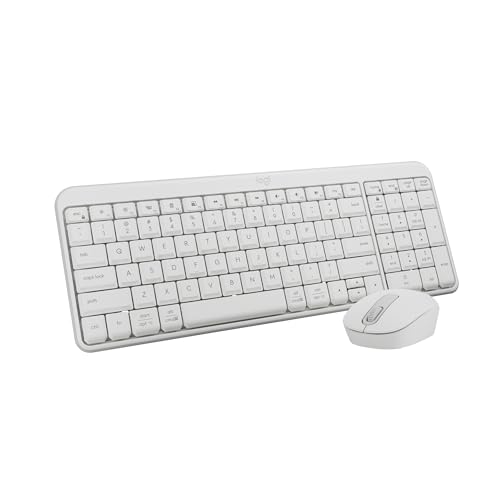 | 9.8PCKitHQ scoreView on Amazon |
02 | 9.6PCKitHQ scoreView on Amazon |
03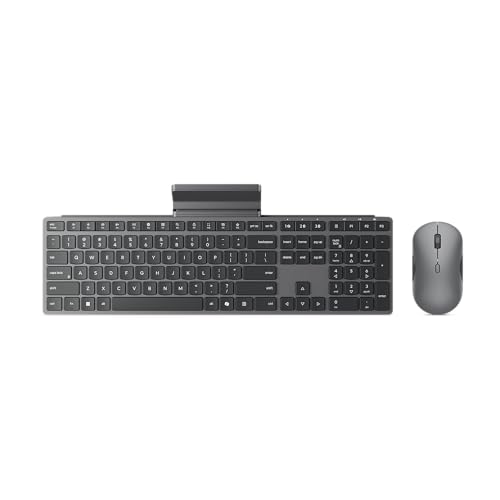 Also Consider Lenovo 700 Modern Wireless Keyboard & Mouse Combo | 9.4PCKitHQ scoreView on Amazon |
04 Also Consider Wireless Keyboard and Mouse Combo | 9.2PCKitHQ scoreView on Amazon |
A closer look at each configuration
Logitech MK250 Compact Wireless Bluetooth Keyboard and Mouse Combo
score
The Bluetooth-only connection, compact layout with a number pad, and 12-month rated keyboard battery life define this Logitech combo.
- Wireless
- Yes
- Connection
- Bluetooth connection only
- Weight
- 1.4 lb
- Warranty
- 1 Year Limited Hardware Warranty
The MK250 connects over Bluetooth only, with no dongle and no USB port needed. Its compact keyboard keeps a number pad, arrow keys, and F-key shortcuts, with deep-profile keys and an adjustable tilt-leg design. A small ambidextrous M196 mouse with 3 non-customizable buttons and a smooth shape suits either hand. A spill-resistant design and a 12-month rated battery life come with the keyboard. Recycled plastic makes up a minimum of 66% of the mouse and 64% of the keyboard. The combo weighs 1.4 lb and carries a 1-year limited hardware warranty. It works with MacBook Neo laptops over instant Bluetooth. The combo comes in white.
Choose it if
- You want Bluetooth pairing with no dongle or USB port
- You want a compact keyboard that keeps a number pad
Consider another if
- You need the USB-A receiver of the Logitech MK850
- You need the 36-month rated battery life of the Lenovo 700
Logitech MK850 Performance Wireless Keyboard and Mouse Combo
score
The Bluetooth or USB-A receiver connection, 8 customizable mouse buttons, and cushioned palm rest define this Logitech combo.
- Wireless
- Yes
- Connection
- Bluetooth or included USB-A receiver
- Weight
- 0.07 lb
- Warranty
- 1Year Limited Hardware Warranty
The MK850 connects over Bluetooth or the included USB-A receiver, and the keyboard and mouse work across multiple devices and operating systems. Its oversized wave-shaped keyboard has a cushioned palm rest and carefully crafted keys for quiet typing. A contoured right-handed mouse with a hyper-fast scroll wheel and 8 customizable buttons pairs with up to 3 screens. Logitech DuoLink software links the mouse and keyboard for custom functionality, with Logitech Options to enable it. Download Logitech Options to enable DuoLink. The combo weighs 0.07 lb and carries a 1-year limited hardware warranty.
Choose it if
- You want a full-size mouse with 8 customizable buttons
- You want to pair one mouse with up to 3 screens
Consider another if
- You need the compact layout of the Logitech MK250
- You need the 36-month rated battery life of the Lenovo 700
Lenovo 700 Modern Wireless Keyboard & Mouse Combo
score
The 36-month rated battery life, dual Bluetooth with a 2.4 GHz dongle, and AES-128 encryption define this Lenovo combo.
- Wireless
- Yes
- Connection
- 2.4 GHz Dongle & Dual Bluetooth Connection
- Weight
- 1.05 lb
- Warranty
- 1 Year Manufacturer
The Lenovo 700 connects through a 2.4 GHz dongle or dual Bluetooth, with quick switching between 3 devices and 128-bit AES encryption. Silent, responsive keys and clicks suit long work sessions, and its buttons and keys are customizable. Two AAA batteries run the keyboard and 1 AA battery runs the mouse, with a 36-month rated battery life for both. At 1.05 lb, the combo carries a 1-year manufacturer warranty. It works across operating systems with universal OS compatibility. The combo is Luna Grey.
Choose it if
- You want a 36-month rated battery life for keyboard and mouse
- You want to switch between 3 devices with one combo
Consider another if
- You need the RGB backlighting of the XISOGUU combo
- You need the USB-C wired mode of the XISOGUU combo
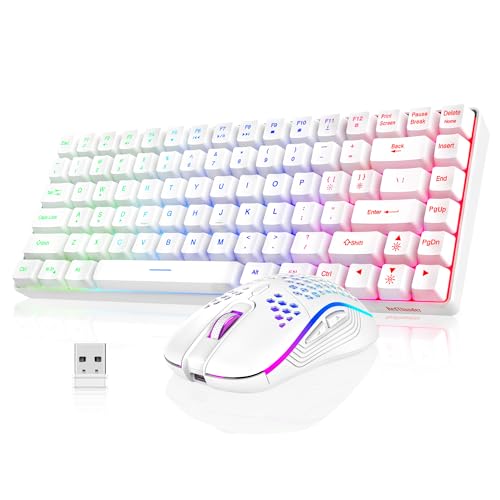
Wireless Keyboard and Mouse Combo
score
The RGB backlighting, tri-mode Bluetooth, 2.4 GHz and USB-C connection, and 2000 mAh rechargeable keyboard define this XISOGUU combo.
- Wireless
- Yes
- Connection
- Bluetooth/2.4GHz/USB-C
- Backlight
- Yes
- Warranty
- 1
The XISOGUU keyboard has 104 keys in a full-size layout with F-keys, a number pad, and removable floating keycaps. Its RGB backlighting offers 16.8 million colors and 9 preset lighting effects, switched with FN+INS or FN+Home. RGB lighting also comes on the mouse, with 4 DPI levels from 1600 to 4800. A 2000 mAh battery sits in the keyboard and a 600 mAh battery in the mouse, with 50 hours of use with the light on as rated. A volume knob and 3 multimedia keys sit on the keyboard, which folds its stand for tilt. Bluetooth, 2.4 GHz, or USB-C connect the combo. The keyboard is a membrane keyboard, not a mechanical keyboard.
Choose it if
- You want RGB backlighting with 16.8 million colors
- You want a rechargeable keyboard with a 2000 mAh battery
Consider another if
- You need the spill-resistant design of the Logitech MK250
- You need the 8 customizable mouse buttons of the Logitech MK850
Make the choice for your setup
Connection modes and device switching
The MK250 connects over Bluetooth only, with no dongle and no USB port needed. The MK850 connects over Bluetooth or the included USB-A receiver. The Lenovo 700 connects through a 2.4 GHz dongle or dual Bluetooth and switches between 3 devices. The XISOGUU connects over Bluetooth, 2.4 GHz, or USB-C, with a wired mode as the third option. The MK850 pairs its mouse with up to 3 screens, and the Lenovo 700 switches between 3 devices. The MK850 receiver sits inside the mouse under the battery cover or in the packaging. A buyer who wants no dongle at all needs the Bluetooth-only MK250; a buyer who wants 3-device switching finds it on the Lenovo 700.
Battery life and charging
The MK250 keyboard carries a 12-month rated battery life, and the Lenovo 700 carries a 36-month rated battery life for the keyboard and mouse. The Lenovo 700 keyboard runs on 2 AAA batteries and the mouse on 1 AA battery, with a 36-month rated battery life for both. The XISOGUU keyboard holds a 2000 mAh battery and the mouse a 600 mAh battery, with 50 hours of use with the light on as rated. The XISOGUU pair sleeps after 2 minutes without operation and wakes on any key press, and the maker asks for 3 hours of charging before first use. A buyer who wants a 36-month rated battery life finds it on the Lenovo 700. Shoppers with a related need can compare our guide to the Best Wireless Keyboard and Mouse with Light.
Keys, mice, and backlighting
The MK250 has deep-profile keys, an adjustable tilt-leg design, and a compact layout with a number pad, arrow keys, and F-key shortcuts. The MK850 has an oversized wave-shaped keyboard with a cushioned palm rest, and its contoured right-handed mouse has a hyper-fast scroll wheel and 8 customizable buttons. The Lenovo 700 has silent, responsive keys and clicks with customizable buttons and keys. The XISOGUU has 104 keys with removable floating keycaps, RGB backlighting with 16.8 million colors and 9 preset effects, a volume knob, 3 multimedia keys, and a mouse with 4 DPI levels from 1600 to 4800. The XISOGUU mouse also carries RGB lighting, with its mode button on the bottom of the mouse. The Lenovo 700 mouse is quiet.
For a wider shortlist, start with Best Dell Wireless Keyboard and Mouse.
FAQ: Wireless Keyboard and Mouse Bluetooth
Which combos connect over Bluetooth only?
The MK250 connects over Bluetooth only, with no dongle and no USB port needed. The MK850 connects over Bluetooth or the included USB-A receiver. The Lenovo 700 connects through a 2.4 GHz dongle or dual Bluetooth. The XISOGUU connects over Bluetooth, 2.4 GHz, or USB-C. All four connect wirelessly.
How long is the rated battery life?
The MK250 keyboard carries a 12-month rated battery life. The Lenovo 700 carries a 36-month rated battery life for the keyboard and mouse. The XISOGUU keyboard holds a 2000 mAh battery and the mouse a 600 mAh battery, with 50 hours of use with the light on as rated.
Which combos have a number pad?
The MK250 keeps a compact layout with a number pad, and the XISOGUU has a 104-key full-size layout with a number pad. The MK850 keyboard is an oversized wave-shaped keyboard with a cushioned palm rest. The Lenovo 700 has silent, responsive keys and clicks.