
Best White Keyboard (2026): 6 Picks Compared
 By Theo LangUpdated
Choose the GravaStar Mercury K1 75% Wireless Mechanical Gaming Keyboard RGB Backlit if you want the best white keyboard with tri-mode wireless and hot-swappable linear switches. Its Moonlight White aluminum exoskeleton, 8000mAh battery and 16.8 million-color RGB suit a white desk setup. The MageGee combo adds a mouse, while the SOLAKAKA A75 adds a multifunction knob.
Your shortlist at a glance
PCKitHQ scores range from 9.2 to 9.8. See how we pick.
| Product and key specifications | Score and retailer |
|---|---|
01 Best Overall GravaStar Mercury K1 75% Wireless Mechanical Gaming Keyboard RGB BacklitSwitch type: GravaStar × Kailh Linear switches, Layout: 75%, Wireless: Yes | 9.8PCKitHQ scoreView on Amazon |
02 | 9.7PCKitHQ scoreView on Amazon |
03 Also Consider SOLAKAKA A75 Wireless Gaming KeyboardSwitch type: LEOBOG caramel latte switch, Wireless: Yes, Backlight: Yes | 9.6PCKitHQ scoreView on Amazon |
04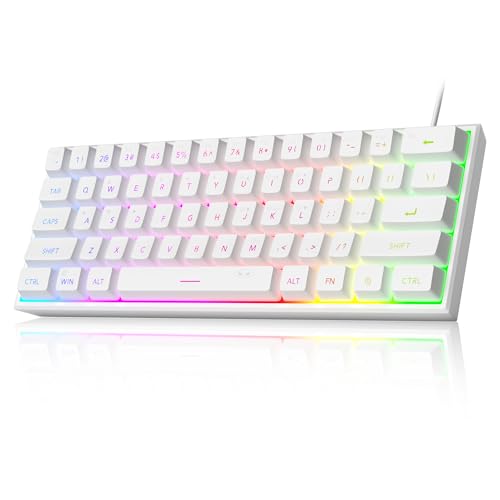 | 9.4PCKitHQ scoreView on Amazon |
05 | 9.3PCKitHQ scoreView on Amazon |
06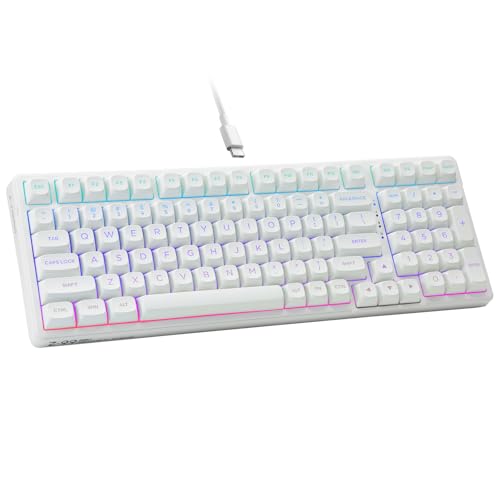 Also Consider HUO JI E-Yooso Creamy Mechanical Keyboard WiredSwitch type: Linear Switches, Layout: 96%, Backlight: Yes | 9.2PCKitHQ scoreView on Amazon |
A closer look at each configuration
GravaStar Mercury K1 75% Wireless Mechanical Gaming Keyboard RGB Backlit
score
A Moonlight White aluminum exoskeleton, tri-mode wireless and hot-swappable linear switches define this 75% GravaStar keyboard.
- Switch type
- GravaStar × Kailh Linear switches
- Layout
- 75%
- Wireless
- Yes
- Backlight
- Yes
- Hot-swappable
- Yes
- Connection
- wired USB-C, Bluetooth 5.0, and 2.4GHz wireless
- Warranty
- 1 Year
The Mercury K1 pairs a Moonlight White aluminum alloy exoskeleton with dual-layer PBT keycaps for a white-themed desk. Its GravaStar x Kailh Linear switches actuate at 40g with 1.5mm pre-travel, and a 5-layer sound-dampening system with a gasket-mounted PC plate absorbs 87% of impact vibrations. Dual RGB ecosystems offer 16.8 million colors and 13 dynamic lighting effects, and GravaCore software enables per-key programming, macros and 8-layer profiles. It connects through wired USB-C, Bluetooth 5.0 and 2.4GHz wireless, works with Windows and Mac, and runs on an 8000mAh battery. It carries a 1 Year warranty.
Choose it if
- You want a white 75% keyboard with 79 keys
- You want tri-mode wireless with an 8000mAh battery
Consider another if
- You need a full-size layout with a number pad
- You need more than 13 dynamic lighting effects
Gaming Keyboard and Mouse Combo
score
A full-size 104-key layout, RGB backlight and an included mouse define this white MageGee keyboard combo.
- Layout
- Full Size
- Backlight
- Yes
- Connection
- USB 2.0
- Weight
- 2.2 lb
The MageGee combo pairs a full-size 104-key keyboard with a mouse. The keyboard uses a standard layout with function keys and a number pad, floating keycaps and non-slip pads on the bottom. Its RGB backlight offers 8 light colors, 5 light modes and multiple brightness levels and speeds. A waterproof USB 2.0 cable with a gold-plated interface supports stable data transmission. It works with Windows, Mac and Linux, and it weighs 2.2 lb.
Choose it if
- You want a full-size keyboard with a number pad
- You want a keyboard and mouse in one box
Consider another if
- You need a wireless keyboard connection
- You need a keyboard under 1 lb
SOLAKAKA A75 Wireless Gaming Keyboard
score
Tri-mode wireless, a multifunction knob and hot-swappable switches define this 75% SOLAKAKA keyboard.
- Switch type
- LEOBOG caramel latte switch
- Wireless
- Yes
- Backlight
- Yes
- Hot-swappable
- Yes
- Connection
- 2.4GHz wireless connection, BT5.0 and USB-C wired connection
- Warranty
- 1
The SOLAKAKA A75 connects through 2.4GHz wireless, BT5.0 and USB-C wired, and supports up to 5 devices at once across Windows, Mac and iOS. Its 75 percent keyboard uses an 81-key layout with arrow keys, a five-layer filling structure with a gasket design, and a LEOBOG caramel latte switch with pre-lubricated stabilizers. Full-size hot-swappable technology supports 3/5-pin switch replacement without soldering. It offers 17 RGB lighting effects, a multi-functional knob for lighting and volume, crystal keycaps with a two-layer structure, and a 4000mAh battery.
Choose it if
- You want a 75% keyboard with 81 keys
- You want tri-mode wireless for up to 5 devices
Consider another if
- You need a full-size layout with a number pad
- You need more than 17 RGB lighting effects
MageGee Mini 60% Gaming Keyboard
score
A compact 60% layout, RGB backlight and an IPX4 circuit board define this white MageGee mini keyboard.
- Switch type
- Membrane
- Layout
- 60%
- Weight
- 0.58 lb
The MageGee Mini uses a 60% layout with 61 keys and no number pad, so it frees desk space for a mouse. The circuit board is IPX4 Certified, and the keyboard is easy to clean. Its membrane keys use imitation mechanical technology for a mechanical feeling, with key height designed to reduce fatigue over long sessions. It works with Windows 10, 8, 7, Vista and XP, and it weighs 0.58 lb.
Choose it if
- You want a compact 60% keyboard with 61 keys
- You want an IPX4 circuit board for easy cleaning
Consider another if
- You need a number pad for data entry
- You need mechanical switches instead of membrane switches
TMKB 60% Mechanical Gaming Keyboard
score
Red linear switches, 15 lighting modes and a detachable USB-C cable define this white TMKB 60% keyboard.
- Layout
- 60%
- Connection
- USB-C
The TMKB 60% keyboard uses red linear switches with 45g actuation and 50 million keystroke durability for rapid keystrokes in gaming and typing. Its compact 60% ANSI design has 61 keys, foldable feet for ergonomic tilt, and double-shot keycaps that resist fading. It offers 15 dynamic lighting modes with adjustable brightness and speed, and anti-ghosting supports 61-key rollover for competitive play. A detachable USB-C cable supports plug-and-play setup for Windows, Linux and macOS, and the white finish suits a white workspace.
Choose it if
- You want red linear switches with 45g actuation
- You want a compact 60% keyboard with 61 keys
Consider another if
- You need a wireless keyboard connection
- You need a number pad for data entry
HUO JI E-Yooso Creamy Mechanical Keyboard Wired
score
A 96% layout with 99 keys, hot-swappable switches and RGB backlight define this white HUO JI keyboard.
- Switch type
- Linear Switches
- Layout
- 96%
- Backlight
- Yes
- Connection
- USB-C
- Weight
- 1.9 lb
- Warranty
- 1 Year Manufacturer
The HUO JI E-Yooso uses a 99-key 96% layout that measures 39 by 13.5 by 4 cm while keeping full keyboard function, with a pluggable USB-C to USB-A cable of 5.25 feet. Its hot-swap PCB supports 3-pin and 5-pin switch replacement without soldering, with pre-lubed linear switches. A gasket structure with 5 layers of sound-absorbing foam gives a creamy sound. It offers 100% anti-ghosting across 99 keys, 15 backlight effects and 8 solid backlight colors, and double-shot PBT keycaps. It weighs 1.9 lb and carries a 1 Year Manufacturer warranty.
Choose it if
- You want a 96% keyboard with 99 keys
- You want hot-swappable switches with a gasket structure
Consider another if
- You need a wireless keyboard connection
- You need a compact 60% keyboard layout
Make the choice for your setup
Pick the best white keyboard size
Size sets how much desk space each keyboard needs and which keys stay within reach. The GravaStar Mercury K1 and the SOLAKAKA A75 both use a 75% layout, with 79 keys on the K1 and 81 keys on the A75; the A75 keeps arrow keys while saving space. The MageGee Mini and the TMKB both use a 60% layout with 61 keys and no number pad, which frees the most desk space. The HUO JI E-Yooso uses a 96% layout with 99 keys and keeps full keyboard function in a 39 by 13.5 by 4 cm body. The MageGee combo is the only full-size option here, with 104 keys, function keys and a number pad.
Compare wireless and wired connections
Connection decides how each keyboard links to your computer and how many devices it serves. The GravaStar Mercury K1 connects through wired USB-C, Bluetooth 5.0 and 2.4GHz wireless. The SOLAKAKA A75 connects through 2.4GHz wireless, BT5.0 and a USB-C wired connection, supporting up to 5 devices at once. The MageGee combo connects through USB 2.0, the TMKB through a detachable USB-C cable, and the HUO JI E-Yooso through a pluggable USB-C to USB-A cable of 5.25 feet. The MageGee Mini works with Windows 10, 8, 7, Vista and XP. Choose tri-mode wireless for several devices, or a wired cable for a fixed desk. A related shortlist covers the Best Portable Keyboard.
Match switches and lighting to your desk
Switches and lighting set how each keyboard feels and looks on a white desk. The GravaStar Mercury K1 uses GravaStar x Kailh Linear switches with 40g actuation and 1.5mm pre-travel, and the SOLAKAKA A75 uses a LEOBOG caramel latte switch. The TMKB uses red linear switches with 45g actuation, and the HUO JI E-Yooso uses pre-lubed linear switches. The MageGee Mini uses membrane keys with a mechanical feeling. For lighting, the K1 offers 16.8 million colors and 13 effects, the A75 offers 17 RGB effects, and the TMKB and E-Yooso each offer 15 lighting modes. Pick the switch feel first, then the lighting you want.
For a wider shortlist, start with Mechanical vs Membrane Keyboard.
FAQ: White Keyboard
Which white keyboards here connect wirelessly?
The GravaStar Mercury K1 and the SOLAKAKA A75 connect wirelessly. The K1 uses wired USB-C, Bluetooth 5.0 and 2.4GHz wireless, and the A75 uses 2.4GHz wireless, BT5.0 and USB-C wired for up to 5 devices.
Which keyboards here are hot-swappable?
The GravaStar Mercury K1, the SOLAKAKA A75 and the HUO JI E-Yooso are hot-swappable. The K1 uses hot-swappable linear switches, the A75 supports 3/5-pin switch replacement without soldering, and the E-Yooso supports 3-pin and 5-pin replacement without soldering.
What sizes do these white keyboards come in?
The GravaStar Mercury K1 and the SOLAKAKA A75 use a 75% layout, the MageGee Mini and the TMKB use a 60% layout with 61 keys, and the HUO JI E-Yooso uses a 96% layout with 99 keys. The MageGee combo is the only full-size option, with 104 keys, function keys and a number pad. The K1 has 79 keys and the A75 has 81 keys.


