
Best Ultrawide Monitor Graphic Design (2026): 8 Picks Compared
 By Theo LangUpdated
The Amzfast 34 Inch 240Hz Curved Gaming Monitor UWQHD (3440x1440) suits designers who want a 34-inch 3440x1440 curved screen with 96% DCI-P3 and 131% sRGB color coverage. Its 240 Hz refresh rate and 1ms response cover fast motion, and PIP/PBP modes split the wide screen for side-by-side work. Match size, resolution, color coverage and ports to the work you do.
Your shortlist at a glance
PCKitHQ scores range from 9.2 to 9.8. See how we pick.
| Product and key specifications | Score and retailer |
|---|---|
01 | 9.8PCKitHQ scoreView on Amazon |
02 | 9.7PCKitHQ scoreView on Amazon |
03 | 9.6PCKitHQ scoreView on Amazon |
04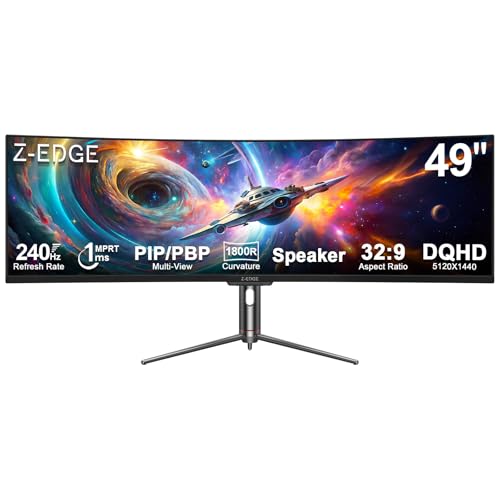 | 9.5PCKitHQ scoreView on Amazon |
05 | 9.5PCKitHQ scoreView on Amazon |
06 | 9.4PCKitHQ scoreView on Amazon |
07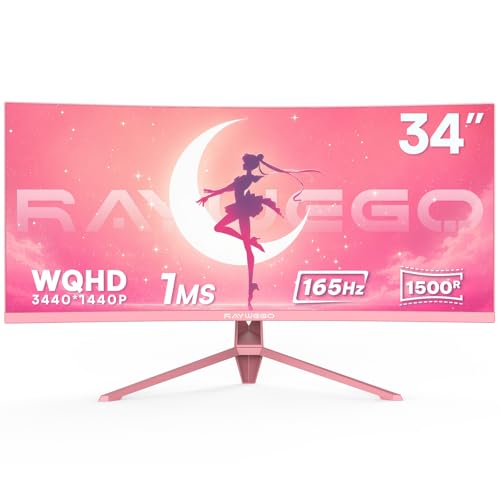 | 9.3PCKitHQ scoreView on Amazon |
08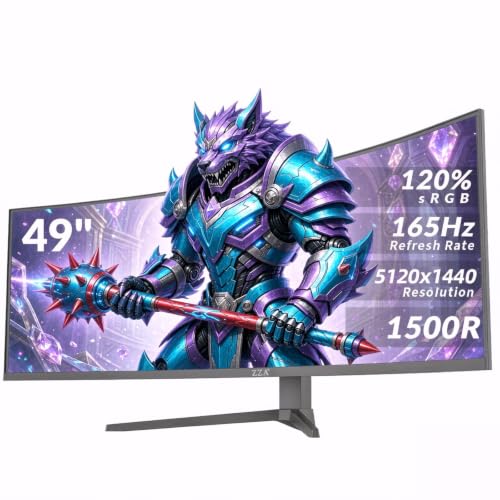 | 9.2PCKitHQ scoreView on Amazon |
A closer look at each configuration
Amzfast 34-inch Curved Gaming Monitor UWQHD AMZG34C8
score
A 34-inch 3440x1440 curved monitor at 240 Hz with 96% DCI-P3, 131% sRGB and PIP/PBP modes.
- Resolution
- 3440x1440
- Native refresh rate
- 240 Hz
- Screen size
- 34 in
- Curved screen
- Yes
- Ultrawide screen
- Yes
- HDMI
- Yes
The Amzfast monitor pairs a 34-inch 3440x1440 UWQHD panel with a 240 Hz refresh rate and 1ms response time on a 1500R curved screen. Color coverage reaches 96% DCI-P3 and 131% sRGB with 10-bit color, 450 nits and 3000:1 contrast. PIP and PBP modes split the screen, and the stand adjusts height, tilt, swivel and pivot. Two HDMI 2.1 inputs connect game consoles and laptops, with a 1-year warranty.
Choose it if
- Designers who want 96% DCI-P3 color coverage
- Editors who need a wide 3440x1440 canvas
Consider another if
- You need a 49-inch screen size
- You need a 5K 5120x1440 resolution
KTC 34-inch Ultrawide Curved Gaming Monitor H34S18E
score
A 34-inch 3440x1440 curved monitor at 240 Hz with 120% sRGB, HDR and PIP/PBP modes.
- Resolution
- 3440×1440
- Native refresh rate
- 240 Hz
- Screen size
- 34 in
- Curved screen
- Yes
- Ultrawide screen
- Yes
- HDMI
- Yes
- DisplayPort
- Yes
- Weight
- 16.31 lb
The KTC monitor uses a 34-inch 3440x1440 UWQHD panel at 240 Hz with 1ms MPRT response and 1500R curvature. Color coverage reaches 120% sRGB with 16.7 million colors, 400 cd/m² brightness, 3000:1 contrast and HDR. PIP and PBP split the screen, and the stand adjusts height by 90mm with tilt, swivel and pivot. Two HDMI 2.1 and two DisplayPort ports connect devices; it weighs 16.31 lb with a 3-year warranty.
Choose it if
- Designers who want 120% sRGB color coverage
- Editors who need PIP/PBP modes for multitasking
Consider another if
- You need a 49-inch screen size
- You need a 5K 5120x1440 resolution
ASUS TUF Gaming VG34VQ3B 34-inch Ultrawide HDR Gaming Monitor
score
A 34-inch 3440x1440 curved monitor at 180 Hz with 90% DCI-P3, HDR and built-in speakers.
- Resolution
- 3440x1440
- Native refresh rate
- 180 Hz
- Screen size
- 34 in
- Curved screen
- Yes
- Ultrawide screen
- Yes
- DisplayPort
- Yes
- Weight
- 16.8 lb
The ASUS TUF monitor pairs a 34-inch 3440x1440 curved panel at 180 Hz with 1ms MPRT response and ELMB Sync. Its color coverage reaches 90% DCI-P3 with HDR, and FreeSync Premium keeps the refresh rate variable. Built-in speakers provide audio, and DisplayWidget Center adjusts monitor settings. The monitor includes a DisplayPort cable and a 3-month Adobe Creative Cloud subscription, and it carries a 3-year manufacturer warranty.
Choose it if
- Designers who want 90% DCI-P3 color
- Editors who want built-in speakers included
Consider another if
- You need a 240 Hz refresh rate
- You need a 49-inch screen size
Z-Edge 5K 49-inch Curved Gaming Monitor UG49P
score
A 49-inch 5120x1440 curved monitor at 240 Hz with 99% sRGB, USB-C and PIP/PBP modes.
- Resolution
- 5120x1440
- Native refresh rate
- 240 Hz
- Screen size
- 49 in
- Curved screen
- Yes
- Ultrawide screen
- Yes
- USB-C
- Yes
- HDMI
- Yes
The Z-Edge monitor uses a 49-inch 5120x1440 DQHD panel with a 240 Hz refresh rate, 1ms MPRT response and 1800R curvature. Color coverage reaches 99% sRGB with 3000:1 contrast and a ΔE under 2, and built-in speakers provide audio. PIP and PBP modes split the screen for two sources, and HDMI 2.1 and USB-C ports connect laptops and desktops. The monitor carries a 2-year manufacturer warranty.
Choose it if
- Designers who want a 49-inch 5120x1440 canvas
- Editors who need USB-C video input
Consider another if
- You need a 34-inch screen size
- You need a 1500R curved screen
KTC 34-inch Curved Gaming Monitor H34S18E
score
A 34-inch 3440x1440 curved monitor at 240 Hz with a VA panel, 120% sRGB and PIP/PBP modes.
- Resolution
- 3440×1440
- Screen size
- 34 in
- Panel
- VA
- Curved screen
- Yes
- Ultrawide screen
- Yes
- HDMI
- Yes
- Weight
- 16.31 lb
- Warranty
- 3-year
The KTC monitor uses a 34-inch 3440x1440 UWQHD panel at 240 Hz with 1ms MPRT response and 1500R curvature. Its VA panel reaches 120% sRGB with 3000:1 contrast, 400 cd/m² and 8-bit color. PIP and PBP split the screen, and the stand adjusts height by 90mm with tilt, swivel and pivot. Dual HDMI 2.1 inputs connect devices; the monitor weighs 16.31 lb with a 3-year warranty.
Choose it if
- Designers who want a VA panel
- Editors who need PIP/PBP modes for multitasking
Consider another if
- You need a 49-inch screen size
- You need a 5K 5120x1440 resolution
Raywego 49-inch Curved Ultrawide Gaming Monitor HDR400
score
A 49-inch 5120x1440 curved monitor at 165 Hz with 127% sRGB, HDR400 and PIP/PBP modes.
- Resolution
- 5120×1440
- Native refresh rate
- 165 Hz
- Screen size
- 49 in
- Panel
- VA
- Curved screen
- Yes
- Ultrawide screen
- Yes
- HDMI
- Yes
- DisplayPort
- Yes
- Weight
- 22 lb
- Warranty
- 1-year
The Raywego monitor uses a 49-inch 5120x1440 DQHD panel at 165 Hz with 1ms response and 1500R curvature. Its VA panel reaches 127% sRGB with HDR400 and 400-nit brightness. PIP and PBP split the screen, and the panel covers the workspace of two 27-inch QHD screens without a center bezel. DisplayPort 1.4 and HDMI 2.0 connect devices, and the monitor weighs 22 lb with a 1-year warranty.
Choose it if
- Designers who want a 49-inch 5120x1440 canvas
- Editors who want HDR400 color support
Consider another if
- You need a 240 Hz refresh rate
- You need a 34-inch screen size
Raywego 34-inch Pink Curved Ultrawide Gaming Monitor
score
A pink 34-inch 3440x1440 curved monitor at 165 Hz with 127% sRGB and PIP/PBP modes.
- Resolution
- 3440 × 1440
- Native refresh rate
- 165 Hz
- Screen size
- 34 in
- Curved screen
- Yes
- Ultrawide screen
- Yes
- HDMI
- Yes
- DisplayPort
- Yes
- Weight
- 8 lb
The Raywego monitor pairs a pink 34-inch 3440x1440 UWQHD panel with a 165 Hz refresh rate, 1ms MPRT response and 1500R curvature. Color coverage reaches 127% sRGB with HDR support, and FreeSync reduces screen tearing. PIP and PBP split the screen for two sources, and HDMI 2.0 and DisplayPort 1.4 connect devices. The three-sided frameless design suits a clean desk setup; the monitor weighs 8 lb.
Choose it if
- Designers who want a pink monitor
- Editors who need a 34-inch UWQHD canvas
Consider another if
- You need built-in speakers for audio
- You need a 240 Hz refresh rate
ZZA 49-inch Ultra-Wide DQHD Curved Gaming Monitor
score
A 49-inch 5120x1440 curved monitor with 120% sRGB, FreeSync Premium and HDMI 2.1.
- Resolution
- 5120×1440
- Screen size
- 49 in
- Curved screen
- Yes
- Ultrawide screen
- Yes
- HDMI
- Yes
- DisplayPort
- Yes
- Weight
- 24.75 lb
The ZZA monitor uses a 49-inch 5120x1440 DQHD panel with a 1500R curve and a 32:9 ratio. Color coverage reaches 120% sRGB with 330 cd/m² brightness and 3000:1 contrast, and FreeSync Premium syncs the refresh rate with the graphics card. The stand adjusts height, tilt and swivel; HDMI 2.1 and DisplayPort 1.4 connect devices. A 3.5mm audio jack provides audio output, and the monitor weighs 24.75 lb.
Choose it if
- Designers who want 120% sRGB color coverage
- Editors who need a 49-inch 5120x1440 canvas
Consider another if
- You need built-in speakers for audio
- You need a 34-inch screen size
Make the choice for your setup
Resolution and screen size
Compare the panel size and resolution first. The 34-inch monitors here show 3440x1440, while the 49-inch monitors show 5120x1440, which is the width of two 27-inch QHD screens without a center bezel. A 34-inch screen fits a standard desk, while a 49-inch screen needs more desk width and depth. The Raywego 49-inch screen holds the workspace of two 27-inch QHD screens without a center bezel, and its PIP and PBP modes show two sources side by side. Check the space on your desk before you choose, and match the resolution to the canvas your work needs: a wider screen holds more panels and timelines side by side.
Color coverage and panel
Color coverage decides how much of a color space the panel shows. The Amzfast reaches 96% DCI-P3 and 131% sRGB, the ASUS reaches 90% DCI-P3, and the Z-Edge reaches 99% sRGB. The two KTC monitors reach 120% sRGB, the two Raywego monitors reach 127% sRGB, and the ZZA reaches 120% sRGB. The Raywego 49-inch uses a VA panel with 127% sRGB and HDR400, and the Amzfast lists 10-bit color depth. The ASUS also includes a DisplayPort cable and a free 3-month Adobe Creative Cloud subscription in the box. Compare the same figure on each monitor, since DCI-P3 and sRGB measure different color spaces. For a closely related choice, read our guide to the Best Ultrawide Editing Monitor.
Ports, multitasking and stands
Check the ports on the monitor against the ports on your computer before you buy. The Amzfast has two HDMI 2.1 inputs. The KTC monitors have HDMI 2.1 and DisplayPort inputs. The Z-Edge adds USB-C alongside HDMI 2.1. The Raywego monitors use HDMI 2.0 and DisplayPort 1.4. PIP and PBP modes split the screen for two sources on the Amzfast, KTC, Z-Edge and Raywego monitors. The Amzfast, KTC and ZZA monitors have stands that adjust height, tilt and swivel. The Amzfast, KTC and Raywego monitors support 100mm by 100mm VESA mounts, and the ZZA supports a VESA wall mount for a clean setup.
Before you decide, also read 24 vs 27 Inch Monitor.
FAQ: Ultrawide Monitor Graphic Design
Is a 49-inch ultrawide better than a 34-inch for design?
It depends on the desk and the work. The 49-inch monitors show 5120x1440, which holds more panels and timelines side by side, while the 34-inch monitors show 3440x1440 on a smaller desk. Measure the desk first, then match the screen to the work.
What color coverage matters for graphic design?
Compare the same figure across monitors. The Amzfast reaches 96% DCI-P3, the ASUS reaches 90% DCI-P3, and the Z-Edge reaches 99% sRGB, while the KTC monitors reach 120% sRGB. DCI-P3 and sRGB measure different color spaces, so do not compare one against the other.
Can these monitors show two sources at once?
The Amzfast, KTC, Z-Edge and Raywego monitors have PIP and PBP modes that split the screen for two sources, so one screen can show a laptop and a desktop side by side. Check the modes and ports on the monitor you choose before you buy.

