
Best Ultrawide Monitor for Gaming and Productivity (2026): 5 Picks Compared
 By Theo LangUpdated
Choose the INNOCN 40" WQHD (3440x1440) 200Hz HDR400 IPS USB C Ultrawide if you want a single 40-inch 3440x1440 screen at 200Hz with 65W USB-C charging for spreadsheets by day and games at night. The two 49-inch 5120×1440 models give you a wider 32:9 canvas, while the 34-inch models keep the same 3440x1440 resolution on a smaller screen. This guide compares all five on size, refresh rate, and connections.
Your shortlist at a glance
PCKitHQ scores range from 9.2 to 9.8. See how we pick.
| Product and key specifications | Score and retailer |
|---|---|
01 | 9.8PCKitHQ scoreView on Amazon |
02 Second Pick INNOCN 34-inch Ultrawide Monitor WQHD 3440 x PC Adaptive-Sync Compatible3440 x 1440, 180 Hz | 9.7PCKitHQ scoreView on Amazon |
03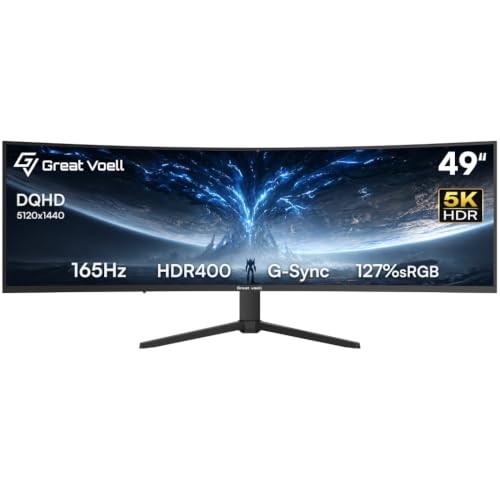 | 9.5PCKitHQ scoreView on Amazon |
04 | 9.3PCKitHQ scoreView on Amazon |
05 | 9.2PCKitHQ scoreView on Amazon |
A closer look at each configuration
INNOCN 40-inch WQHD HDR400 USB C Ultrawide Monitor
score
The 40-inch 3440x1440 IPS panel at 200Hz with 65W USB-C charging suits one-screen work and gaming.
- Resolution
- 3440x1440
- Native refresh rate
- 200 Hz
- Panel
- IPS
- Ultrawide screen
- Yes
- USB-C
- Yes
- HDMI
- Yes
- Warranty
- 1 Year
This INNOCN monitor pairs a 40-inch 3440x1440 IPS panel with a 200Hz refresh rate and 1ms response time. FreeSync and G-SYNC compatibility cover AMD and NVIDIA graphics cards. The 21:9 screen holds three full-size windows side by side, so a code editor, browser, and terminal stay visible at once. One USB-C cable charges a MacBook or Windows ultrabook at 65W while driving the display. The panel covers 99% sRGB and carries HDR400 support. Dual built-in speakers handle calls and demos without external audio. HDMI and DP ports sit alongside USB-C. Warranty coverage runs 1 year.
Choose it if
- You want a 40-inch 3440x1440 screen for three windows side by side
- You want 65W USB-C charging for a MacBook or Windows ultrabook
Consider another if
- You want the 5120×1440 resolution of the 49-inch models
- You want the 3-year warranty of the Great voell or ASUS
INNOCN 34-inch Ultrawide Monitor WQHD 3440 x PC Adaptive-Sync Compatible
score
The 34-inch 3440 x 1440 IPS panel at 180Hz with 100% sRGB suits editing, charts, and fast games.
- Resolution
- 3440 x 1440
- Native refresh rate
- 180 Hz
- Panel
- IPS
- Ultrawide screen
- Yes
- HDMI
- Yes
- Warranty
- 1 Year
This INNOCN monitor pairs a 34-inch 3440 x 1440 IPS panel with a 180Hz refresh rate and 1ms MPRT response time. Adaptive-Sync and G-SYNC Compatible support cover fast games, and the panel covers 100% sRGB with HDR400 support. The 178-degree viewing angle keeps colors consistent from varied positions. PIP and PBP modes show two devices at once, so a PC and a gaming console share the screen without switching inputs. Dual HDMI 2.0 ports, DP 1.4, and a 3.5mm audio jack cover PCs, laptops, PS5, and Xbox Series X. The stand adjusts 130mm in height with -5°~15° tilt. Warranty coverage runs 1 year.
Choose it if
- You want a 34-inch 3440 x 1440 screen with PIP and PBP modes
- You want a 130mm height-adjustable stand with Eye Care technology
Consider another if
- You want the 200Hz refresh rate of the 40-inch INNOCN
- You want the 3-year warranty of the Great voell or ASUS
Great voell 49-inch Curved Gaming Monitor HDR400
score
The 49-inch 5120×1440 VA panel at 165Hz with a 1500R curve suits wide gaming and editing.
- Resolution
- 5120×1440
- Native refresh rate
- 165 Hz
- Screen size
- 49 in
- Panel
- VA
- Curved screen
- Yes
- Ultrawide screen
- Yes
- HDMI
- Yes
- Weight
- 24.2 lb
- Warranty
- 3Year
This Great voell monitor pairs a 49-inch 5120×1440 VA panel with a 165Hz refresh rate and 1ms response time. The 32:9 aspect ratio matches the width of two 27-inch monitors, and the 1500R curve brings the edges closer to your eyes. The panel covers 127% sRGB with a 3000:1 contrast ratio, HDR400 support, and up to 400 nits brightness. FreeSync keeps the GPU and monitor in sync, and PIP/PBP modes show two sources at once. DP 1.4 runs at 165Hz while HDMI 2.0 runs at 100Hz, and a 100x100mm VESA pattern supports wall or arm mounting. Games must support the 32:9 screen size. The monitor weighs 24.2 lb, and warranty coverage runs 3 years.
Choose it if
- You want a 49-inch 5120×1440 screen with a 32:9 aspect ratio
- You want 127% sRGB coverage and HDR400 for photo editing
Consider another if
- You want the 200Hz refresh rate of the 40-inch INNOCN
- You want the 34-inch screen of the ASUS for a smaller desk
Deco Gear 49-inch Curved Super Ultrawide Monitor
score
The 49-inch 5120 × 1440 curved panel at 165Hz with 65W USB-C KVM suits hybrid work.
- Resolution
- 5120 × 1440
- Native refresh rate
- 165 Hz
- Curved screen
- Yes
- Ultrawide screen
- Yes
- USB-C
- Yes
- HDMI
- Yes
- Weight
- 21.1 lb
- Warranty
- 1-Year
This Deco Gear monitor pairs a 49-inch 5120 × 1440 curved panel with a 165Hz refresh rate and 1ms MPRT response time. One USB-C connection delivers 65W power and KVM control, so a single keyboard and mouse switch between systems. The panel covers 100% sRGB and 93% DCI-P3 with HDR support, and the 1500R curve adds depth to games and work. HDMI 2.1 and DP 1.4 cover full-resolution connections, with VRR and ALLM for PS5. PIP/PBP modes, Adaptive Sync, built-in speakers, and rear RGB lighting round out the feature set. The monitor weighs 21.1 lb, and warranty coverage runs 1 year.
Choose it if
- You want 65W USB-C with KVM for one-cable laptop control
- You want a 49-inch 5120 × 1440 screen with PIP and PBP
Consider another if
- You want the 200Hz refresh rate of the 40-inch INNOCN
- You want the 3-year warranty of the Great voell or ASUS
ASUS TUF Gaming VG34WQML5A 34-inch Ultrawide HDR Gaming Monitor
score
The 34-inch 3440 x 1440 curved panel with overclock to 250Hz suits competitive gaming.
- Resolution
- 3440 x 1440
- Screen size
- 34 in
- Curved screen
- Yes
- Ultrawide screen
- Yes
- HDMI
- Yes
- DisplayPort
- Yes
- Weight
- 17.9 lb
- Warranty
- 3 years
This ASUS monitor pairs a 34-inch 3440 x 1440 curved panel with an overclock to 250Hz and a 0.5ms minimum response time. The 1500R curve and 34-inch width suit immersive gameplay, and FreeSync Premium Pro enables variable refresh rate by default. ELMB Sync pairs low motion blur with variable refresh rate for sharp visuals at high frame rates. The panel covers 95% DCI-P3, and DisplayHDR 400 support enhances bright and dark areas in HDR-10 format. DisplayWidget Center gives mouse access to monitor settings. The box includes DisplayPort and HDMI cables plus a USB Type-B to A cable. The monitor weighs 17.9 lb, and warranty coverage runs 3 years.
Choose it if
- You want a 34-inch curved screen with ELMB Sync and FreeSync Premium Pro
- You want 95% DCI-P3 coverage for gaming and content creation
Consider another if
- You want the 5120×1440 resolution of the 49-inch models
- You want the 200Hz native refresh rate of the 40-inch INNOCN
Make the choice for your setup
Match screen size to your desk
Three screen sizes appear in this guide. The INNOCN 40-inch model and the two 34-inch models share 3440x1440 resolution, while the two 49-inch models share 5120×1440 resolution. A 49-inch 32:9 screen matches the width of two 27-inch monitors, so it suits a wide desk with room for charts, timelines, and documents side by side. A 34-inch screen keeps the same 3440x1440 resolution in a smaller footprint, and the 40-inch INNOCN sits between the two sizes. Measure your desk depth and viewing distance before choosing, and keep screen size separate from resolution when you compare models. The 49-inch models weigh 24.2 lb and 21.1 lb, while the ASUS 34-inch model weighs 17.9 lb, so check your desk limits too.
Compare refresh rates and sync
Refresh rates split this guide into four bands. The 40-inch INNOCN runs at a 200Hz native refresh rate, the 34-inch INNOCN at 180Hz, and both 49-inch models at 165Hz. The ASUS reaches 250Hz only as an overclock, so treat that figure as an overclocked mode rather than a native rate. Sync support varies by model: the 40-inch INNOCN pairs FreeSync with G-SYNC compatibility, the 34-inch INNOCN pairs Adaptive-Sync with G-SYNC compatibility, the Great voell uses FreeSync, the Deco Gear uses Adaptive Sync, and the ASUS uses FreeSync Premium Pro with ELMB Sync. Match the sync support to your graphics card before choosing. Shoppers with a related need can compare our guide to the Best 4K Monitor for Eye Strain.
Check USB-C, ports, and warranty
Two monitors in this guide offer 65W USB-C charging. The 40-inch INNOCN charges a MacBook or Windows ultrabook at 65W. The Deco Gear pairs 65W USB-C with KVM control. The 34-inch INNOCN connects through dual HDMI 2.0 ports, DP 1.4, and a 3.5mm audio jack. The Great voell connects through DP 1.4 at 165Hz and HDMI 2.0 at 100Hz, while the ASUS box includes DisplayPort and HDMI cables. Warranty terms run 1 year for the 40-inch INNOCN, the 34-inch INNOCN, and the Deco Gear, and 3 years for the Great voell and the ASUS. Check the port list on each model before you buy.
Before you decide, also read 24 vs 27 Inch Monitor.
FAQ: Ultrawide Monitor for Gaming and Productivity
Which ultrawide suits gaming and productivity together?
The INNOCN 40-inch model pairs a 3440x1440 IPS panel at 200Hz with 65W USB-C charging, so one screen covers spreadsheets and fast games. FreeSync and G-SYNC compatibility cover AMD and NVIDIA graphics cards for work and play.
Which monitors offer 65W USB-C charging?
The 40-inch INNOCN charges a MacBook or Windows ultrabook at 65W through one USB-C cable. The Deco Gear 49-inch model also delivers 65W USB-C power with KVM control for switching between systems with a single keyboard and mouse.
What warranty terms do these monitors carry?
The 40-inch INNOCN, the 34-inch INNOCN, and the Deco Gear each carry a 1-year warranty. The Great voell carries a 3-year warranty, and the ASUS carries a 3-year warranty with advanced replacement and repair service.


