Best Small Wireless Keyboard (2026): 4 Models Side by Side
 By Theo LangUpdated
Choose the Logitech MX Keys Mini Minimalist Wireless Illuminated Keyboard if you want a compact backlit keyboard that pairs with up to 3 devices through Bluetooth Low Energy and charges through USB-C. Its backlit keys light up as your hands approach and adjust to changing light. The Logitech Pebble Keys 2 K380s weighs 0.91 lb, while the TECKNET and Macally keyboards connect through a 2.4GHz USB receiver.
Your shortlist at a glance
PCKitHQ scores range from 9.2 to 9.8. See how we pick.
| Product and key specifications | Score and retailer |
|---|---|
01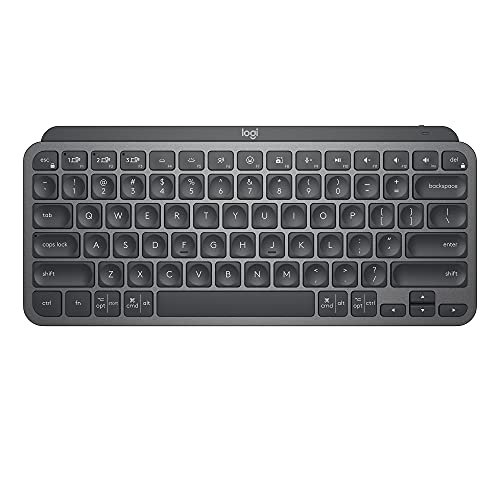 Best Overall Logitech MX Keys Mini Minimalist Wireless Illuminated KeyboardLayout: Compact, Wireless: Yes, Backlight: Yes | 9.8PCKitHQ scoreView on Amazon |
02 Second Pick Logitech Pebble Keys 2 K380s Wireless Bluetooth KeyboardLayout: compact, Wireless: Yes, Connection: Bluetooth | 9.6PCKitHQ scoreView on Amazon |
03 Also Consider TECKNET 2.4G Wireless KeyboardLayout: Mini Compact, Wireless: Yes, Connection: 2.4GHz USB | 9.4PCKitHQ scoreView on Amazon |
04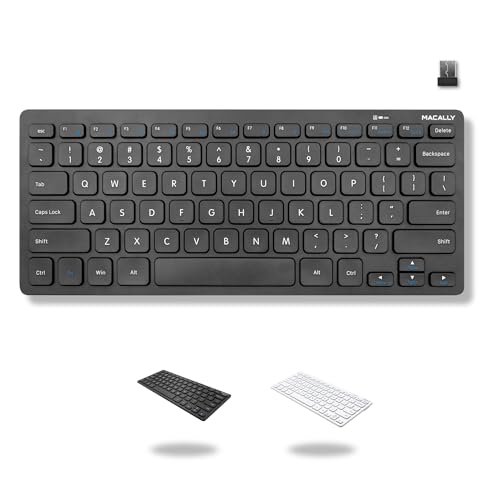 Also Consider Macally Compact Wireless KeyboardLayout: 78-key, Wireless: Yes, Connection: 2.4Ghz USB-A | 9.2PCKitHQ scoreView on Amazon |
A closer look at each configuration
Logitech MX Keys Mini Minimalist Wireless Illuminated Keyboard
score
The compact backlit layout, three-device Bluetooth Low Energy pairing, and USB-C charging define this Logitech keyboard.
- Layout
- Compact
- Wireless
- Yes
- Backlight
- Yes
- Connection
- Bluetooth Low Energy
- Weight
- 1.5 lb
The Logitech MX Keys Mini Minimalist Wireless Illuminated Keyboard has a compact layout and backlit keys that light up the moment your hands approach and automatically adjust to suit changing lighting conditions. Its keys are shaped for your fingertips, and its Smart Keys include voice to text dictation, mic mute and unmute, and emoji keys. It pairs with up to 3 devices through Bluetooth Low Energy and works with macOS, iOS, Windows, Linux, and Android. USB-C charging keeps it powered up to 10 days on a full charge or up to 5 months with the backlighting turned off. It weighs 1.5 lb.
Choose it if
- You want a compact backlit keyboard for macOS, iOS, Windows, Linux, or Android
- You want to pair one keyboard with up to 3 devices
Consider another if
- You need the 0.91 lb carrying weight of the Logitech Pebble Keys 2 K380s
- You need the 36-month warranty term of the TECKNET keyboard
Logitech Pebble Keys 2 K380s Wireless Bluetooth Keyboard
score
The 0.91 lb compact design, three-device Bluetooth switching, and customizable Fn keys define this Logitech keyboard.
- Layout
- compact
- Wireless
- Yes
- Connection
- Bluetooth
- Weight
- 0.91 lb
- Warranty
- 1 Year Limited Hardware Warranty
The Logitech Pebble Keys 2 K380s Wireless Bluetooth Keyboard has a slim, compact design and weighs 0.91 lb. It connects through Bluetooth to up to 3 devices across Windows, macOS, iPadOS, and ChromeOS, and its Easy-Switch buttons change the active device with one click. Its 10 Fn keys can be personalized with the Logi Options+ app, and the Fn shortcut keys give access to search, screen capture, and the emoji menu. Its scooped round keys give a laptop-like typing experience. Batteries are included, and an auto-sleep power-saving mode is listed. It carries a 1 Year Limited Hardware Warranty.
Choose it if
- You want a 0.91 lb compact Bluetooth keyboard for travel
- You want to switch between 3 devices across Windows, macOS, iPadOS, or ChromeOS
Consider another if
- You need a 2.4GHz USB receiver connection for your computer
- You need USB-C rechargeable power rather than replaceable batteries
TECKNET 2.4G Wireless Keyboard
score
The 2.4GHz USB connection, 11.5 by 4.9 inch size, and 10.4 ounce weight define this TECKNET keyboard.
- Layout
- Mini Compact
- Wireless
- Yes
- Connection
- 2.4GHz USB
- Warranty
- 36-month warranty
The TECKNET 2.4G Wireless Keyboard measures 11.5 by 4.9 inches and weighs 10.4 ounces. It uses a 2.4GHz USB receiver, plugs into Windows, Mac, Chrome OS, or Linux computers, and gives a connection rated up to 32.8ft. It does not support Bluetooth, so the device needs a USB-A port. Its chocolate keycap design gives smooth, quiet tapping with reduced key travel, and it includes media hotkeys. Its Enter key layout differs from a standard full-size keyboard, so adjustment time may be needed. It requires 2 AAA batteries, which are not included, and lists a 12-month battery life. It carries a 36-month warranty with registration required.
Choose it if
- You want a 2.4GHz USB keyboard with a connection rated up to 32.8ft
- You want an 11.5 by 4.9 inch keyboard weighing 10.4 ounces
Consider another if
- You need a Bluetooth connection to pair with your devices
- You need batteries included in the box with the keyboard
Macally Compact Wireless Keyboard
score
The 78-key layout, 12 shortcut keys, and 2.4GHz USB-A connection define this Macally keyboard.
- Layout
- 78-key
- Wireless
- Yes
- Connection
- 2.4Ghz USB-A
- Warranty
- 1 year
The Macally Compact Wireless Keyboard has a 78-key layout with 12 shortcut keys and no number pad, which saves desk space. It connects through a 2.4GHz USB-A dongle and is plug and play with any PC or Chromebook with a USB-A port, with no drivers or software needed. Its slim, mini size suits travel. It uses 1 AAA battery, which is included, and an on/off switch helps save battery when it is not in use. It carries a 1 year warranty.
Choose it if
- You want a 78-key keyboard with 12 shortcut keys and no number pad
- You want a plug and play keyboard for a PC or Chromebook with a USB-A port
Consider another if
- You need Bluetooth pairing with up to 3 devices
- You need the 36-month warranty term of the TECKNET keyboard
Make the choice for your setup
Match the connection to your devices
The Logitech MX Keys Mini pairs with up to 3 devices through Bluetooth Low Energy, and the Logitech Pebble Keys 2 K380s connects through Bluetooth to up to 3 devices across Windows, macOS, iPadOS, and ChromeOS. Both switch between paired devices. The TECKNET keyboard uses a 2.4GHz USB receiver and does not support Bluetooth, while the Macally keyboard uses a 2.4GHz USB-A dongle. Both USB keyboards need a USB-A port on the computer. Check the ports on the computer and the operating systems named for each keyboard before choosing between Bluetooth pairing and a USB receiver. The MX Keys Mini also works with macOS, iOS, Windows, Linux, and Android.
Compare size, weight, and layout
The Logitech MX Keys Mini has a compact layout and weighs 1.5 lb. The Logitech Pebble Keys 2 K380s is also compact and weighs 0.91 lb, with scooped round keys and a laptop-like typing experience. The TECKNET keyboard measures 11.5 by 4.9 inches and weighs 10.4 ounces, with a chocolate keycap design and media hotkeys. Its Enter key layout differs from a standard full-size keyboard, so adjustment time may be needed. The Macally keyboard has a 78-key layout with 12 shortcut keys and no number pad. Compare the stated dimensions, weight, key count, and Enter key layout against the desk space and typing layout you need. The Pebble Keys 2 K380s also lists customizable Fn keys for search, screen capture, and the emoji menu. If that fits your setup better, see our guide to the Best Compact Wireless Keyboard.
Check power and warranty terms
The Logitech MX Keys Mini charges through USB-C and stays powered up to 10 days on a full charge or up to 5 months with the backlighting turned off. The Logitech Pebble Keys 2 K380s includes batteries and lists an auto-sleep power-saving mode. The TECKNET keyboard requires 2 AAA batteries, which are not included, and lists a 12-month battery life. It carries a 36-month warranty with registration required. The Macally keyboard includes 1 AAA battery, has an on/off switch to save battery, and carries a 1 year warranty. The Pebble Keys 2 K380s carries a 1 Year Limited Hardware Warranty. Compare the stated power source, battery terms, and warranty length for each keyboard.
For a wider shortlist, start with Mechanical vs Membrane Keyboard.
FAQ: Small Wireless Keyboard
Which keyboards pair with three devices?
The Logitech MX Keys Mini pairs with up to 3 devices through Bluetooth Low Energy. The Logitech Pebble Keys 2 K380s connects through Bluetooth to up to 3 devices and switches between them with Easy-Switch buttons.
Which keyboards use a USB receiver instead of Bluetooth?
The TECKNET keyboard uses a 2.4GHz USB receiver and does not support Bluetooth. The Macally keyboard uses a 2.4GHz USB-A dongle that provides a wireless connection to a computer or laptop. Both keyboards need a USB-A port on the computer.
What power sources do these keyboards use?
The Logitech MX Keys Mini charges through USB-C. The Logitech Pebble Keys 2 K380s includes batteries. The TECKNET keyboard requires 2 AAA batteries, which are not included. The Macally keyboard includes 1 AAA battery and has an on/off switch to help save battery.