
Best R Curvature for A Curved Monitor (2026): 5 Picks Compared
 By Theo LangUpdated
Choose the Samsung 34-inch ViewFinity S65TC if you want a 1000R curve on a 34-inch Ultra-WQHD screen in 21:9 for work across multiple windows. The LG 34-inch UltraWide monitors use an 1800R curve with a 120Hz refresh rate, and the ASUS TUF Gaming uses a 1500R curve at 100Hz. The Samsung T550 brings the 1000R curve to a 27-inch FHD 1080p screen.
Your shortlist at a glance
PCKitHQ scores range from 9.2 to 9.8. See how we pick.
| Product and key specifications | Score and retailer |
|---|---|
01 Best Overall Samsung 34-inch ViewFinity (S65TC) Ultra-WQHD 1000R Curved Computer MonitorUltra-WQHD, 100 Hz | 9.8PCKitHQ scoreView on Amazon |
02 | 9.7PCKitHQ scoreView on Amazon |
03 | 9.5PCKitHQ scoreView on Amazon |
04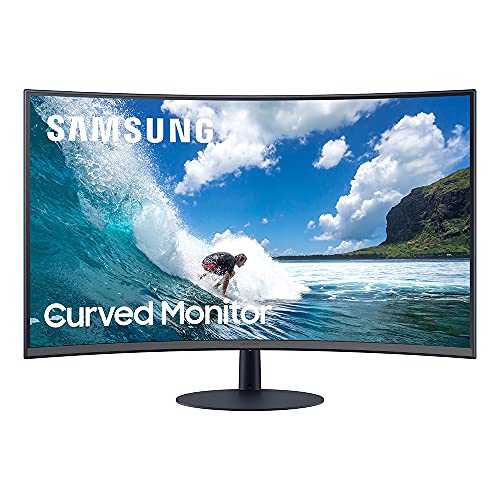 | 9.3PCKitHQ scoreView on Amazon |
05 | 9.2PCKitHQ scoreView on Amazon |
A closer look at each configuration
Samsung 34-inch ViewFinity (S65TC) Ultra-WQHD 1000R Curved Computer Monitor
score
The Samsung 34-inch ViewFinity pairs a 1000R curve with Ultra-WQHD, 100Hz, HDR10 and Thunderbolt 4.
- Resolution
- Ultra-WQHD
- Native refresh rate
- 100 Hz
- Curved screen
- Yes
- Ultrawide screen
- Yes
- Weight
- 17.9 lb
- Warranty
- 1 year manufacturer
The Samsung 34-inch ViewFinity (S65TC) has a 1000R curved Ultra-WQHD display in a 21:9 aspect ratio with a 100Hz refresh rate, HDR10 and AMD FreeSync. Thunderbolt 4 carries data and 90W charging, and the monitor also has HDMI, DisplayPort, a USB3 Hub and a LAN port. Built-in speakers free desk space, and the height-adjustable stand adds swivel and tilt. A KVM switch controls two sources with one keyboard and mouse, with split screen, Picture-in-Picture and Picture-by-Picture. TÜV-certified intelligent eye care adjusts brightness and color temperature for the environment. It weighs 17.9 lb and carries a 1 year manufacturer warranty.
Choose it if
- You want a 1000R curve on a 34-inch Ultra-WQHD screen
- You want Thunderbolt 4 with 90W charging
Consider another if
- You need a 120Hz refresh rate for motion
- You need a 27-inch screen for a smaller desk
LG 34-inch UltraWide Curved Monitor
score
The LG 34-inch UltraWide pairs an 1800R curve with 3440 x 1440, 120Hz and 99% sRGB coverage.
- Resolution
- 3440 x 1440
- Native refresh rate
- 120 Hz
- Panel
- VA
- Curved screen
- Yes
- Ultrawide screen
- Yes
- USB-C
- Yes
- HDMI
- Yes
- DisplayPort
- Yes
The LG 34-inch UltraWide has an 1800R curved VA panel at 3440 x 1440 in a 21:9 aspect ratio, with a 120Hz refresh rate, a 5ms GtG response time and 99% sRGB coverage. HDR10 and HDR Effect add brighter highlights, and AMD FreeSync with Dynamic Action Sync helps reduce screen tearing. The 21:9 screen supports PIP and PBP, and the LG Switch app splits the screen into custom layouts. DisplayPort 1.4, HDMI 2.0, USB-C and a headphone jack connect your devices, and the height, swivel and tilt stand mounts on 100 x 100 mm VESA.
Choose it if
- You want a 120Hz refresh rate on a 3440 x 1440 VA panel
- You want USB-C, DisplayPort 1.4 and HDMI 2.0 connections
Consider another if
- You need a 1000R curve on your desk
- You need Thunderbolt 4 with 90W charging
LG 34-inch UltraWide Curved Monitor
score
The LG 34-inch UltraWide pairs an 1800R curve with 3440 x 1440, 120Hz and a 13.7 lb frame.
- Resolution
- 3440 x 1440
- Native refresh rate
- 120 Hz
- Panel
- VA
- Curved screen
- Yes
- Ultrawide screen
- Yes
- HDMI
- Yes
- DisplayPort
- Yes
- Weight
- 13.7 lb
The LG 34-inch UltraWide has an 1800R curved VA panel at 3440 x 1440 in a 21:9 aspect ratio, with a 120Hz refresh rate, a 5ms response time and 99% sRGB coverage. HDR10 and 99% sRGB coverage deliver balanced color and smooth tonal transitions. VRR with Dynamic Action Sync and Black Stabilizer brightens dark scenes. HDMI 2.0 and DisplayPort 1.4 connect your devices, and the tilt stand adjusts the viewing position. It weighs 13.7 lb.
Choose it if
- You want a 120Hz VA panel with 99% sRGB coverage
- You want 11 custom screen layouts for your workspace
Consider another if
- You need the 1000R curve of the Samsung
- You need the 1500R curve of the ASUS
Samsung T550 27-inch Computer Monitor
score
The Samsung T550 pairs a 27-inch 1000R curved screen with FHD 1080p and built-in speakers.
- Resolution
- FHD 1080p
- Native refresh rate
- 75 Hz
- Curved screen
- Yes
- HDMI
- Yes
- Weight
- 11.2 lb
- Warranty
- 1 Year Manufacturer
The Samsung T550 is a 27-inch FHD 1080p monitor with a 1000R curved screen in a 16:9 aspect ratio and a 75Hz refresh rate. HDMI and D-Sub connect your devices, and built-in 5 Watt speakers play sound without a separate speaker. The virtually borderless display has a fabric-textured back and a slim metal stand. It holds a TÜV Rheinland eye comfort certificate for its 1000R curved display. It weighs 11.2 lb and carries a 1 Year Manufacturer warranty.
Choose it if
- You want a 27-inch 1000R curved screen
- You want built-in 5 Watt speakers
Consider another if
- You need a 3440 x 1440 resolution
- You need a 100Hz refresh rate or higher
ASUS TUF Gaming 34-inch Ultra-Wide Curved HDR Monitor (VG34VQEL1A)
score
The ASUS TUF Gaming pairs a 1500R curve with 3440 x 1440, 100Hz and a 1ms response time.
- Resolution
- 3440 x 1440
- Native refresh rate
- 100 Hz
- Curved screen
- Yes
- Ultrawide screen
- Yes
- HDMI
- Yes
- DisplayPort
- Yes
- Weight
- 17.79 lb
- Warranty
- 3 years
The ASUS TUF Gaming VG34VQEL1A is a 34-inch UWQHD monitor at 3440 x 1440 in a 21:9 aspect ratio, with a 1500R curve and a 100Hz refresh rate. A 1ms MPRT response time and ASUS Extreme Low Motion Blur reduce ghosting and motion blur, and FreeSync Premium with AMD graphics cards enables VRR. HDR-10 support and 125% sRGB color gamut cover bright and dark areas. DisplayPort 1.2, two HDMI 2.0 ports and a USB hub connect your devices, and the height-adjustable stand includes a tripod socket. It weighs 17.79 lb and carries a 3 years warranty.
Choose it if
- You want a 1500R curve for gaming
- You want a 1ms response time and FreeSync Premium
Consider another if
- You need the 120Hz refresh rate of the LG monitors
- You need an 1800R curve for your desk
Make the choice for your setup
What the R number means
The R number is the radius of the circle the curve follows, and the smaller the R value, the deeper the curve. The Samsung ViewFinity and the Samsung T550 both use a 1000R curve, the ASUS TUF Gaming uses a 1500R curve, and the two LG monitors use an 1800R curve. A deeper curve wraps the screen further around your view, while a gentler curve stays closer to flat. A 1000R curve sits on a 34-inch Ultra-WQHD screen and a 27-inch FHD 1080p screen, a 1500R curve on a 34-inch 3440 x 1440 screen, and an 1800R curve on two 34-inch 3440 x 1440 screens.
Screen size and resolution
Screen size and resolution decide how much fits on the screen at once. The Samsung ViewFinity has a 34-inch Ultra-WQHD display in 21:9, and the two LG monitors and the ASUS TUF Gaming each have a 34-inch 3440 x 1440 display in 21:9. The Samsung T550 has a 27-inch FHD 1080p display in 16:9. A 21:9 screen holds two windows side by side, and the Samsung ViewFinity adds a KVM switch with split screen, Picture-in-Picture and Picture-by-Picture. The LG with USB-C supports PIP and PBP, and the LG that weighs 13.7 lb splits the screen into up to 11 custom layouts. A 34-inch 3440 x 1440 screen gives more room than a 27-inch FHD 1080p screen. Shoppers with a related need can compare our guide to the Best 27 QHD Curved Monitor.
Refresh rate and connections
Refresh rate sets how many times the screen updates each second. The two LG monitors run at a 120Hz refresh rate, the Samsung ViewFinity and the ASUS TUF Gaming run at 100Hz, and the Samsung T550 runs at 75Hz. The Samsung ViewFinity connects through Thunderbolt 4 with 90W charging, HDMI, DisplayPort, a USB3 Hub and a LAN port. The LG with USB-C connects through DisplayPort 1.4, HDMI 2.0, USB-C and a headphone jack. The ASUS connects through DisplayPort 1.2, two HDMI 2.0 ports and a USB hub. The Samsung T550 connects through HDMI, DisplayPort and D-Sub. Built-in 5 Watt speakers play sound without a separate speaker, and the monitor weighs 11.2 lb.
Before you decide, also read 24 vs 27 Inch Monitor.
FAQ: R Curvature for A Curved Monitor
What does 1000R mean on a curved monitor?
The R number is the radius of the circle the curve follows, and the smaller the R value, the deeper the curve. A 1000R curve is deeper than a 1500R curve, and a 1500R curve is deeper than an 1800R curve. The Samsung ViewFinity and the Samsung T550 use a 1000R curve.
Which curvature is best for a 34-inch monitor?
It depends on the screen and the curve you want. The Samsung ViewFinity uses a 1000R curve on a 34-inch Ultra-WQHD screen, the ASUS TUF Gaming uses a 1500R curve on a 34-inch 3440 x 1440 screen, and the two LG monitors use an 1800R curve on 34-inch 3440 x 1440 screens. Check the curve against the screen size before you buy.
Do curved monitors need a special connection?
No. These monitors connect through HDMI and DisplayPort, and the Samsung ViewFinity adds Thunderbolt 4 with 90W charging while the LG with USB-C adds a USB-C port. The Samsung T550 adds a D-Sub port, and the ASUS adds a USB hub. Check that your computer has the port your monitor uses.


