
Best Portable Monitor Vertical (2026): 7 Picks Compared
 By Theo LangUpdated
Choose the Anyking Laptop Screen Extender 15.6" for a vertical second screen that stacks above your laptop on its own slide-rail stand. Its 15.6-inch IPS panel shows 1920 x 1080 at 60 Hz, and the stand rotates 90 degrees for portrait reading of code and long documents. The remaining six monitors in this guide cover larger 16-inch panels, lighter travel weights, and smaller 14-inch screens.
Your shortlist at a glance
PCKitHQ scores range from 9.2 to 9.8. See how we pick.
| Product and key specifications | Score and retailer |
|---|---|
01 | 9.8PCKitHQ scoreView on Amazon |
02 | 9.7PCKitHQ scoreView on Amazon |
03 | 9.6PCKitHQ scoreView on Amazon |
04 | 9.5PCKitHQ scoreView on Amazon |
05 | 9.4PCKitHQ scoreView on Amazon |
06 | 9.3PCKitHQ scoreView on Amazon |
07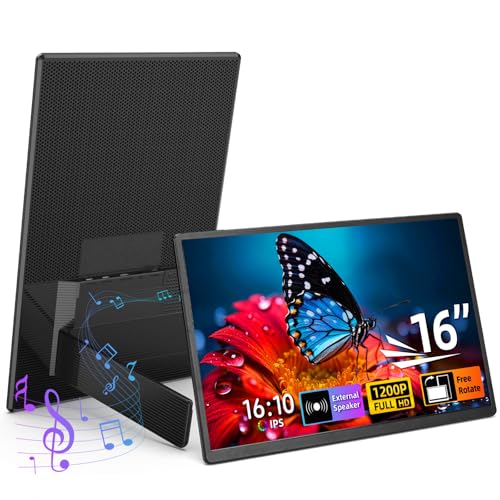 | 9.2PCKitHQ scoreView on Amazon |
A closer look at each configuration
Laptop Screen Extender 15.6-inch
score
The 15.6-inch IPS screen at 1920 x 1080 and 60 Hz pairs with a slide-rail stand that rotates 90 degrees for portrait use.
- Resolution
- 1920 x 1080
- Native refresh rate
- 60 Hz
- Screen size
- 15.6 in
- Panel
- IPS
- USB-C
- Yes
- HDMI
- Yes
- Warranty
- 365-day
The Anyking S13 pairs a 15.6-inch IPS screen with 1920 x 1080 resolution and a 60 Hz refresh rate. Its slide-rail stand holds the display above the laptop, rotates 90 degrees, and detaches for 75 x 75 mm VESA mounting. Two full-function USB-C ports and one Mini HDMI port connect to laptops. A single USB-C cable carries video and power when the laptop port supports DP Alt Mode.
Choose it if
- You want a second screen stacked above your laptop
- You use a 12 to 17.3 inch laptop
Consider another if
- You need the 16-inch screen of the Orfibz
- You need the 1.5 lb carrying weight of the Orfibz
Orfibz 16-inch Portable Monitor
score
The 16-inch 1200P FHD screen and 360 degree rotating stand switch between landscape and portrait at 1.5 lb.
- Resolution
- 1200P FHD
- USB-C
- Yes
- Weight
- 1.5 lb
- Warranty
- 1 Year
The Orfibz N3 has a 16-inch 1200P FHD screen with a 16:10 aspect ratio. Its 360 degree detachable rotating stand switches between landscape and portrait, and the smart cover guards the screen in a bag and doubles as a mouse pad. At 1.5 lb it slips into a backpack or laptop bag. A single Type-C cable carries video and power from a full-function Type-C port.
Choose it if
- You want a 16-inch screen for reading long documents
- You want a 1.5 lb monitor for daily travel
Consider another if
- You need the 1920 x 1200 resolution of the ZUMWALT
- You need the 75 x 75 mm VESA mount of the Anyking
16.1-inch Portable Monitor for Laptop
score
The 16.1-inch IPS screen shows 1920 x 1200 with a 360 degree magnetic stand at 1.48 lb.
- Resolution
- 1920x1200
- Panel
- IPS
- USB-C
- Yes
- HDMI
- Yes
- Weight
- 1.48 lb
The ZUMWALT S4 pairs a 16.1-inch IPS screen with 1920 x 1200 resolution, 300 nits brightness, a 1000:1 contrast ratio, and a 178 degree viewing angle. Its detachable magnetic stand rotates 360 degrees for landscape and portrait. At 1.48 lb with a 0.31 inch profile, it fits a backpack or laptop bag, and the PU leather cover doubles as a mouse pad. USB-C and HDMI both connect, and the package includes the cables, the magnetic stand, and a setup guide.
Choose it if
- You want a 1920 x 1200 screen for code and spreadsheets
- You want the 1.48 lb weight for a travel bag
Consider another if
- You need the 85 W PD pass-through output of the Anyking
- You need the 14-inch screen of the VEOUT stand monitor
KYY Portable Monitor 15.6'' USB-C
score
The 15.6-inch IPS screen shows 1920 x 1080 with dual speakers and a smart cover that stands in portrait.
- Resolution
- 1920*1080
- Panel
- IPS
- HDMI
- Yes
- Warranty
- 12 months
The KYY K3-2 has a 15.6-inch IPS screen with 1920 x 1080 resolution, HDR, and a 178 degree viewing angle. Dual speakers play audio, and dedicated buttons adjust brightness and volume without opening the on-screen menu. The smart cover protects the screen in a bag and folds into a stand that holds the monitor horizontally or vertically. Dual full-function Type-C ports and a Mini HDMI port connect to laptops, phones, and consoles. The warranty runs 12 months.
Choose it if
- You want dual speakers built into the monitor
- You want a 15.6-inch screen for travel gaming
Consider another if
- You need the 1920 x 1200 resolution of the ZUMWALT
- You need the 1.48 lb weight of the ZUMWALT
Veout 16-inch Portable Monitor for Laptop
score
The 16-inch IPS screen shows 1920 x 1200 with 100% sRGB in an aluminum case at 1.58 lb.
- Resolution
- 1920×1200
- Screen size
- 16 in
- Panel
- IPS
- Weight
- 1.58 lb
- Warranty
- Lifetime
The Veout V1 pairs a 16-inch IPS screen with 1920 x 1200 resolution, 100% sRGB, and a 1200:1 contrast ratio on a 16:10 panel. The aluminum case weighs 1.58 lb and measures 0.36 inches thick, and the built-in stand adjusts from 0 to 75 degrees and supports portrait mode. Dual USB-C ports and a Mini HDMI port connect to laptops, phones, and consoles. Built-in speakers play audio for calls and video.
Choose it if
- You want 100% sRGB for photo and design work
- You want an aluminum case in Black, Silver, Blue, or Pink
Consider another if
- You need the 14-inch size of the VEOUT stand monitor
- You need the 1.48 lb weight of the ZUMWALT
VEOUT Portable Monitor
score
The 14-inch IPS screen shows 1920 x 1080 with a 180 degree swivel stand at 1.6 lb.
- Resolution
- 1920x1080
- Screen size
- 14 in
- Panel
- IPS
- USB-C
- Yes
- HDMI
- Yes
- Warranty
- 1 Year
The VEOUT 14-inch monitor has an IPS screen with 1920 x 1080 resolution, 300 nits brightness, a 1000:1 contrast ratio, and HDR support. Its 180 degree swivel stand adjusts the viewing position, and the monitor can also mount on a wall. At 1.6 lb and 0.3 inches thin, it slips into a computer bag for travel. Dual full-function USB-C ports and a Mini HDMI port connect to laptops, phones, PCs, and consoles.
Choose it if
- You want a 14-inch screen for a small bag
- You want a wall-mountable monitor with a swivel stand
Consider another if
- You need the 16-inch screen of the Orfibz
- You need the 1920 x 1200 resolution of the BKVOO
BKVOO Portable Monitor 16-inch Horizontal Vertical
score
The 16-inch screen shows 1920 x 1200 with 100% sRGB and a matte anti-glare surface at 1.6 lb.
- Resolution
- 1920x1200
- Screen size
- 16 in
- Weight
- 1.6 lb
- Warranty
- 12-month
The BKVOO 16-inch monitor shows 1920 x 1200 with 100% sRGB on a 16:10 panel, and its matte screen has an anti-glare finish. Its stand switches the screen between landscape and portrait for coding, reading documents, and browsing. Switching modes means changing the Display Orientation in the computer settings, since auto-rotation is not supported. At 1.6 lb it slips into a backpack beside a laptop.
Choose it if
- You want a 16-inch screen for coding and reading
- You want a matte anti-glare screen for work and gaming
Consider another if
- You need the 1.48 lb weight of the ZUMWALT
- You need the 14-inch size of the VEOUT stand monitor
Make the choice for your setup
Pick the screen size first
Start with size. The VEOUT 14-inch monitor is the most compact screen here, while the ZUMWALT measures 16.1 inches and the Orfibz, Veout V1, and BKVOO measure 16 inches. The Anyking and KYY measure 15.6 inches. Resolution splits two ways: the Anyking, KYY, and VEOUT 14-inch screens show 1920 x 1080, while the ZUMWALT, Veout V1, and BKVOO show 1920 x 1200. The Orfibz shows 1200P FHD. A 16:10 screen suits portrait reading of long documents and code, since the taller shape fits more lines on screen. Match the screen to the bag it must fit, since the folded size decides whether it travels with the laptop.
Check the stand and rotation
Every monitor here turns to portrait, but the stands differ. The Anyking uses a slide-rail stand that rotates 90 degrees and detaches for a 75 x 75 mm VESA mount. The Orfibz and ZUMWALT stands rotate a full 360 degrees, and the ZUMWALT stand is magnetic. The KYY smart cover folds into a stand that holds the monitor horizontally or vertically. The Veout V1 stand adjusts from 0 to 75 degrees, and the VEOUT 14-inch stand swivels 180 degrees and also mounts on a wall. The BKVOO stand switches between landscape and portrait, but auto-rotation is not supported, so change the Display Orientation in the computer settings after turning the screen. Shoppers with a related need can compare our guide to the Best Portable Monitor Extender for Laptop.
Match the ports and power
A full-function USB-C port carries video and power over one cable on the Anyking, Orfibz, KYY, and VEOUT 14-inch monitors, but check the laptop port first. The Anyking needs a USB-C port that supports DP Alt Mode and supplies enough power, and it includes USB-C to USB-C, HDMI to Mini HDMI, and USB-A to USB-C cables. The Orfibz needs Thunderbolt 3.0 or 4.0 with DP support for a single cable, and uses HDMI with USB-A otherwise. The KYY and VEOUT 14-inch monitors also connect over one USB-C cable from a full-function port. The Anyking supports PD 3.0 input up to 100 W with pass-through output up to 85 W.
Before you decide, also read Best Portable Monitor.
FAQ: Portable Monitor Vertical
Which monitors rotate into portrait mode?
All seven rotate into portrait mode. The Anyking rotates 90 degrees on its slide-rail stand, the Orfibz and ZUMWALT rotate a full 360 degrees, and the VEOUT 14-inch stand swivels 180 degrees. The BKVOO needs the Display Orientation changed after turning the screen.
What cable connects these monitors to a laptop?
A full-function USB-C cable carries video and power on the Anyking, Orfibz, KYY, and VEOUT 14-inch monitors when the laptop port supports video output. The Anyking also connects by HDMI to Mini HDMI with USB for power, and it includes all three cables.
Which monitor suits a small desk?
The VEOUT 14-inch monitor takes the least width, and the Anyking stacks its screen above the laptop on a slide-rail stand, which frees desk width for a mouse and notes. The Orfibz at 1.5 lb and the ZUMWALT at 1.48 lb also pack small for cafe tables.


