Best Portable Monitor OLED 120Hz (2026): Top 4 by the Specs
 By Theo LangUpdated
Choose the InnoView 14 Inch OLED Portable Monitor 2.8K 2880x1800 120Hz 1ms if you want the sharpest panel here: a 14-inch OLED at 2880x1800 with a 120Hz native refresh rate and 1ms response. The Forzola and Prystivue 16-inch monitors trade resolution for size at 2048x1280, while the JUNEBOX 16-inch model adds 10-point touch. All four use OLED panels with 100% DCI-P3 and 100000:1 contrast. The sections below compare resolution, size and connections.
Your shortlist at a glance
PCKitHQ scores range from 9.2 to 9.8. See how we pick.
| Product and key specifications | Score and retailer |
|---|---|
01 | 9.8PCKitHQ scoreView on Amazon |
02 | 9.6PCKitHQ scoreView on Amazon |
03 | 9.4PCKitHQ scoreView on Amazon |
04 | 9.2PCKitHQ scoreView on Amazon |
A closer look at each configuration
InnoView 14-inch Portable Monitor 2.8K 1ms
score
The 14-inch OLED panel at 2880x1800 with a 120Hz refresh rate and 1ms response defines this InnoView monitor.
- Resolution
- 2880x1800
- Native refresh rate
- 120 Hz
- Screen size
- 14 in
- Panel
- OLED
- USB-C
- Yes
- HDMI
- Yes
- Weight
- 1.39 lb
- Warranty
- 18 months
This InnoView monitor has a 14-inch OLED panel at 2880x1800 with a 120Hz native refresh rate, 1ms response, 100% DCI-P3, 10-bit color and 350 nits brightness. It supports FreeSync and HDR. Connections include two full-function USB-C ports and one HDMI port, with DP Alt Mode over USB-C. The package includes a USB-C cable, a USB-C power cable, an HDMI cable and a 20W PD adapter. It weighs 1.39 lb and measures 0.15 in thin. The built-in kickstand adjusts from 0 to 180 degrees, and VESA 75mm holes support a desktop arm or wall mount. Dual built-in speakers and a 3.5mm headphone jack are included. Warranty is 18 months.
Choose it if
- You want a 2880x1800 OLED panel at 120Hz
- You want a 1.39 lb monitor with a kickstand
Consider another if
- You need the 16-inch screen of the Forzola
- You need the 500-nit brightness of the Prystivue
Forzola 16-inch Monitor HDR 2K ×1280
score
The 16-inch OLED panel at 2048x1280 with a 120Hz refresh rate, 0.3ms response and 500 nits defines this Forzola monitor.
- Resolution
- 2048×1280
- Native refresh rate
- 120 Hz
- Screen size
- 16 in
- Panel
- OLED
- USB-C
- Yes
- HDMI
- Yes
- Weight
- 2 lb
- Warranty
- 1 Year
This Forzola monitor has a 16-inch OLED panel at 2048x1280 with a 120Hz refresh rate, 0.3ms response, 100% DCI-P3, 10-bit color and 500 nits peak brightness. It supports HDR with a 100000:1 contrast ratio and a viewing angle of more than 178 degrees. The 8:5 aspect ratio gives 11% more visible area than a 16-inch 16:9 screen. Connections include two full-function USB-C ports and a Mini HDMI input, with an HDMI to Mini HDMI cable and a USB-C to USB-C cable in the box. A built-in stand adjusts the tilt angle, and dual stereo speakers are included. It weighs 2 lb. Warranty is 1 year.
Choose it if
- You want a 16-inch OLED screen at 120Hz
- You want the 500-nit peak brightness
Consider another if
- You need the 2880x1800 resolution of the InnoView
- You need the 0.1ms touch response of the JUNEBOX
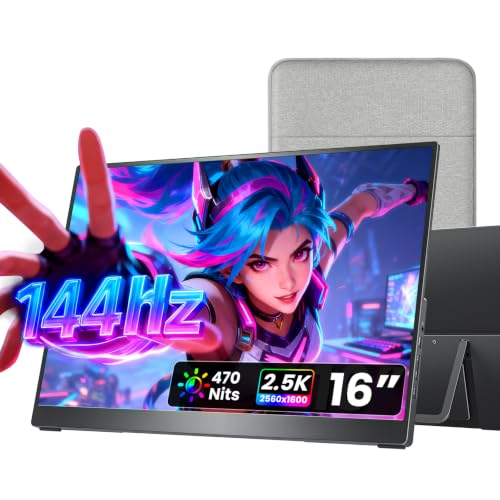
16-inch Portable Monitor
score
The 16-inch OLED touchscreen at 2048x1280 with a 120Hz refresh rate and 10-point touch defines this JUNEBOX monitor.
- Resolution
- 2048×1280
- Screen size
- 16 in
- Panel
- OLED
- DisplayPort
- Yes
This JUNEBOX monitor has a 16-inch OLED touchscreen at 2048x1280 with a 120Hz refresh rate, 500 nits peak brightness, 100% DCI-P3 and 10-bit color. It is factory-calibrated to ΔE under 2 and has a 100000:1 contrast ratio. The 10-point touch responds in 0.1ms and works on Windows 10 and 11 and Android USB-C hosts with DisplayPort Alt Mode; on macOS it is display only. A single USB-C cable carries video and touch with external power required, or Mini HDMI carries video only. It weighs 1.5 lb and is 0.13 in thin, with a slim aluminum body and an included sleeve case. An adjustable kickstand and 75mm VESA holes are included, with dual speakers.
Choose it if
- You want 10-point touch on a 16-inch OLED
- You want a 1.5 lb monitor at 0.13 in thin
Consider another if
- You need the 2880x1800 resolution of the InnoView
- You need touch support on macOS
16-inch Portable Monitor
score
The 16-inch OLED panel at 2048x1280 with a 120Hz refresh rate, 0.1ms response and 500 nits defines this Prystivue monitor.
- Resolution
- 2048×1280
- Screen size
- 16 in
- Panel
- OLED
- USB-C
- Yes
- HDMI
- Yes
- Weight
- 1.76 lb
This Prystivue monitor has a 16-inch OLED panel at 2048x1280 with a 120Hz refresh rate, 0.1ms response, 100% DCI-P3, 10-bit color and 500 nits peak brightness. It has a 100000:1 contrast ratio and a 178-degree viewing angle. The 8:5 screen ratio adds vertical space for split-screen multitasking. Connections include dual full-function USB-C ports and a Mini HDMI port, with one-cable video, audio, power and data over USB-C. The box includes a Mini HDMI to HDMI cord, an A to C cable, a C to C cable, a 20W PD power adapter and a protective carry sleeve. It weighs 1.76 lb. A foldable kickstand, 75 by 75mm VESA holes and 8-ohm 1W stereo speakers are included.
Choose it if
- You want a 16-inch OLED screen at 120Hz
- You want 500-nit brightness with 0.1ms response
Consider another if
- You need the 2880x1800 resolution of the InnoView
- You need the 10-point touch of the JUNEBOX
Make the choice for your setup
Resolution and refresh rate
Resolution and refresh rate decide how sharp motion looks. The InnoView panel runs at 2880x1800 with a 120Hz native refresh rate and 1ms response, the highest resolution here. The Forzola, JUNEBOX and Prystivue panels run at 2048x1280 with a 120Hz refresh rate; the Forzola responds in 0.3ms, the Prystivue in 0.1ms, and the JUNEBOX pairs 120Hz with 0.1ms touch. All four panels are OLED with 100% DCI-P3 and a 100000:1 contrast ratio. The InnoView and Forzola add HDR support. A 120Hz panel needs a source that outputs 120Hz: the Forzola requires an input source that supports 2K and 120Hz, or the 2K signal and 120Hz cannot be output. Match the resolution and refresh rate to the output your laptop or console provides.
Screen size and brightness
Screen size and brightness decide how much you see and how well it holds up in bright light. The InnoView is a 14-inch panel with 350 nits brightness. The Forzola, JUNEBOX and Prystivue are 16-inch panels with 500 nits peak brightness. The Forzola and Prystivue use an 8:5 aspect ratio. The Forzola gives 11% more visible area than a 16-inch 16:9 screen. The InnoView uses a 16:10 panel. Weight runs from 1.39 lb for the InnoView to 2 lb for the Forzola, with the JUNEBOX at 1.5 lb and the Prystivue at 1.76 lb. The InnoView is 0.15 in thin and the JUNEBOX is 0.13 in thin. Shoppers with a related need can compare our guide to the Best Portable Monitor PC.
Ports, touch and mounting
Connections decide what you can plug in and whether touch works. The InnoView has two full-function USB-C ports and one HDMI port, with DP Alt Mode over USB-C. The Forzola has two full-function USB-C ports and a Mini HDMI input. The Prystivue has dual full-function USB-C ports and a Mini HDMI port. The JUNEBOX has USB-C and Mini HDMI, and its 10-point touch needs a USB-C port with DisplayPort Alt Mode; touch works on Windows 10 and 11 and Android hosts, while macOS is display only. All four have a built-in stand. The InnoView, JUNEBOX and Prystivue have VESA holes: 75mm on the InnoView and JUNEBOX, and 75 by 75mm on the Prystivue. The InnoView, Forzola, JUNEBOX and Prystivue all include speakers.
For a wider shortlist, start with Best Portable Monitor.
FAQ: Portable Monitor OLED 120Hz
Which monitor has the highest resolution here?
The InnoView has the highest resolution at 2880x1800 on a 14-inch OLED panel. The Forzola, JUNEBOX and Prystivue have 2048x1280 panels. All four panels run at 120Hz with 100% DCI-P3 color and a 100000:1 contrast ratio.
Which of these monitors has a touchscreen?
Only the JUNEBOX has a touchscreen, with 10-point touch and 0.1ms touch response on a 16-inch OLED panel. Touch needs a USB-C port with DisplayPort Alt Mode and works on Windows 10 and 11 and Android USB-C hosts. On macOS the JUNEBOX is display only, with no touch.
What ports do these portable monitors have?
The InnoView has two full-function USB-C ports and one HDMI port. The Forzola and Prystivue each have two full-function USB-C ports and a Mini HDMI port. The JUNEBOX has USB-C and Mini HDMI. The InnoView and Prystivue include a 20W PD adapter in the box.