
Best Performing Handheld Gaming PC (2026): 5 Picks Compared
 By Theo LangUpdated
The Lenovo Legion Go 8.8" 144Hz WQXGA Handheld Touchscreen Gaming PC pairs the AMD Ryzen Z1 Extreme processor with 16GB of RAM and a 512GB SSD, and its 8.8-inch 144Hz touch display suits players who want a large, fast handheld screen. The ONEXPLAYER 3 pairs 32GB of LPDDR5X memory with the same 144Hz refresh rate on an 8.8-inch AMOLED display. The GPD Win 5 carries 64GB of LPDDR5X memory with a 2TB SSD.
Your shortlist at a glance
PCKitHQ scores range from 9.2 to 9.8. See how we pick.
| Product and key specifications | Score and retailer |
|---|---|
01 Best Overall Lenovo Legion Go 8.8-inch WQXGA Handheld Touchscreen Gaming PC16GB RAM, 512GB SSD, 144 Hz | 9.8PCKitHQ scoreView on Amazon |
02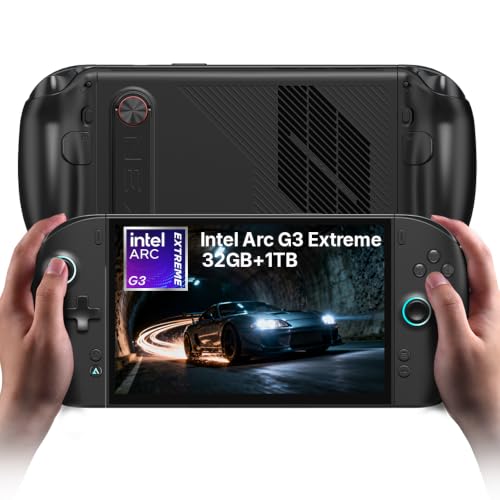 | 9.7PCKitHQ scoreView on Amazon |
03 | 9.5PCKitHQ scoreView on Amazon |
04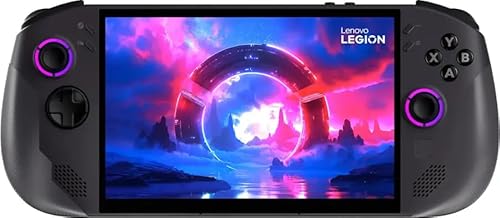 Also Consider Lenovo Legion Go S 8APU1 8-inch Gaming Handheld Powered by SteamOS32GB RAM, 1TB SSD, 120 Hz | 9.3PCKitHQ scoreView on Amazon |
05 | 9.2PCKitHQ scoreView on Amazon |
A closer look at each configuration
Lenovo Legion Go 8.8-inch WQXGA Handheld Touchscreen Gaming PC
score
The AMD Ryzen Z1 Extreme processor, 16GB of RAM, and 144Hz 8.8-inch touch display define this Legion Go configuration.
- Installed memory
- 16 GB
- Installed storage
- 512GB
- Native refresh rate
- 144 Hz
- Processor
- AMD Ryzen Z1 Extreme
- Warranty
- 1 year
This Legion Go configuration has an AMD Ryzen Z1 Extreme processor, 16GB of RAM, and a 512GB SSD. Its 8.8-inch WQXGA touch display runs at a native 144Hz refresh rate. The device has two USB4 40Gbps ports, stereo speakers, and an integrated camera. Its controllers carry 24 on-gamepad controls. The design weighs just under 2 pounds. The warranty is 1 year manufacturer coverage for limited parts and labor. The 512GB SSD is the installed drive in this configuration, so compare it with the size of the games you plan to keep on the device.
Choose it if
- You want the 8.8-inch WQXGA touch display at 144Hz
- You want two USB4 40Gbps ports for your connections
Consider another if
- You need 32GB of installed memory like the ONEXPLAYER 3
- You need 1TB of installed storage like the Legion Go S
ONEXPLAYER 3 Gaming Handheld PC G3
score
The Intel Arc G3 Extreme processor, 32GB of LPDDR5X memory, and 144Hz AMOLED display define this ONEXPLAYER 3 configuration.
- Installed memory
- 32 GB
- Native refresh rate
- 144 Hz
- Processor
- Intel Arc G3 Extreme
- Weight
- 1.72 lb
- Warranty
- 1 Years
This ONEXPLAYER 3 configuration has an Intel Arc G3 Extreme processor with Arc B390 graphics and 32GB of LPDDR5X memory. Its 8.8-inch AMOLED display has a 1920x1200 resolution, a 144Hz refresh rate, VRR, and 1100 nits. The processor is a 14-core CPU with a 46 TOPS NPU. The controllers detach, and the device has dual USB4 ports, an 85Wh battery, and a 11203mm² vapor chamber. The magnetic keyboard and controller connector are optional accessories that need to be purchased separately. The warranty is 1 Years.
Choose it if
- You want the 8.8-inch AMOLED display at 144Hz
- You want detachable controllers for tablet and handheld use
Consider another if
- You need 64GB of installed memory like the GPD Win 5
- You need the 3-year warranty of the Legion Go S
GPD Win 5 Handheld Gaming PC
score
The AMD Ryzen AI Max+ 395 processor, 64GB of LPDDR5X memory, and 2TB SSD define this GPD Win 5 configuration.
- Installed memory
- 64 GB
- Installed storage
- 2TB
- Processor
- AMD Ryzen AI Max+ 395
- Weight
- 2.02 lb
- Warranty
- 2-Year
This GPD Win 5 configuration has an AMD Ryzen AI Max+ 395 processor with 16 cores and 64GB of LPDDR5X memory at 8000 MT/s. Its installed storage is a 2TB SSD. The Radeon 8060S graphics processor has 40 CUs and uses RDNA 3.5 architecture, with support for AMD FreeSync Premium and FSR 3.1. The device also has XDNA 2 AI acceleration with up to 126 TOPS of AI compute power. The device weighs 2.02 lb. The warranty is a 2-Year Limited Warranty.
Choose it if
- You want 64GB of LPDDR5X memory at 8000 MT/s
- You want the 2TB SSD for a large local game library
Consider another if
- You need the 3-year warranty of the Legion Go S
- You need the 1.61 lb weight of the Legion Go S
Lenovo Legion Go S 8APU1 8-inch Gaming Handheld Powered by SteamOS
score
The AMD Ryzen Z1 Extreme processor, 32GB of memory, and 120Hz 8-inch touch display define this Legion Go S configuration.
- Installed memory
- 32 GB
- Installed storage
- 1TB
- Native refresh rate
- 120 Hz
- Processor
- AMD Ryzen Z1 Extreme
- Weight
- 1.61 lb
- Warranty
- 3 years
This Legion Go S configuration runs SteamOS and has an AMD Ryzen Z1 Extreme processor with integrated Radeon 780M graphics. It has 32GB of LPDDR5x memory and a 1TB SSD. Its 8-inch WUXGA touchscreen panel has a 1920x1200 resolution, a 120Hz refresh rate, and support for VRR. The controllers are integrated into the body with no detachable parts. The device has dual USB-C ports, microSD support, 3.5 mm audio, Wi-Fi 6E, and Bluetooth. The included 65 W USB-C power adapter and cable come in the box. The device weighs about 1.61 lb. The warranty is 3 years of Lenovo Legion Ultimate Support.
Choose it if
- You want SteamOS with native access to your Steam library
- You want the 3-year Legion Ultimate Support warranty
Consider another if
- You need a 144Hz panel like the Legion Go
- You need 64GB of installed memory like the GPD Win 5
ONEXPLAYER 3 Gaming Handheld PC B390
score
The Intel Arc G3 Extreme processor, 32GB of LPDDR5X memory, and 144Hz AMOLED display define this ONEXPLAYER 3 configuration.
- Installed memory
- 32 GB
- Installed storage
- 1TB
- Processor
- Intel Arc G3 Extreme
- Warranty
- 1
This ONEXPLAYER 3 configuration has an Intel Arc G3 Extreme processor with Intel Arc B390 integrated graphics and 32GB of LPDDR5X memory. Its installed storage is a 1TB PCIe 4.0 SSD. Its 8.8-inch AMOLED display has a 1920x1200 resolution, a 144Hz refresh rate, VRR, HDR support, and up to 1100 nits peak brightness. The processor has a configurable TDP of up to 35W. The device has dual USB-C 4.0 ports, USB-A 3.2, microSD expansion, Wi-Fi 7, Bluetooth 5.4, and fingerprint unlock. The magnetic keyboard is an optional accessory that needs to be purchased separately. The warranty is 1.
Choose it if
- You want the 8.8-inch AMOLED display with HDR support
- You want Wi-Fi 7 and Bluetooth 5.4 connectivity
Consider another if
- You need 64GB of installed memory like the GPD Win 5
- You need the 3-year warranty of the Legion Go S
Make the choice for your setup
Compare the processors first
The Legion Go and the Legion Go S both use the AMD Ryzen Z1 Extreme processor. The ONEXPLAYER 3 configurations both use the Intel Arc G3 Extreme processor with Intel Arc B390 integrated graphics. The GPD Win 5 uses the AMD Ryzen AI Max+ 395 processor with 16 cores. Processor names alone do not establish measured application speed, so compare them with the memory and storage in each configuration. The Legion Go pairs its processor with 16GB of RAM and a 512GB SSD. The Legion Go S pairs the same processor with 32GB of memory and a 1TB SSD. The GPD Win 5 pairs its processor with 64GB of LPDDR5X memory and a 2TB SSD. The ONEXPLAYER 3 configuration with the 1TB PCIe 4.0 SSD pairs its processor with 32GB of LPDDR5X memory.
Match memory and storage to your library
Installed memory in this guide runs from 16GB in the Legion Go to 64GB in the GPD Win 5. The Legion Go S and both ONEXPLAYER 3 configurations have 32GB of installed memory. Installed storage runs from a 512GB SSD in the Legion Go to a 2TB SSD in the GPD Win 5. The Legion Go S has a 1TB SSD, and the ONEXPLAYER 3 configuration with the 1TB PCIe 4.0 SSD has 1TB of installed storage. Compare each installed figure with the size of the games you plan to keep on the device. Expansion options such as microSD support do not change the installed drive capacity. If that fits your setup better, see our guide to the Best Handheld PC.
Weigh the screen and the software
The Legion Go has an 8.8-inch WQXGA touch display at 144Hz. The ONEXPLAYER 3 configurations have 8.8-inch AMOLED displays at 144Hz with 1920x1200 resolution and VRR. The Legion Go S has an 8-inch WUXGA touchscreen panel at 120Hz with a 1920x1200 resolution and support for VRR. The Legion Go S runs SteamOS, with native access to the Steam library, cloud saves, and built-in controller remapping. The ONEXPLAYER 3 configurations and the GPD Win 5 run on Windows 11. Match the display size and refresh rate to the games you play, and match the software to the library you already use.
Before you decide, also read Best Handheld Gaming Computer.
FAQ: Performing Handheld Gaming PC
Which handheld has the most installed memory?
The GPD Win 5 has 64GB of LPDDR5X memory at 8000 MT/s. The Legion Go S and both ONEXPLAYER 3 configurations have 32GB of installed memory. The Legion Go has 16GB of RAM. Compare those installed figures with the memory your games and applications need.
Which handhelds have a 144Hz display?
The Legion Go has an 8.8-inch WQXGA touch display at 144Hz. Both ONEXPLAYER 3 configurations have 8.8-inch AMOLED displays at 144Hz with 1920x1200 resolution and VRR. The Legion Go S has an 8-inch WUXGA touchscreen panel at 120Hz.
Which handheld runs SteamOS?
The Legion Go S runs SteamOS, with fast boot, smooth updates, native access to the Steam library, cloud saves, and built-in controller remapping. The ONEXPLAYER 3 configurations and the GPD Win 5 run on Windows 11.


