
Best Motherboard PCIe 5.0 (2026): 4 Picks Compared
 By Theo LangUpdated
You want a PCIe 5.0 board with four M.2 slots, so choose the GIGABYTE X870E AORUS Elite WiFi 7 AMD AM5 LGA 1718, with Wi-Fi 7 and dual USB4. Its X870E chipset pairs with four M.2 slots and a 16+2+2 power design, while the ASUS B650E-E brings three M.2 slots with Wi-Fi 6E. The ASUS X870-PLUS and the GIGABYTE X870 each bring four M.2 slots with Wi-Fi 7.
Your shortlist at a glance
PCKitHQ scores range from 9.2 to 9.8. See how we pick.
| Product and key specifications | Score and retailer |
|---|---|
01 | 9.8PCKitHQ scoreView on Amazon |
02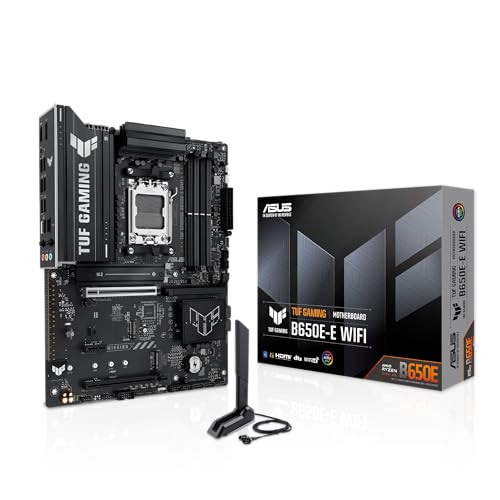 | 9.6PCKitHQ scoreView on Amazon |
03 | 9.4PCKitHQ scoreView on Amazon |
04 | 9.2PCKitHQ scoreView on Amazon |
A closer look at each configuration
GIGABYTE X870E AORUS Elite
score
The X870E chipset, four M.2 slots, dual USB4 and Wi-Fi 7 define this GIGABYTE board for PCIe 5.0 builds.
- Socket
- AM5
- Chipset
- X870E
- Form factor
- ATX
- Memory generation
- DDR5
- Wi-Fi
- Yes
- Weight
- 5.07 lb
- Warranty
- 5 Year Manufacturer
The GIGABYTE X870E AORUS Elite WiFi 7 uses the AM5 socket with the X870E chipset and supports AMD Ryzen 9000, 8000 and 7000 Series processors. DDR5 runs through four DIMMs with AMD EXPO support, and the power design is 16+2+2. The board has VRM and M.2 Thermal Guard. Connectivity covers PCIe 5.0, four M.2 slots, dual USB4, front and rear USB-C, a Sensor Panel Link and 2.5GbE LAN, with EZ-Latch on the board. The board weighs 5.07 lb and carries a 5 Year Manufacturer warranty.
Choose it if
- You want the X870E chipset with four M.2 slots
- You want Wi-Fi 7 with dual USB4
Consider another if
- You want a 2.71 lb board like the GIGABYTE X870
- You need 80A SPS power stages like the ASUS X870-PLUS
ASUS TUF GAMING B650E-E
score
The B650E chipset, one PCIe 5.0 M.2 slot and Wi-Fi 6E define this ASUS TUF board for PCIe 5.0 builds.
- Socket
- AM5
- Chipset
- B650E
- Form factor
- ATX
- Memory generation
- DDR5
- Wi-Fi
- Yes
- Weight
- 3.95 lb
- Warranty
- 3 year
The ASUS TUF GAMING B650E-E WIFI uses the AM5 socket with the B650E chipset and supports AMD Ryzen 9000, 8000 and 7000 Series desktop processors. DDR5 runs on the board, and the power solution is 8+2+1 80A DrMOS stages on an 8-layer PCB with 8+4 pin ProCool power connectors. M.2 support is one PCIe 5.0 slot and two PCIe 4.0 slots, beside a PCIe 5.0 x16 slot. Connectivity covers Wi-Fi 6E, Realtek 2.5Gb Ethernet, a front USB 20Gbps Type-C connector, a rear USB 10Gbps Type-C port, DisplayPort and HDMI. The board also has PCIe Slot Q-Release, M.2 Q-Latch, Q-Antenna, Q-LED, BIOS FlashBack, a pre-mounted I/O shield and three addressable RGB Gen 2 headers with Aura Sync. The board weighs 3.95 lb and carries a 3 year warranty.
Choose it if
- You want one PCIe 5.0 M.2 slot with two PCIe 4.0 slots
- You want Wi-Fi 6E and BIOS FlashBack
Consider another if
- You need four M.2 slots like the GIGABYTE boards
- You need Wi-Fi 7 like the GIGABYTE boards
ASUS TUF Gaming X870-PLUS
score
The X870 chipset, four M.2 slots, USB4 40Gbps and Wi-Fi 7 define this ASUS TUF board for PCIe 5.0 builds.
- Socket
- AM5
- Chipset
- X870
- Form factor
- ATX
- Memory generation
- DDR5
- Wi-Fi
- Yes
- Weight
- 2 lb
- Warranty
- 3 years
The ASUS TUF Gaming X870-PLUS WiFi uses the AM5 socket with the X870 chipset and supports AMD Ryzen 9000, 8000 and 7000 Series desktop processors. DDR5 runs on the board, and the power solution is 16+2+1 80A SPS stages on an 8-layer PCB with ProCool connectors. Connectivity covers PCIe 5.0, four M.2 slots, Wi-Fi 7, 2.5Gb LAN, HDMI, USB4 40Gbps, SATA 6 Gbps and a USB 20Gbps Type-C port. The board includes ASUS-exclusive AI Overclocking, AI Cooling II and AEMP, plus Dynamic OC Switcher, Core Flex and PBO Enhancement. The board weighs 2 lb and carries a 3 years warranty.
Choose it if
- You want four M.2 slots with Wi-Fi 7
- You want USB4 40Gbps and a 2.5Gb LAN port
Consider another if
- You need a 5-year warranty like the GIGABYTE boards
- You need 16+2+2 power stages like the GIGABYTE boards
GIGABYTE X870 AORUS Elite WIFI7
score
The X870 chipset, four M.2 slots, dual USB4 and Wi-Fi 7 define this GIGABYTE board for PCIe 5.0 builds.
- Socket
- AM5
- Chipset
- X870
- Form factor
- ATX
- Memory generation
- DDR5
- Wi-Fi
- Yes
- Weight
- 2.71 lb
- Warranty
- 5 Year Manufacturer
The GIGABYTE X870 AORUS Elite WIFI7 uses the AM5 socket with the X870 chipset and supports AMD Ryzen 9000, 8000 and 7000 Series processors. DDR5 runs through four DIMMs with AMD EXPO support, and the power design is 16+2+2. The board has VRM and M.2 Thermal Guard. Connectivity covers PCIe 5.0, four M.2 slots, dual USB4, front and rear USB-C, a Sensor Panel Link and 2.5GbE LAN, with EZ-Latch on the board. The board weighs 2.71 lb and carries a 5 Year Manufacturer warranty.
Choose it if
- You want the X870 chipset with four M.2 slots
- You want a 2.71 lb board with a 5-year warranty
Consider another if
- You need the X870E chipset like the GIGABYTE X870E
- You need 80A SPS power stages like the ASUS X870-PLUS
Make the choice for your setup
M.2 slots and PCIe 5.0
The GIGABYTE X870E pairs four M.2 slots with PCIe 5.0, and the GIGABYTE X870 does the same with four M.2 slots and PCIe 5.0. The ASUS X870-PLUS has four M.2 slots and states PCIe 5.0 Ready. The ASUS B650E-E has three M.2 slots: one PCIe 5.0 slot and two PCIe 4.0 slots, beside a PCIe 5.0 x16 slot. The GIGABYTE boards add VRM and M.2 Thermal Guard, and the ASUS B650E-E adds a flexible M.2 heatsink beside its three slots. The GIGABYTE X870E and the GIGABYTE X870 state the same four M.2 slots and dual USB4. Count the M.2 slots against the drives you plan to install, and keep the PCIe 5.0 slot count separate from the total slot count.
Chipsets and power stages
The GIGABYTE X870E uses the X870E chipset, while the GIGABYTE X870 and the ASUS X870-PLUS use the X870 chipset, and the ASUS B650E-E uses the B650E chipset. All four boards use the AM5 socket and DDR5. The GIGABYTE boards state a 16+2+2 power design, and the ASUS X870-PLUS states 16+2+1 80A SPS power stages on an 8-layer PCB. The ASUS B650E-E states 8+2+1 80A DrMOS power stages on an 8-layer PCB with 8+4 pin ProCool power connectors. The ASUS B650E-E power solution also includes alloy chokes and durable capacitors. The GIGABYTE X870E and the GIGABYTE X870 state the same 16+2+2 power design on different chipsets. Compare the chipset and the power stage figures board by board, since each board states its own figures. For a closely related choice, read our guide to the Best B650M Motherboard.
Wi-Fi, USB and LAN
Wi-Fi 7 appears on the GIGABYTE X870E, the ASUS X870-PLUS and the GIGABYTE X870, while the ASUS B650E-E has Wi-Fi 6E. The GIGABYTE boards have dual USB4 with front and rear USB-C, and the ASUS X870-PLUS has USB4 40Gbps with a USB 20Gbps Type-C port. The ASUS B650E-E has a front USB 20Gbps Type-C connector and a rear USB 10Gbps Type-C port. All four boards have a 2.5Gb LAN connection: 2.5GbE LAN on the GIGABYTE boards, Realtek 2.5Gb Ethernet on the ASUS B650E-E and 2.5Gb LAN on the ASUS X870-PLUS. The ASUS B650E-E also has DisplayPort and HDMI beside its USB-C ports. Match the Wi-Fi standard and the USB ports against the devices you plan to connect.
Before you decide, also read Best Motherboard.
FAQ: Motherboard PCIe 5.0
Which boards have four M.2 slots?
The GIGABYTE X870E, the ASUS X870-PLUS and the GIGABYTE X870 each have four M.2 slots. The ASUS B650E-E has three M.2 slots: one PCIe 5.0 slot and two PCIe 4.0 slots. All four boards state PCIe 5.0, so compare the M.2 counts, not the PCIe version.
Which boards have Wi-Fi 7?
The GIGABYTE X870E, the ASUS X870-PLUS and the GIGABYTE X870 have Wi-Fi 7. The ASUS B650E-E has Wi-Fi 6E. All four boards are ATX with DDR5 and an AM5 socket. The GIGABYTE X870E and the GIGABYTE X870 also have dual USB4.
How long is the warranty on these boards?
The GIGABYTE X870E and the GIGABYTE X870 carry a 5 Year Manufacturer warranty. The ASUS B650E-E carries a 3 year warranty, and the ASUS X870-PLUS carries a 3 years warranty. Check the warranty terms before ordering, since coverage differs across the boards.


