
Best Monitors for Finance (2026): Our 4 Picks Ranked
 By Theo LangUpdated
If you read spreadsheets all day, choose the HP 24mh FHD Monitor for its 23.8-inch IPS display at 1920 x 1080 and 75 Hz with height adjustment and Low Blue Light mode. The BenQ GW2491 adds a 100Hz IPS panel with 99% sRGB and a 3-year warranty, while the Sceptre 22-inch gives you the same 1080p at 75 Hz on a smaller screen. Match the screen size and eye-care features to your working hours.
Your shortlist at a glance
PCKitHQ scores range from 9.2 to 9.8. See how we pick.
| Product and key specifications | Score and retailer |
|---|---|
01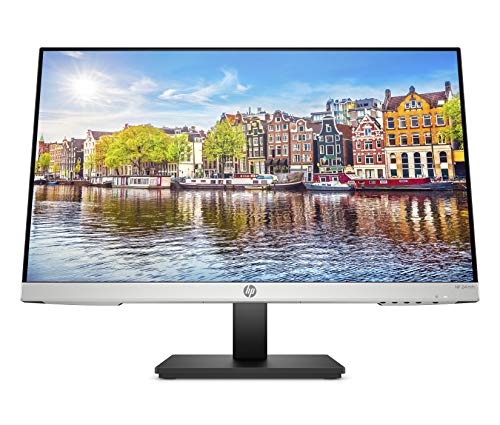 | 9.8PCKitHQ scoreView on Amazon |
02 | 9.6PCKitHQ scoreView on Amazon |
03 | 9.4PCKitHQ scoreView on Amazon |
04 | 9.2PCKitHQ scoreView on Amazon |
A closer look at each configuration
HP 24mh Monitor
score
A 23.8-inch IPS display at 1080p and 75 Hz with height adjustment and built-in speakers for desk work.
- Resolution
- 1920 x 1080
- Native refresh rate
- 75 Hz
- Screen size
- 23.8 in
- Panel
- IPS
- HDMI
- Yes
- DisplayPort
- Yes
- Weight
- 9.94 lb
- Warranty
- One year limited warranty
This HP 24mh has a 23.8-inch IPS display at 1920 x 1080 and 75 Hz with 178-degree viewing angles, so spreadsheets stay readable from practically any position. The micro-edge display has virtually no bezel on three sides, and height adjustment runs 100mm with a tilt of 5 degrees forward or 23 degrees backward. HDMI, DisplayPort and VGA ports connect a PC and peripherals, and two built-in 2W speakers handle sound. Low Blue Light mode shifts colors to a warmer spectrum, and the monitor carries a one-year limited warranty. The ultra-slim design leaves more desk space, and the wide viewing angles keep the image consistent for anyone beside you. VESA mounting is included for the HP 24mh, alongside height and tilt adjustment.
Choose it if
- You want a 23.8-inch IPS screen for spreadsheets
- You need height adjustment and tilt for your desk
Consider another if
- You need a 100Hz refresh rate for smoother motion
- You need a warranty longer than one year limited
BenQ GW2491 23.8-inch Eye-Care Monitor
score
A 23.8-inch IPS panel at 100Hz with 99% sRGB and eye-care features for long reading sessions.
- Resolution
- 1080x1920
- Native refresh rate
- 100 Hz
- Panel
- IPS
- HDMI
- Yes
- DisplayPort
- Yes
- Weight
- 5.95 lb
- Warranty
- 3 Year Manufacturer
This BenQ GW2491 has a 23.8-inch IPS panel at 1080p with a 100Hz refresh rate and 99% sRGB color space for accurate color from any angle. The ultrathin bezel design frames the screen for a clear viewing experience, and ePaper Mode supports long reading sessions. TUV certification covers Flicker-Free and Low Blue Light Plus, and Eyesafe 2.0 keeps blue light down with vivid colors. HDMI and DisplayPort connect the monitor, and Eye-CareU is included. The monitor weighs 5.95 lb and carries a 3-year manufacturer warranty. The 100Hz refresh rate reacts more quickly to changes for a smoother experience, and the frameless design keeps focus on the screen. The GW2491 panel measures 23.8 inches, matching the HP screen size while running at the faster 100Hz rate.
Choose it if
- You want a 100Hz IPS panel for smoother scrolling
- You need 99% sRGB color for accurate charts
Consider another if
- You need a screen larger than 23.8 inches
- You need a refresh rate above 100Hz
Sceptre 22-inch LED Monitor E225W-19203S
score
A 22-inch 1080p display at 75Hz with two HDMI ports and built-in speakers for a smaller desk.
- Resolution
- 1920x1080
- Native refresh rate
- 75 Hz
- Screen size
- 22 in
- HDMI
- Yes
- Weight
- 7.16 lb
- Warranty
- limited 1 year
This Sceptre 22-inch monitor runs Full HD 1920x1080 at up to 75Hz with built-in speakers. Two HDMI ports, one VGA port and an audio out jack connect a PC and peripherals, and the display works with Windows 10. Full HD resolution keeps text sharp for reading, and the 75Hz refresh rate keeps motion smooth on screen. Two HDMI ports take a PC and a second device without swapping cables. The brushed black finish fits a home office, and the monitor carries a limited 1-year warranty. The monitor weighs 7.16 lb. Its model number is E225W-19203S. The 75 hertz rate matches the HP rate at the same 1080p resolution.
Choose it if
- You want a 22-inch screen for a smaller desk
- You need two HDMI ports for two devices
Consider another if
- You need a screen larger than 22 inches
- You need a refresh rate above 75Hz
Lenovo ThinkVision T22i-30 22-inch Class LED Monitor
score
A 22-inch class Full HD monitor with an anti-glare screen and a 3-year warranty for office work.
- Resolution
- Full HD
- Weight
- 15.2 lb
- Warranty
- 3 year Manufacturer
This Lenovo ThinkVision T22i-30 is a 22-inch class Full HD LED monitor with a 21.5-inch viewable screen in 16:9. The anti-glare screen surface cuts reflections under bright office lighting, and the single screen suits a one-monitor desk setup. Full HD resolution keeps text sharp, and the 16:9 screen fits spreadsheets and documents side by side. The monitor is a single screen, so it suits a desk with room for one display. The raven black finish matches other office equipment. The model number is T22i-30, and the monitor carries a 3-year manufacturer warranty.
Choose it if
- You want a 22-inch class screen with anti-glare
- You need a 3-year manufacturer warranty
Consider another if
- You need a viewable screen above 21.5 inches
- You want a monitor lighter than 15.2 lb
Make the choice for your setup
Size the screen for spreadsheets
Finance work means spreadsheets with many columns, so screen size decides how much you see at once. The HP 24mh and the BenQ GW2491 both run 23.8-inch screens at 1080p, while the Sceptre and the Lenovo ThinkVision are 22-inch class screens. A 23.8-inch screen shows the same 1080p columns larger than a 22-inch screen. The HP micro-edge display has virtually no bezel on three sides, so two HP screens sit side by side without a wide gap. The BenQ ultrathin bezel design gives the same frameless look for a second screen. Two screens also let you keep a spreadsheet open on one and email on the other. Compare the screen sizes with the columns you track each day. The Lenovo viewable screen is 21.5 inches, slightly under its 22-inch class name.
Compare refresh rate and eye-care features
Refresh rate and eye-care features decide how the screen feels over a long day. The BenQ GW2491 runs a 100Hz refresh rate, while the HP 24mh and the Sceptre run 75 Hz. The BenQ adds Flicker-Free and Low Blue Light Plus with Eyesafe 2.0 and ePaper Mode for long reading sessions, and the HP adds Low Blue Light mode that shifts colors to a warmer spectrum. The BenQ panel also covers 99% sRGB for accurate color. The Lenovo ThinkVision has an anti-glare screen surface, and the Sceptre has built-in speakers. The HP height adjustment and tilt help you set the screen at a comfortable position. Match the refresh rate and eye-care features to the hours you spend reading on screen. For a closely related choice, read our guide to the Best Monitor for 100.
Check ports, weight and warranty
Ports, weight and warranty decide how the monitor fits the desk. The HP 24mh connects through HDMI, DisplayPort and VGA. The BenQ GW2491 connects through HDMI and DisplayPort. The Sceptre connects through two HDMI ports and one VGA port with an audio out jack. Check the connections of the monitor you choose against the ports on your PC. The BenQ weighs 5.95 lb, the Sceptre 7.16 lb, the HP 9.94 lb and the Lenovo 15.2 lb. Warranties run one year limited on the HP and Sceptre and 3 years on the BenQ and Lenovo. The HP adds height adjustment with 100mm of travel and a tilt of 5 degrees forward or 23 degrees backward. The Lenovo weighs 15.2 lb, so set it in place and leave it there.
Before you decide, also read 24 vs 27 Inch Monitor.
FAQ: Monitors for Finance
Which monitor is best for spreadsheets?
The HP 24mh suits spreadsheets with a 23.8-inch IPS display at 1920 x 1080 and 75 Hz, height adjustment and Low Blue Light mode. The BenQ GW2491 matches the size at 100Hz with 99% sRGB. Both show the same 1080p columns, so pick the refresh rate and eye-care features you want. The HP also adds height adjustment with 100mm of travel.
What refresh rates do these monitors have?
The BenQ GW2491 runs at 100Hz, and the HP 24mh and Sceptre run at 75 Hz. A higher refresh rate gives smoother motion on screen, so compare the documented rates with how you work each day. The BenQ 100Hz rate reacts more quickly to changes than the 75 Hz panels.
Do these monitors have built-in speakers?
The HP 24mh has two built-in 2W speakers, and the Sceptre has built-in speakers. If you want sound from the monitor itself, choose the HP or the Sceptre, and check the audio connections on your PC. The HP speakers sit in the monitor, so no separate speakers are needed on the desk.


